ImageLayered
What is ImageLayered?
Working with a flat image can become frustrating when you need to move one object, change a product color, replace a background, or create several versions of the same design. What looks like a simple editing task can quickly turn into a long session of selections, masks, and manual retouching.
ImageLayered takes a different approach. It uses AI to break a single image into separate, editable RGBA layers, allowing individual elements to be moved, resized, recolored, replaced, or exported independently. The result is especially useful when the original layered project is no longer available and all you have is a finished image.
The workflow is refreshingly straightforward: upload an image, choose how many layers you want, and let the system analyze the composition. For designers, e-commerce teams, social media creators, and anyone who regularly repurposes visual content, this can remove a surprisingly large amount of repetitive work.
Key Features
- Automatic Layer Decomposition: The system separates a flat image into multiple transparent, editable layers without requiring manual masking or complex selections.
- Smart Background Reconstruction: Hidden areas behind extracted objects can be reconstructed, making the resulting background more useful when an element is moved or removed.
- Flexible Layer Counts: Users can select the desired number of outputs, with the main tool supporting between 2 and 13 outputs.
- Precision Layering: Precision mode allows users to describe what they want isolated while also receiving named layers and positional information.
- Independent Editing: Individual elements can be resized, recolored, moved, replaced, or exported without rebuilding the entire composition.
- Open-Source Model Foundation: Quick mode is powered by the open-source Qwen Image Layered model, adding an interesting technical foundation to the service.
User Interface
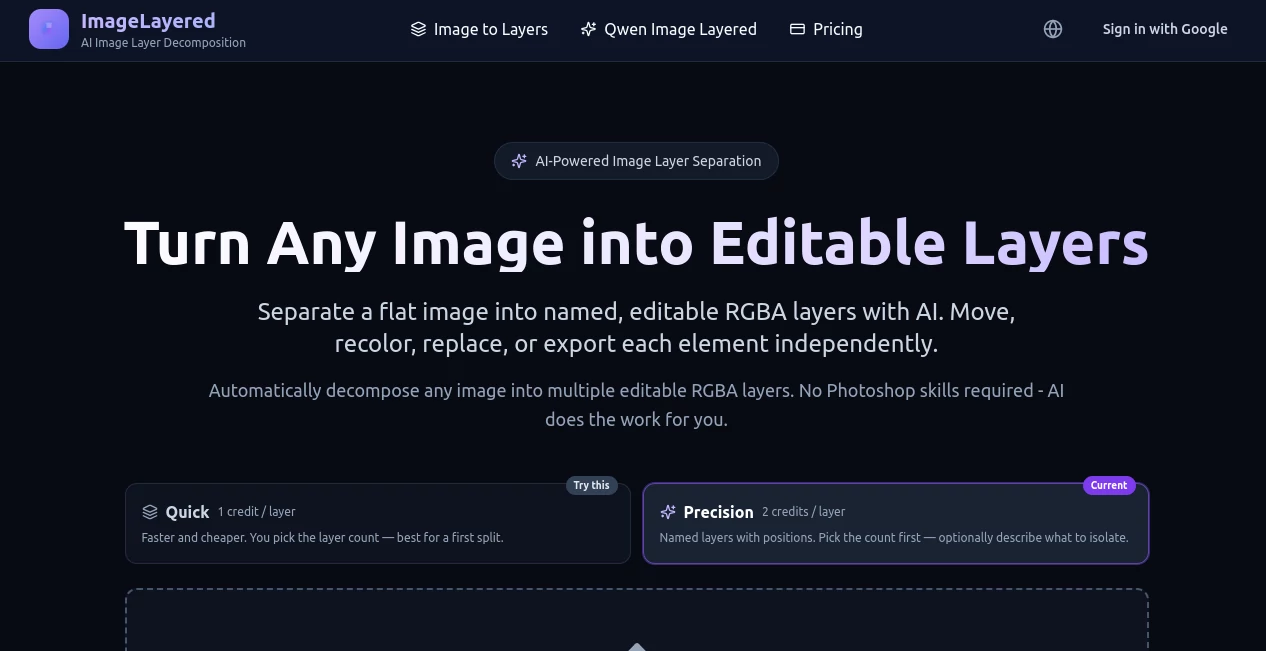
The interface is built around a simple upload-and-process workflow. A drag-and-drop upload area keeps the first step obvious, while the Quick and Precision modes make it easy to decide between speed and more controlled extraction.
Precision mode is particularly useful when the image contains several people or objects that need to be separated in a specific way. For example, a user can request a separate layer for every person while selecting the total number of outputs beforehand. The interface then presents the resulting layers individually, making it easier to understand what was extracted.
Accuracy & Performance
The biggest advantage is the amount of manual work the system can remove from a typical image-editing workflow. Instead of tracing objects with a pen tool or creating masks one by one, the AI analyzes the composition and produces transparent layers automatically.
Performance naturally depends on the complexity of the original image. Simple compositions with clearly defined objects are easier to separate, while crowded scenes, overlapping subjects, intricate edges, or unusual visual elements may require additional refinement in a traditional editor.
The background reconstruction feature is also important. Rather than simply cutting an object out, the system can rebuild areas that were hidden behind it. That makes the resulting layers considerably more useful for creative variations and object replacement.
Capabilities
The tool is designed for more than ordinary background removal. A single photograph can be transformed into a collection of independently editable elements, which opens up practical possibilities for product photography, advertising creatives, social media graphics, presentations, and design revisions.
Quick mode is suited to users who want a fast first separation. Precision mode provides more control by allowing the layer count to be selected and an optional description to guide what should be extracted. The output count includes the base image, so selecting four outputs produces one reconstructed base plus three extracted layers.
Another useful characteristic is recursive refinement. When an extracted layer still contains several elements, users can further decompose it rather than starting from the original image again. This makes the workflow more flexible for increasingly complicated compositions.
Security & Privacy
Privacy is an important consideration whenever images are uploaded to an online editing service. The service states that uploaded images are used to provide the requested layer-decomposition process and are protected through encrypted transmission and storage. Its privacy policy also explains that image data is temporarily stored for processing and that users can request deletion.
Payment processing is handled through Stripe, while the service uses infrastructure including Cloudflare R2, Supabase, and Cloudflare. Users should still avoid uploading confidential material unless they are comfortable with the service's published data-handling practices.
Use Cases
E-commerce: Product teams can turn a finished product photograph into separate layers and create variations without arranging another photoshoot. Product colors, surrounding objects, and backgrounds can be changed much more easily.
Graphic Design: Designers who receive flattened artwork can recover individual visual elements and continue editing instead of recreating the entire composition from scratch.
Social Media Content: A creator can separate people, products, backgrounds, and props, then produce multiple versions for different platforms or advertising experiments.
Advertising: Marketing teams can reuse existing campaign images by changing backgrounds, repositioning products, or creating alternative compositions for testing.
Creative Projects: Illustrations, photographs, promotional artwork, and other visual assets can be decomposed into editable pieces for further experimentation.
Content Repurposing: When the original design file has disappeared but a final PNG or JPEG remains, automatic layer extraction can provide a practical way to recover much of the editable structure.
Pros and Cons
- Pros: Automatic image decomposition, transparent RGBA outputs, background reconstruction, simple browser-based workflow, flexible layer selection, and support for both quick and precision processing.
- Pros: The underlying Qwen Image Layered model is open source and available under the Apache 2.0 license.
- Pros: Credits are pay-as-you-go and the current pricing page states that purchased credits do not expire.
- Cons: AI-generated reconstruction may not perfectly reproduce every hidden detail in a complicated photograph.
- Cons: Precision mode currently requires PNG or JPEG images with a minimum resolution of 512×512 pixels.
- Cons: Professional users working on highly complex compositions may still need Photoshop or another editor for final pixel-level adjustments.
Pricing Plans
The service uses a credit-based pricing system rather than requiring a recurring subscription. Quick processing costs one credit per output layer, while Precision processing costs two credits per actual output layer.
- Starter: $1.99 for 40 credits, suitable for testing the workflow.
- Standard: $9.99 for 200 credits, aimed at regular users.
- Professional: $19.99 for 400 credits, designed for higher-volume processing.
All three plans are one-time purchases, and the pricing page states that credits do not expire. This is a convenient arrangement for occasional users who do not want another monthly subscription sitting on their list of software expenses.
How to Use ImageLayered
- Open the image-layering workspace in your browser.
- Upload a PNG, JPEG, WebP, or GIF when using the supported Quick workflow.
- Choose Quick mode for a straightforward separation or Precision mode when you need more control.
- Select the desired number of output layers.
- In Precision mode, optionally describe the objects or people you want separated.
- Start the processing and wait for the AI to analyze the image.
- Review the generated layers and use them individually in your preferred editing workflow.
Comparison with Similar Tools
Traditional image editors remain excellent choices when complete manual control is required, but separating a finished image into multiple objects can take considerable time. The main advantage here is automation: instead of manually creating selections and reconstructing hidden areas, the AI handles the initial decomposition.
Background-removal services solve a narrower problem by isolating the foreground from its background. This approach goes further by attempting to create several independent RGBA layers, making it more suitable when the goal is to edit multiple elements rather than simply remove a background.
For a designer who needs pixel-perfect control, a professional editor is still valuable. For someone who wants to turn a flattened image into a useful starting point quickly, automated layer decomposition can be a much faster first step.
Conclusion
Turning a finished image back into something editable has traditionally required patience and a good understanding of masking, selections, and retouching. AI layer decomposition changes that equation by handling much of the tedious separation work automatically.
The combination of named RGBA layers, reconstructed backgrounds, flexible layer counts, and a precision workflow makes this particularly appealing for designers, e-commerce teams, marketers, and content creators who frequently reuse existing visuals.
It is not intended to eliminate professional image editors altogether. Instead, it works best as a fast bridge between a flat image and a genuinely editable composition. For many everyday projects, that bridge can save a substantial amount of time.
Frequently Asked Questions (FAQ)
What does this tool do?
It uses AI to separate a flat image into multiple editable RGBA layers. Individual objects, people, and other visual elements can then be handled independently.
Can I choose how many layers are created?
Yes. The main workspace allows users to choose the number of outputs, with the available range currently extending from 2 to 13. The selected count includes the reconstructed base image.
What is Precision mode?
Precision mode provides additional control. Users choose the layer count and can optionally describe which elements should be isolated. It also provides named layers with positional information.
Can the background be reconstructed?
Yes. The system can reconstruct hidden areas behind extracted objects, which is useful when an object needs to be moved or removed from the original composition.
What image formats are supported?
Quick processing supports JPEG, PNG, WebP, and GIF. Precision processing supports PNG and JPEG, with a minimum image size of 512×512 pixels.
Is it suitable for professional design work?
It can be a valuable part of a professional workflow, particularly for quickly recovering objects from flattened images. However, complex images may still benefit from final manual refinement in a professional editor.
Does it require Photoshop skills?
No. The layer separation itself is automated and takes place through the browser-based interface, making the initial process accessible to users without advanced editing experience.
Are the credits recurring?
No. The current plans are one-time purchases rather than monthly subscriptions, and the pricing page states that purchased credits do not expire.
Is the underlying technology open source?
The Quick workflow is powered by Qwen Image Layered, an open-source model released under the Apache 2.0 license.
Can I use the generated layers for further editing?
Yes. The output is designed as editable RGBA layers, allowing individual elements to be moved, resized, recolored, replaced, or incorporated into another design workflow.
AI Photo & Image Generator , Photo & Image Editor , AI Image to Image .
These classifications represent its core capabilities and areas of application. For related tools, explore the linked categories above.
ImageLayered details
Website unavailable — View Alternatives
Pricing
- Freemium
Apps
- Web App
Categories

ImageLayered Alternatives Product
Seedream 4.5

Image to URL…

Image to Pro…

Stylize Image

PatchDesign.…

UnblurImage …

AIGPTImage

PropFade

MAGIK FACE