
ImageSearch.mobi
What is ImageSearch.mobi?
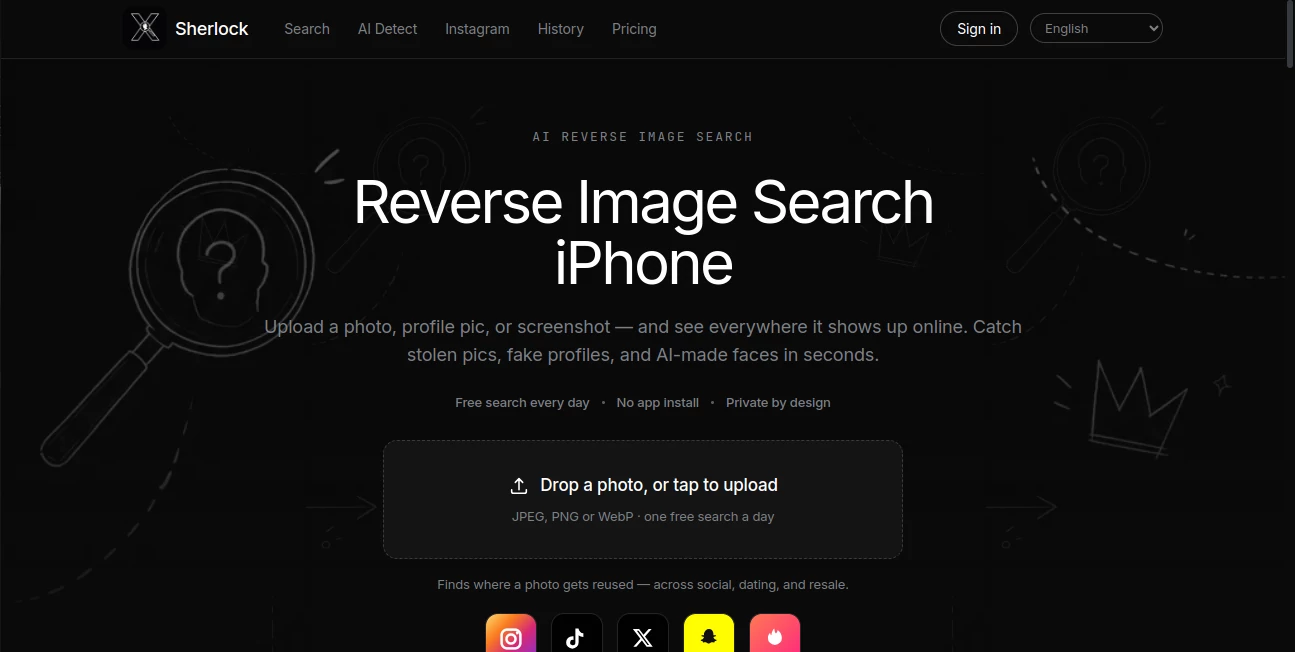
ImageSearch.mobi is an AI-powered reverse image search service designed to help people discover where a photo appears online and investigate whether an image has been reused, altered, or associated with suspicious activity. It works directly from a browser, making it particularly convenient for iPhone users who want to check a screenshot, profile picture, product photo, rental image, or another visual without installing software.
The idea is simple but surprisingly useful: upload an image, let the service search open-web sources, and review the matches and signals it finds. Instead of relying only on visual similarity, the results are presented as clues that can help users understand the context surrounding an image. This makes the service useful for everyday online checks, especially when a picture seems too familiar, too perfect, or simply out of place.
Key Features
- Reverse image search from a browser
- Support for JPEG, PNG, and WebP images
- Search for reused images across public web sources
- Matching pages and similar-image results
- Signals that may indicate AI-generated or edited imagery
- Useful checks for dating profiles, marketplace listings, and rental photos
- Browser-based experience with no installation required
- Daily free search option
- Credit-based searches for users who need additional checks
User Interface
The interface keeps the main task straightforward. Users can drop a picture into the search area or tap the upload option, which is especially practical on a phone. There is no complicated workflow to learn, and the service focuses attention on the image and the evidence returned from the search.
The three-step process is easy to understand: choose a photo, upload it, and review the report. For someone checking an unfamiliar profile or product listing, that simplicity can make the difference between actually investigating an image and simply ignoring a suspicious feeling.
Accuracy & Performance
Reverse image search is most valuable when it provides useful context rather than simply returning a list of visually similar pictures. The service searches large-scale open-web image sources and connects matching pages, similar images, and other available clues into a report.
Results can be particularly helpful when an image has been reused publicly. For example, the same product photograph appearing across several listings or the same profile picture appearing on multiple pages can provide an important reason to investigate further. AI-generated and edited-image signals are also presented as clues rather than absolute proof, which is a sensible approach because automated image analysis should not be treated as a final judgment.
Capabilities
The service covers several practical scenarios. A user can check a profile photo before trusting an unfamiliar online contact, investigate a marketplace photograph before sending a deposit, or compare a rental image with other publicly available listings.
It can also be useful for photographers, content creators, researchers, and ordinary web users who want to understand where an image has appeared. The combination of reverse searching and AI-related signals gives the service a broader purpose than a basic image-matching utility.
Security & Privacy
Privacy is an important part of the product's positioning. The website states that previous searches remain in the user's browser rather than being stored on its servers. It also says that uploaded photos are resized in the browser before being sent, so the original full-resolution image is not uploaded.
The privacy policy further states that uploaded images are not sold or used to create advertising profiles. It also explains that the service does not create or store biometric face templates and that image matching is based on the whole image and public web pages rather than facial recognition.
Use Cases
- Dating and social profiles: Check whether a profile photo appears elsewhere online before trusting a new contact.
- Marketplace shopping: Investigate product photographs that appear on multiple listings or in different locations.
- Rental listings: Compare apartment or property photos with other publicly available pages.
- Content verification: Find earlier appearances of an image and gather additional context.
- Photography: Discover where personal photographs may have been reused online.
- AI image checking: Review available signals when a picture looks unusually artificial or heavily edited.
Pros and Cons
Pros
- Works directly in a web browser
- Convenient for iPhone users
- No installation is required for browser searches
- Useful for investigating suspicious photos and listings
- Combines image matches with contextual risk clues
- Offers a free daily search
- Strong emphasis on image-search privacy
Cons
- Reverse image results depend on what can be found across public web sources
- An AI-generated signal should be treated as an indication rather than definitive proof
- Users who perform many searches may need additional credits
- The service is primarily focused on investigation rather than image creation or editing
Pricing Plans
The service provides one free reverse image search each day for users who sign in. Additional searches use credits, with a weekly plan providing 60 credits. Users can also purchase credit packs as one-time purchases, and unused credits from those packs do not expire. This model is convenient for occasional users because they can test the service without immediately committing to a subscription.
How to Use It
- Select a photo, screenshot, profile picture, product image, or rental photograph.
- Crop the image when necessary so the most relevant part is clearly visible.
- Open the service in a browser and upload the image.
- Wait for the reverse image search to process the picture.
- Review matching pages, similar images, AI signals, and other risk clues.
- Open suspicious source pages yourself and compare the available information before making a decision.
Comparison with Similar Tools
Traditional reverse image search services are often built around finding visually similar results or pages containing the same image. This service takes a more investigation-focused approach by combining image matches with contextual information and risk-oriented signals.
That distinction makes it especially interesting for situations where the goal is not simply to identify an image, but to answer a more practical question: “Where else has this picture appeared, and should I be concerned?” For checking online profiles, marketplace listings, rental photographs, and suspicious images, that extra context can make the search considerably more useful.
Conclusion
For anyone who regularly encounters unfamiliar images online, a good reverse image search can be a surprisingly valuable safety and research tool. The service makes the process accessible from an iPhone browser, combines matching results with useful contextual clues, and puts considerable emphasis on keeping searches private.
Its strongest use is not proving that an image is genuine or fraudulent with absolute certainty. Instead, it gives users evidence they can investigate themselves. Finding the same product photo in several cities, discovering an image on unrelated profiles, or seeing signs associated with AI generation can all be useful pieces of the puzzle. For everyday online verification, that practical approach makes it a worthwhile addition to an AI image toolkit.
Frequently Asked Questions (FAQ)
How does reverse image search work?
You upload an image, and the service searches available open-web image sources for matching or visually similar appearances. The resulting pages and signals can then be reviewed to understand where the picture has been used.
Can I search a screenshot or profile picture?
Yes. Screenshots, profile pictures, product photographs, and other supported image files can be uploaded for reverse image searching.
Can it find reused product photographs?
Yes. One of the intended uses is checking marketplace images that may have appeared in other listings or locations.
Can it detect AI-generated images?
The service can provide signals associated with AI-generated imagery, but those signals should be considered evidence for further review rather than definitive proof.
Is reverse image search available on iPhone?
Yes. The browser-based service is designed to work on iPhone without requiring a separate installation, and an iPhone app is also available.
Is there a free option?
Yes. The current website offers one free search per day for signed-in users, while additional searches can be performed using credits.
Are uploaded images used for advertising?
The website states that uploaded images are not sold or used to build advertising profiles and that it does not use third-party advertising pixels to follow users after a search.
AI Image Recognition , AI Image Scanning .
These classifications represent its core capabilities and areas of application. For related tools, explore the linked categories above.
ImageSearch.mobi details
Website unavailable — View Alternatives
Pricing
- Freemium
Apps
- Web App
Categories

ImageSearch.mobi Alternatives Product

WhereWasTaken

labgen

Zush

Photo to Text

Where Is Thi…

Face Shape D…
AI Face Anal…

Instantly Id…

deck cleaner