
ImgBulk
What is ImgBulk?
Creating one AI image is easy. Creating 50, 100, or 200 images without turning the process into a repetitive chore is a different challenge. ImgBulk is built around that exact problem, giving creators, marketers, designers, e-commerce teams, and content studios a structured workspace for producing large batches of AI-generated images.
The platform supports both text-to-image and image-to-image workflows, while allowing prompts and reference images to be organized as individual tasks. Instead of opening a generator repeatedly and copying prompts one by one, users can prepare an entire batch, select their preferred model and output settings, monitor progress, retry failed tasks, and download completed results together.
Up to 200 task rows can be organized in a single batch, although the number that can actually run depends on factors such as available credits, file size, model capabilities, and concurrency settings. This makes the service particularly interesting for anyone who regularly produces image-heavy content at scale.
Key Features
- Batch text-to-image generation for large prompt collections.
- Batch image-to-image editing with reference images.
- Up to 200 tasks in one batch.
- CSV and Excel import for preparing large prompt lists.
- Support for GPT Image 2, Nano Banana 2, Nano Banana Lite, Seedream 5.0, and Seedream 4.0.
- Per-task prompts and reference images within a shared batch.
- Live task status and progress tracking.
- Individual retry options for failed generations.
- Bulk ZIP downloads for completed images.
- AI-assisted prompt generation.
- Credit-based pricing with model-specific generation costs.
- Failed generations are not billed.
User Interface
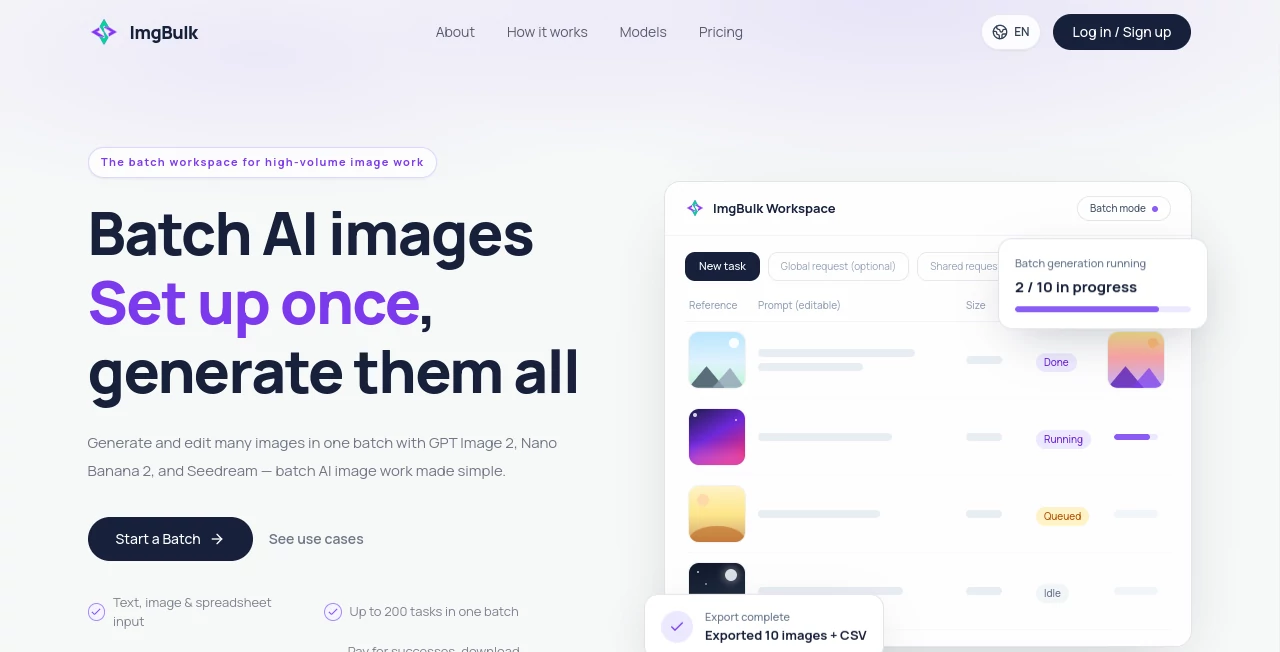
The interface is designed more like a production workspace than a typical chat-based image generator. Tasks are arranged in a structured view, making it easier to see prompts, inputs, settings, and generation status without losing track of what belongs to which image.
Users can add tasks manually for smaller projects or import a CSV or Excel file when working with dozens or hundreds of prompts. Each imported row becomes an editable task, so there is an opportunity to review and correct the content before starting generation.
For a marketing team preparing a month's worth of social media graphics, for example, the spreadsheet-based workflow can save a considerable amount of repetitive copy-and-paste work.
Accuracy & Performance
Performance is particularly relevant when many images need to be generated together. Rather than treating every image as an isolated request, the platform manages them as a batch and provides individual statuses for queued, processing, completed, or failed tasks.
Concurrency can be controlled to suit the workflow, while completed and failed tasks remain separately identifiable. If one generation fails, users can retry that specific task instead of restarting the entire batch. Failed generations are not billed, which also reduces the risk of wasting credits on unsuccessful results.
Output options vary according to the selected model, with supported resolutions reaching 4K for several models. The system also displays the expected cost before a batch is submitted, helping users understand the credit requirement in advance.
Capabilities
The biggest strength is the combination of scale and task-level control. Every row can have its own prompt and reference images, while shared settings such as the selected model, aspect ratio, and resolution can be applied to the batch.
Different workflows are possible. A designer can generate a large collection of concepts from a spreadsheet, an online store can prepare product visuals, and a marketing team can create multiple advertising variations without manually submitting each request.
The supported model selection also gives users flexibility. GPT Image 2 is available alongside Nano Banana 2, Nano Banana Lite, Seedream 5.0, and Seedream 4.0, with available resolutions and settings adapting to the capabilities of each model.
Security & Privacy
The service operates as a cloud-based SaaS platform, so users should consider its data-handling terms when uploading proprietary images, product assets, or other sensitive material. The platform provides account and data-management documentation, including a dedicated process for requesting account closure and eligible data deletion.
Users should also keep their login credentials private and avoid uploading material they do not have permission to process. As with any service that connects multiple third-party AI models, availability and performance can also depend partly on the underlying model providers.
Use Cases
E-commerce: Generate product visuals, promotional concepts, seasonal campaign assets, and alternative creative directions in larger quantities.
Marketing teams: Turn a spreadsheet of campaign ideas into a structured image-generation queue and create multiple advertising concepts without repeating the same manual workflow.
Social media: Prepare image collections for content calendars, thumbnails, promotional posts, and recurring campaigns.
Design studios: Explore numerous visual concepts while keeping each request separately organized and easy to review.
Content creators: Generate batches of images for articles, videos, newsletters, or social campaigns instead of producing every asset individually.
Agencies: Manage client-specific image production through repeatable batch workflows, particularly when a campaign requires many related but different visuals.
Pros and Cons
- Pros: Supports batches of up to 200 tasks, CSV and Excel imports, multiple AI image models, image editing, individual prompts, reference images, failure retries, progress tracking, and ZIP downloads.
- Pros: Failed generations are not billed, and the system provides a cost estimate before submitting a batch.
- Pros: Reference images do not carry a separate additional credit charge.
- Cons: The number of tasks that can actually run may be limited by credits, file size, model capabilities, and concurrency settings.
- Cons: Users who only create an occasional single image may not need the additional batch-oriented workflow.
- Cons: Credit costs vary considerably between models and resolutions, so users need to check the selected model before running a large batch.
Pricing Plans
The platform uses prepaid credit packs rather than a recurring subscription model. Current options include a Starter pack at $5 for 500 credits, a Creator pack at $15 for 1,700 credits including 200 bonus credits, a Pro pack at $29 for 3,600 credits including 700 bonus credits, and a Bulk pack at $139 for 20,000 credits including 6,100 bonus credits.
Image generation consumes different amounts of credits depending on the selected model and resolution. Current listed rates range from 6 credits for some 1K generations to 28 credits for certain 4K generations. GPT Image 2, for example, is listed at 8 credits for 1K, 12 credits for 2K, and 16 credits for 4K output.
Because the cost is calculated per successful image, the credit system can be useful for users whose workloads change from project to project. The confirmation screen also shows the model, number of tasks, unit cost, and expected total before generation is submitted.
How to Use It
- Create or prepare your image prompts. For a small project, tasks can be entered manually; for larger projects, prepare them in a CSV or Excel spreadsheet.
- Add reference images when an existing subject, product, material, or visual style needs to influence the result.
- Choose the AI model and configure the available output settings, such as aspect ratio and resolution.
- Review the individual task rows and check the estimated credit cost before submission.
- Start the batch and monitor the status of individual tasks as they move through the workflow.
- Review completed results and retry only the tasks that failed.
- Download finished images individually or collect the completed batch as a ZIP file.
Comparison with Similar Tools
Traditional AI image generators are often designed around a single prompt and a single generation session. That approach works well for experimentation, but it becomes cumbersome when the requirement changes from one image to dozens of different images.
The batch-focused approach here is more suitable for production workloads. Instead of repeatedly opening a generator, entering a prompt, waiting for the result, saving it, and starting over, users can prepare a collection of independent tasks and manage them from one workspace.
The spreadsheet import is another practical difference. Teams that already manage campaigns, catalogs, or content calendars in Excel or CSV files can move those existing lists into the image workflow rather than recreating every request manually.
Conclusion
For occasional AI image experiments, a simple image generator may be enough. For anyone responsible for producing a large number of visual assets, however, the workflow becomes much more important than the act of generating a single picture.
This platform addresses that production problem with batch generation, spreadsheet imports, multiple models, per-task prompts, reference images, progress tracking, targeted retries, and bulk downloads. The combination makes it especially appealing to e-commerce sellers, marketing teams, agencies, designers, and content studios that regularly need many images rather than just one.
The strongest feature is arguably the way it turns a collection of prompts into an organized production queue. Once the initial setup is done, the repetitive parts of image generation become considerably easier to manage.
Frequently Asked Questions (FAQ)
How many tasks can be included in one batch?
A single batch can contain up to 200 task rows. The number that can actually run depends on account credits, file size, model capabilities, and concurrency settings.
Can every image have a different prompt?
Yes. Each task can contain its own prompt and reference images, while shared batch settings control elements such as the model, aspect ratio, and resolution.
Can I import prompts from Excel?
Yes. Supported CSV and Excel files can be imported into the workspace. The resulting rows can then be reviewed and edited before generation.
Can I edit existing images?
Yes. The platform supports batch image-to-image workflows, allowing users to provide existing images and editing instructions.
Which AI models are available?
Current supported models include GPT Image 2, Nano Banana 2, Nano Banana Lite, Seedream 5.0, and Seedream 4.0. Available settings depend on the capabilities of each model.
What happens if an image generation fails?
Failed tasks keep their individual status and can be retried without rerunning completed tasks. Failed generations are not billed, and the corresponding held credits are released during settlement.
Do reference images cost extra credits?
No separate credit surcharge is currently applied to supported reference images.
Can I download all completed images together?
Yes. Completed results can be downloaded individually or packaged together as a ZIP file for bulk download.
Is there a subscription?
The current pricing system is based on one-time credit purchases rather than recurring automatic subscription charges. Credit packs are available at several levels to accommodate different workloads.
AI Photo & Image Generator , AI Marketing Plan Generator , AI Image to Image .
These classifications represent its core capabilities and areas of application. For related tools, explore the linked categories above.

ImgBulk Alternatives Product

grok bikini

Leonardo.ai

whisk ai

Imagens App

AI Family Ph…

Remove Handw…

SeeDream 4.5

Nano Banana …

Meev