

















Jade Note
What is Jade Note?
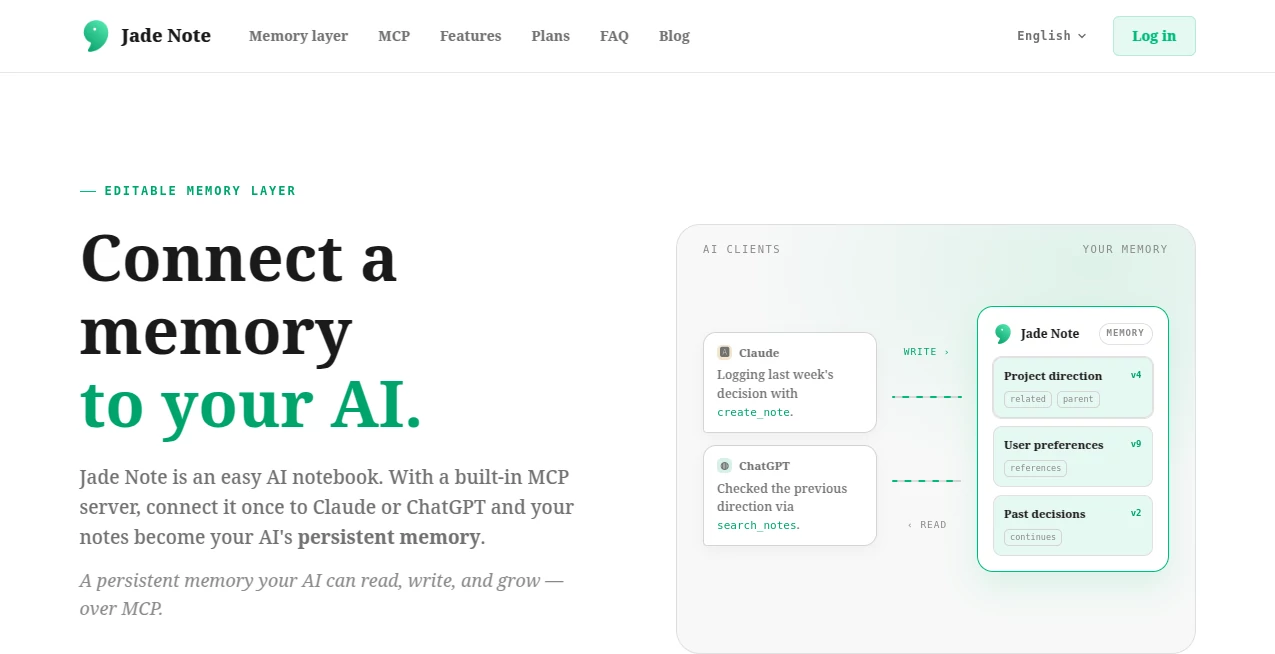
Keeping valuable information across multiple AI conversations has become a challenge for professionals, researchers, students, and creators. Instead of losing important context every time a chat ends, this platform provides a persistent memory layer that grows alongside your work. It transforms everyday notes into structured knowledge that can be accessed, updated, and expanded whenever needed.
Rather than acting as a traditional notebook, it combines note-taking, knowledge management, semantic search, and AI-powered automation in a single workspace. Users can capture ideas, organize projects, record decisions, and allow compatible AI assistants to reference that information during future conversations. The result is a smoother workflow where context is never lost and every interaction becomes more intelligent.
Its biggest advantage is the ability to let both humans and AI collaborate on the same knowledge base while maintaining version history, structured relationships between notes, and secure authentication. Whether you're managing long-term projects or building a personal knowledge system, it creates an environment where information stays useful instead of disappearing after every session.
Key Features
User Interface
The interface is intentionally clean and distraction-free. Notes are organized into categories, making navigation simple even as the knowledge base grows. Markdown editing provides flexibility for writing, while semantic search allows users to locate information naturally instead of relying on exact keywords. The overall experience feels approachable for beginners while remaining powerful enough for advanced users.
Accuracy & Performance
Semantic retrieval helps AI understand context beyond simple keyword matching. Notes remain interconnected through structured relationships such as parent, child, related, references, and continuation links, allowing conversations to build upon previous knowledge with greater accuracy. Automatic version control ensures every modification can be reviewed or restored whenever necessary.
Capabilities
- Persistent AI memory across conversations.
- Markdown-based note editor.
- Semantic search for fast knowledge retrieval.
- Structured knowledge graph using linked notes.
- AI-assisted note creation and editing.
- Category-based organization.
- Scheduled AI triggers and automated reviews.
- Knowledge maintenance with freshness checks.
- Version history with rollback support.
- RAG-powered chat using personal notes.
- Multiple AI client compatibility through MCP.
- Custom properties and category wikis.
Security & Privacy
Security is built into the platform through OAuth authentication, client-specific access, and detailed version tracking. Every AI-generated modification can be previewed before being accepted, while rollback functionality allows users to restore previous versions whenever needed. Write protection for individual notes provides additional control, making autonomous AI interactions significantly safer than traditional note systems.
Use Cases
- Building a personal second brain.
- Managing long-term research projects.
- Recording project decisions and meeting notes.
- Maintaining documentation for ongoing work.
- Organizing study materials and learning resources.
- Keeping journals and daily reflections.
- Creating searchable knowledge bases for teams.
- Managing travel ideas, wish lists, and personal planning.
- Preserving conversation history for AI assistants.
Pros and Cons
Pros
- Persistent memory shared between users and AI.
- Excellent organization through structured note relationships.
- Automatic version history with rollback protection.
- Powerful semantic search.
- Supports AI automation through scheduled triggers.
- Clean and intuitive writing environment.
- Works with MCP-compatible AI assistants.
Cons
- Some advanced automation features require a paid plan.
- The full experience depends on compatible AI clients.
- Large knowledge graphs may require thoughtful organization for best results.
Pricing Plans
A free plan includes note management, categories, semantic search, AI chat, and a monthly AI credit allowance. New users receive a generous Pro trial with access to premium capabilities. Paid plans unlock additional AI credits, more automation triggers, category-level AI chat, self-maintaining knowledge features, and enhanced memory management capabilities.
How to Use Jade Note
Start by creating an account and organizing information into meaningful categories. Write notes using the built-in Markdown editor, then use the AI chat to summarize, search, or expand your knowledge. Connect compatible AI assistants through the supported protocol to allow them to retrieve and update your notes automatically. As your collection grows, create relationships between notes, enable automated triggers for recurring reviews, and let the knowledge base evolve into a continuously improving memory system.
Comparison with Similar Tools
Unlike conventional note-taking applications that simply store information, this solution focuses on creating an evolving memory layer for AI interactions. While many knowledge management tools provide search and organization, few allow AI assistants to safely read, write, and maintain structured memory with version control and semantic relationships. Its combination of persistent memory, automation, knowledge graphs, and secure AI collaboration makes it particularly attractive for users who rely on conversational AI every day.
Conclusion
This platform redefines what digital note-taking can become by transforming static notes into living knowledge that AI can understand, maintain, and expand. The combination of structured organization, semantic retrieval, automated maintenance, and strong security creates a practical environment for anyone who wants their AI conversations to build upon previous knowledge instead of starting from scratch each time. For professionals, students, researchers, and creators, it offers a modern approach to long-term knowledge management that continues to improve with every interaction.
Frequently Asked Questions (FAQ)
Can the platform remember information between AI conversations?
Yes. It provides persistent memory that remains available across future conversations through compatible AI clients.
Does it support structured knowledge management?
Yes. Notes can be connected using multiple relationship types to build an organized knowledge graph.
Is it suitable for project documentation?
Absolutely. Teams and individuals can store decisions, research, meeting notes, and project history in one searchable workspace.
Can AI automatically organize my notes?
Yes. AI can suggest edits, create links, summarize content, and perform automated maintenance through scheduled triggers.
Is my data protected?
Yes. Authentication, version history, rollback functionality, and write protection help ensure both security and control over stored information.
AI Documents Assistant , AI Knowledge Management , AI Productivity Tools , AI Notes Assistant .
These classifications represent its core capabilities and areas of application. For related tools, explore the linked categories above.

Jade Note Alternatives Product
AI Business …

Zush

SalaryHow

GPT Image 2 …

ekstrakt

ChatView-AI …

PDF Inspector

Image Descri…

Denoisr
