
Krumzi
What is Krumzi?
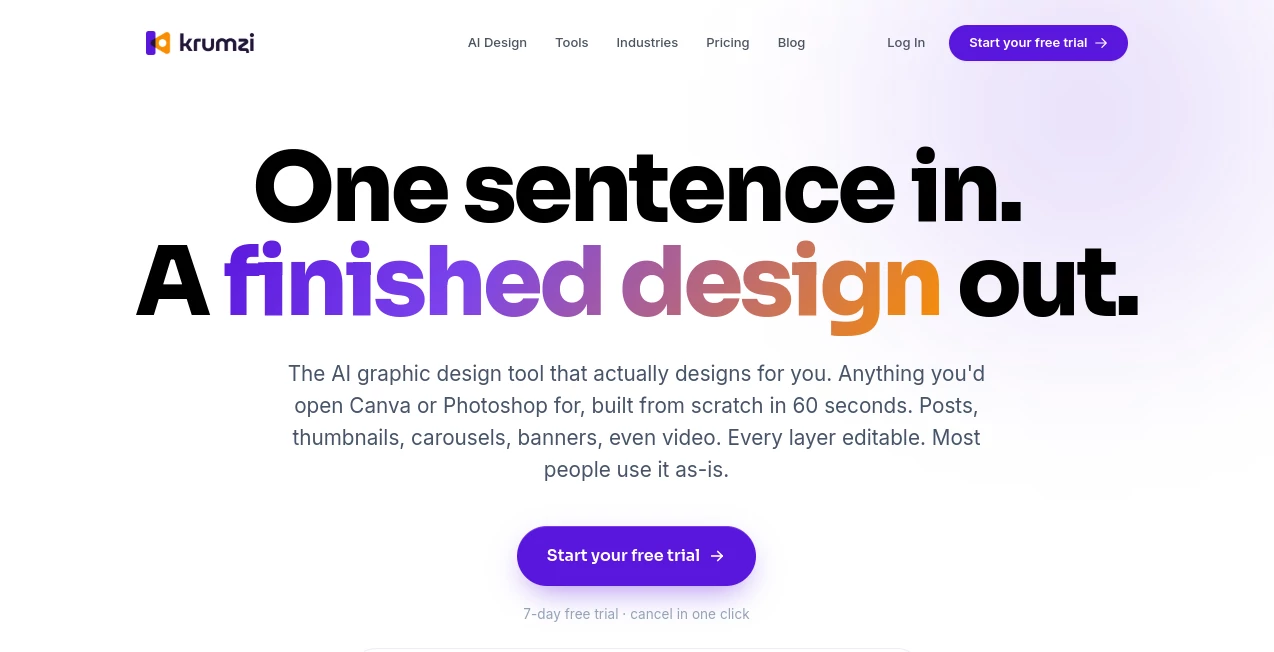
Krumzi is an AI graphic design platform built around a simple idea: describe the design you need, and let the software build it from scratch. Instead of starting with a template and spending time adjusting fonts, spacing, colors, and images, users can provide a plain-English description and receive a finished visual in seconds.
The platform is aimed at creators, marketers, small businesses, coaches, and anyone who regularly needs visual content but does not want to spend hours inside a traditional design editor. It can handle social posts, carousels, advertisements, thumbnails, posters, banners, presentations, covers, and many other formats.
One particularly useful detail is that the result is not simply a flat AI-generated picture. Text, shapes, images, colors, and other design elements remain individually editable, giving users much more control after generation.
Key Features
- AI-generated graphic designs created from natural-language descriptions.
- Designs created from scratch rather than selected from a traditional template library.
- Editable text, images, shapes, colors, sizing, rotation, opacity, and layout elements.
- Brand Kit for applying logos, fonts, and brand colors consistently.
- AI-generated images that can be incorporated directly into designs.
- Multiple AI models for different speed and quality requirements.
- High-resolution exports for social media, digital content, and print.
- Support for social posts, carousels, advertisements, thumbnails, posters, presentations, newsletters, covers, and more.
User Interface
The workflow is intentionally straightforward. Instead of forcing users to learn a complicated collection of design controls before producing anything, the platform begins with a description of what they want. The AI then handles the initial composition, while the editor remains available for anyone who wants to make adjustments.
This approach works particularly well for people who know what they want to communicate but do not necessarily know which font combination, layout, spacing, or visual hierarchy will make the idea look professional.
Accuracy & Performance
For a design generator, useful performance is not only about how quickly an image appears. The quality of the composition and the ability to modify the result afterward matter just as much. The platform states that its design workflow can produce a complete design in around 60 seconds, while individual social media creation pages promote a workflow that goes from brief to export in under a minute.
The result can also be refined through natural-language requests. For example, a user can ask for a darker color treatment, a different layout, or a less corporate style instead of rebuilding the design from the beginning.
Capabilities
The range of formats is one of the strongest parts of the platform. Social media users can create posts, stories, carousels, and platform-specific graphics. Marketers can work on advertisements, sale banners, coupons, and promotional visuals. Creators can produce YouTube thumbnails, ebook covers, podcast-related graphics, and blog headers.
It also goes beyond everyday social content. Posters, presentations, business cards, brochures, invitations, certificates, newsletters, menus, resumes, and other visual assets are supported. This makes it useful as a general-purpose design workspace rather than a tool limited to one content format.
Security & Privacy
Security and privacy details should always be reviewed against the platform's current terms and privacy documentation before uploading confidential business material or sensitive customer information. For normal design work, users should still apply sensible precautions, particularly when working with private brand assets, unpublished campaigns, or commercially sensitive information.
Use Cases
Content creators can use the platform to turn simple content ideas into thumbnails, social posts, carousels, covers, and other publishing assets without repeatedly starting from a blank canvas.
Small businesses can create promotional graphics, event posters, advertisements, product announcements, menus, and branded social content without needing a dedicated designer for every small request.
Marketing teams can produce multiple variations of campaign creatives and adapt designs for different platforms. The Brand Kit is especially useful when the same visual identity needs to appear across a large volume of content.
Another practical use is presentation design. Instead of spending an evening trying to make slides visually consistent, a user can describe the topic, audience, and desired tone and then refine the generated result.
Pros and Cons
- Pros: Fast text-to-design workflow, editable design layers, strong variety of formats, automatic brand consistency, built-in AI image generation, multiple AI models, and a full editor for manual refinements.
- Pros: The workflow is accessible to non-designers and does not require users to understand professional design terminology.
- Cons: The service uses a credit-based system, so frequent AI generation can require attention to monthly usage.
- Cons: Users who want complete manual control from the beginning may still prefer a traditional professional design application.
- Cons: A payment method is required to begin the seven-day trial, so users should pay attention to the trial and subscription terms.
Pricing Plans
The platform offers three main subscription levels. The Starter plan costs $19 per month and includes 1,000 AI credits each month, an AI Image Maker, an AI Carousel Maker, and watermark-free image exports.
The Pro plan costs $39 per month and provides 2,500 AI credits. It adds unlimited video exports, a video editor, exports up to 4K, and the Brand Kit, making it a stronger choice for creators and marketers producing content regularly.
The Ultra plan costs $89 per month and includes 6,000 AI credits, everything in Pro, and access to Claude Opus. Annual billing is also available, with the listed annual prices equivalent to two months free compared with monthly billing.
All three plans currently begin with a seven-day free trial. A payment card is required when starting the trial, and the subscription begins automatically when the trial ends unless it is cancelled.
How to Use It
- Choose the type of design you want to create.
- Describe the design in plain English, including the subject, audience, style, colors, platform, or important text.
- Let the AI build the composition, typography, colors, and visual hierarchy.
- Review the generated design and make changes if necessary.
- Edit individual text, images, colors, shapes, or other layers in the editor.
- Apply your saved brand elements when you need consistent branding.
- Export the finished design in the appropriate size and quality for your intended use.
Comparison with Similar Tools
The biggest difference from template-first design platforms is the starting point. Traditional tools generally ask users to browse templates, select one, replace the content, and manually adjust the result. Here, the process begins with a description and the AI creates the composition itself.
It also takes a different approach from AI image generators. A conventional image generator may create an attractive picture, but text and design elements can become part of one flat image. This platform is designed to produce an editable design where individual elements can be changed after generation.
For someone who enjoys building every detail manually, a traditional editor may remain the better choice. For someone who knows what the finished graphic should communicate but wants to skip much of the repetitive design work, the AI-first workflow is considerably more convenient.
Conclusion
For creators and businesses that constantly need new visual content, the biggest advantage here is the reduction of small design decisions. Instead of searching through templates, adjusting layouts, and rebuilding the same concept for different platforms, users can start with a simple brief and let the AI handle the first version.
The editable output makes the experience more useful than a basic image generator, while the Brand Kit helps maintain a recognizable visual identity across different designs. Combined with support for social media, advertising, presentations, posters, thumbnails, and many other formats, it offers a practical solution for people who need professional-looking graphics without turning every design request into a full project.
Frequently Asked Questions (FAQ)
What is this tool used for?
It is an AI graphic design platform for creating social media graphics, advertisements, carousels, thumbnails, posters, presentations, banners, covers, and many other visual assets from written descriptions.
Do I need professional design skills?
No. The core workflow is based on describing what you want in plain English. The AI handles much of the initial layout, typography, color selection, and composition.
Are the generated designs editable?
Yes. Individual design elements remain editable, including text, images, shapes, colors, size, rotation, and opacity.
Can I use my own branding?
Yes. The Brand Kit allows users to save brand colors, fonts, and logos so they can be applied consistently to future designs.
Does it support social media designs?
Yes. It supports designs for platforms including Instagram, Facebook, LinkedIn, Pinterest, Twitter, TikTok, and WhatsApp, along with multiple carousel and social content formats.
Is there a free trial?
Yes. The current plans include a seven-day free trial with full access. A payment card is required to begin the trial, and the subscription starts after the trial unless cancelled.
How much does it cost?
The current monthly plans are Starter at $19, Pro at $39, and Ultra at $89. Annual billing is also available at $190, $390, and $890 respectively.
Can it create video?
Yes. Video creation and editing capabilities are included in the higher-tier plans, with the Pro plan offering unlimited video exports and exports up to 4K.
Can I create presentations with it?
Yes. The platform includes an AI presentation maker designed to create cohesive slide designs based on the subject, audience, and desired tone.
Is it suitable for small businesses?
Yes. It can be useful for small businesses that need frequent marketing graphics, advertisements, social media posts, promotional banners, event materials, and branded content without relying on a designer for every asset.
Design & Art , AI Social Media Assistant , AI Design Generator , AI Graphic Design .
These classifications represent its core capabilities and areas of application. For related tools, explore the linked categories above.

Krumzi Alternatives Product

Wolfcut Onli…

Nano Banana …
Pixal3D

NanoBanana2
AI Room Desi…
Claude Desig…
YoFont

SeeDream 4.5

Pixelied