
Lazy Prompter
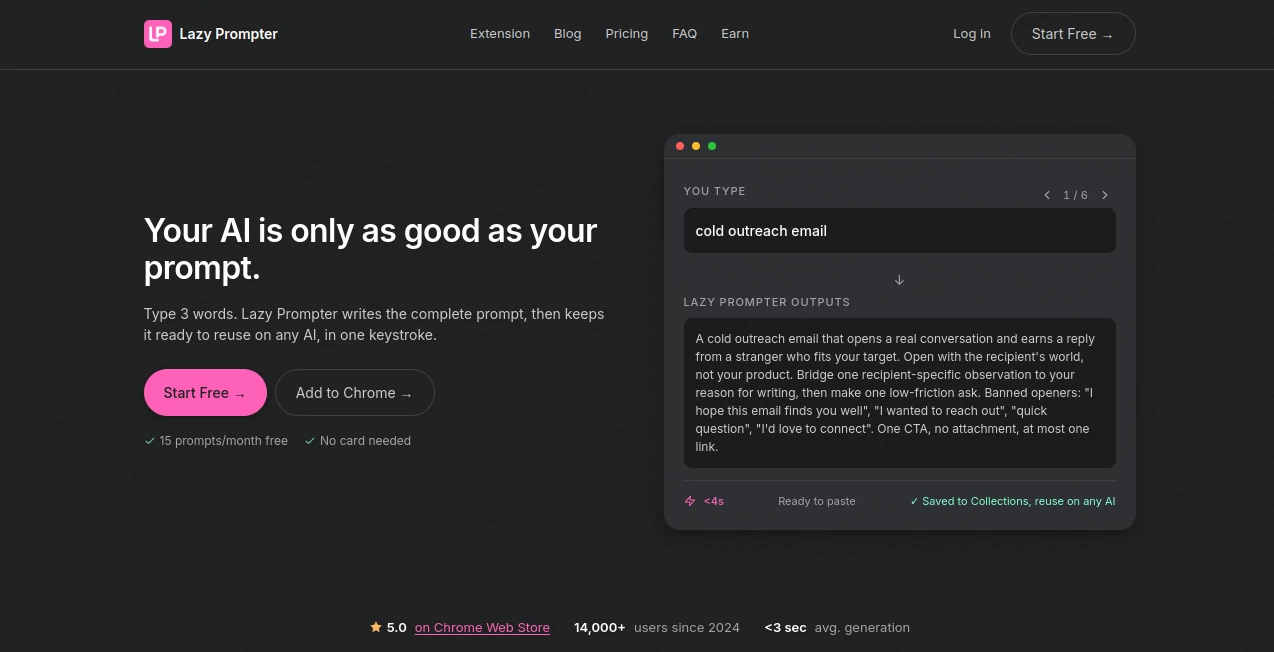
What is Lazy Prompter?
Creating a useful AI prompt often takes more effort than expected. You may know exactly what you want, yet still spend several attempts rewriting the same instructions before getting a good result. Lazy Prompter takes a practical approach to this problem by giving users a dedicated place to create, organize, save, and reuse prompts.
The platform is designed for people who work with AI regularly and do not want their best instructions scattered across browser tabs, notes, documents, and chat histories. It combines prompt creation with an organized library, making it easier to keep useful instructions ready for the next task.
It can be particularly useful for everyday work such as preparing professional emails, explaining code, creating LinkedIn posts, or getting ready for meetings. Instead of starting from an empty chat every time, users can build a collection of prompts that fit the way they actually work.
Key Features
- Prompt creation and management in one workspace.
- Saved prompts organized into collections.
- Search functionality for quickly finding stored prompts.
- Tags and color organization for easier prompt management.
- Quick-start prompts for common tasks such as professional emails, code explanations, LinkedIn posts, and meeting preparation.
- Prompt Mode for straightforward prompt creation and use.
- Custom AI functionality for users who want to create their own AI assistant on the Pro plan.
- Copy controls that make it simple to reuse saved prompts in other AI applications.
User Interface
The interface keeps the main workflow straightforward. Users can create a prompt, add it to a collection, apply tags, and assign a color to make it easier to recognize later. A search field is also available, which becomes increasingly useful as a prompt library grows.
The quick-start options are a nice touch for new users. Rather than asking someone to figure out what to write first, the workspace provides starting points for familiar jobs such as email writing, coding explanations, LinkedIn content, and meeting preparation.
Accuracy & Performance
For a prompt management tool, performance is less about generating a particular answer and more about making the prompting workflow reliable and repeatable. The platform focuses on keeping prompts accessible, organized, and ready to copy when needed.
There is also a useful distinction between prompt management and AI assistance. Users can maintain their own instructions instead of relying entirely on a temporary conversation. This makes it easier to refine a prompt over time and reuse the improved version across similar tasks.
Capabilities
The core capability is prompt organization. Users can save prompts inside collections and use tags or colors to create a structure that matches their workflow. This can be especially helpful for people who maintain separate prompts for marketing, coding, communication, research, or daily productivity.
The platform also includes a Custom AI option on Pro, allowing users to create their own AI assistant. For someone who repeatedly performs the same type of task, this can turn a collection of instructions into a more consistent working environment.
Another practical feature is the absence of memory between messages. This makes it important to treat saved prompts as reusable instructions rather than assuming the system will remember previous conversations automatically.
Security & Privacy
Privacy is an important consideration when building a personal prompt library, particularly when prompts contain business processes or internal instructions. The service provides dedicated Terms of Service and Privacy Policy pages as part of its account system.
Users should still avoid placing confidential credentials, passwords, private customer information, or other sensitive data inside reusable prompts unless they have confirmed that the intended workflow and account settings are appropriate for that information.
Use Cases
Content and marketing: Writers and marketers can maintain reusable instructions for drafting emails, social posts, promotional copy, or other recurring content tasks.
Software development: Developers can save prompts for explaining unfamiliar code, reviewing snippets, documenting functions, or preparing technical responses. Having these instructions ready can save considerable time when similar questions appear repeatedly.
Professional communication: Users who frequently write emails, LinkedIn posts, reports, or business messages can keep their preferred prompting formulas in one place instead of rebuilding them from scratch.
Meetings: A dedicated collection of meeting-preparation prompts can help users prepare agendas, questions, summaries, or discussion points before important conversations.
Personal AI workflows: Anyone who uses several AI tools can maintain a central prompt library and quickly copy the right instruction whenever a new task begins.
Pros and Cons
- Pros: Clean prompt organization, searchable collections, tags and colors, useful quick-start prompts, a free plan, and advanced Custom AI functionality for Pro users.
- Cons: The free plan is limited to 15 prompts per month, and users looking for unlimited prompts, all modes, and Custom AI functionality need to upgrade.
Pricing Plans
The service currently offers a free option with 15 prompts per month and Prompt Mode. It is a useful way to test the workflow before committing to a paid subscription.
The Pro Monthly plan costs $5 per month and provides unlimited prompts, all modes, and access to the broader Pro feature set. There is also a Pro Yearly option priced at $49 per year, which provides the same unlimited usage and Pro functionality on an annual basis.
For users who prefer a one-time purchase, the Lifetime plan provides unlimited access forever and includes five team seats. This can be an attractive option for people who expect to use a prompt library as part of their long-term workflow.
How to Use It
Start by creating an account and opening the prompt workspace. You can begin with one of the quick-start examples or create a prompt from scratch for a task you perform regularly.
Once the prompt is ready, save it to a collection. Add a relevant tag or color if you expect to build a larger library. When you need it again, use the search or collection structure to locate the prompt and copy it for use in your preferred AI workflow.
For more advanced workflows, Pro users can explore the Custom AI feature and create a specialized assistant around the type of work they perform most often.
Comparison with Similar Tools
Many AI products concentrate primarily on generating answers, while this platform approaches the problem from the workflow side. Its focus is on keeping useful prompts organized and reusable rather than simply producing another one-off response.
Compared with storing prompts in a basic notes application, dedicated collections, tags, colors, search, and prompt-focused controls provide a more structured environment. This difference becomes more noticeable when a user has dozens or hundreds of prompts and needs to find a specific instruction quickly.
The free tier also makes the service easy to test. For occasional prompt users, the monthly allowance may be sufficient. More frequent users can move to the $5 monthly or $49 yearly Pro plans, while the lifetime option is aimed at people who prefer a one-time purchase.
Conclusion
For anyone who uses AI repeatedly throughout the day, prompt organization can become a surprisingly important part of the workflow. A strong prompt is only valuable if you can find it when you need it, improve it over time, and reuse it without rebuilding the same instructions.
This platform does a good job of focusing on that practical problem. Its combination of collections, search, tags, quick-start prompts, and reusable instructions makes it useful for professionals, developers, marketers, writers, and everyday AI users. The low-cost Pro plans and lifetime option also give users several ways to scale their usage as their prompt library grows.
Frequently Asked Questions (FAQ)
What is this tool used for?
It is designed to help users create, organize, save, search, and reuse AI prompts. It can be useful for writing, coding, marketing, communication, meeting preparation, and other recurring AI tasks.
Is there a free plan?
Yes. The Free plan currently includes 15 prompts per month and Prompt Mode.
How much does Pro cost?
Pro Monthly costs $5 per month, while Pro Yearly costs $49 per year. Both provide unlimited prompts and access to all modes.
Is there a lifetime plan?
Yes. The Lifetime plan provides unlimited access and includes five team seats without recurring subscription payments.
Can I create my own AI assistant?
Yes. Custom AI is available as part of the Pro feature set and allows users to create their own AI assistant for more specialized workflows.
Can I organize saved prompts?
Yes. Saved prompts can be placed into collections and organized with tags and colors, making larger prompt libraries easier to manage.
Does it remember previous conversations?
No. The workspace states that there is no memory between messages, so reusable instructions are better kept as saved prompts rather than relying on conversation history.
Who can benefit from using it?
It can be useful for content creators, marketers, developers, business professionals, students, and anyone who frequently uses AI and wants a more organized way to manage reusable prompts.
AI Productivity Tools , Prompt .
These classifications represent its core capabilities and areas of application. For related tools, explore the linked categories above.
Lazy Prompter details
Website unavailable — View Alternatives
Pricing
- Freemium
Apps
- Web App
Categories

Lazy Prompter Alternatives Product

AI Entity

Betula AI

Odysseus AI

KwaKwa Cours…

PrompTessor

Graph Maker

AltHunt

SlideStorm AI

AfterSession