
Lip Reader Pro
What is Lip Reader Pro?
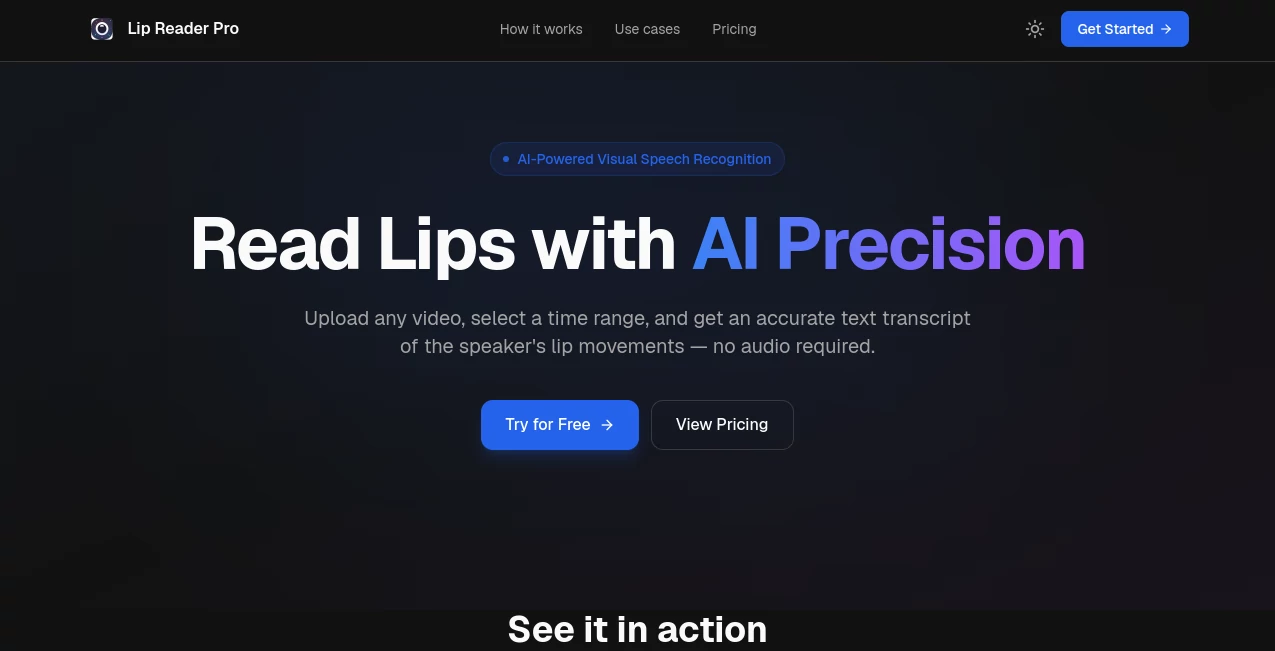
LipReadPro is an advanced AI visual speech recognition platform designed to convert lip movements from videos into written text, even when no audio is available. By analyzing facial movements and speech patterns visually, it helps users recover spoken information from silent, muted, or damaged video recordings.
The platform provides a practical solution for situations where traditional speech-to-text systems cannot work because there is no usable sound. Users can upload a video, choose the section they want to analyze, and receive a generated transcript based only on visible lip movements. This makes it a valuable tool for accessibility, media recovery, research, and video analysis.
With a simple workflow and browser-based experience, the service removes the complexity often associated with AI-powered video processing. Whether you are working with silent footage, archived recordings, or videos with poor audio quality, it offers a convenient way to extract meaningful information.
Key Features
User Interface
The platform focuses on simplicity, allowing users to start the transcription process without technical knowledge. The interface provides an easy upload experience where users can add supported video files, select a specific time range, and let the AI analyze the chosen section.
The timeline selection feature is especially useful because users do not need to process an entire recording when they only need a specific moment. This saves time and makes the workflow more efficient for professional and personal projects.
Accuracy & Performance
The system uses AI-powered visual speech recognition models trained to understand different lip movements, speakers, viewing angles, and lighting conditions. While results depend on video quality and visibility, the technology provides an impressive approach to extracting text from silent footage.
For the best performance, videos should contain a clearly visible face, good lighting, and minimal obstruction around the mouth area. Front-facing recordings generally provide stronger results, while profile views can also work when enough lip movement is visible.
Capabilities
- Convert silent videos into text transcripts using lip movement analysis
- Process videos without requiring an audio track
- Support common video formats including MP4, MOV, and AVI
- Analyze selected sections of videos through timeline controls
- Help recover information from videos with missing or damaged audio
- Assist accessibility projects for people with hearing difficulties
- Support multiple languages and accents through AI recognition models
- Provide fast browser-based processing without complicated setup
Security & Privacy
Privacy is an important part of handling video-based AI services. The platform states that uploaded video data is not stored or permanently retained after processing, helping users feel more comfortable when working with personal or sensitive recordings.
Users should still ensure they have the necessary rights and permissions before uploading any video content, especially when working with private recordings or third-party footage.
Use Cases
This technology can be useful across many industries where understanding speech from video is challenging. Content creators can use it to recover dialogue from videos where the original audio track was lost or damaged. Journalists and researchers may find it helpful when analyzing visual-only footage.
For accessibility purposes, the tool can support communities that need additional ways to understand video communication. It can also assist in reviewing historical archives, silent recordings, security footage analysis, and media restoration projects.
- Content Creation: Generate transcripts from videos with unclear or unavailable audio.
- Accessibility: Improve access to video information for people with hearing challenges.
- Historical Archives: Analyze old footage where sound recordings are missing.
- Forensic Analysis: Support investigation workflows involving silent video evidence.
- Media Recovery: Extract possible spoken content from damaged recordings.
- Research: Study communication patterns and visual speech recognition.
Pros and Cons
Pros
- Works without an audio track
- Simple upload and transcription workflow
- Useful for unique video analysis situations
- Supports multiple video formats
- Helpful for accessibility and media recovery projects
- Browser-based and easy to access
Cons
- Accuracy depends heavily on video quality and face visibility
- Results may vary with unclear mouth movements
- Best performance requires one clearly visible speaker
- Long videos may require additional processing time or credits
Pricing Plans
The platform offers flexible plans based on video processing needs. Users can start with a free option that includes limited credits for testing the service before choosing a paid subscription.
- Free Plan: Includes 10 seconds of lip reading credits with standard processing.
- Basic Plan: Includes 600 seconds of processing credits with faster processing and priority support.
- Pro Plan: Includes 2400 seconds of processing credits with the fastest processing experience.
How to Use LipReadPro
Using the platform requires only a few simple steps:
- Upload a compatible video file.
- Select the specific section of the video you want to analyze.
- Allow the AI system to process visible lip movements.
- Review the generated text transcript.
For better results, choose videos with clear facial visibility, good lighting, and minimal objects blocking the speaker’s mouth.
Comparison with Similar Tools
Traditional transcription software usually depends on recorded audio, making it ineffective when sound quality is poor or completely unavailable. This platform takes a different approach by focusing on visual speech recognition.
Compared with standard subtitle generators, it provides a specialized solution for silent video analysis. It is particularly useful in cases where audio-based AI tools cannot provide any results because the original sound is missing.
Although AI lip reading technology is still developing, this approach represents an important step toward more flexible video understanding systems.
Conclusion
LipReadPro offers an innovative solution for extracting speech information from videos without relying on audio. Its combination of AI-powered visual recognition, simple workflow, and practical use cases makes it an interesting option for creators, researchers, accessibility professionals, and anyone working with silent footage.
While video quality remains an important factor in achieving accurate results, the ability to analyze lip movements and transform them into text opens new possibilities for video accessibility and information recovery.
Frequently Asked Questions (FAQ)
Can it read lips from videos without sound?
Yes. The platform is designed to analyze visible lip movements and generate text without requiring an audio track.
What video formats are supported?
Supported formats include common video files such as MP4, MOV, and AVI.
How can I improve transcription accuracy?
Use videos with good lighting, a clearly visible face, and minimal obstruction around the speaker’s mouth. Videos with one visible speaker usually provide better results.
Can it process long videos?
The service is optimized for shorter video segments. Processing limits depend on the selected pricing plan and available credits.
Is uploaded video data stored?
The service indicates that uploaded videos are not stored or permanently retained after processing.
Video , AI Speech Recognition , AI Speech to Text .
These classifications represent its core capabilities and areas of application. For related tools, explore the linked categories above.

Lip Reader Pro Alternatives Product
Video To Text

AudioScribe

MP3toMIDI

mp3tourl

FluentDictat…

ModelsLab

Ssave App

Whisper AI

Speechara