


















Lip Sync AI
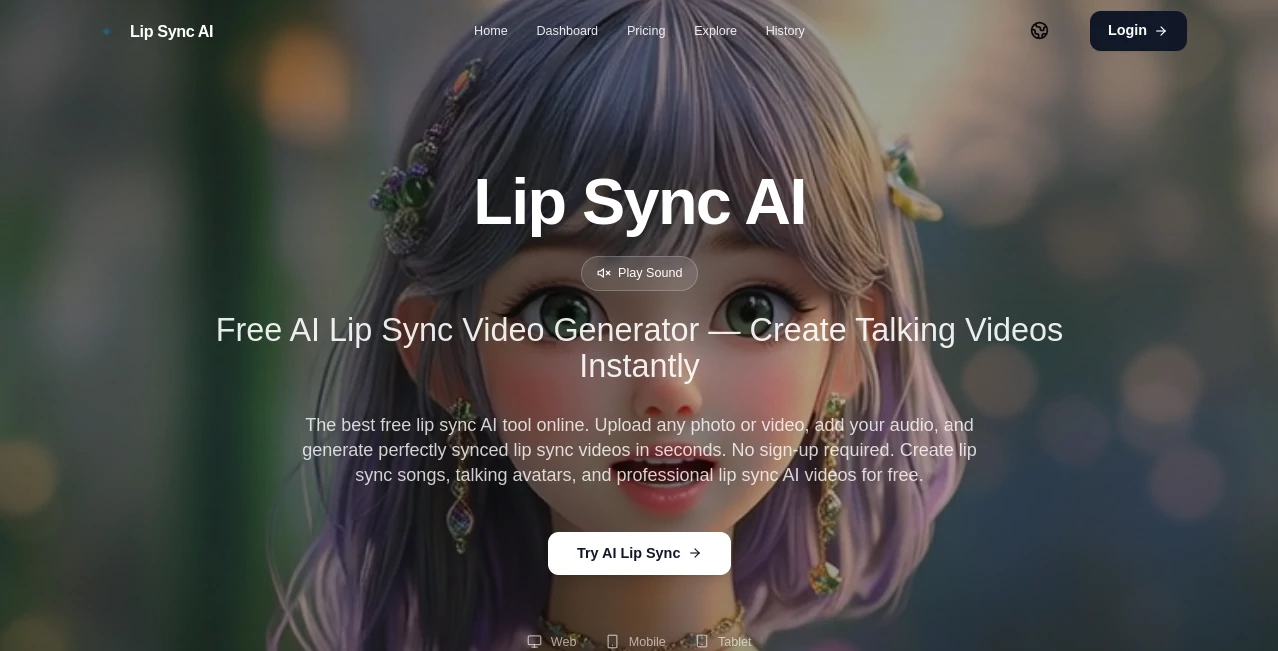
What is Lip Sync AI?
There's something magical about watching a still photo suddenly come alive — lips moving naturally to a song, a character delivering lines with perfect timing, or a static avatar turning into a convincing speaker. This tool makes that happen faster and more naturally than I expected. You upload a clear photo (or short video), add your audio, and within seconds you get a synced result that often looks shockingly real. I’ve used it to turn a friend’s selfie into a hilarious birthday song video, and the reaction was pure gold. It removes the usual headaches of animation while delivering results that feel professional enough for social posts or even light marketing.
Introduction
Creating talking head videos used to mean hours in editing software or expensive studio time. This platform changes the game by letting anyone generate realistic lip-synced videos from just a photo and audio clip. No sign-up required to start, no complicated timelines, and no steep learning curve. It’s become popular for everything from fun social content to more polished creations because it focuses on what matters most: natural mouth movements, character consistency, and speed. Whether you’re making lip-sync songs, talking avatars, or quick explainer clips, it turns the process from tedious to exciting in just a few clicks.
Key Features
User Interface
The dashboard is wonderfully simple. Big upload areas for your image or video and audio file sit front and center, with clear previews and a prominent generate button. You can try examples instantly to get a feel for it, and the whole flow is designed so you spend time creating rather than figuring things out. Even on mobile it stays usable, which is perfect when inspiration strikes on the go.
Accuracy & Performance
The lip movements sync impressively well to the audio, handling different languages, singing, and natural speech with minimal glitches. Character faces stay consistent throughout the clip, and the generation is fast enough that you can create multiple versions and pick the best one. It performs especially well with clear, front-facing photos, turning them into believable talking heads without the uncanny distortions you sometimes see in other tools.
Capabilities
It works with both still photos and existing videos, supports singing and speaking, handles multiple languages, and produces results suitable for social media, content creation, or fun experiments. You can create lip-sync songs, talking avatars, product explainers, or even animated characters. The output quality is good enough for quick professional use while remaining completely free to try without any account barriers.
Security & Privacy
Your uploads are processed securely and not stored long-term unless you choose to save them. No forced sign-up means minimal personal data is collected upfront. For casual creators and those testing ideas, this low-friction, privacy-conscious approach feels very welcoming.
Use Cases
A content creator turns a static selfie into a lip-synced song cover that gets strong engagement on social media. A marketer creates quick talking avatar videos for product announcements without booking talent. Someone makes a funny birthday message by syncing a family photo to a custom audio clip. Teachers experiment with animated explainers that hold students’ attention better than static slides. The possibilities feel endless once you start playing with it.
Pros and Cons
Pros:
- Extremely easy to use — no sign-up needed to try it right away.
- Fast generation with impressively natural lip movements.
- Works great for both photos and short videos.
- Free tier is genuinely useful for testing and small projects.
- Good character consistency compared to many similar tools.
Cons:
- Best results require clear, well-lit front-facing photos.
- Longer or very complex audio may need splitting into shorter clips.
- Advanced features and higher usage limits are behind paid plans.
Pricing Plans
It starts completely free with a daily limit that’s generous enough for most casual and testing needs. Paid plans remove limits, unlock higher quality and faster processing, and give more monthly generations. The structure is straightforward — you can stay free as long as you want or upgrade when your projects grow. Many users find the free version already covers most personal and light creative needs.
How to Use Lip Sync AI
Go to the main page, upload a clear photo or short video of a face, then upload or record your audio clip. Review the settings if needed (most people can skip straight to generate). Click the button and wait a short moment while it processes. Preview the result, download if you like it, or tweak and regenerate. For songs or longer content, many people break the audio into shorter segments for best quality. The entire process is quick enough that you can experiment with several versions in one sitting.
Comparison with Similar Tools
Many lip sync tools require accounts, have heavy watermarks on free versions, or produce stiff, unnatural movements. This one stands out for its no-sign-up start, solid free tier, and focus on natural-looking results with good consistency. It’s lighter and more accessible than enterprise solutions while delivering quality that competes well for everyday creators. The balance of simplicity and effectiveness makes it a strong choice for most users.
Conclusion
Turning a static image into a talking, singing, or speaking character used to be complicated and time-consuming. This tool makes it feel almost effortless while delivering results that are fun, shareable, and often surprisingly good. Whether you’re creating content for fun, work, or just experimenting, it opens up creative possibilities that used to require much more skill and equipment. If you’ve ever wanted to bring a photo to life with voice and movement, this is one of the easiest and most enjoyable ways to do it right now.
Frequently Asked Questions (FAQ)
How long does it take to generate a video?
Usually just a few seconds to under a minute depending on length and current load.
Do I need to create an account?
No — you can start creating immediately without signing up.
Can I use it for singing or music videos?
Yes, it handles songs and music particularly well for lip-sync content.
What kind of photos work best?
Clear, front-facing portraits with good lighting give the strongest results.
Are the videos free to download?
Yes on the free tier (with limits), and paid plans offer more generations and higher quality.
These classifications represent its core capabilities and areas of application. For related tools, explore the linked categories above.

Lip Sync AI Alternatives Product
LipPulse

HappyHorse

WonderShare …

Leonardo.ai

VideoDubber

happyhorse ai
LatentSync
