

















Lium
Verified Blue CheckMark
Verified Blue CheckMark products are featured above free or unverified listings.
This badge indicates authenticity and builds trust, giving your product higher visibility across the platform.
Upgrade to get verified
Verified Blue CheckMark products are featured above free or unverified listings. This badge indicates authenticity and builds trust, giving your product higher visibility across the platform.
Upgrade to get verified
What is Lium?
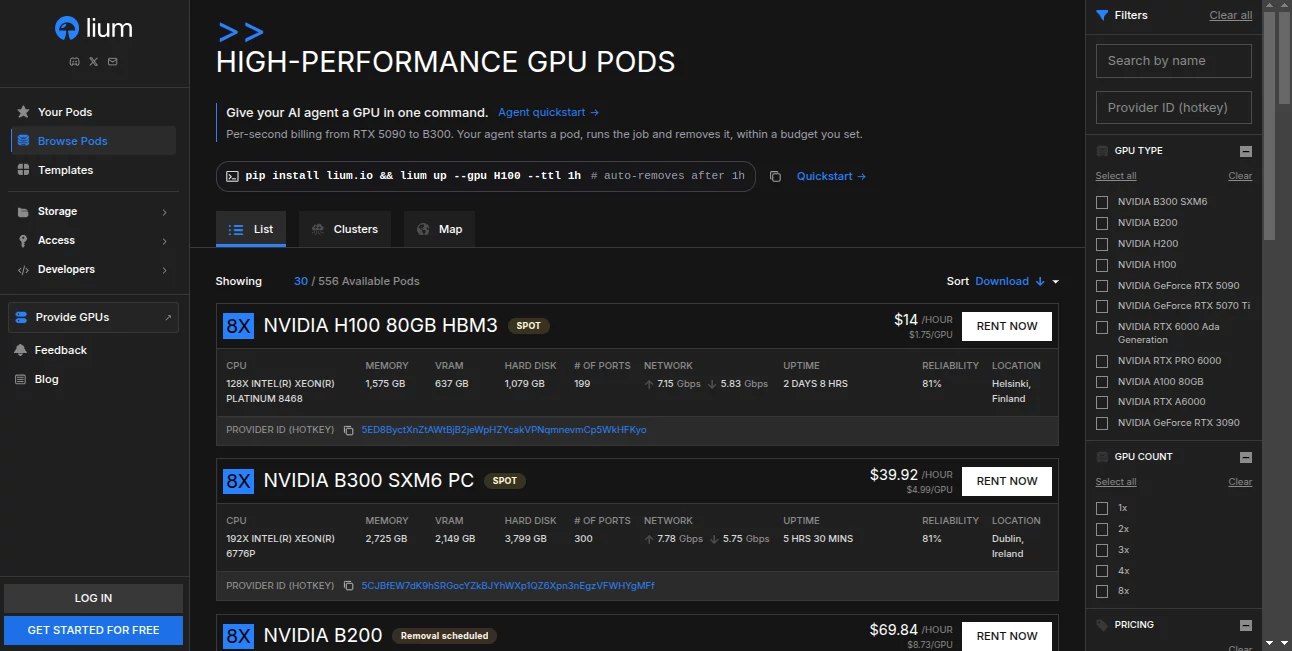
Access to powerful GPUs can make a real difference when developing AI applications, training machine learning models, running inference workloads, or processing demanding computational tasks. However, purchasing expensive hardware is not always practical, particularly for independent developers, startups, and teams experimenting with new ideas. Lium provides a GPU rental marketplace where users can access computing resources from independent hardware providers and pay according to their actual usage.
The platform is designed for developers who need flexible access to GPU computing without committing to owning physical machines. Users can select available GPU resources, launch computing environments, run their workloads, and remove them when the work is complete. Its support for a web interface, command-line tools, a Python SDK, and a REST API makes it suitable for both hands-on development and automated workflows.
Whether you are testing an open-source language model, experimenting with computer vision, or building an AI agent that needs additional processing power, this approach can help reduce the initial cost and operational effort associated with GPU infrastructure.
Key Features
User Interface
The marketplace provides a practical way to explore GPU models, compare listed prices, review available machines, and deploy computing resources. Developers who prefer working in a terminal can use the command-line interface instead of relying entirely on a graphical dashboard.
The developer-focused workflow is particularly useful for people who want to integrate infrastructure management into existing projects. Once familiar with the available commands, users can automate routine tasks such as launching a GPU pod, executing a workload, retrieving results, and shutting down the environment.
Accuracy & Performance
Computing performance depends on the selected GPU, its memory capacity, the workload, and the configuration of the rented machine. The marketplace includes different classes of hardware, from consumer graphics cards to professional and data-center GPUs. This variety gives developers more flexibility when matching resources to a particular project.
The platform evaluates connected nodes and provides GPU specifications and performance-related information to help users assess their options. Nevertheless, a higher-end GPU is not automatically the best choice for every task. Model size, memory requirements, software compatibility, and expected processing time should all influence the final selection.
For example, a developer testing a small image-generation model may be able to work with a less expensive GPU, while a large language model with substantial memory requirements may need a more capable data-center accelerator.
Capabilities
The service supports a broad range of GPU-intensive workloads, including machine learning, model training, AI inference, scientific computing, and data processing. Users can deploy their own software environments and run workloads suited to the selected hardware rather than being limited to a single predefined AI application.
- On-demand GPU rentals: Access available computing resources without purchasing physical hardware.
- Multiple GPU classes: Compare consumer, professional, and data-center graphics processors.
- Command-line automation: Manage GPU resources through terminal commands and scripts.
- Python integration: Use the available SDK to manage pods programmatically.
- REST API access: Integrate resource management into applications and automated systems.
- AI agent workflows: Allow compatible coding agents to provision resources and run computational tasks.
- Flexible usage: Start and stop workloads as project requirements change.
- Public pricing information: Inspect GPU price ranges and availability before committing to a rental.
These capabilities make the platform useful for more than occasional experiments. Teams can also incorporate rented GPUs into repeatable development, testing, and deployment workflows.
Security & Privacy
Security depends partly on the type of machine selected and how the workload is configured. The platform documents confidential computing options for supported hardware, providing stronger isolation for workloads that require additional protection. Users should verify the machine's capabilities and complete the recommended attestation process before relying on these protections for sensitive data.
On ordinary machines without confidential computing, the hardware provider may have access to the host environment, including files, process memory, and environment variables inside a rented pod. For that reason, users should avoid uploading private keys, cryptocurrency recovery phrases, API credentials, or other secrets to standard instances.
Good security practices include limiting permissions, using short-lived credentials, keeping sensitive keys outside the rented environment, and deleting resources when they are no longer needed. Developers handling confidential information should review the security documentation and applicable service policies before deployment.
Use Cases
- AI model training: Rent suitable GPUs for training experiments without investing in a dedicated workstation or server.
- Large language model inference: Run supported open-weight models using frameworks configured for the chosen hardware.
- AI agent development: Give coding agents access to temporary compute resources for tests, simulations, and processing tasks.
- Computer vision: Process images, evaluate recognition models, and experiment with visual AI applications.
- Research and experimentation: Test different GPU configurations before deciding which hardware best fits a research workload.
- Rendering and parallel computing: Use compatible GPU resources for demanding graphics and computational jobs.
- Startup prototyping: Build and test AI-powered products without immediately purchasing expensive infrastructure.
- Automated development pipelines: Launch computing resources from scripts and remove them after a job finishes.
Consider a small development team preparing a prototype for an AI-powered application. Instead of purchasing a high-end GPU before validating the idea, the team can rent a suitable machine, run its experiments, compare results, and adjust its hardware choice as requirements become clearer. That flexibility can make early-stage development more manageable.
Pros and Cons
Pros
- Access to a diverse selection of GPU hardware through one marketplace.
- Per-second billing without a minimum rental period for GPU pods.
- Pricing and availability information that helps developers compare options.
- CLI, Python SDK, and API support for automated infrastructure management.
- Suitable for experiments, inference, training, and other GPU-intensive workloads.
- Potentially lower upfront costs than purchasing dedicated hardware.
- Confidential computing options for supported machines and appropriate workloads.
- Compatible workflows for developers and AI agents that can operate through command-line tools.
Cons
- GPU availability and prices can change as independent providers update their listings.
- Performance and reliability may differ between individual machines.
- Users need sufficient technical knowledge to configure software environments and troubleshoot workloads.
- Security protections vary by machine, so standard pods may be unsuitable for sensitive workloads.
- Long-running workloads can become expensive if GPU selection and runtime are not monitored.
- Persistent storage and other resources may incur additional charges.
- Access is subject to the platform's geographic restrictions and sanctions policies.
Pricing Plans
The platform uses a usage-based GPU rental model rather than relying exclusively on fixed monthly subscription plans. Each provider sets a price for its hardware, and the marketplace displays GPU-hour rates and current availability. Actual prices vary by GPU model, provider, and market conditions.
GPU pods are billed by the second, with no minimum rental period. For example, if a pod costs $2.40 per hour and runs for 20 seconds, the GPU rental charge for that period is approximately $0.0133, excluding any separately billed resources.
Users need sufficient account balance to start a pod, and the documented requirement is a balance covering at least 15 minutes of the selected pod's cost. Billing stops when the pod is deleted or its scheduled end time is reached.
- Pay-as-you-go: Pay for the time your rented GPU pod runs.
- Consumer GPUs: Consider lower-cost options for compatible experiments and lighter workloads.
- Professional GPUs: Choose from workstation-class hardware according to your memory and performance requirements.
- Data-center GPUs: Explore more powerful accelerators for demanding AI training and inference workloads.
- Payment methods: Account balances can be funded using supported card payments or cryptocurrencies, subject to the platform's current payment options.
Before starting a job, compare current prices, confirm that the required GPU is actually available, and estimate the expected runtime. Remember that persistent volumes, backups, or other optional resources may have separate charges. Checking the live pricing information is the best way to calculate a realistic project budget.
How to Use the Platform
- Create an account: Follow the available account setup process and configure the credentials needed to access the service.
- Compare GPU options: Review available hardware, memory specifications, prices, and provider information.
- Fund your balance: Add sufficient funds to cover the required starting balance and anticipated usage.
- Select a GPU pod: Choose a machine that meets your model's memory, performance, and software requirements.
- Configure the environment: Select an appropriate software or Docker environment, provide the required SSH access, and configure your workload.
- Launch the pod: Deploy through the web interface or use the command-line interface and API for automated workflows.
- Run your workload: Execute your training, inference, testing, or computational job and monitor its progress.
- Retrieve your results: Copy completed outputs to a suitable location before removing temporary resources.
- Stop unnecessary computing: Delete the pod or ensure its scheduled end time is configured correctly to avoid unwanted charges.
Developers who want to automate this process can explore the Python package and command-line documentation. Before giving an AI agent access to infrastructure, create appropriately restricted credentials and apply spending limits where supported.
Comparison with Similar Tools
GPU rental marketplaces and cloud computing services can solve similar problems, but they differ in how resources are priced, provisioned, and managed. The right choice depends on whether you value flexible hardware selection, managed infrastructure, predictable contracts, or integration with an existing cloud environment.
- Compared with traditional cloud GPU instances: A marketplace can provide a useful alternative for developers seeking a range of independently supplied GPUs and usage-based pricing. Traditional cloud services may be preferable when a project depends on a specific ecosystem, established enterprise agreements, or integrated managed services.
- Compared with other GPU marketplaces: The main factors to examine are available GPU models, live prices, hardware verification, regional availability, security options, and the ease of automating deployments.
- Compared with purchasing a GPU: Renting reduces the need for an upfront hardware investment and avoids maintaining a dedicated machine. However, frequent or continuous usage may eventually make owned hardware more economical.
- Compared with hosted AI APIs: Renting a GPU offers more control over the software environment and can support running compatible open-weight models. Hosted APIs are generally simpler when you only need to send requests to a managed model and do not want to maintain the underlying infrastructure.
A useful comparison should consider the total cost of a completed workload rather than the hourly rate alone. Include setup time, storage, data transfer where applicable, expected runtime, reliability, and the engineering effort needed to operate the machine.
Conclusion
Flexible access to GPU computing can make AI development more accessible to independent developers, research teams, and businesses that need substantial processing power without a major hardware purchase. The combination of a multi-provider marketplace, usage-based billing, command-line automation, a Python SDK, and API access makes this platform particularly relevant to technically capable users who want control over their computing workloads.
Its strongest advantage is the ability to match rented GPU resources to a particular task and pay for the time a pod actually runs. Developers should still compare live prices, check hardware availability, estimate total costs, and understand the security limitations of each machine before launching production workloads.
For anyone building AI applications, experimenting with machine learning, or automating compute-heavy development tasks, it is a worthwhile option to evaluate alongside conventional cloud infrastructure and hosted AI services.
Frequently Asked Questions (FAQ)
What is this platform used for?
It provides a marketplace for renting GPU computing resources. Typical applications include AI model training, inference, machine learning experiments, scientific computing, and other GPU-intensive workloads.
Do I need to purchase a GPU?
No. Users can rent available GPUs from independent providers and release the computing resources when their work is complete.
How does GPU billing work?
GPU pods are priced per hour but billed by the second, without a minimum rental period. Your total charge depends on the selected hardware, the number of GPUs, and how long the pod remains in a billable state.
Can I use it with AI coding agents?
Yes. Its command-line interface and developer tooling are designed to support automated workflows. Compatible agents can provision computing resources, run commands, retrieve results, and remove temporary pods when configured with appropriate permissions.
Does it support Python?
Yes. A Python package provides a software development kit and command-line tools for managing GPU pods programmatically. Developers can use it in scripts and other automated workflows.
Are GPU prices fixed?
No. Providers set their own prices, and availability can change over time. Check the current marketplace listings before estimating the cost of a project.
Is it suitable for confidential data?
It depends on the hardware and security configuration. Ordinary machines may expose pod files, memory, and environment variables to the host provider. For sensitive workloads, investigate supported confidential computing options and follow the documented verification procedures.
Can I use it without command-line experience?
The web interface offers a way to explore and deploy computing resources, but running custom AI workloads may still require familiarity with software environments, GPU compatibility, and basic infrastructure management.
Are there geographic restrictions?
Yes. The service enforces restrictions related to sanctioned parties and certain countries or regions. Review the current eligibility and compliance policies before creating an account or attempting to rent resources.
How can I avoid unexpected charges?
Choose a GPU suited to your workload, estimate the runtime, monitor resource usage, and delete pods when they are no longer required. Also review any additional charges for persistent storage, backups, or other resources.