
Loric AI
What is Loric AI?
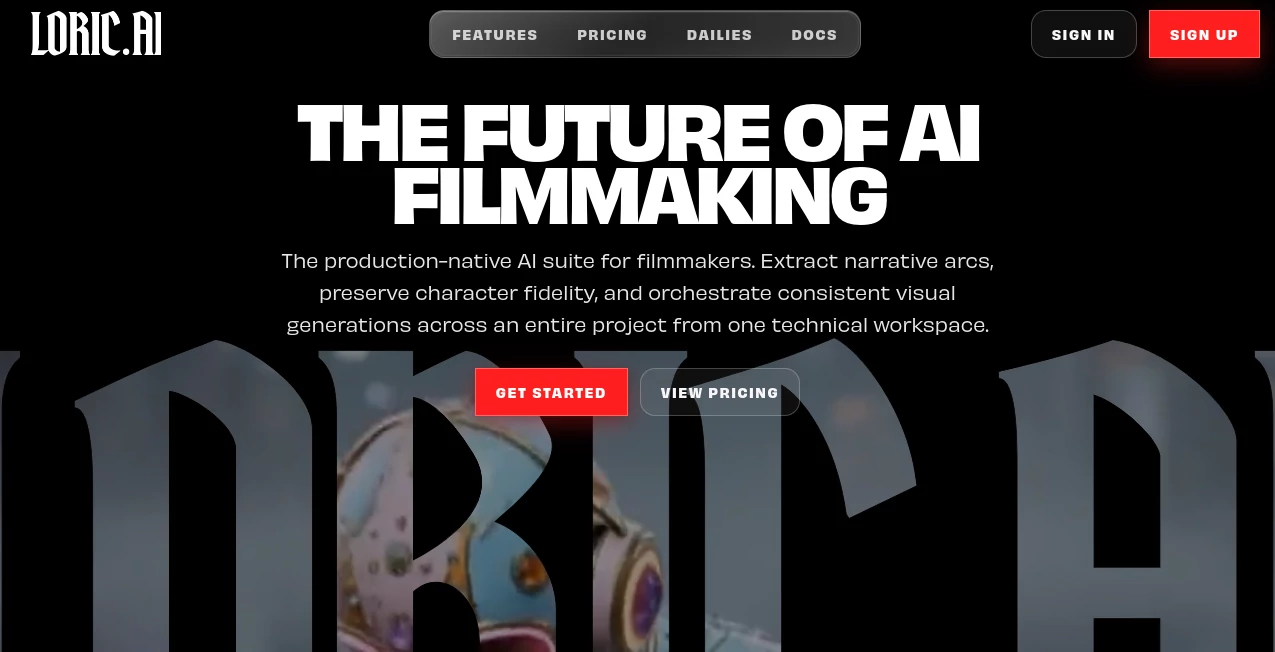
Creating cinematic content with artificial intelligence has become much more practical, but maintaining visual consistency across an entire project is still a challenge for many creators. This platform was designed specifically for filmmakers, video creators, agencies, and production teams that need more than a simple image or video generator. Instead of treating every generation as an isolated task, it provides a complete production environment where scenes, characters, prompts, and creative assets remain connected throughout the filmmaking process.
Whether you're producing a short film, commercial, music video, YouTube series, or branded content, the workflow focuses on preserving story continuity while giving creators access to multiple state-of-the-art AI models from one workspace. The result is a smoother creative process with fewer repetitive tasks and more time spent refining ideas instead of rebuilding projects from scratch.
Key Features
User Interface
The workspace is organized around production rather than individual generations. Projects are divided into scenes, reusable assets, prompt libraries, character references, and editing tools, making navigation intuitive even for complex productions. Everything stays connected, allowing creators to move naturally between planning, generation, editing, and final review.
Accuracy & Performance
One of the strongest advantages is its ability to preserve character identity, scene continuity, and visual style across long-form productions. Instead of manually recreating prompts for every shot, creators can reuse project memory, scene references, and consistent design elements. Multiple leading AI image and video models are available inside one production environment, allowing users to choose the most suitable model without disrupting their workflow.
Capabilities
- Generate cinematic AI videos and images.
- Maintain consistent characters throughout an entire project.
- Create reusable scene libraries.
- Store prompt collections for future productions.
- Train custom LoRA models for unique visual identities.
- Edit existing images while preserving project context.
- Build shot sequences using composition tools.
- Upscale generated frames for presentations and production delivery.
- Switch between multiple AI generation models.
- Manage recurring locations, props, and visual assets.
Security & Privacy
Creative assets remain organized inside dedicated projects, reducing the risk of losing references between generations. Commercial licensing is included with paid plans, making the platform suitable for professional production work. Project-based organization also helps teams maintain consistent creative resources across ongoing productions.
Use Cases
- Independent filmmakers producing AI-assisted movies.
- YouTube creators building cinematic storytelling channels.
- Marketing agencies producing commercial campaigns.
- Animation studios exploring AI-assisted pre-production.
- Music video production.
- Social media video creation.
- Storyboarding before live filming.
- Concept visualization for investors and clients.
- Educational video production.
- Creative agencies managing multiple visual projects.
Pros and Cons
Pros
- Built specifically for filmmaking workflows.
- Excellent character and scene consistency.
- Supports multiple leading AI generation models.
- Production-focused project organization.
- Reusable prompt and scene libraries save significant time.
- Integrated editing and upscaling tools.
- Commercial licensing included.
Cons
- Designed mainly for video creators rather than casual users.
- Advanced features may require some learning.
- Large productions consume more compute credits.
Pricing Plans
The platform offers several subscription options designed for different production needs.
- Starter: Suitable for smaller creative projects with monthly compute credits.
- Pro: Designed for creators who produce content regularly and require higher generation capacity.
- Studio: Best suited for professional studios and demanding production workloads with premium support.
Each paid plan includes full studio access and commercial usage rights, while compute capacity increases with higher subscription tiers.
How to Use Loric.ai
Begin by creating a new production project and organizing your story into individual scenes. Add character references, locations, prompts, and creative assets to establish visual consistency. Generate images or videos using the available AI models, then refine outputs with editing tools and scene memory. Continue building your project while reusing prompts, characters, and environments across every sequence until the final production is complete.
Comparison with Similar Tools
Many AI video generators focus on creating individual clips, but they often struggle with maintaining consistency across longer productions. This platform approaches filmmaking differently by acting as a centralized production workspace. Scene organization, reusable prompt systems, character memory, LoRA training, editing capabilities, and project-wide continuity make it particularly attractive for creators producing narrative content rather than isolated videos.
For professional filmmakers, agencies, and long-form storytellers, this production-first approach can significantly reduce repetitive work while improving overall visual consistency.
Conclusion
For creators who want more than a simple AI video generator, this platform delivers a complete filmmaking ecosystem. The combination of scene management, character continuity, reusable creative assets, integrated editing, and access to multiple AI generation models creates an efficient workflow from concept to final delivery. Whether producing independent films, branded content, cinematic YouTube videos, or commercial campaigns, it provides a professional environment that helps transform creative ideas into polished visual productions with remarkable consistency.
Frequently Asked Questions (FAQ)
Who is this platform designed for?
It is primarily built for filmmakers, production studios, agencies, content creators, and anyone producing cinematic video projects.
Can it maintain character consistency?
Yes. Character continuity is one of its strongest capabilities, allowing creators to preserve consistent appearances throughout an entire production.
Does it support multiple AI models?
Yes. Users can work with several advanced AI image and video generation models from a unified workspace.
Is it suitable for commercial work?
Yes. Paid subscriptions include commercial licensing, making it appropriate for professional projects.
Can beginners use it?
Yes. While professional features require some exploration, the organized workflow makes it approachable for creators willing to learn AI filmmaking.
AI Image to Video , AI Video Generator , AI Video Editor , AI UGC Video Generator .
These classifications represent its core capabilities and areas of application. For related tools, explore the linked categories above.

Loric AI Alternatives Product

Wan AI

AI Motion Co…

KlingVideo
OmniGemini

Wan 2.7 AI

Free Sora Ge…

Blipix

AI Animate I…
Fuser Studio