


















Magic Music
What is Magic Music?
Turning a simple musical idea into a finished song can normally take hours of writing, arranging, recording, and editing. This AI music creation platform takes a much shorter route. Users can describe a song in plain language, provide lyrics, or work from an existing audio idea and quickly build a complete track with vocals and instruments.
The experience is designed to feel approachable even if you have never opened a digital audio workstation. You can choose a style such as pop, rock, jazz, electronic, classical, hip-hop, country, or R&B, select a vocal direction, and let the system handle the musical arrangement. For someone with a lyric sitting in a notebook or a rough concept for a video, this can turn a vague idea into something you can actually listen to.
One particularly useful aspect is the combination of generation and further editing. Instead of treating the first result as the final product, creators can extend tracks, create covers, add instruments, or work with uploaded audio on eligible plans. That makes the platform more practical for experimentation than a simple one-click song generator.
Key Features
- Text-to-music generation for turning written ideas into complete songs.
- Lyrics-to-music generation for transforming existing lyrics into vocal tracks.
- AI-generated vocals with male and female vocal options.
- Support for multiple musical genres, including pop, rock, jazz, electronic, classical, hip-hop, country, and R&B.
- Instrumental-only generation for users who need background music without vocals.
- AI track extension for developing shorter pieces into longer arrangements.
- AI cover creation for changing the musical feel or genre of an existing song.
- Instrument layering for adding elements such as drums, bass, strings, and synths.
- Audio upload for extending or working with existing material on eligible paid plans.
- MP3 downloads on paid plans, with WAV availability depending on the selected plan.
- Private generations on eligible subscriptions.
- Cloud storage for keeping generated tracks available inside the workspace.
- Multiple concurrent generations on paid plans to speed up creative experimentation.
User Interface
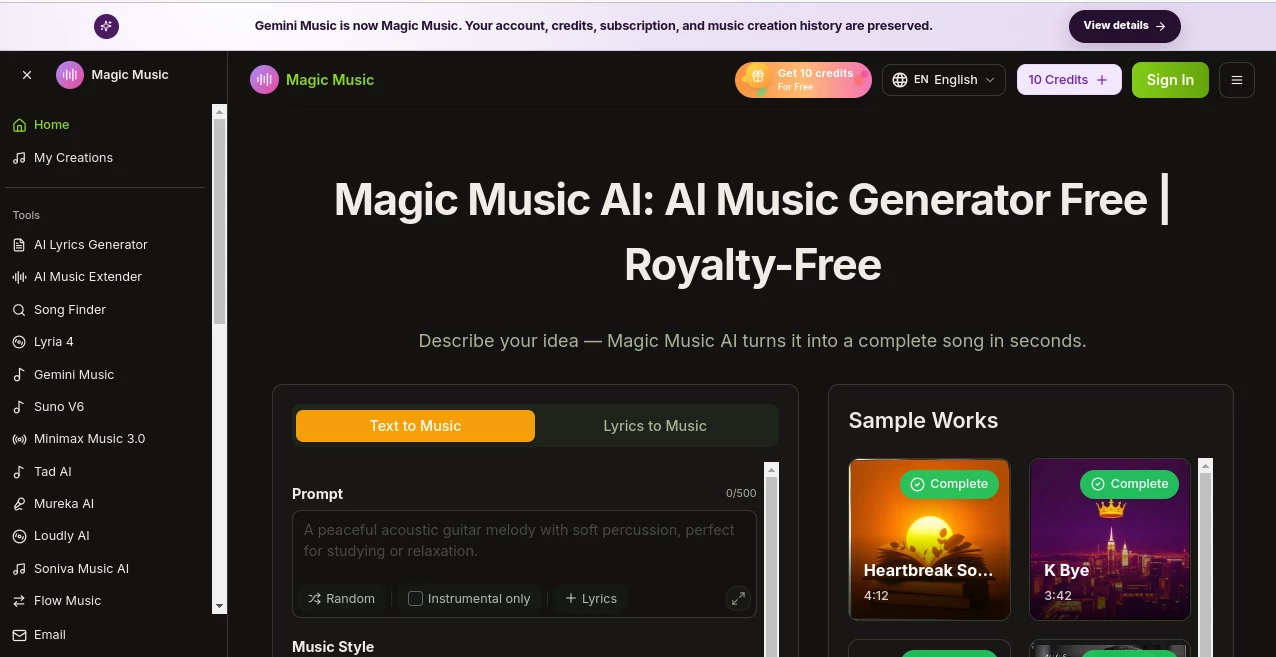
The interface keeps the main creative controls close together. A creator can start with a prompt, choose between text-to-music and lyrics-to-music, select a genre, decide whether vocals are needed, and begin generation without navigating through a complicated production environment.
This simplicity is especially helpful for people who think about music in terms of feelings and ideas rather than technical production settings. Someone working on a travel video, for example, can describe an upbeat summer track and choose a suitable style instead of manually building a beat, selecting instruments, and arranging a timeline from scratch.
The sample-work area also gives new users a useful way to understand what the system can produce before committing to a particular workflow.
Accuracy & Performance
Music generation is subjective, so accuracy here is less about matching a single correct answer and more about how closely the generated track follows the user's creative direction. Genre, mood, lyrics, and vocal choices give creators several ways to steer the result.
The platform states that songs can generally be generated in under a minute, with its homepage describing typical generation times of around 30 to 60 seconds. That quick turnaround makes it practical to test several ideas instead of spending a long session on one arrangement.
For creative work, this speed matters. A songwriter can try different interpretations of the same lyrics, while a video creator can experiment with several moods before deciding which soundtrack fits the footage best.
Capabilities
The platform goes beyond basic prompt-to-song generation. Text and lyrics can be used as starting points, while additional tools allow creators to extend tracks, create genre-based covers, and add new instrumental layers.
The music-style selection covers a broad range of popular genres, and users can also request different moods and creative directions through their prompts. Vocal generation is available when a song needs a performed element, while instrumental mode is useful for background music, videos, podcasts, presentations, and other projects where vocals could become distracting.
For more advanced workflows, eligible plans support audio uploads, allowing an existing track to become part of the creative process rather than forcing users to begin from a blank prompt every time.
Security & Privacy
The platform provides private generations on its paid Lite and Pro plans, while the free plan uses public generations. Cloud storage is also included with different retention periods depending on the subscription.
Because music projects can contain unreleased material, original lyrics, or commercially sensitive ideas, creators should review the platform's current privacy policy and terms before uploading material they consider confidential. This is particularly important for professional projects and unpublished recordings.
Use Cases
- Songwriters: Turn unfinished lyrics or musical concepts into listenable demos and explore alternative arrangements.
- Video Creators: Create original background music for YouTube videos, short-form content, and other productions.
- Podcasters: Produce custom intros, transitions, and background tracks instead of relying entirely on generic stock music.
- Filmmakers: Experiment with emotional or cinematic musical ideas for different scenes.
- Advertisers: Create jingles, campaign music, and multiple musical variations from a creative brief.
- Independent Musicians: Quickly test genres, vocal ideas, and arrangements before investing in a full production.
- Content Teams: Generate several musical concepts during the early stages of a campaign or creative project.
- Hobbyists: Explore songwriting and music production without needing formal musical training.
Pros and Cons
- Pros: Simple browser-based workflow, text and lyrics-to-music generation, AI vocals, broad genre selection, track extension, cover creation, instrument layering, and fast generation.
- Pros: Free access is available for users who want to experiment before subscribing.
- Pros: Paid plans provide substantially larger credit allowances and additional creation features.
- Pros: The workflow is approachable for users without professional music-production experience.
- Cons: The free plan has significant restrictions, including public generations and no MP3/WAV downloads.
- Cons: Some advanced capabilities, such as audio uploads and private generations, require a paid subscription.
- Cons: WAV downloads are not included with the currently listed Lite and Pro plans.
- Cons: The most suitable results may require several prompt attempts and creative refinement.
Pricing Plans
A free plan is available with 10 credits per month. It includes text and lyrics-to-music generation, track extension, public generations, music sharing, and seven-day cloud storage. However, downloads and several advanced features are excluded.
The Lite plan is currently listed at $9.90 per month under the displayed promotional price and includes 800 credits, up to 80 generations per month, 160 songs per month, AI lyrics generation, track extension, cover creation, audio uploads of up to four minutes per track, private generations, 30-day cloud storage, and MP3 downloads.
The Pro plan is currently listed at $29.90 per month under the displayed promotional price. It provides 3,000 credits per month and up to 600 songs, together with the latest model access, AI lyrics generation, track extension, cover creation, audio uploads of up to six minutes per track, private generations, 60-day cloud storage, MP3 downloads, and three concurrent generations.
Commercial licensing and download availability should be checked against the current plan terms before publishing generated music commercially, as the pricing page currently lists commercial licensing as excluded from the Free, Lite, and Pro plans despite broader licensing language elsewhere on the site.
How to Use It
- Open the music creation workspace and start a new generation.
- Choose text-to-music or lyrics-to-music depending on your starting material.
- Describe the song, mood, instruments, or creative direction in the prompt.
- Select a suitable musical genre such as pop, rock, electronic, jazz, classical, hip-hop, or R&B.
- Choose an instrumental result or add vocals, with male, female, or random vocal options where available.
- Generate the track and listen to the result.
- If the first version is close but not quite right, experiment with a different prompt or use the available extension, cover, or instrument tools.
- Download the finished track in the format supported by your subscription.
Comparison with Similar Tools
Compared with many AI music generators that concentrate primarily on creating a song from a text prompt, this platform takes a broader approach to the creative workflow. Users can begin with text or lyrics, but they can also continue working with the generated material through extension, covers, and instrument layering.
That makes it particularly appealing to creators who want more than a quick musical sample. A songwriter may start with lyrics, a video editor may begin with a mood, and a producer may want to develop an existing audio idea. The same workspace can accommodate these different starting points.
Its genre selection and straightforward controls also make it less intimidating for beginners than traditional production software. Professional producers may still prefer dedicated DAWs for detailed mixing and mastering, but for rapid ideation and AI-assisted song creation, the simpler workflow can save considerable time.
Conclusion
For anyone who has ever had a song idea but lacked the time, equipment, or production skills to turn it into a finished track, this platform offers an appealing shortcut. Its strongest point is not simply generating music from text; it is the way several creative steps are brought together in one browser-based workflow.
The combination of lyrics-to-music, AI vocals, genre selection, track extension, covers, and instrument layering gives creators plenty of room to experiment. A free tier also makes it easy to test the experience before deciding whether a larger credit allowance is worthwhile.
It is best suited to creators who value speed and experimentation. Whether the goal is a quick songwriting demo, background music for a video, a podcast intro, or a starting point for a larger production, it provides a practical place to turn a musical thought into something audible.
Frequently Asked Questions (FAQ)
Can I create music from lyrics?
Yes. You can provide your own lyrics and generate a song around them, with the system creating the melody, arrangement, and AI vocals according to the selected direction.
Can I generate instrumental music?
Yes. The creation interface includes an instrumental-only option, which is useful when you need background music without a vocal performance.
What genres are supported?
The available style options include country, folk, rock, blues, classical, disco, funk, pop, jazz, electronic, hip-hop, and R&B, with additional creative directions possible through prompts.
Is there a free plan?
Yes. The free tier currently provides 10 credits per month and access to basic text and lyrics-to-music creation, although downloads and several advanced features are restricted.
Can I extend an existing track?
Yes. Track extension is available, and paid plans can also support uploaded audio for extending existing material within the stated upload-duration limits.
Can I change the style of a song?
Yes. The cover-generation feature can be used to reinterpret music in another genre, while the available style controls and prompts help guide the desired musical direction.
Can I use the generated music commercially?
Licensing should be checked carefully before commercial publication. The current pricing page lists commercial licensing as unavailable on the Free, Lite, and Pro plans, so users should rely on the latest plan terms rather than assuming that every generated track includes commercial rights.
AI Text to Music , AI Singing Generator , AI Music Generator , AI Voice & Audio Editing .
These classifications represent its core capabilities and areas of application. For related tools, explore the linked categories above.

Magic Music Alternatives Product

Speech Notes

Lyria3 AI

Adobe Podcast

SeedMusic 1.0

MusicGPT AI

Custom Gift …

Lyria 3

Melodank

SpeechGen AI
