


















MuseGen
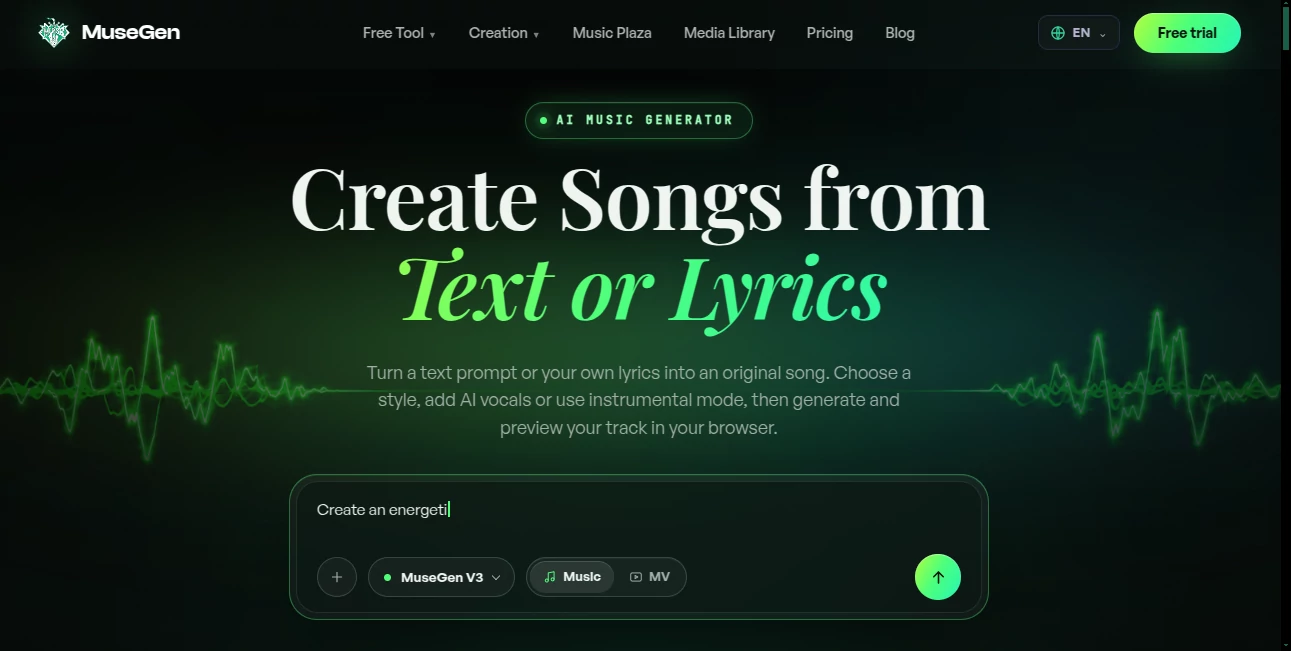
What is MuseGen?
Creating original music has traditionally required years of practice, expensive software, and professional production skills. Today, AI is changing that process by allowing anyone to transform an idea, a few words, or complete lyrics into polished songs within minutes. This platform removes many of the technical barriers while keeping creativity at the center of the experience.
Whether you are producing background music for videos, composing original songs, experimenting with new genres, or creating commercial audio for clients, the platform delivers an intuitive workflow that feels approachable for beginners while offering enough creative control for experienced musicians. From realistic AI vocals to instrumental generation, every step is designed to simplify music production without sacrificing quality.
One of its biggest strengths is the ability to generate complete tracks instead of isolated melodies. The system automatically handles composition, arrangement, harmony, rhythm, mixing, and mastering, giving creators a release-ready result in a remarkably short time. The generated tracks are royalty-free, making them suitable for content creators, marketers, educators, businesses, and independent artists.
Key Features
User Interface
The interface is clean and beginner-friendly. Users simply enter a text prompt or their own lyrics, choose a musical style, decide whether to generate vocals or an instrumental version, and let the AI handle the production process. More advanced options allow users to customize genres, vocal styles, song structure, and creative direction without becoming overwhelming.
Accuracy & Performance
The AI accurately interprets mood, genre, tempo, and lyrical themes to generate coherent songs from beginning to end. Instead of producing disconnected musical fragments, it maintains consistency across verses, choruses, and transitions while delivering clear audio suitable for publishing or further editing.
Capabilities
- Generate complete songs from text prompts.
- Convert written lyrics into fully produced music.
- Create instrumental tracks without vocals.
- Produce realistic AI-generated singing voices.
- Support multiple musical genres and moods.
- Generate royalty-free music for commercial projects.
- Edit song sections and extend compositions.
- Preview tracks instantly before downloading.
- Export high-quality audio files.
- Support future professional workflows with advanced export options.
Security & Privacy
Private music generation is available for premium subscribers, allowing creators to keep projects confidential. The service also stores creations online, making it easier to revisit and manage music libraries while offering commercial usage rights through paid plans.
Use Cases
- Create background music for YouTube videos.
- Produce original soundtracks for podcasts.
- Generate advertising music for brands.
- Compose songs from personal lyrics.
- Create royalty-free music for social media.
- Develop game soundtracks and ambient music.
- Produce demo songs for musicians.
- Create educational audio projects.
- Generate music for presentations and business content.
- Experiment with different musical genres without recording instruments.
Pros and Cons
Pros
- Very easy for beginners.
- Fast song generation.
- High-quality AI vocals.
- Supports instrumental and vocal production.
- Royalty-free output for commercial use.
- Wide variety of musical genres.
- Professional-quality mixing included.
- No musical knowledge required.
Cons
- Some advanced features require a paid subscription.
- Professional exports are limited on free plans.
- Creative control is broader with premium plans.
Pricing Plans
A free plan allows users to create a limited number of songs each day, making it easy to explore the platform before committing. Paid subscriptions expand monthly generation limits, unlock advanced AI models, provide WAV downloads, commercial usage rights, private music generation, vocal removal tools, song editing features, and faster processing for professional creators.
How to Use MuseGen
- Enter a text prompt or paste your lyrics.
- Select your preferred genre, mood, or musical style.
- Choose between vocal or instrumental generation.
- Customize additional settings if desired.
- Generate the song.
- Preview the result.
- Edit or regenerate sections if necessary.
- Download the finished audio for personal or commercial use.
Comparison with Similar Tools
Compared with many AI music generators that focus mainly on short loops or simple melodies, this solution produces complete songs with vocals, structured arrangements, and polished production. Its support for lyric-based generation, extensive genre selection, built-in mastering, commercial licensing, and advanced editing features makes it particularly attractive for creators who need production-ready music rather than rough musical sketches.
Conclusion
AI-powered music production has become significantly more accessible, and this platform demonstrates how quickly an idea can become a polished song. Its combination of intelligent composition, realistic vocals, commercial licensing, and an intuitive workflow makes it valuable for creators of every experience level. Whether producing content for social media, podcasts, games, marketing campaigns, or personal creative projects, it offers an efficient way to create professional-quality music without the traditional complexity of music production.
Frequently Asked Questions (FAQ)
Do I need musical experience?
No. The platform is designed for beginners as well as experienced musicians.
Can I generate instrumental music?
Yes. Users can create instrumental tracks without AI vocals.
Can I use the generated music commercially?
Commercial usage rights are available through paid subscription plans.
Can I create songs from my own lyrics?
Yes. You can paste your own lyrics, and the AI will compose a complete song around them.
Does the platform support multiple music genres?
Yes. It supports a broad range of genres, moods, and musical styles, allowing creators to experiment with different sounds.
AI Music Generator , AI Voice & Audio Editing , AI Speech Synthesis , AI Text to Music .
These classifications represent its core capabilities and areas of application. For related tools, explore the linked categories above.

MuseGen Alternatives Product

Seed Audio

MakeBestMusic

HappyHorse

Custom Gift …

Chatterbox T…

Solmi AI

Seed Audio

AI Describe …

Maestra
