

















Muuic
What is Muuic?
Creating music no longer requires expensive software, powerful computers, or years of technical experience. This browser-based music production platform brings together a modern digital audio workstation, AI-assisted composition, and an intuitive editing environment that makes producing original tracks accessible to everyone. Whether you're sketching a melody, building electronic beats, or experimenting with orchestral arrangements, everything happens directly inside your web browser.
The platform combines traditional music production workflows with intelligent creative assistance. Instead of replacing the musician, AI works alongside the creative process by helping generate musical ideas, effects, and compositions while leaving complete artistic control in the hands of the user. This balance makes it appealing to beginners exploring music production as well as experienced producers looking for faster workflows.
One of its biggest strengths is the combination of composition, recording, editing, mixing, and exporting inside a single workspace. Users can start with a blank project, import MIDI files, record live performances, edit every note visually, apply studio-quality effects, and export finished tracks without installing any software.
The experience feels remarkably smooth. Opening the editor is almost instant, allowing inspiration to be captured whenever creativity strikes. Instead of worrying about setup, artists can focus on writing melodies, refining harmonies, and experimenting with sound design.
Key Features
User Interface
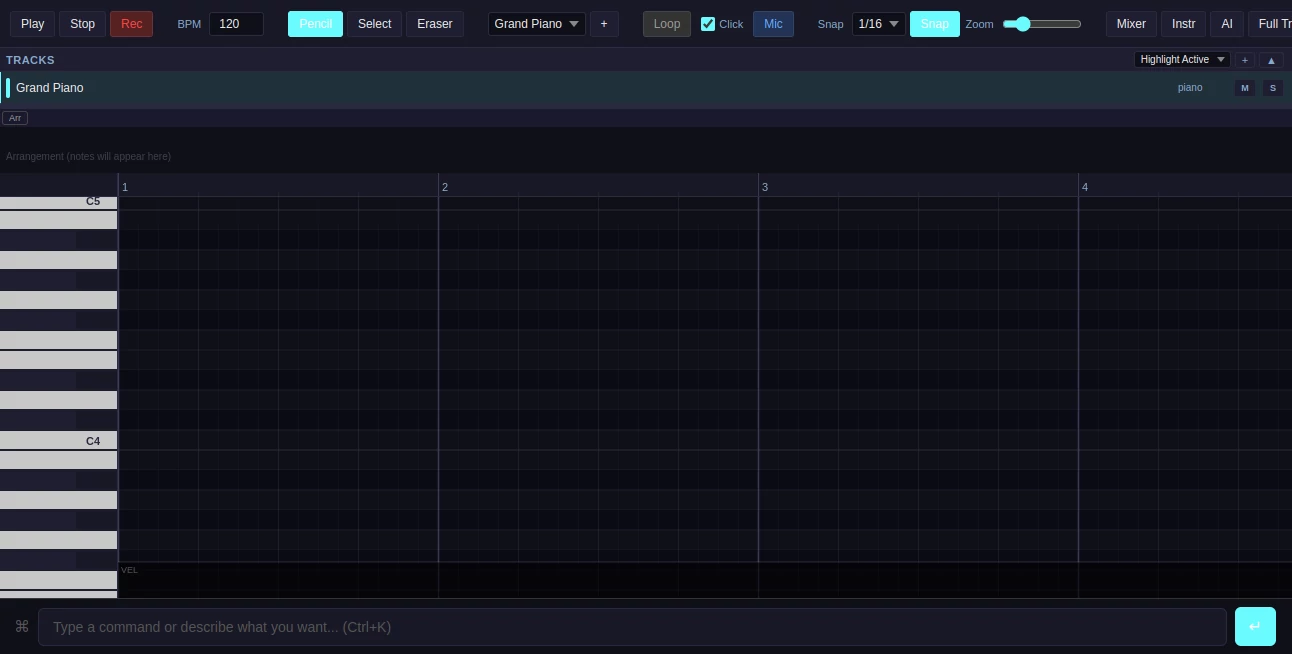
The workspace is designed around a zoomable piano roll that serves as the center of music creation. Notes can be added, edited, resized, moved, or deleted with familiar drawing tools that make arranging melodies intuitive. Playback controls, looping, recording options, and navigation tools remain accessible without cluttering the interface.
Multiple tracks can be organized independently, allowing instruments and recordings to be layered into complete arrangements. The mixer provides convenient access to volume balancing and track adjustments, giving users a workflow similar to desktop digital audio workstations while remaining entirely browser-based.
Accuracy & Performance
Real-time playback provides immediate feedback while editing compositions. MIDI input through compatible controllers enables expressive performances with responsive note recording. The piano roll accurately reflects every performance, making post-recording edits straightforward and precise.
Audio rendering and export options maintain quality for both creative experimentation and finished productions. The ability to export projects as WAV or MIDI files ensures compatibility with other production environments whenever additional editing is required.
Capabilities
This platform goes beyond basic sequencing by offering an impressive collection of music production tools.
- AI-assisted music generation for creative inspiration.
- Visual piano roll editor with zoom functionality.
- MIDI keyboard support for live performances.
- Microphone recording directly inside the browser.
- Audio file uploading for remixing or editing.
- Multiple synthesizers including sawtooth, square, sine, triangle, and FM synthesis.
- Grand piano samples alongside custom instrument support.
- Professional effects such as reverb, delay, chorus, distortion, EQ, compression, and filtering.
- Project import and export using the native project format.
- WAV and MIDI exporting for sharing or continuing work elsewhere.
- AI-powered effects generation through a dedicated AI panel.
The platform also introduces a subscription option that provides weekly AI credits and additional creative capabilities, making advanced AI-assisted workflows even more accessible for active creators.
Security & Privacy
Projects can be saved through registered accounts, helping users organize ongoing work while protecting their creative progress. Import and export capabilities also allow musicians to maintain local backups of their compositions whenever desired. Since the application operates inside the browser, users avoid installing additional desktop software while maintaining flexibility across different devices.
Use Cases
- Create original songs from scratch.
- Compose background music for YouTube videos.
- Produce podcast intros and outros.
- Write electronic dance music and synthwave tracks.
- Experiment with AI-generated musical ideas.
- Practice MIDI keyboard performance.
- Record vocals or instruments through a microphone.
- Build educational music theory demonstrations.
- Create game soundtracks and ambient music.
- Export MIDI arrangements for professional DAWs.
Pros and Cons
- Pros
- Runs entirely inside a web browser.
- No software installation required.
- Integrated AI tools encourage creativity.
- Supports MIDI controllers.
- Professional audio effects included.
- Microphone recording and audio upload support.
- Exports projects as WAV and MIDI.
- Simple interface suitable for beginners while remaining powerful for experienced users.
- Cons
- Some advanced AI capabilities require a subscription.
- Real-time collaboration is still under development during the alpha stage.
- Certain upcoming features continue to evolve.
Pricing Plans
The platform offers free access for creating and editing music directly in the browser. Users who require additional AI functionality can subscribe to the premium membership, which provides weekly AI credits along with enhanced creative features. Pricing details may change as new capabilities are introduced during ongoing development.
How to Use muuic
Getting started is straightforward.
- Open the browser-based editor.
- Create a new project.
- Select an instrument or synthesizer.
- Compose notes using the piano roll or connect a MIDI controller.
- Record live performances or vocals through your microphone.
- Apply effects such as reverb, EQ, compression, or delay.
- Generate musical ideas using the AI panel.
- Mix individual tracks.
- Export the finished composition as WAV or MIDI.
Comparison with Similar Tools
Unlike many browser music editors that focus solely on sequencing, this platform combines AI-assisted composition, live recording, MIDI editing, synthesizers, audio effects, and exporting within one integrated environment. The inclusion of intelligent music generation provides an additional creative advantage over traditional browser DAWs that rely entirely on manual composition.
Compared with desktop production software, it emphasizes accessibility and convenience. Users can begin creating music immediately without downloading large applications or managing complex installations. This makes it especially attractive for musicians who frequently switch devices or prefer cloud-based creative workflows.
Conclusion
This browser-based music production platform demonstrates how modern AI can enhance creativity without complicating the artistic process. By combining an intuitive piano roll, powerful synthesis options, professional mixing effects, microphone recording, MIDI compatibility, and intelligent music generation, it delivers a complete songwriting environment that feels both approachable and capable.
Its growing feature set, commitment to AI-powered composition, and browser-first design make it an exciting choice for producers, students, hobbyists, and content creators alike. As additional collaboration and project management capabilities continue to arrive, it has the potential to become an even more compelling destination for online music production.
Frequently Asked Questions (FAQ)
Can beginners use this platform?
Yes. The visual piano roll and straightforward interface make it suitable for users with little or no music production experience.
Does it support MIDI keyboards?
Yes. Compatible MIDI controllers can be connected for recording performances directly into projects.
Can I export my music?
Yes. Finished compositions can be exported as WAV or MIDI files for sharing or further editing.
Does it include AI music generation?
Yes. The integrated AI panel helps generate musical ideas and creative effects that can accelerate the composition process.
Can I record vocals?
Yes. Users can record audio from a microphone or upload existing audio files to include in their music projects.
AI Text to Music , AI Productivity Tools , AI Music Generator , AI Voice & Audio Editing .
These classifications represent its core capabilities and areas of application. For related tools, explore the linked categories above.

Muuic Alternatives Product

Whisper Web

WhispriNote

Monkey Eatin…

Nifty

Musikalis AI…

Eleven AI

Create Filla…

Referent

Voice Art
