Nano Banana Pro
What is Nano Banana Pro?
There’s a noticeable difference when an AI actually understands what you want — not just generating pretty pictures, but delivering images with strong character consistency, clean text rendering, and precise editing control. This platform does that exceptionally well. You can start with a simple prompt or upload a reference photo, and the results feel polished enough for real commercial use. I’ve tested it on product shots, portraits, and creative illustrations, and it consistently surprises me with how well it maintains style and identity across multiple generations. It’s become my go-to when I need quality fast without the usual AI headaches.
Introduction
Most AI image tools are good for quick experiments, but fall short when you need professional output. Nano Banana Pro was built for creators who want higher fidelity, better text, stronger editing capabilities, and reliable character consistency. Whether you’re generating from scratch or refining existing images, it gives you more control and cleaner results than many alternatives. It’s particularly strong for ads, e-commerce visuals, branding, and detailed illustrations — the kind of work where small details matter. The best part? You can start creating for free and see the quality immediately.
Key Features
User Interface
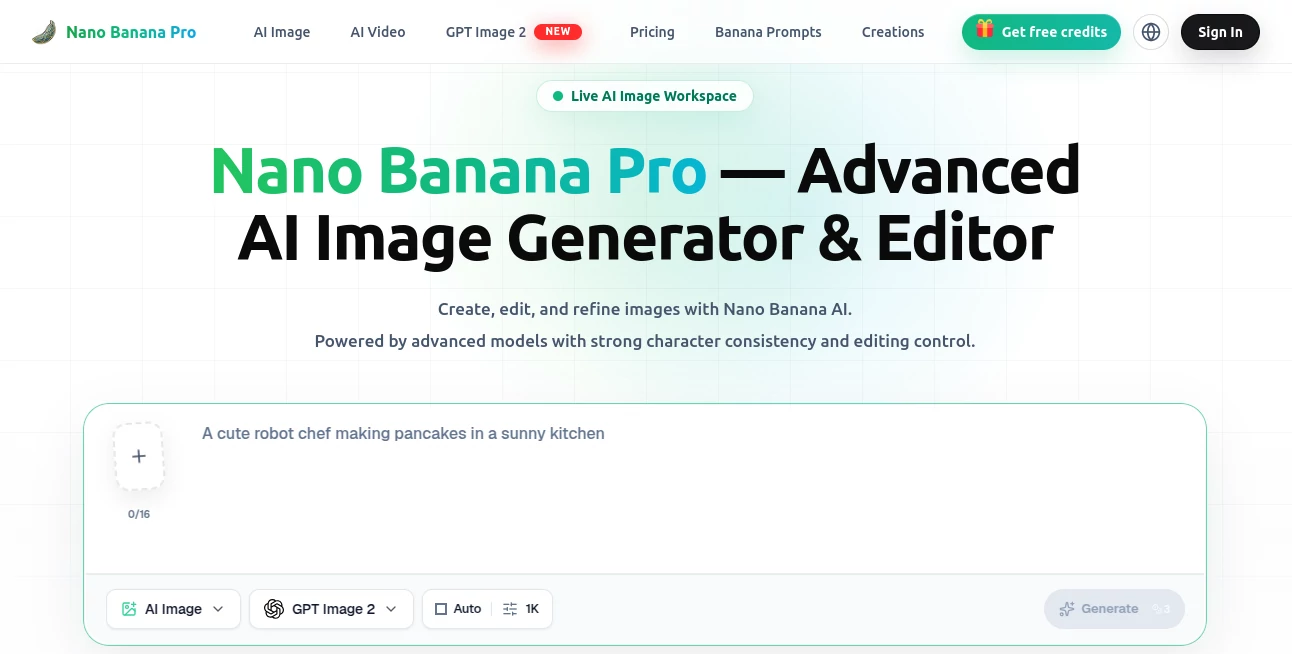
The workspace is clean and focused. A large prompt area, easy image upload, style and aspect ratio options, and a prominent generate button make the flow feel natural. Before-and-after comparisons for edits are built-in, and you can iterate quickly with follow-up prompts. It never feels overwhelming — just efficient and pleasant to use, whether you’re a beginner or a daily power user.
Accuracy & Performance
It excels at keeping faces, characters, and styles consistent across edits — something many tools still struggle with. Text rendering is noticeably sharper, making it great for posters, product labels, and branding work. Generation speed is fast, and the output quality holds up even on complex scenes. In real use, it reduces the number of retries needed, saving both time and frustration.
Capabilities
You get strong text-to-image, image-to-image editing, background replacement, outfit changes, old photo restoration, professional headshots, product poster generation, and more. It supports iterative refinement — upload an image, describe changes, and keep improving until it’s just right. The model handles both creative illustrations and photorealistic work with impressive results, making it versatile for marketing, social content, concept art, and personal projects.
Security & Privacy
Your images and prompts are processed securely, with no unnecessary long-term storage. The platform focuses on delivering great output while respecting user data. For commercial creators working with brand assets or client work, that thoughtful approach provides welcome peace of mind.
Use Cases
A brand designer generates consistent product visuals for an entire campaign in one sitting. An e-commerce seller turns plain product photos into polished lifestyle shots without hiring a photographer. A book illustrator maintains the same character style across dozens of scenes. A social media manager creates eye-catching promotional graphics in minutes instead of hours. It fits naturally into daily creative workflows for anyone who needs high-quality images fast.
Pros and Cons
Pros:
- Excellent character and style consistency across multiple generations.
- Strong text rendering for posters, labels, and branding work.
- Powerful image editing and iterative refinement tools.
- Fast generation with high-quality, commercially viable results.
- Generous free access to test the quality before upgrading.
Cons:
- Very complex or highly specific scenes may still need a few attempts.
- Unlimited high-volume use requires a paid plan.
Pricing Plans
The free tier lets you create and edit several images daily — enough to evaluate the quality properly. Paid plans unlock higher limits, faster generation, priority access during peak times, and advanced features. Pricing is competitive for the output quality, especially when you consider how much time it saves compared to traditional design or stock photo work.
How to Use Nano Banana Pro
Start simple: type a detailed prompt or upload a reference image. Choose your preferred style or aspect ratio if needed, then hit generate. Once you have a result, use follow-up prompts to refine lighting, background, composition, or details. Compare versions side-by-side, download the best one, and repeat as needed. The workflow is fast and iterative, letting you go from idea to polished image in minutes rather than hours.
Comparison with Similar Tools
While many AI image generators produce decent results, this one stands out with better character consistency, sharper text, and more reliable editing capabilities. It feels more production-ready than purely experimental tools and more controllable than basic generators. For creators who need images that look professional rather than just “AI-generated,” it offers a noticeable edge.
Conclusion
When you need images that look intentional and high-quality, this tool delivers without the usual compromises. It respects your time, understands creative intent, and produces results you can actually use in real projects. Whether you’re building a brand, creating content, or just having fun with visuals, it makes the process smoother and the output stronger. It’s the kind of practical creativity tool that quickly becomes part of your daily workflow.
Frequently Asked Questions (FAQ)
Is it good for commercial work?
Yes — many users rely on it for ads, social content, product visuals, and branding.
How strong is character consistency?
One of its strongest points — faces and styles stay recognizable across edits and generations.
Can I edit existing images?
Absolutely. Upload a photo and describe the changes you want — it handles refinements very well.
Do I need to pay to start?
No — there’s a generous free tier to test the quality right away.
What makes it different from other generators?
Better text rendering, stronger editing control, and higher consistency for practical creative work.
AI Photo & Image Generator , AI Art Generator , AI Design Generator , AI Image to Image .
These classifications represent its core capabilities and areas of application. For related tools, explore the linked categories above.
Nano Banana Pro details
Website unavailable — View Alternatives
Pricing
- Free
Apps
- Web App
Categories

Nano Banana Pro Alternatives Product
SciFig
grok images
StylinAI
AI Interior …
FaceShapeDet…

ai banana
Nano Banana 2
Wplace Live
string art g…