

















NewTattoo AI
What is NewTattoo AI?
Finding the perfect tattoo can take weeks or even months. Browsing endless galleries often leads to more questions than answers, especially when every artist has a different style. This platform changes that experience by allowing anyone to transform a simple idea into professional-looking tattoo concepts within seconds. Whether you're planning your very first tattoo or adding another piece to an existing collection, it provides a creative space where inspiration becomes visual before you ever step into a tattoo studio.
Instead of relying on generic templates, the platform generates original concepts from natural language prompts. Users can experiment with artistic styles, body placements, lettering, and complexity levels while refining every detail until the design feels right. The generated artwork serves as an excellent starting point for discussions with professional tattoo artists, helping clients communicate their vision more clearly.
Key Features
User Interface
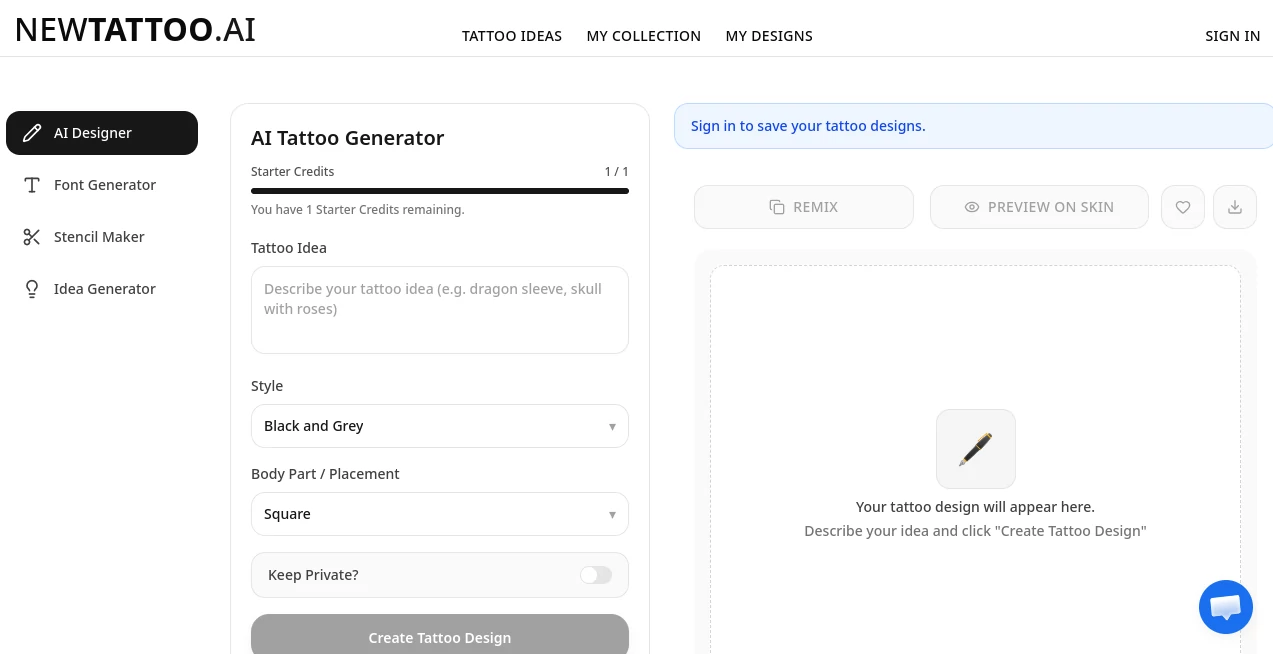
The interface is refreshingly straightforward. Users simply describe their tattoo idea, choose a preferred style, select the intended body placement, and generate unique concepts instantly. Navigation is intuitive, making it accessible even for people with no design experience. Personal collections allow favorite creations to be saved, organized, and revisited whenever inspiration strikes.
Accuracy & Performance
The image generation process is remarkably fast while maintaining impressive visual quality. Designs closely follow user descriptions and support numerous artistic directions including minimalist, blackwork, geometric, realism, traditional, Japanese-inspired, and fine-line tattoos. Multiple generations allow users to compare ideas until they discover a design that perfectly matches their vision.
Capabilities
- Create unique tattoo artwork from text descriptions.
- Generate custom tattoo lettering and font styles.
- Explore different tattoo styles and artistic themes.
- Choose tattoo placement for better design optimization.
- Control design complexity from simple to highly detailed.
- Upload reference images for personalized inspiration.
- Convert artwork into clean tattoo stencils.
- Download high-resolution tattoo designs.
- Save favorite concepts in a personal gallery.
- Share designs directly with tattoo artists.
Security & Privacy
Privacy has been thoughtfully considered. Users can enable private mode to keep generated designs from appearing publicly. This is particularly valuable for anyone developing highly personal artwork before revealing it to friends or tattoo professionals. The platform also makes it clear that generated designs are intended for inspiration and should be refined by experienced tattoo artists before permanent application.
Use Cases
- Design a completely original tattoo from a personal idea.
- Experiment with multiple artistic styles before making a decision.
- Create custom name, quote, or script tattoos.
- Generate sleeve, wrist, chest, back, or leg tattoo concepts.
- Prepare reference artwork for tattoo consultations.
- Discover inspiration when unsure about a final design.
- Create tattoo stencils from existing artwork.
- Help tattoo studios speed up the early design process.
Pros and Cons
Pros
- Very easy for beginners to use.
- Produces unique tattoo concepts within seconds.
- Supports numerous tattoo styles.
- Offers free daily generations.
- High-quality downloadable artwork.
- Reference image support improves personalization.
- Built-in stencil generation saves additional editing work.
- Private mode protects personal creations.
Cons
- Final tattoos should always be refined by a professional tattoo artist.
- Highly detailed concepts may still require manual adjustments.
- Some advanced capabilities are reserved for premium users.
Pricing Plans
A generous free plan allows users to generate several tattoo concepts each day without providing payment details. Those who require unlimited generations, advanced customization options, and additional premium features can upgrade to a paid subscription designed for more frequent creative work.
How to Use NewTattoo.ai
- Describe your tattoo idea using natural language.
- Select your preferred tattoo style.
- Choose the intended body placement.
- Adjust the desired complexity level.
- Optionally upload a reference image.
- Generate multiple tattoo concepts.
- Save or download your favorite design.
- Share the artwork with your tattoo artist for final customization.
Comparison with Similar Tools
Many AI tattoo generators focus only on creating simple illustrations, but this platform extends well beyond basic image generation. Built-in placement optimization, tattoo font generation, stencil conversion, adjustable complexity, and privacy controls create a more complete workflow. Instead of producing random artwork, it helps users move from a rough idea to a tattoo-ready concept that can be refined professionally. For both tattoo enthusiasts and artists, this streamlined approach saves considerable time during the planning phase.
Conclusion
Designing permanent body art deserves more than endless scrolling through inspiration boards. This platform offers an enjoyable and practical way to explore creative possibilities while maintaining flexibility throughout the design process. From personalized lettering to intricate sleeves, every concept begins with a simple idea and quickly evolves into detailed artwork. Its thoughtful combination of speed, customization, privacy, and artistic variety makes it one of the most compelling AI-powered tattoo design solutions available today.
Frequently Asked Questions (FAQ)
Can beginners use this platform?
Yes. The interface is simple enough for first-time users while still offering advanced customization for experienced creators.
Can I create different tattoo styles?
Yes. It supports styles such as minimalist, blackwork, realism, geometric, traditional, fine-line, Japanese-inspired designs, and more.
Can I upload reference images?
Yes. Reference images can guide the AI toward more personalized tattoo concepts.
Are my tattoo designs private?
Yes. Users can enable a private option to prevent their generated designs from being publicly visible.
Can I use the generated artwork directly for tattooing?
The designs are excellent creative starting points, but professional tattoo artists should always refine them to ensure they fit the body correctly and meet tattooing standards.
AI Photo & Image Generator , AI Art Generator , AI Tattoo Generator , AI Design Generator .
These classifications represent its core capabilities and areas of application. For related tools, explore the linked categories above.

NewTattoo AI Alternatives Product
Claude Desig…
Create a Car…
Imagine2

Upscale image

Berrioo
UNi-1 AI

Nano Banana …
Image2

KKV AI
