

















NoteDock
What is NoteDock?
Keeping ideas organized is often harder than coming up with them. Notes end up scattered across different apps, screenshots get buried in photo galleries, and important reminders are forgotten at the worst possible moment. This intelligent note management solution was created to solve exactly that problem by transforming scattered information into a searchable, organized knowledge hub.
Instead of forcing users to create folders, labels, or complicated structures, the platform automatically understands context, groups related information, and makes everything easy to find later. Whether you're saving meeting notes, planning a vacation, collecting research, or recording voice memos, every piece of information becomes part of a smart personal memory system that continues working in the background.
Its biggest strength lies in reducing mental clutter. Rather than remembering where something was stored, users can simply ask natural questions and instantly retrieve exactly what they need. The experience feels less like searching files and more like talking to someone who remembers everything.
Key Features
User Interface
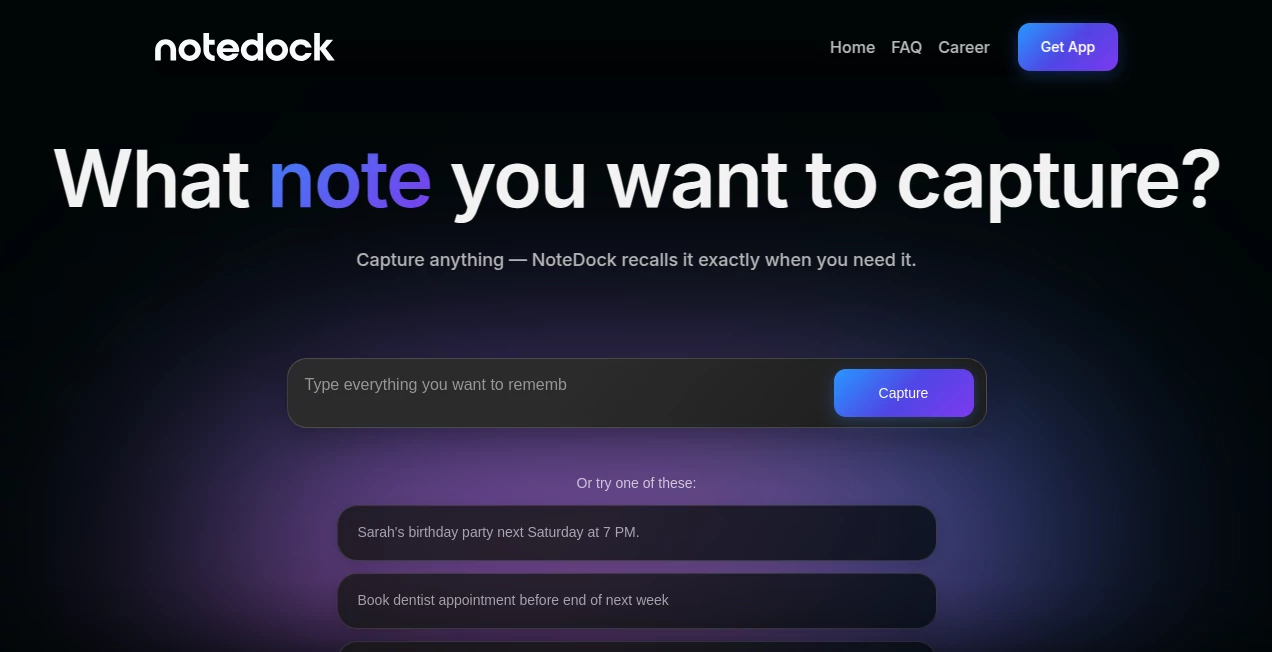
The interface is intentionally minimal, making it incredibly easy to capture information in seconds. Text notes, voice recordings, screenshots, images, web links, and tasks can all be added without interrupting your workflow. Navigation remains clean even after storing hundreds of notes because related content is automatically grouped together.
Accuracy & Performance
Advanced AI analyzes every saved item to identify context, relationships, and topics. Natural language search makes retrieval remarkably accurate, allowing users to ask complete questions instead of remembering exact keywords. AI-generated summaries also help users quickly review large collections of notes without reading every individual entry.
Capabilities
- Capture notes, voice recordings, screenshots, links, and documents.
- Automatically organize information into meaningful collections.
- Create smart reminders and task deadlines.
- Generate summaries from stored notes.
- Search using everyday language.
- Transform scattered travel ideas into complete itineraries.
- Brainstorm and expand existing notes with AI assistance.
- Synchronize reminders with supported calendar services.
- Surface forgotten ideas when they become relevant again.
- Maintain a continuously growing personal knowledge base.
Security & Privacy
Privacy has clearly been treated as a priority. User content remains under the owner's control, and stored notes are encrypted during transmission and while stored on servers. According to the service documentation, personal data is never sold or used for advertising, while AI providers process information only when users request AI-powered features. The platform also states that user content is not used to train AI models.
Use Cases
- Managing daily personal notes and reminders.
- Organizing business meetings and project discussions.
- Planning vacations using saved locations and travel ideas.
- Collecting research materials for students and academics.
- Building long-term personal knowledge libraries.
- Keeping track of gift ideas, shopping lists, and events.
- Managing creative ideas for writers, designers, and content creators.
- Recording voice memos while traveling or commuting.
Pros and Cons
Pros
- Automatic AI-powered organization without manual folders.
- Excellent natural language search experience.
- Supports multiple content formats including voice and screenshots.
- Intelligent reminders and calendar synchronization.
- Simple interface with almost no learning curve.
- Strong privacy-focused approach.
Cons
- Currently focused on the Apple ecosystem.
- Some advanced AI features require a paid subscription after the trial period.
- Third-party AI processing is required for intelligent features.
Pricing Plans
New users receive a free trial that allows them to experience premium AI capabilities before subscribing. After the trial ends, users can continue accessing their stored notes, while advanced AI functions and smart reminders require a Pro subscription available through Apple's App Store.
How to Use NoteDock
Start by creating an account and adding your first notes, screenshots, voice recordings, or links. There's no need to create folders or organize content manually because the AI handles categorization automatically. Continue adding information whenever inspiration strikes. Later, simply ask questions in natural language, request summaries, create reminders, or let the AI connect related ideas into meaningful collections. Over time, the system evolves into a highly personalized digital memory assistant.
Comparison with Similar Tools
Traditional note-taking applications mainly focus on storing information, leaving organization entirely to the user. This platform takes a different approach by actively understanding relationships between notes, generating summaries, surfacing forgotten information, and responding to conversational searches. Compared to conventional productivity tools, it behaves more like an intelligent memory assistant than a simple notebook, making it especially valuable for people who constantly collect ideas throughout the day.
Conclusion
People often spend more time trying to remember where they saved information than actually using it. This AI-powered solution removes that frustration by organizing content automatically and making retrieval effortless. Its combination of intelligent search, contextual organization, reminders, and privacy-conscious design creates an experience that feels natural from the first day of use. For professionals, students, creators, and anyone who values clear thinking, it offers a refreshing way to manage information without adding complexity.
Frequently Asked Questions (FAQ)
Can it organize notes automatically?
Yes. AI analyzes new content, understands context, and groups related information without requiring manual folders or tags.
Does it support voice notes?
Yes. Users can capture voice recordings alongside text notes, screenshots, documents, and web links.
Is my information kept private?
Yes. The service states that user data remains private, is encrypted, and is not used to train AI models.
Can I search using normal sentences?
Yes. Natural language search allows users to ask questions instead of relying on exact keywords.
Who benefits the most from this platform?
Professionals, students, researchers, entrepreneurs, and anyone who frequently captures ideas or manages large collections of personal information will find it especially useful.
AI Productivity Tools , AI Task Management , AI Meeting Assistant , AI Notes Assistant .
These classifications represent its core capabilities and areas of application. For related tools, explore the linked categories above.

NoteDock Alternatives Product

LorePanic

XreplyAI

VideoLens

Maestra

Claude and C…

MakeGraph

Jamy.ai | Au…

Sendmux

Nifty
