
NoteGPT
What is NoteGPT?
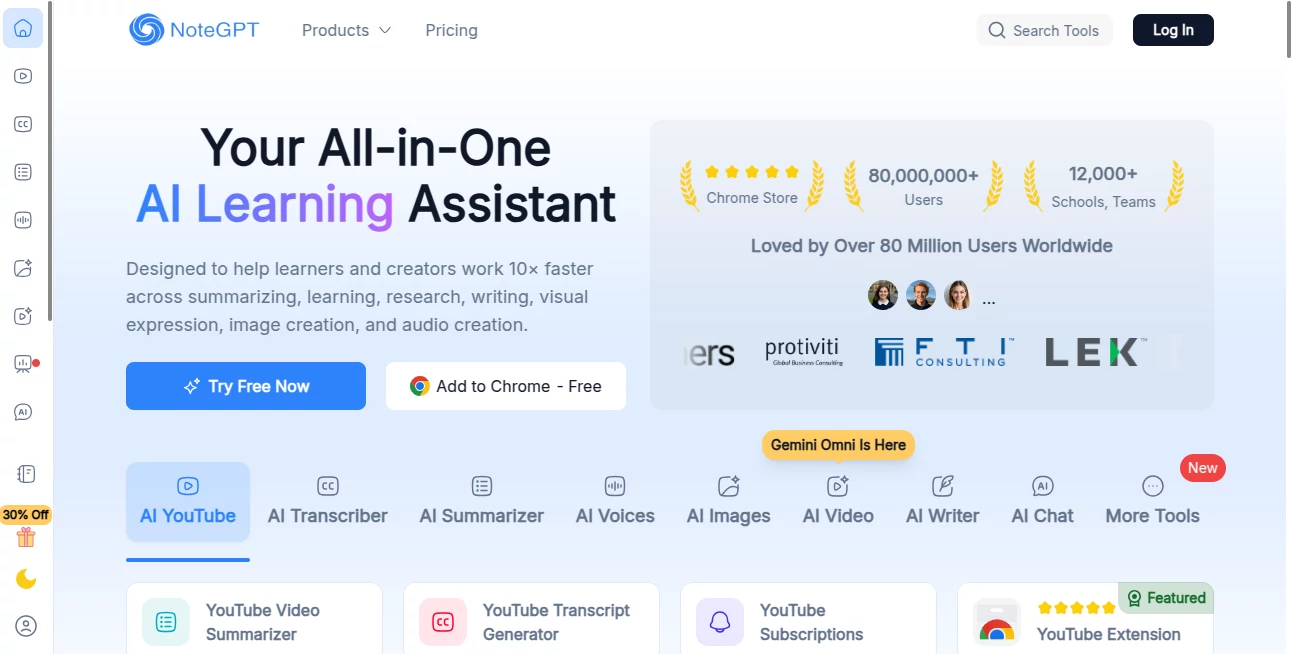
There's something incredibly satisfying about finishing a long video or lecture and actually walking away with clear, organized notes instead of scattered highlights and half-remembered points. This tool makes that possible in minutes. You drop in a YouTube link, upload a PDF, or record audio, and it returns structured notes, summaries, mind maps, and even flashcards that feel like they came from a very diligent study partner. I've used it on hour-long lectures and come away with notes that were better organized than anything I could have written myself. It doesn't just transcribe — it understands, condenses, and helps you actually learn.
Introduction
Most of us consume far more content than we can realistically remember or organize. Between YouTube tutorials, online courses, research papers, and meetings, important information gets lost in the noise. NoteGPT was built to solve that exact problem. It turns passive consumption into active learning by intelligently summarizing, structuring, and connecting ideas for you. Whether you're a student cramming for exams, a professional trying to keep up with industry updates, or someone who just wants to get more value from the content they watch, this tool quietly becomes indispensable. The best part? It respects your time and your brain — giving you exactly what you need without the fluff.
Key Features
User Interface
The interface is refreshingly clean and focused. You can paste a YouTube link, drag in a PDF, or record audio directly. Everything happens in one workspace with clear tabs for transcript, summary, mind map, flashcards, and chat. No overwhelming menus or hidden features — just a calm, logical flow that makes you feel in control from the first click. Dark mode, keyboard shortcuts, and instant search across your notes make daily use feel smooth and natural.
Accuracy & Performance
It handles long-form content remarkably well — understanding context, technical terms, and speaker nuances that many tools miss. Summaries stay faithful to the source while cutting out filler, and the AI chat lets you ask specific questions about the material with accurate answers pulled from the actual content. Processing speed is impressive even for hour-long videos or dense PDFs, and the output quality consistently feels like it was reviewed by a careful human assistant.
Capabilities
Beyond basic transcription and summarization, it creates beautiful mind maps that show how ideas connect, generates Anki-style flashcards for active recall, lets you chat with the document like a tutor, and supports multiple languages. You can export notes in various formats, save entire libraries, and even collaborate by sharing specific notes. It's not just a summarizer — it's a complete second brain for learning and knowledge work.
Security & Privacy
Your uploads and notes are encrypted and private by default. The tool doesn't train on your data, and you can delete everything anytime. For students and professionals working with sensitive material, that peace of mind is huge — you can focus on learning without worrying about where your content is going.
Use Cases
A university student pastes a 90-minute lecture and walks away with perfect notes and ready-made flashcards before the next class. A marketer analyzes competitor webinars and pulls key insights into structured reports. A researcher condenses dozens of academic papers into connected mind maps that reveal patterns across sources. A busy professional records team meetings and gets clean action items and decisions summarized instantly. It adapts beautifully to different needs while keeping the core experience consistent and reliable.
Pros and Cons
Pros:
- Excellent accuracy on long, complex content like lectures and research papers.
- Multiple output formats (notes, mind maps, flashcards, chat) in one place.
- Fast processing even for lengthy videos and documents.
- Clean, distraction-free interface that actually helps you focus.
- Strong privacy practices that build trust.
Cons:
- Free tier has reasonable limits — heavy users will want a paid plan.
- Extremely niche or highly technical content can occasionally need light editing.
- No offline mode (yet).
Pricing Plans
The free plan is generous enough for regular students and casual users, giving you a solid taste of the full experience. Paid plans unlock unlimited processing, larger file support, advanced features like custom AI instructions, and priority support. Pricing is reasonable and scales with how deeply you rely on it — many users say it quickly becomes one of their highest-ROI tools.
How to Use NoteGPT
Paste a YouTube link or upload a PDF/audio file. Let it process (usually very fast), then explore the generated summary, full notes, mind map, or flashcards. Ask the AI questions about the content in the chat panel. Save the note to your library, export it, or share it with others. Over time you build a personal knowledge base that’s searchable and actually useful. The workflow is so smooth you’ll wonder how you ever took notes the old way.
Comparison with Similar Tools
Many note-taking tools either focus only on transcription or only on summarization. This one combines both beautifully while adding mind maps and flashcards in a single, polished experience. Where others feel clunky or limited, NoteGPT feels thoughtful and complete. It strikes an excellent balance between power and simplicity that most competitors haven't quite reached yet.
Conclusion
In a world overflowing with content, the ability to turn what you consume into knowledge you actually retain is incredibly valuable. NoteGPT does this exceptionally well — quietly, efficiently, and with real attention to quality. Whether you're learning for school, work, or personal growth, it helps you get more out of every hour you invest. Once you start using it, going back to manual note-taking feels strangely outdated.
Frequently Asked Questions (FAQ)
How accurate is the transcription?
Very high on clear English content. Accents and technical topics may need minor corrections but are generally excellent.
Can I upload my own audio recordings?
Yes — it handles meeting recordings, lectures, and personal voice notes very well.
Are my notes private?
Yes. Your content is encrypted and not used for training.
Does it work with non-English content?
It supports multiple languages, with especially strong performance on major ones.
Is there a limit on video length?
Free plan has reasonable limits; paid plans support much longer content.
AI Documents Assistant , AI Summarizer , AI Productivity Tools , AI Notes Assistant .
These classifications represent its core capabilities and areas of application. For related tools, explore the linked categories above.
NoteGPT details
Website unavailable — View Alternatives
Pricing
- Free
Apps
- Web App
- Chrome Extensions
Categories

NoteGPT Alternatives Product
Zush
CursiveKit

Grow Creator

Referent

Keepmind

Toolquix

SuperAI
Wisegrid

Flow Veo 3