
omg
What is omg?
omg is built for developers who want their coding agents to keep working without being tied to an open laptop. Instead of treating an AI coding agent as something that only runs while you are sitting at your desk, the platform provides a cloud Computer where coding agents can continue working in the background.
The idea is particularly useful for developers managing several projects or tasks at the same time. You can run agents for activities such as writing integration tests, refactoring application code, migrating parts of a project, or preparing release notes while keeping your local machine free for other work.
What makes the approach interesting is that you bring your own coding-agent account. The service provides the computing environment, while you can work with agents such as Claude, Codex, OpenCode, or Pi. Multiple sessions can operate at the same time, making it possible to delegate different pieces of development work instead of waiting for one task to finish before starting another.
Key Features
- Cloud-based Computers designed specifically for coding agents.
- Support for multiple coding-agent sessions running in parallel.
- Compatibility with Claude, Codex, OpenCode, and Pi.
- Background operation that continues even when your laptop is closed.
- Persistent workspaces that remain available when a machine sleeps.
- Multiple agent capacity depending on the selected plan.
- Dedicated computing resources with different CPU, memory, and storage configurations.
- Support for continuous workflows and background development jobs.
- Push-style workflow support and a progressive web app experience.
- Option to use your own coding-agent account rather than buying model access separately.
- Hardware-isolated Firecracker microVMs for individual Computers.
- Workspace snapshots that can help restore paused environments.
User Interface
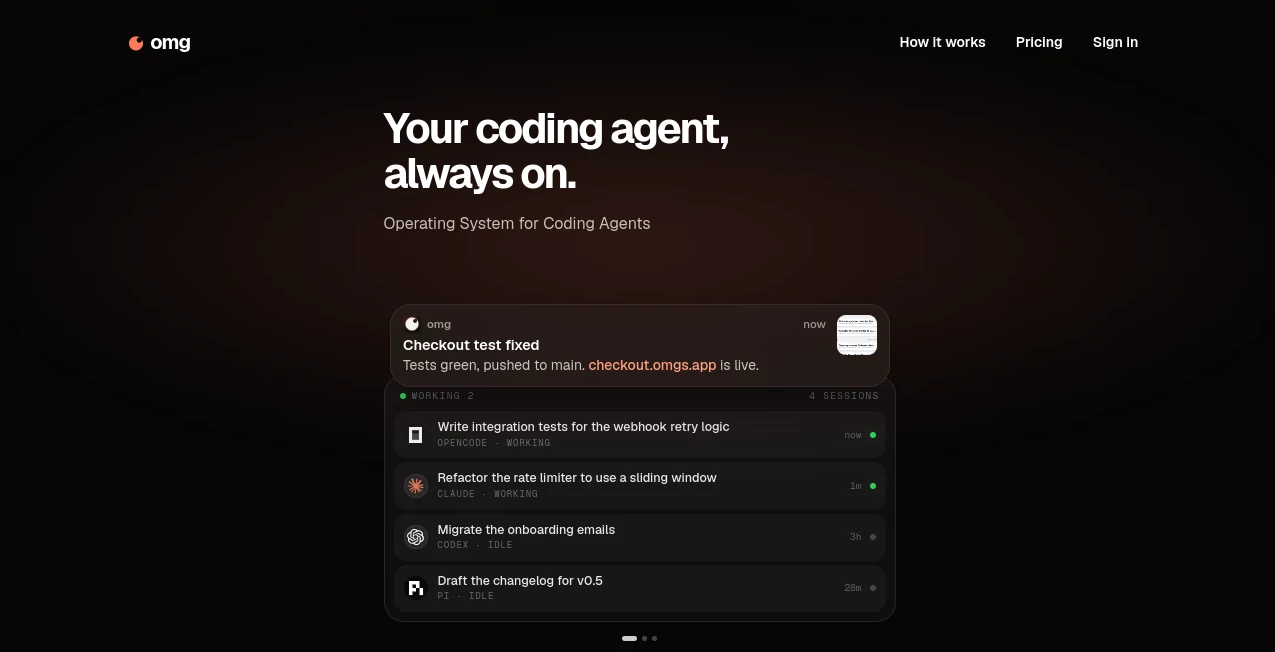
The interface is designed around activity rather than a traditional code editor. You can see active agent sessions and what each one is currently working on, which makes the service feel more like a control center for autonomous development tasks.
This becomes especially useful when several agents are doing different jobs. One can work on tests while another handles a refactor and a third prepares documentation. Having those activities visible in one place makes a multi-agent workflow much easier to follow.
Accuracy & Performance
Performance here depends partly on the coding agent and model you choose, but the underlying environment is designed to remove one common bottleneck: keeping your own computer available for long-running development tasks.
The higher plans provide substantially more computing resources. The largest configuration includes 12 vCPUs, 36 GB of memory, 256 GB of disk space, and an always-on environment. For developers running several demanding workflows at once, that can make a noticeable difference.
For example, a developer could leave an agent handling a test suite or background development task while continuing unrelated work locally. The platform's cloud-based setup is intended to keep those workflows running independently of the developer's laptop.
Capabilities
The platform is best understood as infrastructure for coding agents rather than another standalone AI code generator. You decide which agent to use, provide the task, and give it an environment in which it can actually work.
That distinction opens up several practical workflows. Agents can work on repositories, manipulate project files, run development tasks, write tests, refactor existing code, and prepare changes while the developer supervises their progress.
The ability to run multiple agents simultaneously is another major advantage. Instead of asking one agent to handle an entire project sequentially, developers can divide work into smaller tasks and let different sessions handle them in parallel.
Security & Privacy
Security is an important part of the infrastructure. Each Computer runs inside a hardware-isolated Firecracker microVM rather than a shared container. According to the privacy policy, this isolation is designed to prevent one tenant's agent from reaching another tenant's files.
Traffic is encrypted in transit, while secrets are stored encrypted and excluded from analytics and session replay. The service also states that it does not sell user data or train its own models using customers' code and prompts.
The platform processes the prompts, repositories, files, and workspace state needed to operate the service. When an external coding agent is used, relevant prompts and files are sent to the model provider behind that agent. Developers working with private repositories should therefore understand which model provider they have selected before assigning sensitive tasks.
Use Cases
- Parallel development: Run different coding tasks simultaneously instead of waiting for one agent to finish.
- Automated testing: Leave an agent working on integration tests or other test-related tasks in the background.
- Code refactoring: Delegate larger refactoring jobs while continuing other development work.
- Repository maintenance: Use an agent to handle repetitive changes across an existing project.
- Release preparation: Have an agent prepare changelogs and other development documentation.
- Background workflows: Keep development jobs running without leaving a laptop open overnight.
- Multi-project development: Give different agents separate responsibilities across several projects.
- Remote development: Access a persistent coding environment instead of relying entirely on a local machine.
- AI-assisted startups: Small teams can use several agents as additional development capacity for routine engineering work.
Pros and Cons
Pros
- Lets coding agents continue working when your computer is offline or closed.
- Supports multiple agents running at the same time.
- Works with several popular coding-agent environments.
- Provides persistent cloud workspaces.
- Higher plans offer substantial CPU, memory, and storage resources.
- Uses hardware-isolated microVMs for individual Computers.
- The free plan can be tested without entering a payment card.
- Users can bring their own coding-agent account.
Cons
- The paid plans can become expensive for developers who need many concurrent agents.
- The quality of generated code still depends heavily on the selected coding agent and model.
- Users working with sensitive repositories need to consider the external model provider involved in each workflow.
- The service is more useful for developers already comfortable with AI coding agents than for beginners looking for a simple code-generation interface.
- Some of the advanced capacity is available only on higher-priced plans.
Pricing Plans
The service currently offers a free option as well as several paid configurations. The free plan costs $0, requires no card, and includes 3 active hours, 16 GB of workspace storage, and one agent at a time. The free usage is hard-capped, so running out of included hours does not create an unexpected charge.
The first paid plan costs $48 per month and supports up to 5 agents at once. It includes 120 active hours per month, 4 vCPUs, 8 GB of memory, and 64 GB of disk space.
A higher plan costs $149 per month and supports up to 16 agents simultaneously. It includes 300 active hours, 8 vCPUs, 16 GB of memory, and 128 GB of disk space.
The largest plan costs $498 per month and supports up to 24 agents. It provides 12 vCPUs, 36 GB of memory, 256 GB of disk space, and an always-on 24/7 environment for continuous workflows and background jobs.
How to Use It
Start by creating an account and selecting the coding agent you want to work with. The service provides the Computer where that agent can operate, while the model or coding-agent account remains yours.
Once your workspace is ready, connect the relevant repository or project files and describe the development task you want the agent to handle. A small task such as writing tests is a good place to start before assigning a larger refactoring or migration.
For more complex projects, divide the work into separate responsibilities. For example, one agent can handle tests, another can work on application code, and another can prepare documentation. The session view makes it possible to monitor what is happening across those tasks.
When a Computer becomes idle, supported plans can put it to sleep while keeping the workspace available. This approach helps reduce unnecessary resource usage without forcing you to rebuild the environment when you return.
Comparison with Similar Tools
Traditional AI coding assistants are often designed around an active development session inside a local editor. That approach works well when you want immediate suggestions or assistance while writing code, but it is less convenient for tasks that may take a long time or require several independent workflows.
This platform takes a different approach by providing a persistent cloud Computer for coding agents. The emphasis is not simply on generating a code snippet. It is on giving an agent an environment where it can continue working, access project files, run development tasks, and remain available after the developer leaves the desk.
The multi-agent model also makes it attractive for developers who want to experiment with dividing a project into parallel tasks. Instead of replacing an existing coding agent, it acts as the environment that gives those agents somewhere to work.
Conclusion
For developers who have started using AI coding agents but find themselves limited by local hardware, open laptops, or sequential workflows, this platform offers a compelling alternative. Its strongest idea is simple: give coding agents their own persistent Computer and let them keep working.
The combination of multiple concurrent sessions, persistent workspaces, dedicated resources, and support for several coding-agent environments makes it particularly interesting for developers building products, maintaining repositories, and experimenting with increasingly autonomous development workflows.
The free plan also provides a practical way to test the concept before committing to a paid configuration. Developers who eventually need several agents working continuously can scale up to considerably more CPU, memory, storage, and concurrent sessions.
Frequently Asked Questions (FAQ)
What is this platform used for?
It provides cloud Computers where coding agents can work on software projects, repositories, tests, refactoring tasks, documentation, and other development workflows without requiring your laptop to remain open.
Can multiple coding agents run at the same time?
Yes. The paid plans support multiple concurrent agents, with capacity ranging from 5 agents on the entry-level paid plan to 24 agents on the highest plan.
Does it provide its own AI coding model?
The service primarily provides the computing environment for coding agents. Users can bring their own coding-agent account and work with supported agents such as Claude, Codex, OpenCode, or Pi.
Is there a free plan?
Yes. The free plan costs $0, requires no payment card, and includes 3 active hours, 16 GB of workspace storage, and one active agent at a time.
Is the workspace persistent?
Yes. Paid Computers can sleep when idle while the workspace remains available. The service also uses snapshots to help restore paused environments.
How is user data handled?
The service states that it does not sell user data or train its own models on customer code. Prompts, repositories, files, and workspace state are processed to operate the service, and relevant information may be sent to the model provider associated with the coding agent being used.
Is it suitable for long-running development tasks?
Yes. Continuous and background development workflows are one of the main reasons to use a cloud Computer. The highest plan is designed specifically for always-on workflows and background jobs.
AI Code Assistant , AI Developer Tools , AI DevOps Assistant .
These classifications represent its core capabilities and areas of application. For related tools, explore the linked categories above.

omg Alternatives Product

git-lrc

Prava Ai

Empiriolabs …

AllInOneTools

Ito AI

TutuoAI

freellm.net

Nimbalyst

CtrlOps