
Online Vocal Remover
What is Online Vocal Remover?
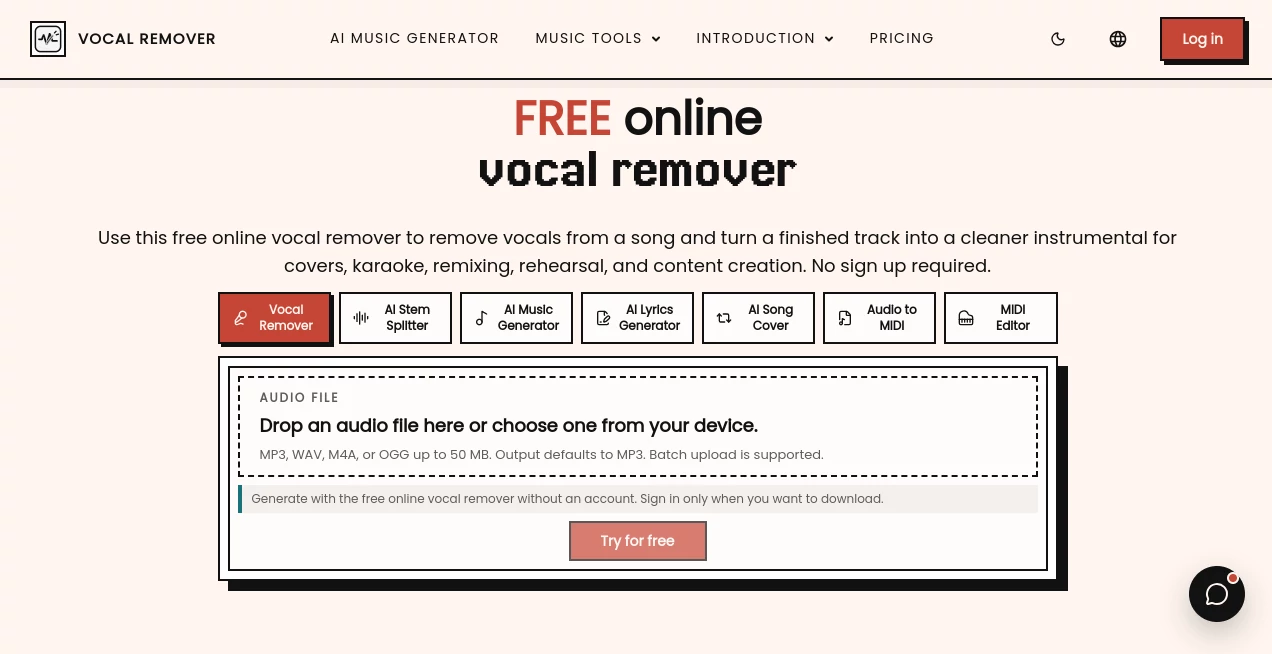
Online Vocal Remover is a browser-based AI audio tool designed to separate vocals from finished songs and create cleaner instrumental tracks. It is particularly useful when you need a backing track for karaoke, want to practice a cover, or are preparing a quick remix without opening a full desktop audio editor.
The workflow is refreshingly simple. Upload an MP3, WAV, M4A, or OGG file, let the AI process the mix, and preview the resulting stems. Files can be up to 50 MB, and the free version can be tested without creating an account. For musicians and creators who occasionally need a vocal-free version of a song, that low-friction approach is a real advantage.
What makes the service more practical than a basic vocal reduction filter is its focus on actual separation. The processed track can be used as a starting point for rehearsal, music education, remix preparation, social content, or arrangement analysis. It is not a replacement for professionally recorded stems, but for many everyday jobs it can save considerable time.
Key Features
- AI-powered vocal and instrumental separation
- Browser-based processing with no desktop installation
- Support for MP3, WAV, M4A, and OGG audio files
- Up to 50 MB upload size for individual files
- Free single-file processing for testing
- Online preview of processed vocals and instrumental audio
- Batch processing on paid plans
- Batch uploads of up to 10 files on subscription plans
- ZIP export for larger workflows
- Monthly credit-based plans for frequent users
- Useful workflow for karaoke, cover practice, remixing, and music education
User Interface
The interface keeps the main task front and center: choose an audio file and start processing. There is no complicated mixer, timeline, or collection of controls to learn before getting started. That makes the service approachable for someone who simply wants an instrumental track as well as for a creator who needs to prepare several files quickly.
The upload area accepts common audio formats, and the generated results can be previewed online. Users can also try the basic workflow without signing up, with an account becoming relevant when they want to download their processed results.
Accuracy & Performance
Separation quality depends heavily on the original recording. Clean, high-quality source audio generally gives the AI more useful information to work with. Songs with dense arrangements, strong effects, layered backing vocals, loud cymbals, or heavy mastering can produce small remnants of the original vocal.
This is worth keeping in mind when evaluating the results. A faint echo or small piece of harmony does not necessarily indicate a problem with the workflow; it can simply be a consequence of how closely the vocal frequencies overlap with instruments in the original mix.
For karaoke, rehearsal, classroom exercises, content drafts, and remix sketches, the results can be more than sufficient. For a commercial release or demanding studio production, it is sensible to listen carefully to the complete track before using the stem as a final production element.
Capabilities
The core capability is vocal separation, but its practical uses extend beyond simply muting a singer. Producers can use the instrumental output to examine chord progressions and arrangements, while singers can create backing tracks for rehearsals and cover performances.
It can also be useful when preparing material for short-form videos. Instead of searching for an official instrumental version, a creator can work from an existing song and quickly produce a usable backing track. Educators may also find the separation useful for listening exercises where students need to focus on either the vocal or instrumental side of a recording.
Security & Privacy
The service is designed around an online workflow, so audio processing takes place through the browser-based platform rather than requiring users to install an audio application locally. The site also provides dedicated privacy and legal information for users who want to review its policies before uploading material.
As with any online audio service, users should consider the nature of the recordings they upload and avoid submitting material they are not authorized to process. Copyright and licensing responsibilities remain with the person using the resulting audio, especially when tracks are published, performed, or monetized.
Use Cases
- Karaoke: Create a backing track when an official instrumental is unavailable.
- Cover practice: Remove the original lead vocal and rehearse your own performance over the arrangement.
- Remix preparation: Extract a cleaner instrumental starting point before moving the project into a DAW.
- Music education: Use separated parts for listening exercises and arrangement analysis.
- Content creation: Prepare background music for videos and other creator projects.
- Live rehearsal: Build useful practice material without spending time editing the original mix manually.
- Arrangement study: Hear chords, drums, synths, and other elements that may be harder to notice underneath a lead vocal.
Pros and Cons
- Pros: Free to try, simple browser workflow, no installation, no account required for initial processing, common audio format support, online preview, and batch processing available on paid plans.
- Pros: The credit system makes the paid plans suitable for users who regularly process multiple tracks.
- Pros: Useful for several practical scenarios rather than being limited to karaoke alone.
- Cons: Source quality has a noticeable effect on separation results.
- Cons: Dense mixes may leave vocal echoes, backing harmonies, or small audio artifacts.
- Cons: Free usage is limited compared with the paid subscription tiers.
Pricing Plans
A free option is available for users who want to test single-file vocal removal and preview the resulting stems. The free plan does not include batch uploads or ZIP export and provides fewer saved results.
The Basic annual plan is listed at $7.49 per month when billed annually, with 1,200 credits refreshed each month and processing capacity of about 240 audio files. It supports batch uploads of up to 10 files and ZIP export.
The Pro annual plan costs $14.99 per month when billed annually and provides 3,000 monthly credits, enough for approximately 600 audio files, along with batch processing and ZIP export.
The Premium annual plan is listed at $29.99 per month when billed annually. It includes 7,000 monthly credits and capacity for approximately 1,400 audio files, making it the most suitable option for users with heavier separation workloads.
How to Use Online Vocal Remover
- Choose the song or audio recording you want to process.
- Upload the file in MP3, WAV, M4A, or OGG format.
- Start the AI vocal separation process.
- Wait while the service analyzes the finished mix and separates the vocal layer from the instrumental.
- Preview the generated results and listen for any remaining vocal fragments or artifacts.
- Download the result when you are satisfied with the output.
For the cleanest possible result, start with the highest-quality source file available. It is also a good idea to check the chorus, bridge, intro, and ending on both headphones and speakers. A track can sound excellent on one system while revealing small separation artifacts on another.
Comparison with Similar Tools
Traditional audio editors can perform detailed vocal reduction and manual processing, but they usually require more technical knowledge and setup. Dedicated stem-separation applications may offer deeper controls, while browser-based alternatives often focus on quick processing.
This service sits comfortably in the middle for users who value speed over a large collection of production controls. The biggest appeal is the short path from finished song to usable instrumental: upload, process, preview, and continue with the project. Someone preparing a karaoke track before rehearsal, for example, can get started without installing a DAW or learning a complicated interface.
For professional studio work, manually produced stems or original multitrack recordings will generally remain preferable. For everyday creative tasks, however, a focused online workflow can be much more convenient.
Conclusion
For anyone who regularly needs instrumental versions of songs, this AI-powered workflow offers a straightforward way to get from a finished mix to a workable backing track. Its strengths are simplicity, accessibility, useful file-format support, and a pricing structure that accommodates both occasional users and people processing tracks in volume.
The results should always be judged against the quality of the source recording. With a clean input, the service can be a particularly handy companion for karaoke, cover practice, education, remix preparation, and content creation. It is not trying to replace a professional recording studio; instead, it solves a very specific audio problem quickly and without unnecessary complexity.
Frequently Asked Questions (FAQ)
What does this tool do?
It uses AI-based audio separation to reduce or remove vocals from a finished song and produce an instrumental version that can be previewed online.
Which audio formats are supported?
MP3, WAV, M4A, and OGG files are supported, with individual uploads limited to 50 MB.
Can I use it to create karaoke tracks?
Yes. Creating backing tracks for karaoke is one of the main practical uses, along with cover practice, rehearsal, and music education.
Does it completely remove every vocal?
Not necessarily. The final quality depends on the original mix. Dense arrangements can leave faint vocal echoes, reverb, backing harmonies, or other small artifacts.
Do I need to install software?
No. The processing workflow runs online in a web browser, so there is no desktop audio application to install.
Is there a free plan?
Yes. Single-file vocal removal is available for free testing. Paid plans add features such as monthly credits, batch uploads, queue processing, and ZIP exports.
Can I process multiple songs at once?
Batch processing is available with paid subscriptions. The subscription plans support batches of up to 10 files.
Can the output be used commercially?
The technology can prepare audio for creative projects, but users are responsible for having the necessary rights to the original recording and for complying with applicable copyright and licensing requirements.
What is the best source file for vocal separation?
A clean, high-quality recording is preferable. Avoid heavily distorted or repeatedly re-encoded files when possible because the quality of the source mix directly affects the separation result.
AI Audio Enhancer , AI Music Generator .
These classifications represent its core capabilities and areas of application. For related tools, explore the linked categories above.
Online Vocal Remover details
Website unavailable — View Alternatives
Pricing
- Free
Apps
- Web App
Categories

Online Vocal Remover Alternatives Product

AI Music Gen…

Seed Audio

Blinkly AI

PureMIDI

LORY

AI Rap Gener…
Musikalis AI…

lyria 3

Audio Convert