
OpenVox
What is OpenVox?
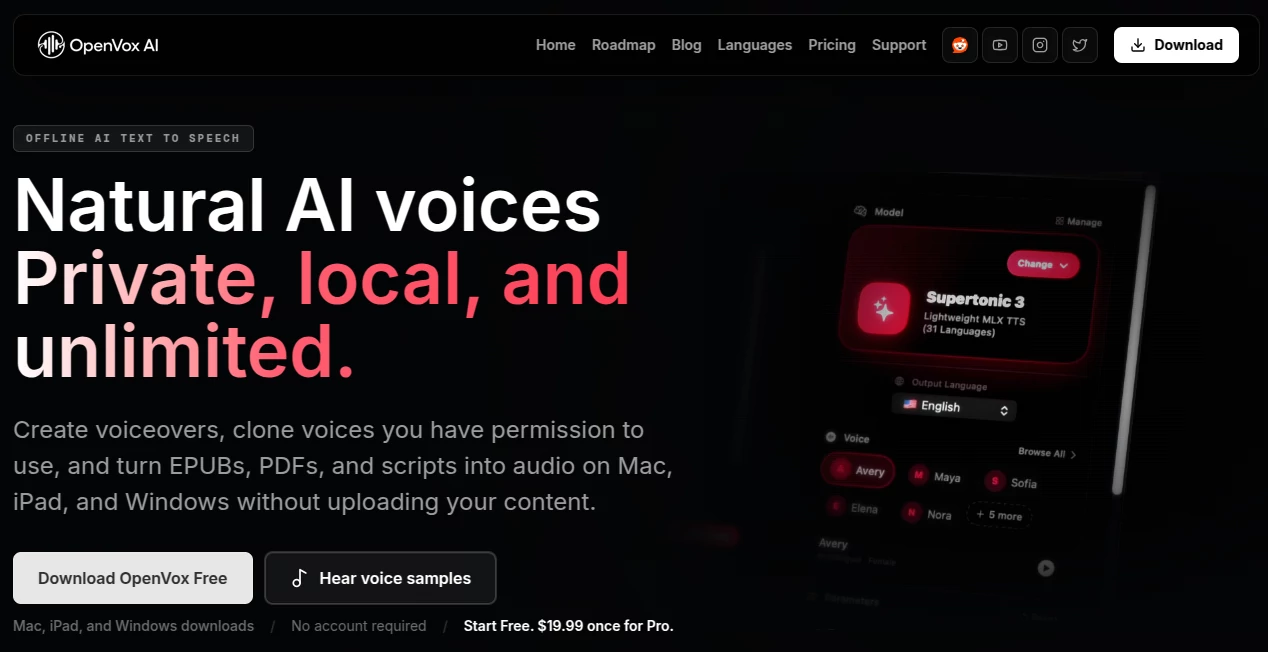
OpenVox is a privacy-first AI text-to-speech platform built for creators, professionals, publishers, and anyone who wants complete control over voice generation. Unlike many cloud-based services, it performs speech generation directly on your local device, allowing users to create realistic voiceovers without uploading sensitive documents or scripts. This local-first approach makes it especially appealing for businesses handling confidential content, educators working with learning materials, and content creators producing commercial projects.
The software supports Mac, Windows, and iPad, making it accessible across multiple platforms while maintaining the same offline workflow. From audiobook production to multilingual narration, voice cloning, and voice design, it delivers an impressive collection of capabilities inside a clean desktop experience. The ability to work without recurring subscriptions or character-based limits also makes it an attractive long-term investment for frequent users. Its combination of privacy, speed, and high-quality AI voices creates a workflow that feels both practical and refreshing for modern content production. Developers also emphasize ethical voice cloning by allowing users to clone only voices they own or have permission to use, while explicitly preventing celebrity impersonation and unauthorized voice replication. This responsible approach helps establish trust while still offering advanced AI voice technology. :contentReference[oaicite:0]{index=0}
Key Features
User Interface
The interface is designed for simplicity without sacrificing functionality. Users can import text files, PDFs, or EPUB books, organize long projects into chapters, preview voices, and export finished audio through an intuitive workflow. Multi-speaker conversations are also easy to build, making dialogue, interviews, podcasts, and storytelling projects much more efficient.
Accuracy & Performance
Speech generation produces natural pronunciation with expressive delivery across hundreds of languages. Multiple AI speech models allow users to choose between faster rendering or premium voice quality depending on project requirements. Since processing occurs locally after installation, response times remain consistent without depending on cloud servers or internet speed. :contentReference[oaicite:1]{index=1}
Capabilities
Beyond traditional text-to-speech, the platform includes voice cloning with user permission, AI voice design, audiobook creation, voice conversion, long-form narration, batch processing, multilingual support, and local API access for automation. It can generate content from plain text, PDF documents, and EPUB files while supporting professional export formats suitable for publishing and commercial production. :contentReference[oaicite:2]{index=2}
Security & Privacy
Privacy is one of its strongest advantages. Voice generation, cloning, and audio processing remain on the user's own device rather than being uploaded to external servers. The application also avoids collecting analytics or personal usage data during normal operation, making it suitable for organizations and individuals who prioritize confidentiality. :contentReference[oaicite:3]{index=3}
Use Cases
Content creators can quickly generate YouTube narrations, podcasts, promotional videos, and social media voiceovers. Authors and publishers are able to transform books into professionally narrated audiobooks with chapter management. Students may convert study materials into audio for hands-free learning, while businesses can create training materials, internal documentation, product demonstrations, and multilingual presentations. Developers can also integrate local voice generation into automated workflows using the available local API.
Pros and Cons
Pros
Runs locally for maximum privacy.
No recurring subscription required for Pro users.
Supports more than 600 languages with multiple AI models.
Includes voice cloning, voice design, audiobook generation, and voice conversion.
Imports PDF, EPUB, and text documents.
Commercial usage is supported with the Pro version.
Cons
Initial AI model downloads require internet access.
Performance depends on the hardware capabilities of the local computer.
Celebrity voice cloning and unauthorized impersonation are intentionally restricted.
Pricing Plans
The software offers a generous free plan that includes daily text generation limits, hundreds of voices, multilingual support, audiobook tools, and several custom voice clones. Users who need unlimited generation, unlimited voice cloning, batch processing, commercial rights, additional export formats, and lifetime updates can upgrade through a one-time Pro purchase instead of paying monthly subscription fees. :contentReference[oaicite:4]{index=4}
How to Use OpenVox
Download and install the application on a supported device.
Choose or download the preferred AI voice model.
Import text, PDF, or EPUB content.
Select a voice or create a custom voice design.
Generate speech locally.
Review the audio and export it in the desired format for publishing or sharing.
Comparison with Similar Tools
Many cloud-based text-to-speech platforms rely on monthly subscriptions, internet connectivity, and character-based billing. This solution follows a different philosophy by processing audio locally, protecting user privacy, and providing unlimited generation after purchasing the lifetime Pro license. While cloud services often focus on online convenience, local processing offers better control over confidential documents, predictable performance, and long-term cost savings for creators producing voice content on a regular basis. Users who frequently generate audiobooks, long narrations, or multilingual projects may particularly appreciate this approach.
Conclusion
For users seeking realistic AI speech without sacrificing privacy, this platform delivers an impressive balance of quality, performance, and affordability. Local processing, multilingual voice support, ethical voice cloning, audiobook production, and commercial-friendly licensing make it suitable for both individual creators and professional teams. Its straightforward interface and lifetime pricing model further strengthen its appeal, offering an efficient alternative to subscription-heavy cloud services while keeping complete ownership of generated content in the hands of the user. :contentReference[oaicite:5]{index=5}
Frequently Asked Questions (FAQ)
Can it work completely offline?
Yes. After the required AI models have been downloaded, speech generation and most core features operate locally without requiring continuous internet access.
Does it support commercial projects?
Yes. Commercial usage is available with the Pro license according to the platform's licensing terms.
Can I clone any person's voice?
No. Voice cloning is intended only for voices you own or have explicit permission to use.
Which file formats can be imported?
Users can import plain text, PDF documents, and EPUB books for narration and audiobook creation.
Which operating systems are supported?
The application is available for macOS, Windows, and iPadOS.
AI Voice Cloning , AI Audio Enhancer , AI Text to Speech , AI Speech Synthesis .
These classifications represent its core capabilities and areas of application. For related tools, explore the linked categories above.
OpenVox details
Website unavailable — View Alternatives
Pricing
- Free
Apps
- Web App
- iOS App
- Windows App
- Mac App
Categories

OpenVox Alternatives Product

Goose Pod

Qwen3 TTS
Readaloudrea…

Klyra AI

Trump AI Vid…
Transcribe A…

SuperAI

Gandr

Fine Voice