
IDPhotoAI
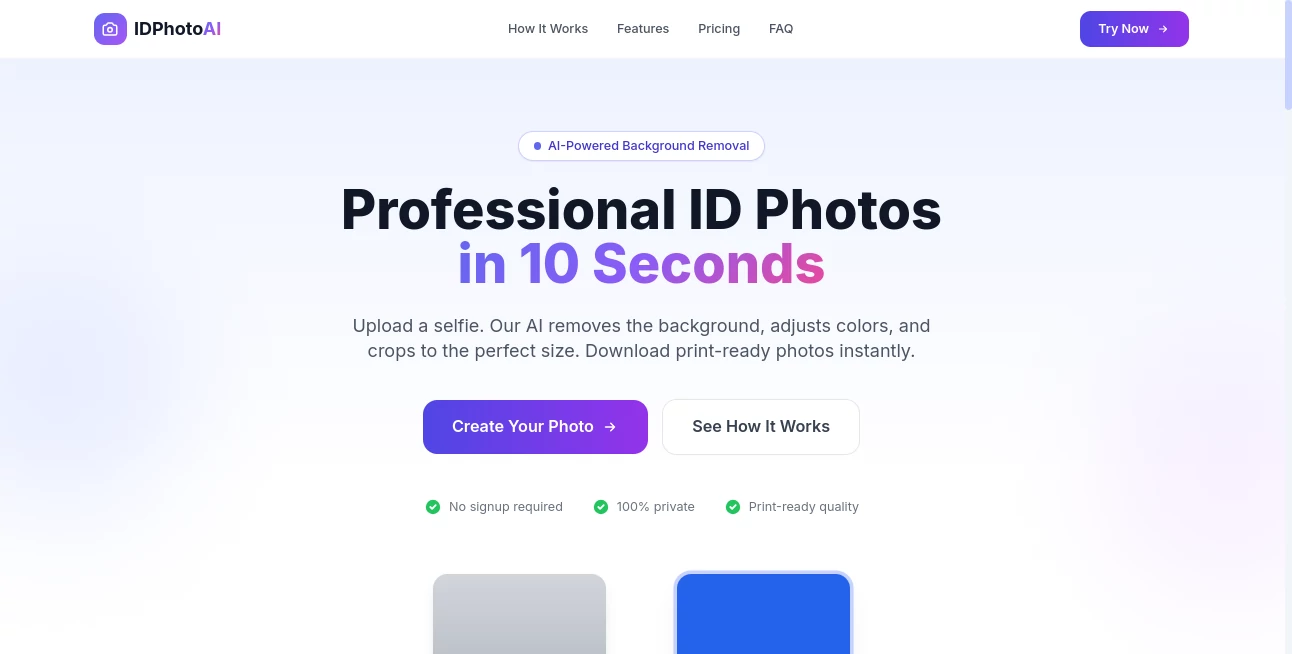
What is IDPhotoAI?
PassPix AI is an AI-powered ID photo maker designed for people who need a professional-looking passport, visa, or identification photo without visiting a photo studio. The process is refreshingly simple: upload a selfie, let the AI handle the background and framing, preview the result, and download a print-ready image when you are satisfied.
What makes the service particularly convenient is that there is no signup requirement. You can start with an existing photo from your phone or computer, even if the original image has an ordinary or messy background. The system automatically detects the face, removes the background, adjusts the image, and centers the subject for the selected photo format.
Key Features
- AI-powered background removal for cleaner ID photos
- Automatic face detection and positioning
- Photo cropping and sizing for different document standards
- Support for common passport and visa formats
- Free preview before payment
- High-resolution, print-ready downloads
- 300 DPI output for printing
- No account or signup required
- Instant digital delivery
User Interface
The interface keeps the process focused on the one thing that matters: creating a usable document photo. Users can upload a JPG or PNG image up to 10MB and receive simple guidance before processing, including suggestions for good lighting, facing the camera directly, and keeping a neutral expression.
There is little unnecessary navigation involved. After uploading a photo, the system processes it and presents a preview where users can compare the original and processed versions. The ability to preview the result before paying is especially useful because it lets you decide whether the photo actually works for your needs.
Accuracy & Performance
The AI handles several otherwise tedious editing tasks automatically. It detects the face, removes the existing background, centers the subject, and prepares the image according to the selected size. The website states that processing generally takes around 10 to 30 seconds, making it practical when a document photo is needed quickly.
Users should still begin with a reasonably clear selfie. Good lighting, a forward-facing pose, and a neutral expression give the system better material to work with. The service supports specific formats such as US Passport, UK Passport, Schengen Visa, and India Visa, with additional photo-size options available through the interface.
Capabilities
The main strength is turning an ordinary personal photograph into a document-ready image without requiring manual editing skills. Users can choose the appropriate photo size and background color, while the AI takes care of the repetitive adjustments.
The output is designed for printing as well as digital use. Full-quality downloads are provided without a watermark and include 300 DPI high-resolution output. For someone who needs a passport-style photograph at home, this removes much of the friction associated with finding a photographer, explaining the required dimensions, and waiting for the finished picture.
Security & Privacy
Privacy is presented as an important part of the service. The website states that the service is 100% private and does not require users to create an account before generating a preview. Since users are working with personal photographs, the ability to begin without providing signup information is a welcome touch.
As with any service that processes personal images, users should review the provider's current privacy policy and terms before uploading sensitive photographs, particularly when preparing official identity documents.
Use Cases
The most obvious use case is preparing a passport photo from a smartphone selfie. Someone planning an international trip can create a suitable image without making a separate trip to a photography shop.
It can also be useful for visa applications, identification documents, school IDs, professional profiles, and other situations where a clean, standardized portrait is required. For example, a student who needs an ID picture or a traveler who suddenly discovers that a visa application requires a specific image size can create a preview in a matter of seconds.
It is also convenient for people who already have a good portrait but do not have the correct background, framing, or dimensions. Instead of opening an image editor and adjusting everything manually, the automated workflow handles the repetitive work.
Pros and Cons
Pros:
- Very simple upload-and-process workflow
- No signup required
- Free preview before purchase
- Automatic background removal and face positioning
- Print-ready 300 DPI output
- Supports multiple document photo standards
- One-time payment rather than a required subscription
Cons:
- The quality of the final result depends partly on the original selfie
- The current pricing model requires payment for the full-resolution download
- Users preparing official documents should still verify the requirements of the relevant authority before submitting a photograph
Pricing Plans
The pricing structure is straightforward. The preview is available for free, allowing users to see the processed photograph before making a purchase. A full-quality download costs $4.99 as a one-time payment.
The paid version removes the watermark and provides a 300 DPI high-resolution file, all available sizes, and instant downloading. For someone who only needs one document photo, a one-time payment can be more appealing than signing up for a recurring subscription.
How to Use the Tool
- Open the photo creation page.
- Upload a clear selfie in JPG or PNG format, up to 10MB.
- For the best result, use good lighting, face the camera directly, and keep a natural expression.
- Let the AI remove the background, detect your face, and position the portrait.
- Preview the processed photograph and compare it with the original.
- Select the required photo size and background color.
- If the result meets your expectations, pay the one-time fee to remove the watermark.
- Download the high-resolution, print-ready photograph.
Comparison with Similar Tools
Traditional passport-photo services still have an advantage when you want a photographer to handle everything in person, but they require travel, scheduling, and usually cost more for a single photograph. Manual image editors provide greater control, although creating a correctly sized document photo can take considerably more time.
This service sits between those two approaches. It gives users an automated workflow similar to a dedicated photo service while keeping the process accessible from a phone or computer. The free preview is another practical advantage because you can inspect the result before deciding whether it is worth paying for.
Conclusion
For anyone who needs a passport, visa, or ID-style photograph without visiting a photo studio, this tool offers a remarkably direct solution. Uploading a selfie and receiving a processed preview within seconds is much easier than manually removing backgrounds, calculating dimensions, and preparing a file for printing.
The strongest part of the experience is its simplicity. There is no complicated editor to learn and no mandatory account creation. With a clear original photograph, the automated processing takes care of the most time-consuming adjustments, while the preview lets users make an informed decision before paying.
At $4.99 for a full-quality download, it is particularly attractive for people who need a single professional-looking document photo and want to get the job done from home.
Frequently Asked Questions (FAQ)
Can I create an ID photo from a selfie?
Yes. You can upload an existing selfie and let the AI process the background, detect your face, and position the photograph.
Do I need to create an account?
No. The service states that no signup is required, so you can begin by uploading your photograph.
Can I preview my photo before paying?
Yes. A free preview is available before payment. The preview contains a watermark, which is removed after purchasing the full-quality version.
How much does a full-quality photo cost?
The current listed price is a one-time payment of $4.99.
What image formats can I upload?
The upload interface supports JPG and PNG files up to 10MB.
Is the downloaded image suitable for printing?
Yes. The full-quality download is advertised as print-ready and is provided at 300 DPI high resolution.
What can I do if my original selfie has a messy background?
The AI automatically removes the original background, allowing you to create a cleaner document-style photograph without manually editing the image.
What should I do to get the best result?
Use good lighting, face the camera directly, and maintain a neutral expression. Starting with a clear and well-lit photograph gives the processing system better source material.
Does the service support different passport and visa sizes?
Yes. The service includes several document-specific options, including US Passport, UK Passport, Schengen Visa, and India Visa formats, with additional size selections available during the creation process.
Can I print the photo at home?
Yes. The full-quality version is designed for printing and can be downloaded as a high-resolution file.
AI Background Remover , Photo & Image Editor , AI Selfie & Portrait , AI Photography .
These classifications represent its core capabilities and areas of application. For related tools, explore the linked categories above.

IDPhotoAI Alternatives Product

SwapAnything
PostPlus AI

Nano Banana …

Add Loved On…

free ai face…

ImgUnblur

BulkPicTools

RemoveVideoBG
Wolfcut Onli…