
Picture Maker
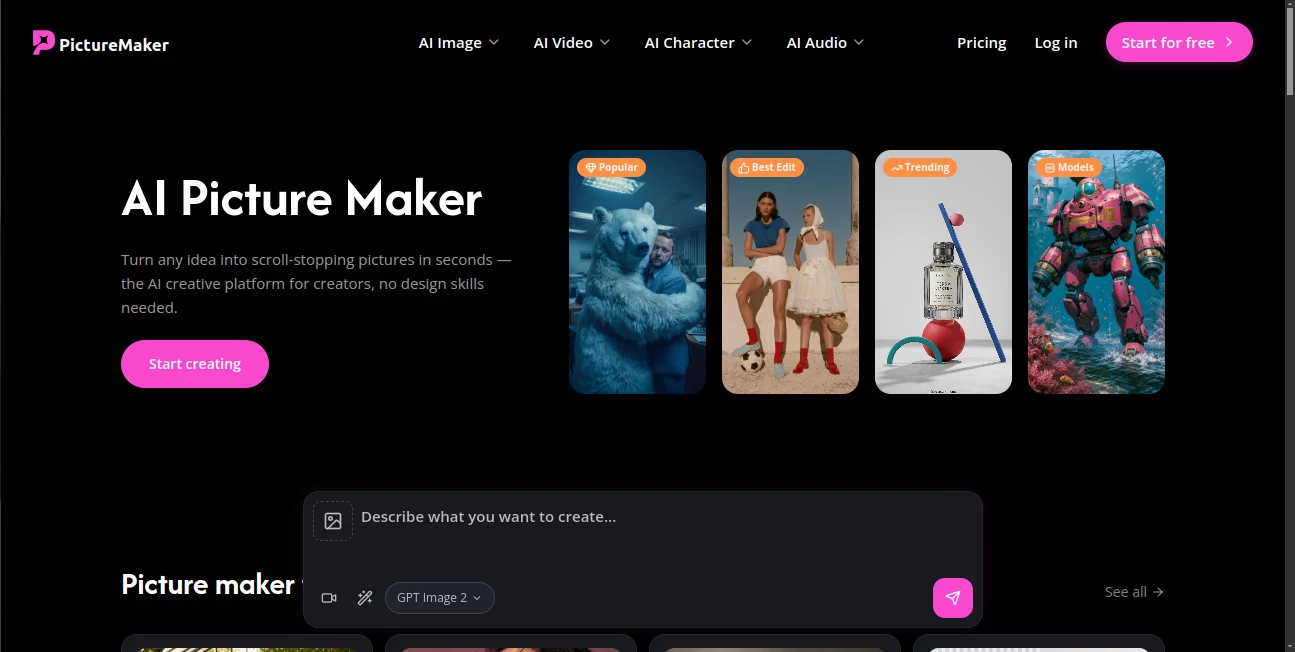
What is Picture Maker?
PictureMaker.ai is an AI-powered image creation platform designed to help users transform ideas into visually impressive artwork, illustrations, and creative images with minimal effort. By combining modern artificial intelligence technology with an easy-to-use workflow, the platform allows creators, marketers, designers, and everyday users to produce unique visuals without needing advanced graphic design skills.
Whether you need social media graphics, creative concepts, marketing visuals, character designs, or artistic experiments, this tool provides a fast way to turn imagination into professional-looking images. Instead of spending hours learning complicated design software, users can simply describe what they want and let AI handle the creative process.
The platform focuses on making AI image generation accessible for everyone, from beginners exploring digital creativity to professionals looking for a faster way to create visual assets.
Key Features
User Interface
The platform offers a clean and straightforward interface that makes image creation simple. Users can start generating artwork by entering a description and adjusting their creative preferences without dealing with complicated settings.
The user experience is designed around speed and simplicity. Even people with no previous experience in AI tools or digital design can quickly understand the workflow and begin creating images.
- Simple prompt-based image creation
- Beginner-friendly workflow
- Fast access to creative tools
- Easy image generation process
- Minimal learning curve for new users
Accuracy & Performance
The platform uses AI models to interpret text descriptions and convert ideas into detailed visual outputs. The quality of generated images depends on the clarity of the prompt, allowing users to experiment with different descriptions to achieve their preferred style and result.
From realistic scenes to imaginative artwork, the system is designed to understand creative instructions and generate visuals that match the user's intent. It is especially useful for quickly exploring concepts before moving into final production.
- AI-powered image generation
- Fast creative output
- Support for different artistic styles
- Prompt-based customization
Capabilities
This tool provides a flexible environment for creating various types of digital images. Users can explore different visual directions, experiment with artistic ideas, and generate content for both personal and professional projects.
- AI-generated artwork
- Creative concept visualization
- Digital illustrations
- Marketing image creation
- Social media visual production
- Creative inspiration and brainstorming
Security & Privacy
Privacy and responsible use are important considerations when working with AI-generated content. Users should review the platform's policies regarding uploaded content and generated images, especially when creating commercial materials or using personal images.
As with any online AI service, users should avoid sharing sensitive personal information and ensure that generated content follows applicable copyright and usage guidelines.
Use Cases
PictureMaker.ai can support a wide range of creative needs across different industries and user groups. Content creators can use it to generate fresh visuals for posts, campaigns, and online communities, while businesses can create promotional graphics without hiring a designer for every small project.
- Social Media Content: Create eye-catching images for Instagram, Facebook, TikTok, and other platforms.
- Marketing: Generate promotional visuals, advertising concepts, and campaign ideas.
- Design Inspiration: Explore creative directions before starting a full design project.
- Blogging: Produce custom illustrations and featured images for articles.
- Education: Create visual learning materials and creative examples.
- Personal Projects: Design wallpapers, artwork, and unique digital creations.
Pros and Cons
Pros
- Easy for beginners to use
- Speeds up the creative process
- No advanced design knowledge required
- Useful for many creative industries
- Helps users turn ideas into visuals quickly
Cons
- Results depend heavily on prompt quality
- Some complex ideas may require multiple attempts
- Professional designers may need additional editing tools
Pricing Plans
Pricing availability may vary depending on the platform's current subscription options. Users should check the latest plans directly through the service to understand available free features, credits, or premium capabilities.
AI image tools commonly offer different access levels, allowing beginners to test creative features while providing advanced options for users who need higher usage limits and additional functionality.
How to Use PictureMaker.ai
Creating images with this platform is designed to be a simple process. Users can follow a few basic steps to bring their ideas to life.
- Open the image creation platform.
- Enter a detailed description of the image you want to generate.
- Choose preferred creative options if available.
- Generate the image and review the result.
- Adjust the prompt to refine the output when needed.
For better results, users should describe important details such as style, colors, environment, mood, and visual elements they want included.
Comparison with Similar Tools
Compared with many traditional design applications, AI image generators provide a faster approach to visual creation by removing the need to manually build every element. Instead of starting with a blank canvas, users begin with an idea and allow artificial intelligence to create a foundation.
While professional platforms may offer deeper editing controls, this solution focuses on accessibility and speed. It is a strong choice for users who want quick creative results without spending significant time learning complex design software.
Conclusion
PictureMaker.ai provides an accessible way to explore AI-powered creativity and transform written ideas into engaging visuals. Its simple workflow makes image generation approachable for beginners while still offering value for creators, marketers, and businesses looking to produce content faster.
For anyone searching for a practical way to experiment with digital art, create marketing assets, or visualize new concepts, this platform offers an efficient and enjoyable creative experience.
Frequently Asked Questions (FAQ)
What is PictureMaker.ai used for?
It is used for creating AI-generated images, artwork, and visual concepts from user descriptions.
Do I need design experience to use it?
No. The platform is designed for beginners and does not require advanced graphic design knowledge.
Can it create images for business purposes?
Yes. Users can create visuals for marketing campaigns, social media content, presentations, and other business-related projects.
How can I improve AI-generated image results?
Using detailed prompts with information about style, composition, colors, and mood usually helps produce better results.
Is AI image generation suitable for professional designers?
Yes. Designers can use AI-generated visuals for inspiration, concept development, and accelerating early creative stages.
AI Photo & Image Generator , AI Art Generator , AI Text to Image .
These classifications represent its core capabilities and areas of application. For related tools, explore the linked categories above.

Picture Maker Alternatives Product

ChatGPT Imag…

Lovable

Krea 2

Seedream 4.5

ArchOne AI

Nano Banana 2

GPT Imagine

Freepik

Nano Banana …