
PoloX AI
What is PoloX AI?
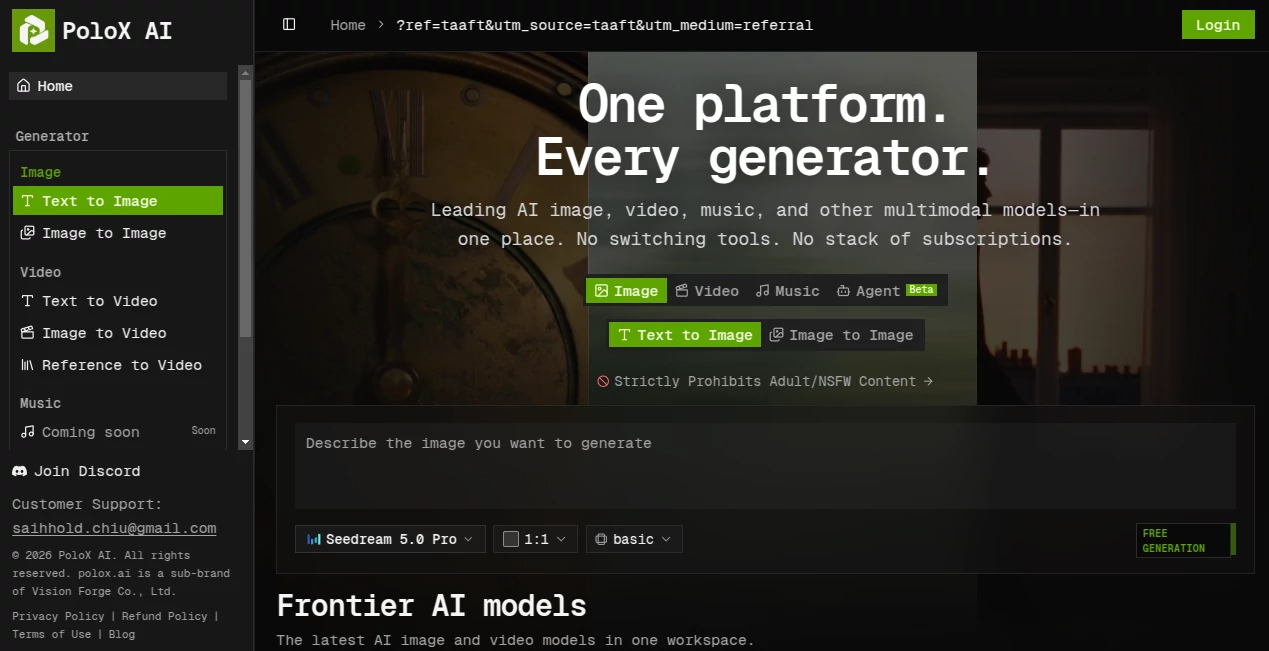
PoloX AI brings a wide range of modern generative AI models into a single workspace, giving creators a simpler way to experiment with images and video without constantly moving between different platforms. Instead of maintaining several subscriptions or learning a new interface for every model, users can work from one place and choose the generation method that fits their project.
The platform currently focuses on image and video generation, with music generation listed as an upcoming capability. Its model collection includes systems from major AI developers such as OpenAI, Google, ByteDance, Black Forest Labs, MiniMax, and Alibaba. This makes it particularly interesting for creators who want to compare different generation approaches while keeping their workflow in one environment.
Key Features
- Text-to-image generation for turning written prompts into visual content.
- Image-to-image generation for transforming or reworking existing visuals.
- Text-to-video generation for creating moving content from descriptions.
- Image-to-video generation for animating existing images.
- Reference-to-video workflows for creating videos based on reference material.
- Access to multiple current-generation AI models through one workspace.
- Built-in background removal for producing transparent PNG images.
- Project management features for keeping generated work organized.
- A planned AI agent designed to select models and manage multi-step generation workflows.
User Interface
The interface is built around a straightforward generator workflow. Users can select an image or video mode, choose the appropriate generation model, adjust available options such as aspect ratio and quality, and then generate their result. The navigation also separates image, video, and upcoming music functionality, making it easier to find the right creative workflow.
This approach is useful for people who have tried several generative platforms and are tired of switching dashboards. Everything feels centered around the actual creative task rather than making users learn a complicated collection of separate products.
Accuracy & Performance
Performance depends heavily on the selected model and the type of generation being requested. One of the platform's strongest advantages is model choice: users can work with several well-known image and video systems instead of being locked into a single generation engine.
The available lineup includes Seedream 5.0 Pro, GPT Image 2, Nano Banana 2, Nano Banana Pro, Flux 3, Seedance 2.5, MiniMax H3, and Wan 3.0, with different models supporting text-to-image, image-to-image, text-to-video, image-to-video, or reference-to-video workflows.
Capabilities
The image side is suitable for creating new artwork from text prompts as well as modifying existing images. For video creators, the platform provides several routes into generation, including text-driven video creation, image animation, and reference-based video generation.
Another appealing feature is the model variety. A creator working on a product visual might prefer one image model, while someone producing a cinematic concept clip may choose an entirely different video model. Having these options together makes experimentation much more practical.
The upcoming agent feature is also worth watching. According to the platform, it is intended to plan generation workflows, select suitable models, and execute multiple steps automatically rather than requiring users to manually connect different tools.
Security & Privacy
The platform publishes dedicated Privacy Policy and Terms of Use pages, providing users with formal documentation around the service. It also explicitly prohibits adult and NSFW content. Users should review the platform's current privacy and usage policies before uploading sensitive or confidential material, particularly when working with client-owned assets.
Use Cases
There are plenty of practical ways to use this type of multi-model workspace. Graphic designers can explore different image-generation models when developing concepts, advertisements, illustrations, or product visuals. Social media creators can generate images and short video concepts without maintaining multiple AI subscriptions.
Marketing teams can use text-to-image tools for campaign concepts, while video teams can turn still artwork into motion or experiment with different video-generation models. It can also be useful for creative exploration: rather than deciding in advance which AI model is best, users can test several approaches and keep the results that fit their project.
Pros and Cons
- Pros: Multiple leading AI models in one workspace.
- Pros: Supports both image and video generation workflows.
- Pros: Includes text-to-image, image-to-image, text-to-video, image-to-video, and reference-to-video options.
- Pros: Reduces the need to switch between different AI platforms.
- Pros: Includes useful image utilities such as background removal.
- Cons: Some planned capabilities, including music generation and the AI agent, are not yet available.
- Cons: Output quality and generation behavior can vary between models.
- Cons: Users looking for only one specific model may find the broader workspace unnecessary.
Pricing Plans
The platform includes a billing section for managing usage, but the exact pricing and credit structure may change as new models and generation capabilities are introduced. Because generation costs can differ considerably between image and video models, checking the current billing information before purchasing is recommended.
How to Use the Platform
- Open the platform and sign in to your account.
- Choose an image or video generation workflow.
- Select the model that matches the type of result you want.
- Enter a detailed prompt or provide an image when the selected workflow supports it.
- Adjust available settings such as aspect ratio or quality.
- Start the generation and review the result.
- Use another model or workflow when you want to explore a different visual direction.
Comparison with Similar Tools
Many generative AI services specialize in one model, one media type, or a relatively narrow creative workflow. This platform takes a different approach by acting as a central workspace for multiple image and video generators. That distinction is important for users who regularly compare models or want access to different generation styles.
Compared with using several independent subscriptions, a unified workspace can make experimentation more convenient. On the other hand, specialized platforms may provide deeper controls around a particular model or creative discipline. The better choice therefore depends on whether flexibility or specialization matters more for the project.
Conclusion
This is a compelling option for creators who want access to a broad selection of modern image and video generation models without building their workflow around a collection of separate services. Its biggest strength is the combination of model variety and a unified workspace.
The current image and video capabilities already make it useful for creative experimentation, marketing content, visual development, and production work. With music generation and the planned agent workflow still on the roadmap, the platform also has room to become an even more comprehensive creative environment.
Frequently Asked Questions (FAQ)
What can I generate?
You can currently work with image and video generation workflows, including text-to-image, image-to-image, text-to-video, image-to-video, and reference-to-video generation.
Which AI models are available?
The available lineup includes models from companies such as OpenAI, Google, ByteDance, Black Forest Labs, MiniMax, and Alibaba. The exact model selection can change as new systems are added.
Can I use my own images?
Yes. Image-to-image and image-to-video workflows are available, allowing supported models to work from existing visual material.
Does it support video generation?
Yes. Video workflows include text-to-video, image-to-video, and reference-to-video generation.
Is music generation available?
Music generation is listed as a coming-soon capability rather than a currently available generator.
Does it allow NSFW content?
No. The platform explicitly states that adult and NSFW content is prohibited.
Who is this platform best for?
It is particularly suitable for designers, marketers, social media creators, video producers, and anyone who wants to experiment with multiple generative AI models from one workspace.
AI Photo & Image Generator , AI Video Generator , AI Image to Image , AI Text to Image .
These classifications represent its core capabilities and areas of application. For related tools, explore the linked categories above.

PoloX AI Alternatives Product

Nano Banana 2
Kling 3.0
BeadPattern
Kling 4.0 AI
AniFlow AI

Happy Horse
seedream 6

Hairstyle An…
Caricature A…