Productokit
What is Productokit?
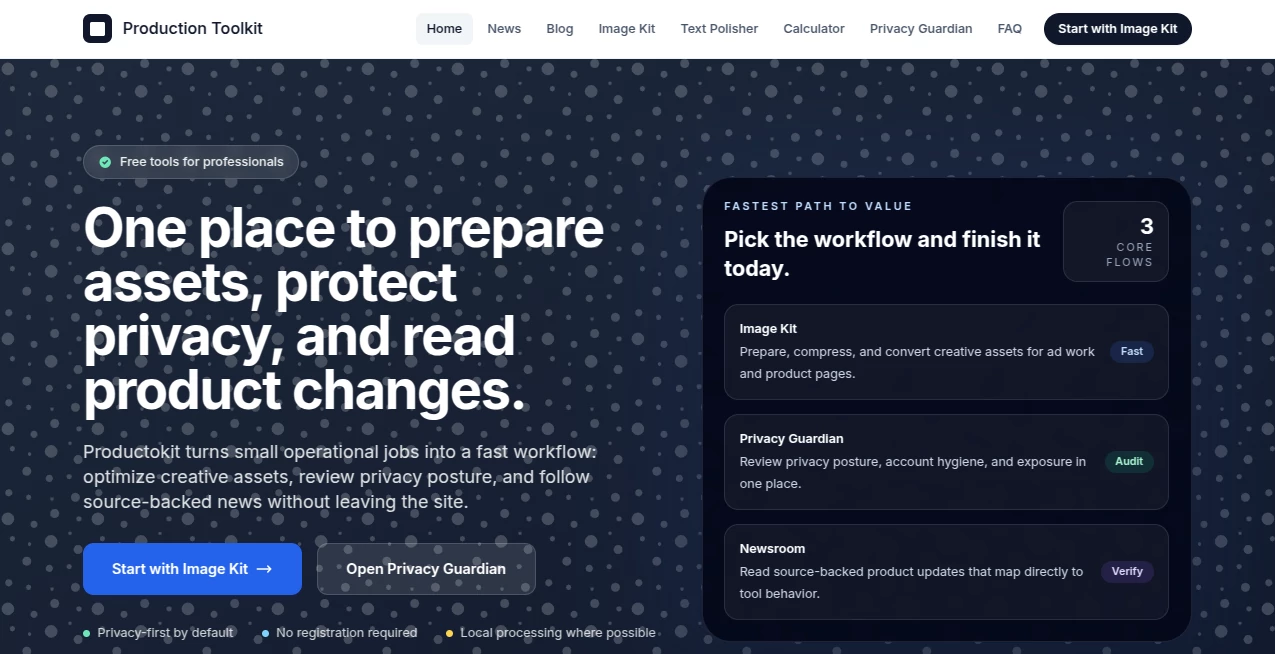
Running Google Ads campaigns or managing Workspace workflows often means juggling dozens of small but critical tasks — compressing images to the right size, checking privacy exposure, cleaning exported data, or staying on top of platform changes. Productokit brings these scattered jobs into one clean, privacy-conscious space. No accounts forced on you, no unnecessary data uploads, just practical tools that get the job done quickly. I’ve seen marketing teams cut hours off their weekly prep work after switching to this toolkit, and compliance folks breathe easier knowing their checks happen locally where possible. It’s the kind of quiet efficiency that makes you wonder how you managed before.
Introduction
Most marketing and operations professionals spend too much time switching between tabs, tools, and checklists. Productokit simplifies that reality by offering a focused collection of utilities built specifically for people working inside the Google ecosystem. From image optimization for Performance Max campaigns to privacy audits and text polishing, everything is designed with speed and data respect in mind. The platform shines because it avoids the usual bloat — no heavy sign-ups for basic use, strong preference for local processing, and clear, source-backed updates in its newsroom. It feels like a reliable workshop rather than another flashy dashboard you’ll abandon after a week.
Key Features
User Interface
The design is refreshingly straightforward. Each tool lives in its own clean module, with intuitive controls that don’t require a manual. Image Kit gives you drag-and-drop with instant previews, Privacy Guardian presents clear scoring and checklists, and the overall navigation lets you jump between workflows without losing context. It’s built for professionals who want to get in, finish the task, and get out — no gamification or unnecessary animations getting in the way.
Accuracy & Performance
The tools deliver dependable results. Image compression hits the sweet spot for Google Ads size limits while preserving visual quality. Privacy checks surface real risks without false alarms. Text polishing cleans formatting and improves readability without changing your voice. Everything runs fast, even on larger batches, and the local-first approach means sensitive files often never leave your device. The consistency builds trust — you know what you’ll get each time.
Capabilities
Image Kit handles batch compression, format conversion (including WebP), and optimization tailored for ads and product pages. Privacy Guardian offers breach detection, privacy scoring, GDPR assistance, and account hygiene reviews. Additional utilities include text polishing for clean exports and financial calculators for quick projections. The newsroom ties it all together with source-backed updates that directly relate to how the tools work. It’s a compact but powerful production suite for marketers and operations teams.
Security & Privacy
Privacy is baked in from the start. Many operations run locally, no registration is required for core tools, and data handling stays minimal and transparent. This approach gives real confidence when working with client assets, campaign data, or internal records. In an industry full of tools that demand broad permissions, the privacy-first stance here feels refreshing and responsible.
Use Cases
Google Ads specialists use Image Kit to prepare compliant creatives quickly before uploading to Performance Max. Compliance teams run regular privacy posture checks without juggling multiple services. Content marketers polish exported reports and clean data before stakeholder presentations. Agencies onboard new clients faster by using the toolkit as a standardized production workflow. Solo operators and small teams especially appreciate how it replaces several disconnected tools with one reliable hub.
Pros and Cons
Pros:
- Strong focus on privacy with local processing where possible.
- No-forced accounts — you can start using core tools immediately.
- Practical, production-oriented features built for real Google workflows.
- Clean, fast interface that respects your time.
- Newsroom ties platform changes directly to tool usage.
Cons:
- Still growing — not every possible utility is available yet.
- Some advanced batch or automation features may require upgrades.
- Best results come when you understand the Google Ads/Workspace context.
Pricing Plans
The platform keeps the core experience accessible with strong free capabilities and no-registration entry points. Paid plans unlock higher usage limits, advanced features, priority processing, and additional tools as they roll out. It’s priced sensibly for professionals and teams who save meaningful time each week — many users find the return on investment clear after the first month of regular use.
How to Use Productokit
Head to any tool directly — no sign-up needed for starters. For Image Kit, drag in your creatives, choose optimization settings, and export ready-to-upload assets. In Privacy Guardian, run scans and review clear recommendations. Use the newsroom to stay current on changes that affect your workflow. For repeated tasks, many teams bookmark their favorite modules and build simple habits around them. The whole experience is designed to feel like a helpful colleague rather than another piece of software you have to learn.
Comparison with Similar Tools
Many marketing suites feel bloated or demand full account access. Others focus on one narrow task and force you to use multiple platforms. Productokit stands out by staying focused on practical Google-centric workflows while putting privacy and simplicity first. It’s lighter than enterprise platforms but more production-ready than scattered free tools. For teams that value speed, trust, and minimal overhead, it often becomes the preferred daily driver.
Conclusion
Good marketing and operations work happens when the small things stop slowing you down. Productokit handles those small but important tasks with care, speed, and respect for your data. It’s not trying to be everything — it’s trying to be reliably good at the things that matter most when you’re preparing campaigns, protecting privacy, or staying informed. For professionals working inside the Google ecosystem, it’s one of those tools that quietly makes every day smoother and more productive.
Frequently Asked Questions (FAQ)
Do I need an account to use the tools?
No — many core functions work without registration.
Is my data safe?
Yes — strong emphasis on local processing and minimal data retention.
Can I process multiple images at once?
Yes — batch capabilities are available, especially on paid plans.
How does it help with Google Ads specifically?
Image optimization, format conversion, and size compliance tools are built with ad platform requirements in mind.
Is it suitable for agencies?
Absolutely — many agencies use it to standardize workflows and improve delivery speed for clients.
AI Documents Assistant , AI Productivity Tools , AI E-commerce Assistant .
These classifications represent its core capabilities and areas of application. For related tools, explore the linked categories above.

Productokit Alternatives Product

Odysseus AI

CapyQR

Monkey Eatin…
AltHunt

ShipBoost

Sales Prospe…

Neurohelper

Free AI Chat

Create Filla…