
Routine
What is Routine?
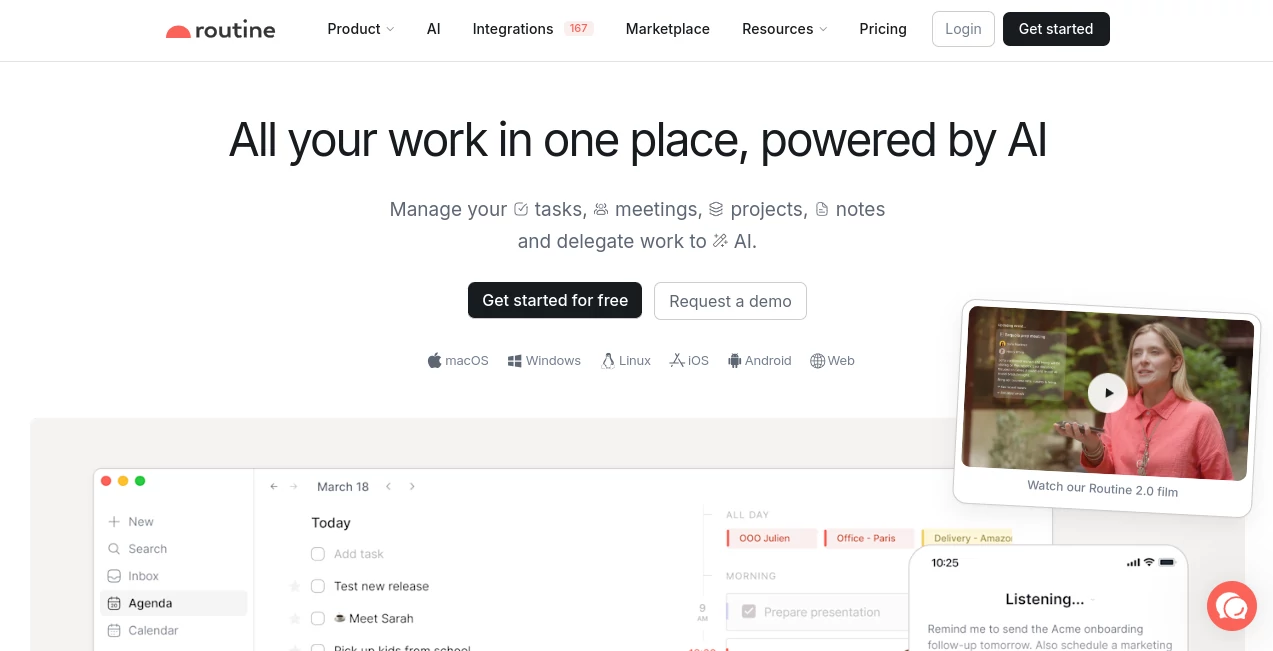
Routine brings tasks, calendars, meetings, notes, projects, contacts, and AI-powered assistance into one workspace designed for people who are tired of jumping between disconnected productivity apps. Its main idea is refreshingly practical: instead of keeping your schedule in one application, tasks in another, and notes somewhere else, you can organize them side by side and see how your work actually fits into your day.
The platform is built for busy professionals, founders, freelancers, managers, and teams that need a clearer view of what needs to happen and when. It combines a flexible planner with task management, time blocking, notes, integrations, automation, and AI features. More than 100,000 professionals and teams are reported to use it worldwide.
One of the most useful aspects is the relationship between tasks and calendar events. A task is not simply something sitting on a checklist; it can become part of your actual schedule. That small distinction can make weekly planning feel much more realistic.
Key Features
- Unified calendars for personal and professional schedules.
- Task management with priorities, labels, projects, and recurring tasks.
- Time blocking and time boxing for structured daily planning.
- AI assistant and voice commands for capturing and organizing work.
- AI meeting notes with transcription, summaries, and action items.
- AI agents and automations for repetitive workflows.
- Universal inbox for centralizing tasks, messages, and notifications.
- Custom databases and user-defined data types.
- Time tracking and task-specific timers.
- Contextual capture for keeping the original source of information.
- Offline functionality with a local-first architecture.
- Integrations that synchronize information across connected services.
- Support for macOS, Windows, Linux, iOS, Android, and the web.
User Interface
The interface is designed around a central workspace rather than a collection of isolated tools. The planner puts tasks and calendar events together, while the dashboard provides a quick place to capture thoughts, create tasks, and organize information.
The calendar supports several layouts, including week, multi-day, and month views. Drag-and-drop scheduling makes it possible to move important tasks directly into available blocks of time. For someone who likes to plan a week on Sunday evening, this approach can be much more useful than simply looking at an empty calendar and hoping the work gets done.
There are also keyboard shortcuts, natural-language commands, a menu bar widget, search, customizable menus, and flexible views. These details help the product feel less like a rigid planner and more like a workspace that can adapt to different working habits.
Accuracy & Performance
Its performance philosophy is closely connected to its local-first design. Core information such as tasks, events, notes, projects, and contacts can remain available locally, allowing the application to continue working without an internet connection. Cloud synchronization is used to keep information consistent across devices and users.
The AI features are useful for reducing manual work rather than replacing human judgment. Voice commands can be used to capture tasks or reorganize a schedule, while meeting features can transcribe conversations, summarize discussions, and identify action items. As with any AI-generated output, important information should still be reviewed before it is relied upon.
Capabilities
The breadth of the platform is where it becomes particularly interesting. A freelancer can track client work, record time, manage meetings, and organize notes without maintaining several separate systems. A manager can connect projects, meetings, contacts, tasks, and documentation. A founder can use custom data types and databases to build workflows around the way the company actually operates.
The platform also supports AI agents and automations. These can handle more involved processes, such as researching information, structuring data, and interacting with connected services. Its Model Context Protocol support can also allow compatible AI clients to interact with tasks, calendar events, pages, contacts, workspaces, and databases through a local authenticated connection.
Security & Privacy
Privacy is an important part of the platform's architecture. It uses a local-first approach in which data is stored locally on the user's device by default, while cloud services are used for synchronization. The company states that data is encrypted in transit with TLS 1.2 or higher and encrypted at rest using AES-256.
The service also states that its infrastructure uses SOC 2-compliant cloud platforms and that it follows privacy practices associated with regulations such as GDPR and CCPA. Authentication includes email/password and OAuth 2.0 options for third-party integrations.
For AI functionality, the company states that its AI model is trained on private datasets. Its privacy documentation also explains that AI features can involve processing submitted content and that third-party providers may process relevant data when required to deliver specific functionality. Users should therefore review the privacy terms and integration permissions before connecting sensitive business information.
Use Cases
- Professionals: Combine calendars, tasks, notes, and daily planning in one workspace.
- Founders: Keep strategic priorities, meetings, projects, and company information connected.
- Freelancers: Manage customers, tasks, projects, meetings, and time tracking for billing and reporting.
- Managers: Coordinate people, projects, objectives, meetings, and recurring responsibilities.
- Remote teams: Centralize information and connect work from multiple services.
- Students and individuals: Plan schedules, recurring activities, notes, and personal projects.
- AI-focused workflows: Use voice commands, AI assistants, agents, automations, and MCP connections to reduce repetitive work.
Pros and Cons
Pros
- Combines calendars, tasks, notes, and projects in one environment.
- Strong time-blocking and weekly planning capabilities.
- Useful AI assistant and voice-based capture features.
- AI meeting notes can turn conversations into actionable tasks.
- Local-first architecture provides a strong offline experience.
- Custom databases make the workspace highly adaptable.
- Available across desktop, mobile, web, and Linux.
- Supports integrations and automation for more advanced workflows.
Cons
- The large feature set may take some time to explore.
- Advanced AI and automation capabilities are concentrated in higher-priced plans.
- Users looking for a very simple to-do list may find the broader workspace more than they need.
- Some advanced capabilities are dependent on the selected subscription tier.
Pricing Plans
The current pricing structure starts with a free plan, making it possible to test the core experience without paying upfront. The Free plan includes tasks, calendars, notes, an AI assistant, AI voice commands, offline mode, three integrations, three custom databases, and 250 AI credits.
- Free: $0 and available indefinitely, with core productivity features and 250 AI credits.
- Personal: $5 per month, adding time blocking, time boxing, exporting, unlimited file uploads, 10 integrations, 10 custom databases, and 500 AI credits.
- Professional: $10 per month, adding AI meeting notes, AI agents, AI automations, time tracking, contextual capture, unlimited integrations, unlimited custom databases, and 7,000 AI credits.
- Business: $15 per seat per month, adding organization features, workspaces, access controls, versioning, consolidated billing, priority support, and 10,000 AI credits per seat.
- Enterprise: Custom pricing with additional security, compliance, audit, analytics, provisioning, and support capabilities.
Pricing and included features can change, so the current plan details should be checked before purchasing.
How to Use the Platform
Start by creating an account and connecting the calendars and services you use regularly. Once the basic workspace is ready, bring your tasks and important information into the planner so your commitments and available time can be viewed together.
For daily work, capture new tasks from the dashboard or use natural-language commands. Give important tasks a date and place them into specific calendar blocks. Recurring responsibilities can be scheduled once and repeated automatically.
Meetings can be handled inside the same workspace, with AI-powered notes helping turn discussions into summaries and follow-up actions. As your workflow grows, custom databases, views, integrations, agents, and automations can be introduced gradually rather than configured all at once.
Comparison with Similar Tools
Compared with a traditional task manager, the biggest difference is the emphasis on time management and the calendar. Tasks are designed to live alongside actual events, making it easier to answer a practical question: when will this work actually get done?
Compared with a flexible workspace such as Notion, the experience is more centered around daily execution, scheduling, and connected work. Custom databases and data relationships still provide plenty of flexibility, but users do not necessarily need to build an elaborate system before they can start planning their week.
Compared with dedicated calendar planners such as Akiflow or Morgen, the platform goes further into notes, databases, AI agents, automation, project organization, and connected business workflows. The result is less of a single-purpose planner and more of an integrated operating environment for personal and professional work.
Conclusion
Routine is a strong choice for anyone who feels that productivity suffers more from scattered information than from a lack of task lists. Its strongest idea is simple: connect the work that needs to be done with the time available to do it, then add notes, meetings, projects, automation, and AI around that foundation.
The local-first architecture, flexible data model, cross-platform support, and increasingly capable AI features give it room to serve both individuals and growing teams. It may be more powerful than necessary for someone who only wants a basic checklist, but for professionals who want their calendar, tasks, notes, and workflows to work together, it offers a compelling alternative to maintaining a collection of disconnected productivity apps.
Frequently Asked Questions (FAQ)
Is there a free plan?
Yes. The Free plan is available indefinitely and includes tasks, calendars, notes, an AI assistant, voice commands, offline mode, three integrations, three custom databases, and 250 AI credits.
Does it work offline?
Yes. The platform uses a local-first architecture, allowing core data and functionality to remain available without an internet connection. Cloud synchronization is used when connectivity is available.
Can I use it on mobile?
Yes. Mobile applications are available for iOS and Android, alongside versions for macOS, Windows, Linux, and the web.
Can it manage tasks and calendar events together?
Yes. Its planner is designed specifically to display tasks and calendar events together, making it possible to schedule work and use time blocking to protect time for important tasks.
Does it include AI meeting notes?
Yes. AI meeting notes can transcribe and summarize meetings and turn action items into tasks. This capability is included in the Professional plan and above.
Can I create custom databases?
Yes. Custom databases and data types allow users and teams to structure information around their own workflows, such as customers, projects, candidates, initiatives, or other business entities.
Is it suitable for teams?
Yes. Business and Enterprise plans add organizational workspaces, access control, versioning, consolidated billing, compliance features, analytics, and other capabilities designed for larger teams.
Does it support AI automation?
Yes. Professional and higher plans include AI agents and AI automations designed to help with research, data structuring, connected services, and repetitive workflows.
AI Productivity Tools , AI Task Management , AI Meeting Assistant , AI Scheduling .
These classifications represent its core capabilities and areas of application. For related tools, explore the linked categories above.

Routine Alternatives Product

Skywork Supe…

AI Agent Ski…

Workik

Rierino
Wisegrid

photo to URL

Jamy.ai | Au…

Remove My Me…

Wild and Fre…