Seedream 5.0 AI Image Generator
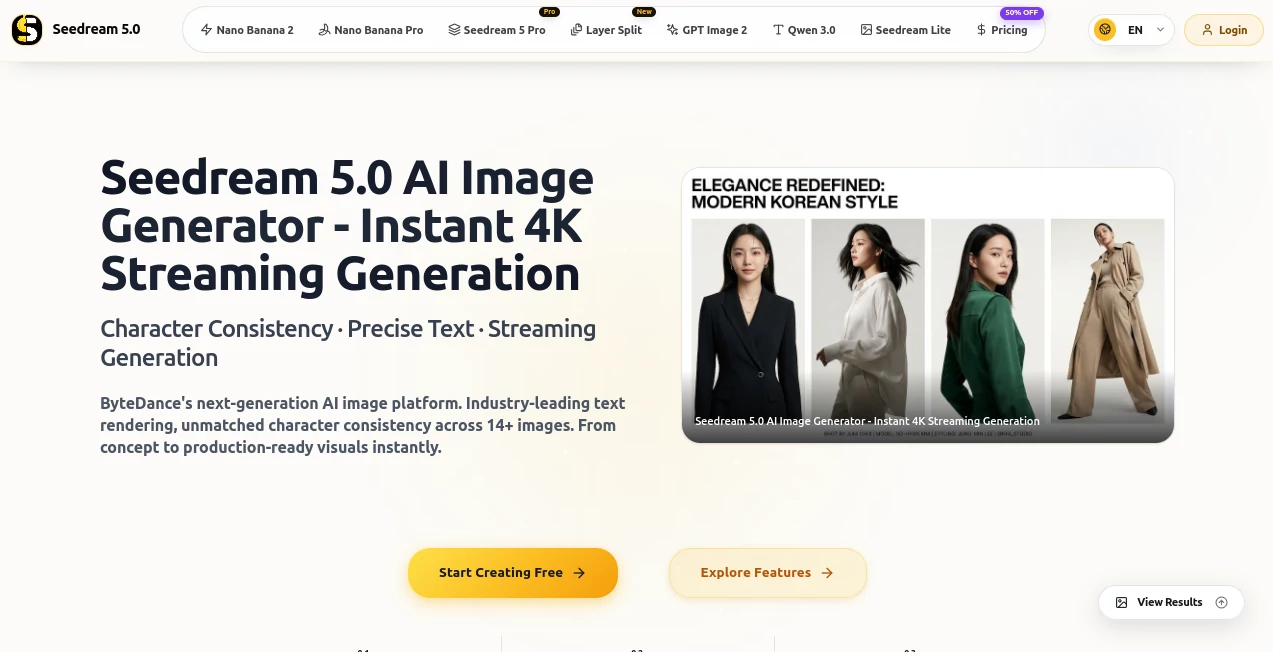
What is Seedream 5.0 AI Image Generator?
Creating a polished visual often takes more than simply writing a prompt. Text needs to appear correctly, products need to stay recognizable, and characters should look consistent from one scene to the next. This AI image creation platform is designed around those practical challenges, giving creators a browser-based workspace for turning ideas and reference images into production-ready visuals.
Its strongest focus is on detailed image generation, accurate typography, consistent subjects, and high-resolution output. Users can work from a text description, upload reference material, or combine several images to guide a new composition. The platform supports both creative experimentation and more structured commercial work, making it useful for designers, marketers, e-commerce teams, agencies, and independent creators.
One particularly useful feature is the ability to work with up to 14 reference images. Imagine preparing a product campaign where the same packaging, model, colors, and visual direction need to appear across several images. Instead of starting from scratch every time, those references can help maintain a more coherent visual language.
Key Features
- Native image generation at resolutions up to 4096×4096.
- Text-to-image and image-to-image workflows.
- Support for up to 14 reference images for consistency-focused projects.
- Multi-image fusion for combining subjects, styles, and compositions.
- Natural-language image editing.
- Precise text rendering for posters, labels, banners, and other text-heavy designs.
- Built-in Canny edge, depth, and mask controls.
- Generation of multiple variations for faster creative exploration.
- Commercial-ready output on paid plans.
- Workflow options suitable for both individual creators and business teams.
User Interface
The interface keeps the main creation process straightforward. A creator can begin with a prompt or reference image, select the desired aspect ratio and generation settings, and then review the resulting images in the workspace. The platform also provides image history and preset-oriented workflows, which can make repeated projects easier to manage.
For someone who normally jumps between an image generator, an editor, and an upscaling service, having generation and editing controls in one place can save a surprising amount of time. The experience is particularly appealing to users who want creative control without dealing with a complicated professional design application.
Accuracy & Performance
Performance is one of the platform's major selling points. Its website states that typical generations can be produced in around 2–3 seconds, while the underlying workflow is designed for rapid iteration. That matters when developing several concepts for an advertisement, product page, social post, or presentation.
Image quality is also geared toward demanding visual work. Native 4K output can reach 4096×4096, while the reference-image system is designed to preserve important characteristics across multiple generations. The platform also highlights strong text rendering, including multi-line layouts and multilingual characters.
Capabilities
The tool covers considerably more than basic text-to-image generation. Users can create new images from written descriptions, transform existing images, blend multiple references, and make targeted changes through natural-language instructions.
The multi-image workflow is especially useful for storytelling and product design. A creator could provide several product angles, a preferred visual style, and a character reference, then use the resulting composition as the foundation for a campaign or storyboard.
For more controlled work, Canny, depth, and mask controls provide additional ways to influence structure and specific regions of an image. This gives experienced creators more room to direct the result instead of relying entirely on a single prompt.
Security & Privacy
The platform's privacy policy states that it may collect information such as email addresses, usage data, social media information, and cookies. It says this information can be used to provide and maintain the service, manage accounts, analyze usage, respond to requests, and improve the platform.
Users can request deletion of their personal data through account settings or by contacting support. The privacy policy also notes that reasonable measures are used to protect personal information, while acknowledging that absolute security cannot be guaranteed.
There is an additional point worth considering for business users: the terms state that users retain ownership of uploaded and generated content, while granting the service a broad license to use submitted content for operating, improving, and promoting the service. Businesses handling confidential client material should therefore review the current privacy policy and terms before uploading sensitive assets.
Use Cases
- Marketing campaigns: Create advertising visuals, promotional banners, campaign concepts, and social media graphics.
- E-commerce: Produce product scenes, lifestyle compositions, catalog imagery, and branded product visuals.
- Poster design: Generate text-heavy promotional posters and layouts without manually recreating every element.
- Character storytelling: Maintain a recognizable character across different poses, environments, and camera angles.
- Brand design: Explore packaging, visual identities, campaign concepts, and branded compositions.
- Content creation: Produce illustrations, thumbnails, editorial visuals, and supporting imagery for online content.
- Storyboarding: Combine reference images and consistent subjects to develop visual sequences.
- Creative experimentation: Quickly test different compositions, lighting choices, styles, and visual directions.
Pros and Cons
Pros
- Native output up to 4096×4096.
- Strong focus on text rendering inside generated images.
- Up to 14 reference images for consistency-driven projects.
- Text-to-image, image-to-image, and editing workflows in one environment.
- Useful controls for more precise image manipulation.
- Fast generation makes rapid iteration practical.
- Paid plans include commercial usage rights.
Cons
- Higher-volume workflows require a paid credit plan.
- Credits are consumed during generation and editing.
- Users working with sensitive commercial material should review the service terms before uploading confidential assets.
- Some advanced capabilities may be more useful to professional creators than casual users.
Pricing Plans
The platform uses a credit-based subscription model. New users can receive 10 free credits without providing a credit card, allowing them to test the generation workflow before committing to a paid plan.
- Basic: $7.99 per month for 360 credits, approximately 180 images, standard generation speed, commercial-ready output, and email support.
- Pro: $25.90 per month for 1,320 credits, approximately 660 images, priority processing, advanced editor controls, and priority support.
- Max: $59.90 per month for 3,600 credits, approximately 1,800 images, faster processing, permanent cloud storage, extended commercial licensing, and a dedicated account manager.
Pricing and promotional offers can change, so users should check the current plan details before subscribing. The service also notes that credit consumption can vary depending on factors such as resolution and more complex image operations.
How to Use It
- Open the image generation workspace and choose a text-to-image or image-to-image workflow.
- Describe the visual you want using a clear, specific prompt.
- Upload reference images when consistency, product appearance, character identity, or visual style matters.
- Select the preferred aspect ratio and resolution.
- Use additional controls such as edge, depth, or masks when greater structural precision is needed.
- Generate the image and compare the available variations.
- Refine the prompt or edit the result with natural-language instructions.
- Export the finished visual when it meets your requirements.
A practical approach is to start with one strong reference image and a simple description rather than filling the prompt with unnecessary details. Once the composition looks right, add references and more precise instructions to refine the result.
Comparison with Similar Tools
Many AI image generators are excellent at producing attractive artwork from short prompts, but this platform takes a more production-oriented approach. Its emphasis on typography, reference-image consistency, multi-image fusion, and native 4K output makes it particularly interesting for users creating assets that need to be reused across a campaign.
Compared with a general-purpose image generator, the strongest advantage here is the workflow around consistency. A designer developing a series of product advertisements, for example, may care less about producing one impressive image and more about keeping the same product details, character appearance, and visual direction throughout an entire collection.
It is not necessarily the right choice for every creative project. Casual users who only want occasional artistic experiments may prefer a simpler generator, while professionals producing commercial assets can benefit more from the additional controls and higher-resolution workflow.
Conclusion
This is a compelling option for creators who want AI-generated visuals that can move beyond experimentation and into real production work. Native 4K generation, reference-based consistency, multi-image fusion, detailed editing controls, and strong text rendering address several of the frustrations that commonly appear when AI-generated images are used for advertising or commercial design.
Its pricing also gives individual creators a relatively accessible starting point, while larger plans are aimed at users producing images at much higher volume. If your projects involve posters, product imagery, branded campaigns, character series, or other visuals where consistency matters, this platform is worth testing with a few real-world prompts rather than judging it from generic examples alone.
Frequently Asked Questions (FAQ)
Can it generate 4K images?
Yes. The platform supports native output up to 4096×4096, allowing creators to work with high-resolution assets without relying on an external upscaling step.
Can I use reference images?
Yes. Up to 14 reference images can be used in supported workflows. This is useful for maintaining visual consistency between characters, products, styles, and scenes.
Can it generate text inside images?
Yes. Accurate typography is one of the platform's main advertised strengths. It supports multi-line text, dense layouts, and multiple languages and special characters.
Is commercial use allowed?
Paid plans include commercial usage rights according to the service's pricing information. Users should still review the current license and terms for their particular project.
Is there a free option?
New users receive 10 free credits without requiring a credit card, giving them an opportunity to test the generation capabilities before purchasing a subscription.
AI Photo & Image Generator , AI Image to Image , AI Text to Image .
These classifications represent its core capabilities and areas of application. For related tools, explore the linked categories above.
Seedream 5.0 AI Image Generator details
Website unavailable — View Alternatives
Pricing
- Free
Apps
- Web App
Categories

Seedream 5.0 AI Image Generator Alternatives Product
Fahhh Meme
ChatGPT Imag…
RenderQuill

Leonardo.ai
Image Text E…

Image To Ima…
Photo Grid C…
GPT IMAGE2

Mage