
SelectTranslate
What is SelectTranslate?
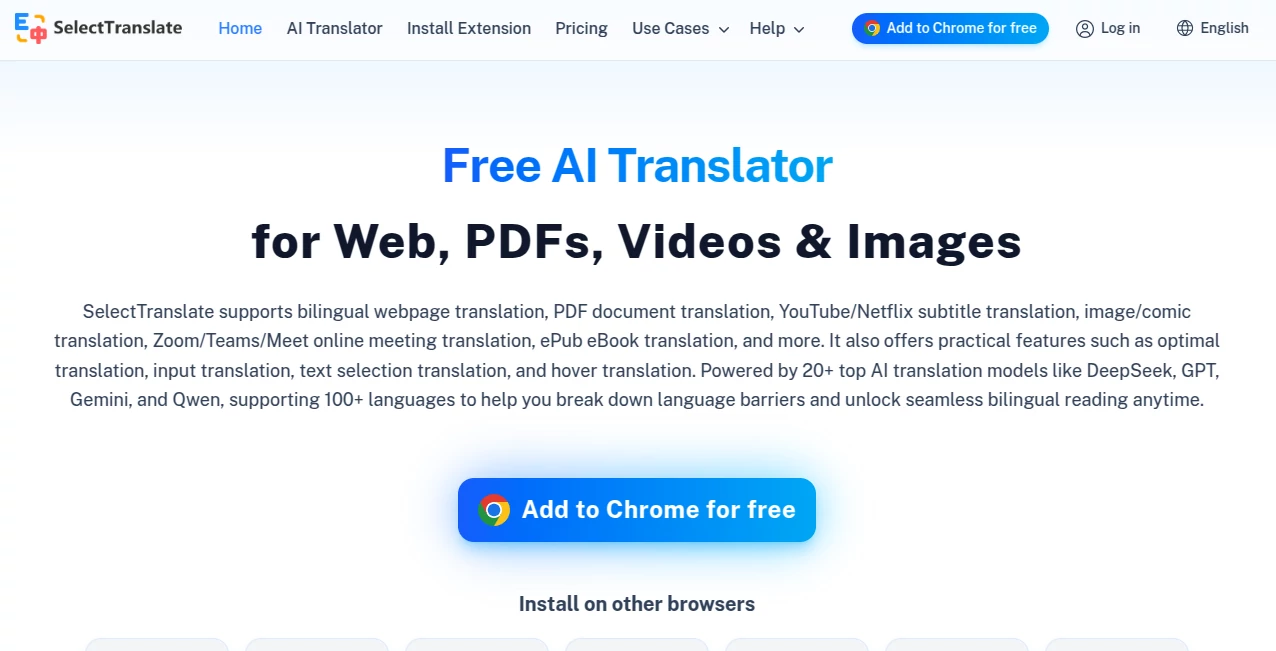
Language barriers can become frustrating when you are reading a foreign website, studying a PDF, watching an international video, or trying to communicate during an online meeting. SelectTranslate brings these situations together in one translation environment, making it easier to understand content without constantly switching between different translation services.
The tool works as a browser extension and supports more than 100 languages. Instead of focusing only on ordinary text translation, it covers webpages, PDF documents, video subtitles, images, eBooks, online meetings, and text entered directly into websites. It also connects with more than 20 AI translation models, giving users more flexibility over how their translations are produced.
For someone who regularly works with international content, the biggest advantage is convenience. A researcher can read a foreign paper, a professional can translate an email while writing it, and a viewer can follow subtitles in another language without leaving the video page.
Key Features
- Bilingual webpage translation that displays translated content alongside the original text.
- PDF translation for documents while retaining much of the original document structure and layout.
- Video subtitle translation for platforms such as YouTube and Netflix, including AI-generated subtitles for videos without existing subtitles.
- Translation support for online meetings through Zoom, Microsoft Teams, and Google Meet.
- Image and comic translation using OCR and multimodal AI capabilities.
- ePub translation for reading foreign-language digital books.
- Input translation for quickly converting text directly inside supported input fields.
- Selection and hover translation for lightweight translations while browsing.
- Optimal Translation, which compares results from multiple AI models and uses a scoring model to select stronger translations.
- AI Expert settings for adapting translations to particular industries, writing styles, tones, and terminology.
- Support for more than 20 AI translation models, including models from OpenAI, Gemini, DeepSeek, Claude, Qwen, Grok, GLM, Seed, and Kimi.
User Interface
The extension is designed around the way people already browse the web. Rather than forcing users into a separate translation website every time they encounter unfamiliar text, translation features can be accessed directly from the browser.
Text selection is particularly convenient for quick reading. Highlight a word or sentence and the translation can be requested without interrupting the page. Hover translation provides another lightweight option for users who frequently encounter individual foreign words.
The interface also provides controls for choosing translation models and target languages. More advanced users can go further by configuring AI Experts and selecting different approaches for specialized content.
Accuracy & Performance
Translation quality depends heavily on the language pair, source material, and selected model. The platform takes an interesting approach by allowing several AI models to participate in the translation process rather than relying on a single engine for every request.
Its Optimal Translation feature can send the same content through multiple models and then use a scoring model to evaluate the results. Users can review scores and, when necessary, choose another model's output. Sentence-level scoring can also help when different sentences in the same passage are better handled by different translations.
This approach is particularly useful for professional documents, emails, technical material, and other situations where a literal translation is not always the best translation.
Capabilities
The range of supported content is one of the strongest parts of the service. Web translation provides a bilingual reading experience, placing translated text beneath the original paragraphs instead of replacing the entire page.
PDF translation goes beyond simple copy-and-paste workflows. The service can process regular documents and, through its PDF Plus functionality, handle scanned PDFs with OCR-based recognition. It can recognize text, formulas, tables, images, and more complex document structures.
Video translation is another useful feature. Users can translate subtitles on major video and streaming platforms, and AI-powered subtitle generation can help with videos that do not already provide subtitles. Subtitle appearance can also be customized.
For meetings, the service supports real-time bilingual subtitles, incoming message translation, and translation of typed responses. This makes it practical for international calls where participants do not share the same native language.
The AI Expert system adds another layer of control. Built-in expert profiles are available for areas such as technology, medicine, finance, law, travel, e-commerce, news, and literature, while custom experts can be created for more specific requirements.
Security & Privacy
The service states that it takes data security seriously and uses measures such as encryption and network security protections to help safeguard personal data and prevent unauthorized access, alteration, or destruction.
Users working with sensitive documents should still review the service's current privacy and data-handling policies before translating confidential business, legal, financial, or personal material. As with any cloud-based AI translation service, the type of content being processed should be considered carefully.
Use Cases
Research and education: Students and researchers can translate academic papers, foreign websites, PDFs, and digital books while keeping the original context available for comparison.
International business: Teams working with overseas customers or partners can translate emails, documents, website content, and meeting conversations without repeatedly moving between separate applications.
Video learning: Foreign-language courses, interviews, tutorials, and educational videos become easier to follow through translated or bilingual subtitles.
Travel and everyday browsing: Travelers can translate websites, menus, instructions, and other foreign-language content while browsing from a desktop or mobile browser.
Technical work: Developers and technology professionals can work with foreign documentation and technical pages while preserving useful context such as code snippets and specialized terminology.
Reading international news: Bilingual webpage translation makes it possible to read international publications while comparing the translated version with the original text.
Pros and Cons
- Pros: Supports more than 100 languages and a broad selection of AI translation models.
- Pros: Handles webpages, PDFs, videos, images, eBooks, and online meetings in one environment.
- Pros: The Optimal Translation feature provides a useful way to compare and score translations from multiple models.
- Pros: Selection and hover translation make quick translations convenient during normal browsing.
- Pros: AI Experts can adapt translation style and terminology to specific industries.
- Cons: Advanced AI models use translation credits under the Plus plan.
- Cons: Some advanced PDF, image, comic, subtitle export, and YouTube features are reserved for paid usage.
- Cons: Translation quality can vary depending on the selected model, language pair, and complexity of the source material.
Pricing Plans
The service provides a Free Plan alongside a Plus Plan. The free option includes unlimited access to basic translation credits, web translation, PDF translation, video subtitle translation, input translation, online meeting translation, Optimal Translation, ePub translation, and offline image translation.
The Plus Plan adds access to advanced AI translation models with 5 million Translation Credits per month. It also expands features such as PDF Plus, image translation, comic translation, video subtitle export, and YouTube AI bilingual subtitles. The Plus plan includes up to 600 minutes of YouTube AI bilingual subtitles per month and up to 3,000 translated images per month.
Users can also configure their own API keys for supported paid translation models if they prefer managing model access themselves. A free trial of the Plus service is available for new users, subject to the current trial terms.
How to Use It
Start by installing the browser extension for a supported browser. The service supports browsers and platforms including Chrome, Edge, Firefox, Safari, Firefox for Android, and Safari for iOS.
Once installed, open a foreign-language webpage and use the web translation feature to create a bilingual reading experience. For a quick translation, highlight a word or sentence and use selection translation instead.
For documents, open the PDF translation feature, upload the document, select the target language and preferred translation model, and start the translation. More advanced document requirements can be handled through PDF Plus.
For videos, open a supported video platform and activate subtitle translation. For online meetings, use the meeting translation features to display bilingual subtitles, translate incoming messages, or translate your own typed responses.
Users who need higher-quality results can select multiple translation models and use Optimal Translation to compare their output. For specialized work, an AI Expert can be selected or customized to match the terminology and style of the project.
Comparison with Similar Tools
Traditional translation websites are excellent for quickly translating a sentence or short passage, but they generally focus on direct text input. This solution takes a broader approach by placing translation directly into the browsing, document, video, and meeting workflow.
Browser translation extensions may provide webpage translation, but the combination of PDF processing, video subtitles, image translation, ePub support, meeting translation, and multiple AI models gives this service a wider scope.
It is also different from using a single AI chatbot for translation. Instead of asking one model to translate everything, users can compare several models and let a scoring system help identify a preferred result. For people who care about terminology, context, and consistency, that extra control can be valuable.
Conclusion
A good translation tool should do more than turn one sentence into another language. It should fit naturally into the places where people actually encounter foreign content. That is where this service stands out.
With support for webpages, PDFs, videos, images, eBooks, and online meetings, it covers a surprisingly wide range of everyday and professional translation needs. The addition of multiple AI models and the Optimal Translation workflow makes it especially interesting for users who want more control over translation quality.
The free plan also makes it easy to explore the core experience before deciding whether advanced models and additional quotas are worth paying for. For multilingual browsing, research, communication, and international work, it is a strong option worth trying.
Frequently Asked Questions (FAQ)
Is the service free to use?
Yes. Core translation features are available through the Free Plan, including web translation, PDF translation, video subtitle translation, input translation, online meeting translation, and ePub translation. Advanced models and additional features are available through Plus or by configuring supported API keys.
How many languages does it support?
The service supports translation across more than 100 languages, covering a wide range of common international language pairs.
Can it translate PDF files?
Yes. It provides standard PDF translation as well as PDF Plus for more advanced document processing. PDF Plus can also handle scanned documents using OCR-based recognition.
Can it translate YouTube videos?
Yes. Video subtitle translation is supported, and YouTube AI bilingual subtitles can also generate translated subtitles for supported videos, including videos where subtitles are not already available.
Can it translate online meetings?
Yes. Online meeting translation supports platforms such as Zoom, Microsoft Teams, and Google Meet, with features including bilingual subtitles, message translation, and input translation.
Does it use AI models?
Yes. The platform integrates more than 20 AI translation models, including several well-known models from OpenAI, Gemini, DeepSeek, Claude, Qwen, Grok, GLM, Seed, and Kimi.
What is Optimal Translation?
Optimal Translation compares results from multiple translation models and uses a scoring model to evaluate them. It can automatically select a higher-scoring translation and also allows users to review or manually choose different results.
Can translations be customized for a specific industry?
Yes. AI Experts allow users to apply specialized translation roles and instructions. Built-in experts cover areas such as technology, medicine, finance, law, travel, e-commerce, news, and literature, while custom experts can be created for individual requirements.
Does it require an account?
Installing the extension does not require signing up or logging in. Some membership-related features and quota management functions may require an account.
AI PDF , AI Translate , AI Transcription , AI Meeting Assistant .
These classifications represent its core capabilities and areas of application. For related tools, explore the linked categories above.
SelectTranslate details
Website unavailable — View Alternatives
Pricing
- Freemium
Apps
- Web App
- Chrome Extensions
Categories

SelectTranslate Alternatives Product

Transpocket
Transpic

Create Filla…

VideoText

UPDF AI

Speech Text

WhisperWebUI

Whisper AI

TO MD