
ShortMatic Ai
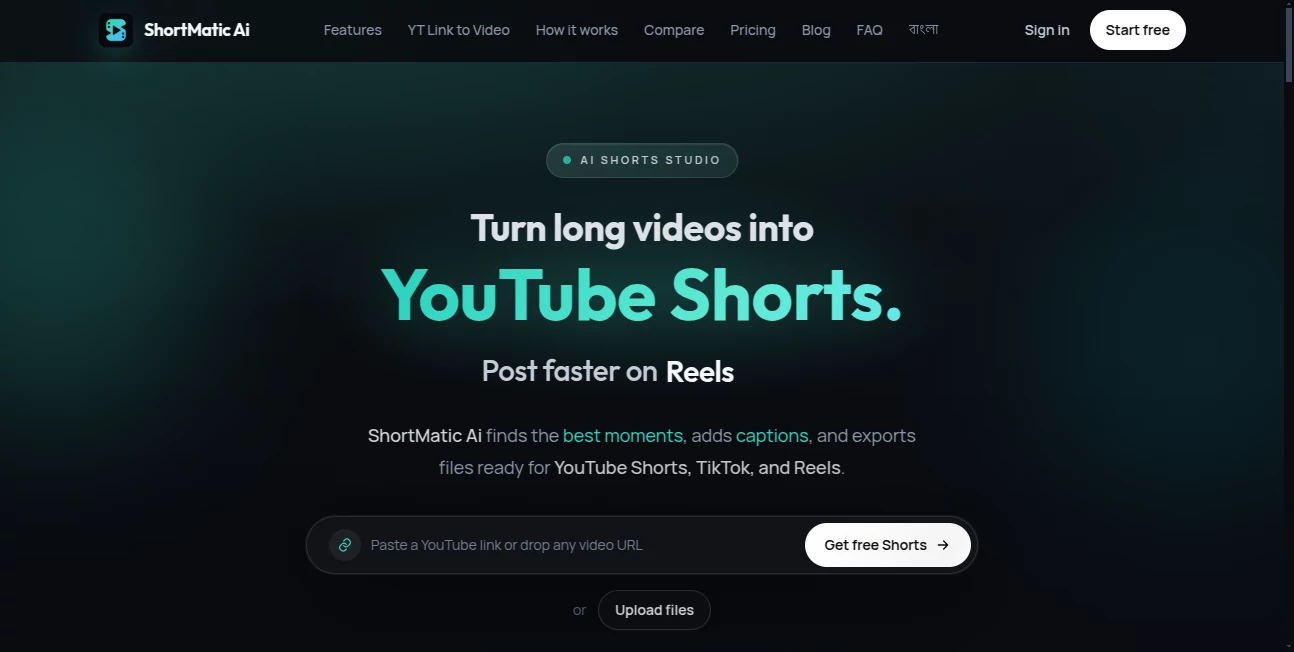
What is ShortMatic Ai?
Turning a long podcast, interview, webinar, tutorial, or YouTube video into several useful short clips can take far longer than creating the original recording. The difficult part is not simply cutting a video into smaller pieces. You need to find moments that make sense on their own, keep the important context, frame the subject correctly for mobile screens, and make the captions easy to follow.
ShortMatic Ai is built specifically around this problem. It takes a long-form video, analyzes the recording, identifies potential short-form moments, adds captions, adjusts the framing, and prepares vertical clips for platforms such as YouTube Shorts, TikTok, and Instagram Reels.
The approach is particularly useful for creators who already have a library of long-form content. Instead of recording separate videos for every social platform, the same source can become several focused pieces of short-form content.
Key Features
- AI-powered detection of promising moments inside long videos.
- Transcript, scene, and hook analysis for selecting potential Shorts.
- Automatic captions with multiple visual styles.
- Subject-aware reframing for vertical and social media formats.
- Support for 9:16, 4:5, and 1:1 aspect ratios.
- YouTube URL importing and direct video file uploads.
- Export-ready videos for YouTube Shorts, TikTok, and Instagram Reels.
- A review-oriented workflow that lets creators refine clips before publishing.
User Interface
The interface is designed around a simple production path rather than a traditional editing timeline. A creator can start by adding a long video, let the system generate potential clips, review the suggestions, adjust the selected material, and export the finished files.
This is a practical advantage for people who do not want to spend time learning a complex video editor. For example, someone with a 60-minute podcast can focus on reviewing suggested moments instead of manually searching through the entire recording from beginning to end.
The workflow remains flexible enough for users who want more control. AI suggestions are treated as starting points, while the final selection can still be reviewed before publishing.
Accuracy & Performance
The clip-finding process looks beyond a simple fixed-duration cut. The system considers transcripts, scenes, and potential hooks together when identifying candidate moments. This helps avoid the common problem of receiving a random section of a long recording that technically fits the required duration but has little value as a standalone video.
Results will naturally depend on the source material. Clear speech, useful demonstrations, interviews, podcasts, tutorials, and other videos containing distinct ideas are especially well suited to this workflow. Human review is still important, particularly when captions contain names, technical terminology, or industry-specific language.
Capabilities
The main strength is content repurposing. A single long recording can provide several opportunities for short-form publishing without requiring the creator to rebuild each video manually.
Caption generation is another useful part of the workflow. Different caption styles are available, including bold and word-timed options, while a clean version without captions can also be selected when text is not appropriate for the content.
Automatic reframing helps prepare footage for mobile viewing. The subject-aware crop is designed to keep faces and important action within the frame when converting wider footage into vertical formats.
The service can be used with podcasts, interviews, webinars, tutorials, educational recordings, YouTube content, and other long-form material. Agencies can also use the workflow when producing multiple short clips from client recordings.
Security & Privacy
When working with uploaded video, privacy and content ownership should always be considered. Users should only process recordings they own or have permission to edit and republish. This is particularly important for agencies working with client material or creators using third-party footage.
The service provides dedicated privacy and legal information for users who want to understand how their data and uploaded material are handled. For sensitive business recordings, it is worth reviewing those policies before uploading confidential content.
Use Cases
YouTubers: Long YouTube uploads can be turned into multiple Shorts, giving creators another way to distribute ideas from their existing content.
Podcasters: A single podcast episode can contain dozens of interesting statements, stories, questions, or opinions. The workflow helps identify candidates that can become short clips for social platforms.
Educators and coaches: Online lessons, workshops, and lectures can be repurposed into focused educational tips without recording a separate video for every topic.
Marketing teams: Webinars, product demonstrations, interviews, and customer testimonials can provide short promotional clips for social media campaigns.
Agencies: Agencies managing several clients can reduce the amount of manual timeline editing required when producing short-form content from existing long videos.
Sports and highlights creators: Long recordings can be reviewed for useful reactions, plays, highlights, or other moments that work independently as vertical content, provided the creator has the necessary rights to use the footage.
Pros and Cons
- Pros: Fast long-to-short workflow, AI-assisted moment discovery, automatic captions, subject-aware reframing, multiple aspect ratios, browser-based workflow, YouTube importing, and support for major short-form platforms.
- Pros: A free plan is available without requiring a credit card, making it possible to test the workflow before purchasing.
- Pros: Paid access is offered as fixed 30-day plans rather than an automatically renewing subscription.
- Cons: AI-selected clips still need human review for context, accuracy, captions, and editorial quality.
- Cons: It is focused on long-video repurposing rather than replacing a full professional editor for complex visual effects and detailed post-production.
- Cons: The usefulness of the generated clips depends heavily on the quality and structure of the original recording.
Pricing Plans
A free plan is available for users who want to test the workflow without entering payment information. The Free plan includes 15 source minutes, 5 Shorts, 2 Best Edits, 500 MB of storage, and 40 background AI jobs per month.
The paid options are Creator at $7.99, Pro at $19, and Agency at $49. These plans provide 30-day access and are purchased as one-time payments through Lemon Squeezy rather than automatically renewing subscriptions.
The Free plan is a sensible starting point for someone who wants to test the quality of generated clips on a real recording. Creators producing content regularly may find the higher tiers more appropriate when their monthly source-video volume increases.
How to Use It
- Open the web application and create a free account.
- Paste a supported YouTube video URL or upload a video file.
- Allow the system to analyze the long-form recording.
- Review the suggested Shorts and choose the moments that make sense for your audience.
- Adjust the selected clips when necessary and check the beginning and ending of each clip.
- Select a suitable caption style or remove captions when a clean presentation works better.
- Check the automatic vertical framing and make sure the important subject remains visible.
- Review the captions against the original audio, especially names and technical terms.
- Export the finished clips and publish them on YouTube Shorts, TikTok, or Instagram Reels.
Comparison with Similar Tools
The biggest difference between this type of workflow and a traditional editor is where the time is saved. A conventional editor gives you detailed control over every frame, but finding useful moments inside a one-hour recording can still require significant manual work.
Tools such as Opus Clip and Munch also focus on AI-assisted video clipping, while CapCut is particularly useful when the goal is detailed editing, effects, templates, and creative customization.
This solution is most attractive when the main problem is discovering and preparing several useful Shorts from existing long-form material. A creator who needs advanced motion graphics or frame-by-frame design may still prefer a traditional editing application after the initial clip selection.
A practical approach is to test the same long recording across different tools and compare how many suggested clips are actually worth publishing, how much caption correction is required, and how quickly the final vertical exports can be produced.
Conclusion
Repurposing long-form content is one of the simplest ways to get more value from videos that have already been recorded, but manually searching through every episode can become a serious production bottleneck.
This AI-powered workflow makes that process much more manageable by combining moment discovery, captions, reframing, review, and export in one place. It is especially well suited to YouTubers, podcasters, educators, marketers, and agencies that regularly work with longer recordings.
The free plan also makes the decision easier because creators can test the process on real content before committing to a paid plan. It does not eliminate the need for editorial judgment, but it can significantly reduce the repetitive work between a finished long video and a collection of publishable short clips.
Frequently Asked Questions (FAQ)
What type of content works best?
Podcasts, interviews, tutorials, webinars, educational recordings, commentary, product demonstrations, and other videos containing clear standalone ideas are strong candidates for AI-assisted clipping.
Can I use a YouTube video as the source?
Yes. The workflow supports importing a YouTube URL. However, users should only process and republish videos they own or have permission to reuse.
Can the generated clips be used on TikTok?
Yes. The exported videos are designed for short-form platforms including TikTok, YouTube Shorts, and Instagram Reels.
Does it automatically add captions?
Yes. Caption generation is part of the workflow, and users can choose from different caption styles or select a clean version without captions.
Can the video be converted to a vertical format?
Yes. Subject-aware reframing is available for 9:16, 4:5, and 1:1 formats, helping keep the important subject inside the frame.
Does it replace professional video editing software?
For the core task of finding moments and creating short-form clips from long videos, a separate editor may not be necessary. However, complex visual effects, detailed audio work, advanced color grading, and frame-by-frame creative editing may still require a dedicated editor.
Is there a free plan?
Yes. The Free plan includes 15 source minutes, 5 Shorts, 2 Best Edits, 500 MB of storage, and 40 background AI jobs per month, with no credit card required.
Are paid plans subscriptions?
No. The paid Creator, Pro, and Agency options provide fixed 30-day access and are sold as one-time purchases rather than automatically renewing subscriptions.
Can AI guarantee viral Shorts?
No. AI can make the production process faster and help identify promising moments, but audience interest, the quality of the hook, the subject matter, publishing strategy, and platform distribution still determine how a Short performs.
Should I review the clips before publishing?
Yes. Always check the context, captions, framing, audio, rights to the source material, and the final exported file before publishing.
AI YouTube Assistant , AI Video Editor , AI Short Clips Generator , AI Social Media Assistant .
These classifications represent its core capabilities and areas of application. For related tools, explore the linked categories above.
ShortMatic Ai details
Website unavailable — View Alternatives
Pricing
- Freemium
Apps
- Web App
Categories

ShortMatic Ai Alternatives Product

YouTube Thum…
Subclip

Klyra AI

Zloth

AI Pixel Ani…

softshill

Veo4

LinkedIn Spe…

Video Breakd…