

















SmartLinks
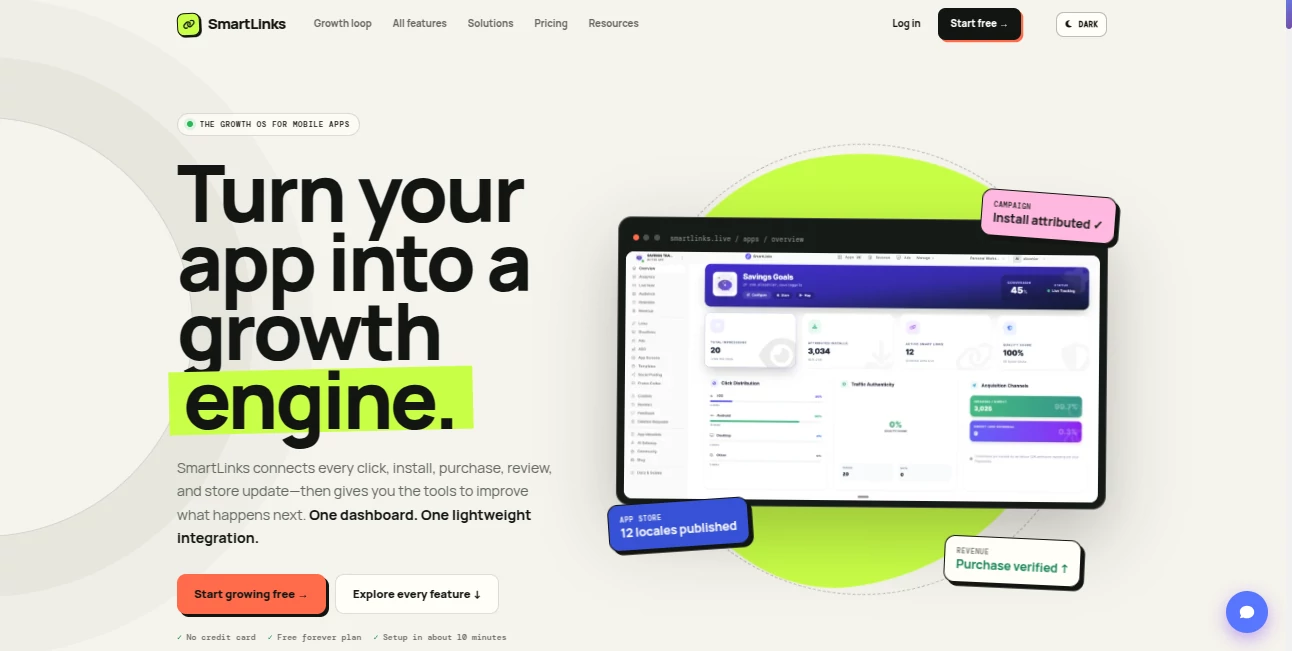
What is SmartLinks?
Growing a mobile app usually means working with several disconnected tools. One handles attribution, another tracks revenue, another helps with app store optimization, and yet another is used for reviews or creative production. Keeping all of these systems aligned can become surprisingly difficult, especially for a small team.
SmartLinks takes a different approach by bringing the major parts of the mobile growth process into one connected workspace. It links campaigns and deep links with installs, purchases, reviews, store performance, user behavior, and app health. Instead of looking at isolated numbers, teams can follow the journey from the first click through installation and revenue.
The platform is designed for indie developers, mobile growth marketers, app studios, publishers, and agencies. It also offers a permanent free plan, making it possible to connect an initial app and explore the core workflow without immediately committing to a paid subscription.
Key Features
The platform combines acquisition, analytics, store optimization, retention, monetization, and developer-focused workflows. This makes it particularly useful for teams that want fewer disconnected services in their mobile growth stack.
- Smart and deferred deep links for iOS, Android, web, QR codes, social campaigns, and advertising
- Branded short links with campaign and UTM information
- Per-link analytics covering clicks, installs, purchases, geography, platforms, referrers, and campaigns
- Behavioral analytics and real-time event monitoring
- Audience and retention analysis
- Verified Apple and Google purchase data
- AdMob revenue tracking
- ASO tools and localized store metadata
- Screenshot creation and store creative production
- Promo video creation with animated device scenes
- Competitor monitoring and review analysis
- Crash and error monitoring
- App Store and Google Play review management
- REST API, scoped API keys, and MCP access
- Team roles and permissions
User Interface
The interface is built around the idea of having one operating view for mobile app growth rather than forcing users to jump between multiple dashboards. Major workflows are organized around acquiring users, understanding performance, optimizing the storefront, listening to customers, monetizing, building integrations, and managing the operational side of an app.
For a founder who normally checks campaign data in one service, store information somewhere else, and revenue in another dashboard, this structure can feel much more practical. The overview also provides a quick way to see acquisition, conversion, audience, quality, and trend information without starting from a blank analytics screen.
The creative side is equally useful. Screenshot Studio provides more than 100 templates for different device families, while the visual editor lets users place real app screens inside device frames and adjust text, colors, gradients, shadows, and layouts.
Accuracy & Performance
One of the strongest aspects of the platform is the way it connects individual events instead of treating every metric as a standalone number. A campaign click can be associated with an install and subsequent activity, allowing marketers to understand which acquisition sources are actually contributing to the business.
The analytics system can monitor event activity, conversion movement, audience distribution, retention, purchases, and advertising revenue. Verified purchase information is available for Apple and Google transactions, while AdMob data can be brought into the same environment.
For example, imagine launching a paid campaign aimed at users in several countries. Rather than stopping at the number of clicks, a growth team can examine installs, downstream purchases, geography, and retention. That extra context makes campaign decisions considerably more useful.
Capabilities
The platform covers a surprisingly broad section of the mobile app lifecycle. On the acquisition side, developers can create deep links, deferred deep links, branded short URLs, QR campaigns, and tracking links. Each link can provide its own performance information.
On the analytics side, teams can inspect live events, audience characteristics, retention behavior, acquisition sources, revenue, and portfolio-level performance. Agencies and app studios can compare multiple applications and identify which products are gaining momentum and which ones require attention.
Store optimization is another major part of the system. Users can research competitors, prepare screenshots, produce promotional videos, generate store copy, manage localized metadata, monitor competitor changes, and work with country-specific pricing recommendations.
The platform also extends into retention. Reviews from the App Store and Google Play can be monitored, crashes can be grouped by error signature, and multilingual review responses can be drafted. This creates a more complete feedback loop between acquisition and product improvement.
Security & Privacy
For development teams, controlled access is an important part of any platform that connects to app data. The service provides scoped API keys, team roles, and permissions so different users and integrations can work with appropriate access.
Its managed AI gateway is also designed to keep provider credentials out of client-side application code while allowing applications to access supported AI capabilities such as chat, vision, image, speech, and transcription models.
The platform additionally includes workflows for data deletion requests, with application and status filtering and an audit trail. These features can be particularly useful for teams operating multiple applications where compliance-related requests could otherwise become difficult to track.
Use Cases
For an indie developer, the biggest advantage is consolidation. A solo founder can use deep links for campaigns, monitor acquisition, prepare store screenshots, inspect reviews, and follow revenue without assembling a large collection of separate services.
Mobile marketers can use the platform to connect campaigns with installs, purchases, geography, and user behavior. This is helpful when the goal is not simply to generate downloads but to understand which sources produce valuable users.
App studios and agencies have another reason to consider it. Cross-app analytics, team permissions, shared workflows, API access, and portfolio-level reporting make it easier to operate several applications from one environment.
It can also be useful for ASO work. A team preparing a store listing for a new market can work on localized metadata, screenshots, pricing, and competitive research as part of the same optimization workflow.
Pros and Cons
Pros
- Combines several mobile growth workflows in one platform
- Permanent free plan for getting started
- Deep links and attribution are connected with analytics
- Supports both iOS and Android workflows
- Includes ASO, screenshot, and promotional video tools
- Provides verified purchase and AdMob revenue insights
- Useful portfolio features for studios and agencies
- REST API and MCP support provide room for automation
- Team roles and permissions are available on higher plans
Cons
- The large feature set may take some time to explore
- Smaller developers may not need every available module
- Advanced capacity and collaboration features require paid plans
- Teams with highly specialized enterprise analytics requirements may still need additional services
Pricing Plans
The pricing structure starts with a Free plan that remains available permanently. It includes one app, up to 10 smart links, 5,000 monthly events, one screen and one video creative project, one team seat, and starter access to the platform. AI features on this plan use the customer's own provider key.
The Growth plan costs $29 per month when billed monthly, or $249 annually. It supports up to five apps, 100 smart links, 50,000 monthly events, five screen projects, five video projects, 500 AI actions per month, and three team seats. AI usage is included without requiring the customer to provide an API key.
The Business plan costs $99 per month or $849 annually. It increases capacity to 20 apps, 1,000 smart links, 250,000 monthly events, 20 screen projects, 20 video projects, 2,500 AI actions per month, and 10 team seats. A/B testing is also included.
The Agency plan costs $290 per month or $2,490 annually. It is intended for agencies and larger multi-client operations, with unlimited client apps subject to fair use, unlimited smart links, up to 1,000,000 monthly events, 10,000 AI actions per month, 25 team seats, custom integrations, white labeling, and priority support.
How to Use the Platform
Getting started is relatively straightforward. Create an account and begin with the free plan if you want to test the workflow without committing to a subscription.
Next, connect your mobile application and configure the relevant platform information. The available SDK and API options allow developers to begin sending events into the system, while the dashboard provides the tools needed for campaign and growth management.
Create a smart or deferred deep link for a campaign, add the appropriate source information, and share it through the desired channel. Once traffic starts arriving, use the analytics dashboard to examine clicks, installs, user behavior, and downstream activity.
From there, move into the optimization tools. Improve screenshots, store metadata, promotional videos, pricing, or localized listings based on what the data tells you. Reviews and crash information can then provide another layer of feedback for improving the application.
A useful workflow is to start with one campaign rather than configuring everything at once. Watch how the first real users move through the funnel, identify where conversion drops, and then use the relevant optimization tools to address the problem.
Comparison with Similar Tools
Many mobile growth products focus heavily on one particular area. Some are primarily attribution platforms, others concentrate on analytics, ASO, creative production, app reviews, or crash monitoring. The main difference here is the attempt to connect these functions inside one operating environment.
That does not necessarily mean every specialized tool becomes unnecessary. Large organizations with complex data infrastructure may prefer dedicated enterprise products for individual functions. For smaller teams, however, having acquisition, analytics, ASO, creative production, revenue intelligence, reviews, and app health connected can reduce the amount of manual work involved in moving information between systems.
The API and MCP capabilities also make the platform more flexible than a closed dashboard. Developers can build their own workflows around the underlying data instead of being limited to the standard interface.
Conclusion
SmartLinks is an appealing option for mobile developers and growth teams that have reached the point where managing an app requires more than a basic analytics dashboard. Its biggest strength is not any single feature. It is the connection between features.
A campaign can lead to a tracked install. That install can become a purchase. Store performance can be examined alongside acquisition data. Reviews and crashes can reveal why users are unhappy. ASO and creative tools can then be used to improve the next campaign. When these steps live in the same environment, the growth process becomes easier to follow.
The permanent free plan also makes the platform approachable. A developer can start with one application and gradually move into more advanced features as the product grows. For founders, marketers, app studios, and agencies looking for a more connected way to manage mobile growth, it is a strong platform worth exploring.
Frequently Asked Questions (FAQ)
What is SmartLinks used for?
It is a mobile app growth platform covering deep links, attribution, analytics, ASO, store creatives, reviews, crash monitoring, revenue tracking, and automation workflows.
Does it support iOS and Android?
Yes. The platform supports mobile workflows across iOS and Android, including deep linking, store management, purchase verification, and app growth analytics.
Is there a free plan?
Yes. The Free plan is permanent and does not require a credit card. It is designed for one app and includes starter limits for links, events, creative projects, and team access.
Can it track app revenue?
Yes. The platform can connect verified Apple and Google purchases with application performance data. AdMob revenue can also be connected for advertising-based applications.
Can I manage multiple apps?
Yes. Paid plans increase the number of supported applications, while the Agency plan is designed for larger portfolios and multiple client applications.
Does it include ASO tools?
Yes. The platform includes an ASO workflow for app names, subtitles, descriptions, keywords, and localized store content, along with screenshot creation, competitor monitoring, and pricing tools.
Can developers access the platform through an API?
Yes. REST API access and scoped keys are available, allowing developers to integrate links, analytics, revenue, reviews, crashes, ASO, and creative data into custom workflows.
Does it support AI workflows?
Yes. AI capabilities are integrated into several workflows, and the platform also provides a managed AI gateway and MCP access for supported automation scenarios.