
Subtitle Remover
What is Subtitle Remover?
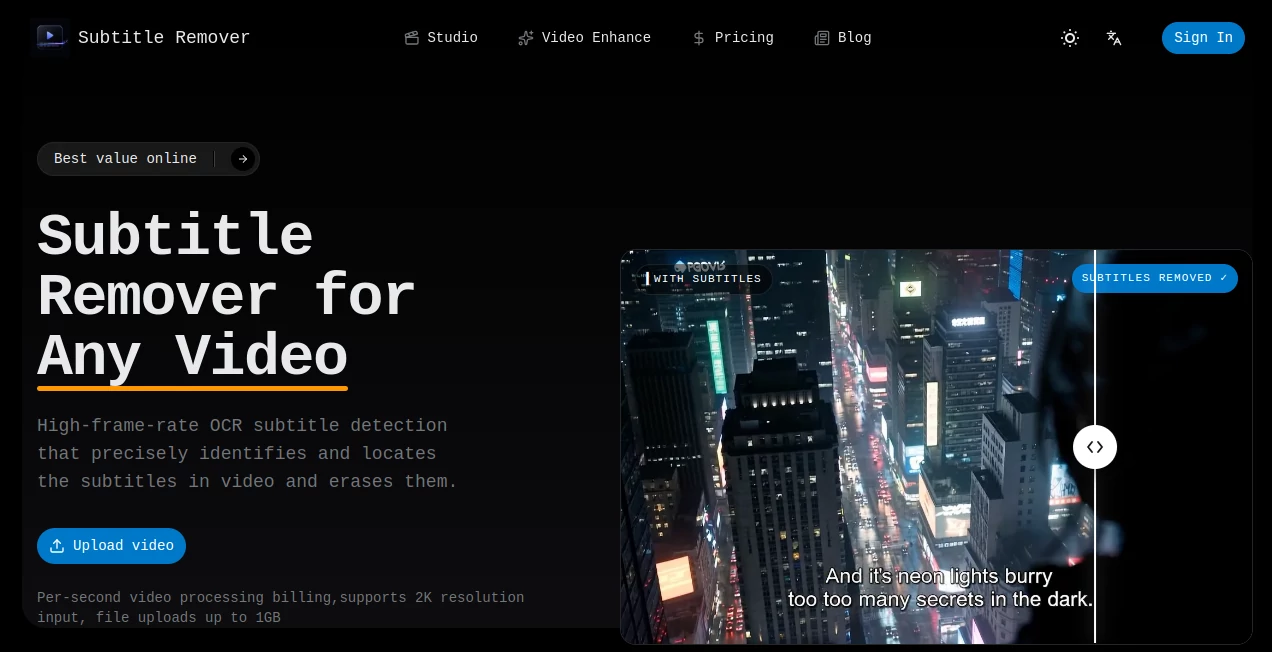
Subtitle Remover is an AI-powered video cleanup tool designed for people who need to remove hard-coded subtitles, captions, watermarks, logos, and other text permanently embedded in a video. Instead of simply hiding unwanted text with a blur, crop, or black box, it reconstructs the area behind the text so the finished footage looks much closer to the original scene.
This is especially useful when a subtitle track cannot simply be switched off. A downloaded clip may have burned-in captions, an old recording may contain permanent text overlays, or a creator may need to prepare footage for localization. In these situations, removing the text without damaging the surrounding image can save a surprising amount of editing time.
The service is built around AI-based temporal inpainting, which examines information across video frames to rebuild pixels covered by unwanted elements. It also combines automatic subtitle detection with manual region selection, giving users a practical option when automatic detection is not enough.
Key Features
- Automatic detection of on-screen subtitles using OCR technology.
- Removal of hard-coded Chinese, English, and other subtitle text.
- Manual region selection for watermarks, logos, captions, and custom areas.
- AI pixel reconstruction that avoids simple blur or mosaic effects.
- Support for MP4, MOV, and MKV uploads.
- Input videos can be uploaded at resolutions up to 2K.
- Clean MP4 output is available at up to 1080p.
- Files are automatically deleted from storage after 30 days.
- Video content is not used to train the service's models.
User Interface
The workflow is refreshingly straightforward. A user can upload a video, choose between automatic detection and manual region selection, start the processing job, and download the cleaned result. There is no need to build a complicated editing timeline or spend time masking subtitles frame by frame.
The automatic option is particularly convenient for ordinary bottom-of-screen captions. When the unwanted text is in an unusual position, a manual box can be drawn around the exact area that needs to be removed. That small amount of control makes the tool more useful than a one-click solution that only understands conventional subtitle placement.
Accuracy & Performance
The strongest part of the technology is its approach to reconstruction. Rather than treating each frame as an isolated image, the temporal inpainting process uses information from surrounding frames to estimate what should appear behind the removed text. This can produce a considerably more natural result when the background changes over time.
Automatic OCR detection is designed to locate subtitles directly in the footage, while manual selection provides an alternative for logos, watermarks, or text that does not behave like conventional subtitles. The service states that many clips can be processed within minutes, although actual processing time will depend on the video and the selected operation.
Capabilities
This is more than a basic subtitle hiding utility. It can be used to clean burned-in captions, channel logos, watermarks, timecodes, titles, and other visible overlays. For example, a course creator working with an old lecture recording could remove permanent text from the frame before preparing a new version.
It can also fit naturally into localization workflows. A video editor may first remove the original language captions and then add a new subtitle track in another language. For creators repurposing older footage, the ability to clear unwanted on-screen text can make the source material easier to adapt for a different audience.
Security & Privacy
Privacy matters whenever video files are uploaded to an online processing service. The service states that uploaded videos are not used for model training. Source and processed files are stored for a limited period and are automatically deleted after 30 days, which provides a clear retention policy rather than leaving uploaded footage available indefinitely.
Users working with commercially sensitive footage should still review the current privacy policy and terms before uploading confidential material. As with any cloud-based video service, understanding how files are handled is an important part of choosing the right workflow.
Use Cases
- Video localization: Remove burned-in subtitles before adding translated captions for another market.
- Content repurposing: Clean existing clips before adapting them for new platforms or audiences.
- Watermark cleanup: Remove unwanted logos and overlays from footage when you have the appropriate rights to edit it.
- Course production: Prepare older educational recordings that contain permanent captions or text overlays.
- Archive restoration: Clean timecodes and other unwanted elements from legacy recordings.
- Short-form video editing: Prepare clips with embedded captions for a new editing workflow.
Pros and Cons
Pros
- Removes hard-coded subtitles instead of simply covering them.
- Uses temporal inpainting to reconstruct the area behind unwanted text.
- Automatic OCR detection makes common subtitle removal quick.
- Manual region selection gives users more control.
- Supports more than subtitles, including watermarks, logos, and on-screen text.
- Accepts video input up to 2K and exports up to 1080p.
- Offers both subscription and pay-as-you-go options.
Cons
- Output resolution is limited to 1080p even when the source is higher resolution.
- Manual region removal uses credits faster than automatic removal.
- Results can vary depending on the complexity and movement of the background behind the text.
- Users processing large volumes of footage may need a higher subscription tier.
Pricing Plans
The pricing model is based on processing credits, with the amount consumed depending on the removal method. Automatic subtitle removal uses approximately 1 credit per second, while manual region removal uses approximately 3 credits per second.
The Basic plan costs $5.90 per month and includes 3,000 credits. It is aimed at occasional users and provides enough credits for roughly 50 minutes of standard automatic removal or around 17 minutes of fine manual removal.
The Standard plan costs $19 per month and includes 15,000 credits. It adds priority processing and batch upload capabilities, making it a better fit for users who clean videos regularly.
The Pro plan costs $49 per month and provides 50,000 credits along with the highest concurrency. This option is intended for professional or high-volume workflows where several processing jobs may need to be handled efficiently.
Annual billing is also available at lower effective monthly rates. The pricing page currently lists annual equivalents of $5.30 per month for Basic, $17 per month for Standard, and $44 per month for Pro when billed annually. A pay-as-you-go option is available as well, which can make more sense for users who only need occasional cleanup.
How to Use It
- Upload an MP4, MOV, or MKV video.
- Choose automatic subtitle detection or select the unwanted area manually.
- Allow the AI system to process the footage and reconstruct the covered pixels.
- Review the processed result.
- Download the cleaned MP4 video.
For ordinary subtitles positioned along the lower part of the frame, automatic detection is the easiest starting point. If the unwanted element is a watermark, logo, timecode, or text in an unusual position, manual region selection offers more precise control.
Comparison with Similar Tools
Traditional video editors can remove visible subtitles by cropping the frame, placing another graphic over the text, or applying a blur. Those methods are useful in some situations, but they do not actually reconstruct the image that was hidden underneath. The result can leave an obvious patch or permanently reduce the usable frame area.
Dedicated AI video cleanup tools take a different approach. By analyzing the surrounding visual information and reconstructing the covered region, they can preserve more of the original composition. This makes an AI-based workflow particularly attractive when the subtitle sits over an important part of the scene.
The manual region feature is another useful distinction. Instead of limiting the workflow to subtitles detected automatically, users can specify the area themselves, which broadens the tool's usefulness for logos, watermarks, timecodes, and other unwanted overlays.
Conclusion
Removing embedded subtitles is normally one of those editing jobs that sounds simple until you actually try to make the result look clean. Covering the text is easy; rebuilding what was behind it is the difficult part. This service addresses that problem with OCR detection, manual region selection, and temporal AI reconstruction.
For occasional users, the relatively accessible entry-level pricing makes it easy to process a few clips without committing to a large production workflow. For editors, localizers, course creators, and teams handling more footage, the higher credit tiers and batch processing can make the process considerably more practical.
It is not a replacement for a full professional video editor, but it does one specific job exceptionally well: giving users a simpler way to turn videos with unwanted burned-in text into cleaner footage that is ready for the next stage of editing.
Frequently Asked Questions (FAQ)
Can hard-coded subtitles really be removed from a video?
Yes. Hard-coded subtitles are part of the video image, so they cannot simply be switched off like a separate subtitle track. An AI inpainting system can analyze the surrounding frames and reconstruct the pixels hidden underneath the text.
Does the tool blur the subtitles?
No. Its main approach is pixel reconstruction rather than placing a blur, mosaic, or black bar over the subtitles. This is intended to create a more natural-looking result.
Can it remove watermarks and logos?
Yes. Manual region selection can be used to identify watermarks, logos, timecodes, and other unwanted on-screen elements in addition to conventional subtitles.
What video formats can I upload?
The service supports MP4, MOV, and MKV files. The website currently allows uploads with source resolution up to 2K.
What is the maximum output resolution?
The current maximum output resolution is 1080p. A source video can be higher resolution, but the cleaned export is limited to 1080p.
How does automatic subtitle detection work?
OCR technology identifies subtitle text in the video and determines where it appears on the frame. The system can then use that information to remove the detected area automatically.
Can I select an area manually?
Yes. Manual region selection lets you draw a box around the exact text, watermark, logo, or other visual element you want to remove. This is useful when automatic subtitle detection is not appropriate.
How are credits calculated?
Credits are charged according to video processing time. Automatic subtitle removal costs approximately 1 credit per second, while manual region removal costs approximately 3 credits per second.
How much does the service cost?
The current monthly plans start at $5.90 for Basic, followed by $19 for Standard and $49 for Pro. Annual billing offers lower effective monthly prices, and a pay-as-you-go option is also available.
Are uploaded videos used to train AI models?
The service states that uploaded videos are not used to train its models. Files are also automatically removed from storage after 30 days.
AI Video Editor , AI Video Enhancer .
These classifications represent its core capabilities and areas of application. For related tools, explore the linked categories above.
Subtitle Remover details
Website unavailable — View Alternatives
Pricing
- Freemium
Apps
- Web App
Categories

Subtitle Remover Alternatives Product

Gemini Omni …

OmniVideo

MixHub AI

Seedance 2.5

Screenify St…

시댄스 2.5

ObjectRemover

Happyhorse 1…

remove bg vi…