
TaxLens
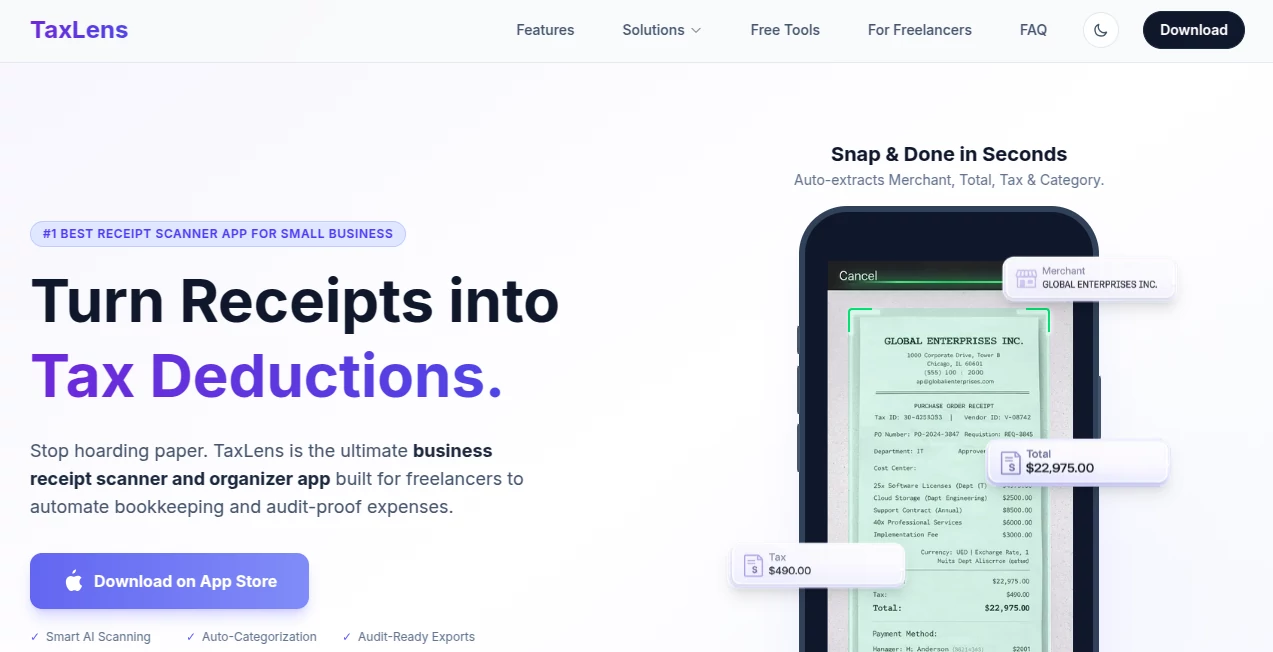
What is TaxLens?
Managing business expenses can quickly become overwhelming, especially for freelancers and small business owners who deal with dozens of receipts every month. TaxLens simplifies this process by transforming paper and digital receipts into organized, tax-ready expense records using intelligent AI-powered scanning technology. Instead of spending hours entering data into spreadsheets, users can scan receipts in seconds and let the app organize everything automatically.
Designed specifically for tax compliance and expense tracking, the platform helps users identify deductible expenses, separate business and personal purchases, and prepare accountant-friendly reports. Whether you're an independent contractor, consultant, freelancer, or entrepreneur, it offers a practical way to reduce paperwork while keeping financial records organized throughout the year.
Its combination of AI automation, privacy-focused architecture, and tax-oriented organization makes it more than just another receipt scanner. It becomes an everyday bookkeeping companion that saves valuable time while improving financial accuracy.
Key Features
User Interface
The interface is clean, intuitive, and optimized for speed. Capturing a receipt requires only a few taps, while organized dashboards display spending summaries, deductible expenses, and categorized transactions in an easy-to-read format. Even users with no accounting experience can comfortably navigate the application without a learning curve.
Accuracy & Performance
Advanced AI-powered OCR technology extracts important receipt details such as merchant names, purchase dates, taxes, totals, and expense categories with impressive accuracy. Batch scanning allows multiple receipts to be processed efficiently, helping users organize large volumes of expenses in just minutes. Multi-currency recognition also improves accuracy for professionals who travel internationally.
Capabilities
The platform provides far more than receipt storage. It automatically categorizes expenses, distinguishes business and personal purchases, estimates potential tax deductions, generates PDF and CSV reports, supports accountant-ready exports, and works well alongside popular accounting workflows. Historical currency conversion and intelligent deduction tracking further enhance its usefulness for modern businesses.
Security & Privacy
Privacy is one of the strongest aspects of the platform. Receipt processing is designed with on-device intelligence whenever possible, while optional iCloud synchronization gives users full control over their information. The service emphasizes that user data is not sold for advertising purposes, and secure storage helps protect sensitive financial documents from unauthorized access.
Use Cases
Freelancers can automatically organize receipts before tax season arrives. Consultants can separate reimbursable expenses from personal purchases. Small business owners can build accountant-ready reports without manually entering transaction data. Contractors who travel internationally benefit from automatic currency conversion, while self-employed professionals can monitor deductible expenses throughout the year instead of scrambling at filing time.
For example, a freelance graphic designer attending several client meetings during a business trip can simply photograph restaurant, transportation, and hotel receipts. The app extracts all necessary information, categorizes expenses appropriately, and prepares professional reports that are ready to share with an accountant.
Pros and Cons
Pros
Fast AI-powered receipt scanning with automatic data extraction.
Smart categorization for business and personal expenses.
Audit-ready PDF and CSV exports.
Supports more than 30 international currencies.
Excellent privacy-first approach with secure data handling.
Simple interface suitable for non-accountants.
Cons
Currently focused primarily on iPhone users.
Advanced functionality requires a premium subscription.
Designed mainly for freelancers and small businesses rather than large enterprise accounting teams.
Pricing Plans
A free version allows users to experience core receipt scanning and expense organization features. Premium subscription options unlock additional capabilities such as unlimited exports, advanced reporting, and enhanced analytics. Subscription plans are available with weekly, monthly, and yearly billing options.
How to Use TaxLens
Download the application from the App Store and open the dashboard.
Capture a paper receipt using the camera or import an existing digital receipt.
Allow the AI engine to extract merchant information, dates, taxes, totals, and categories automatically.
Review the suggested expense category and make adjustments if needed.
Track deductible expenses throughout the year and export professional PDF or CSV reports whenever required.
Comparison with Similar Tools
Many receipt management applications focus only on digitizing receipts, leaving users to manually organize expenses afterward. This solution goes a step further by automatically identifying deductible expenses, separating business and personal purchases, and generating accountant-ready reports without additional work.
Compared with general expense trackers, its tax-focused workflow provides greater value for freelancers and self-employed professionals who want accurate records while minimizing bookkeeping effort. The strong emphasis on privacy, local data control, and straightforward reporting also distinguishes it from many cloud-first competitors.
Conclusion
For freelancers, consultants, contractors, and small business owners, staying organized throughout the year can make tax season significantly less stressful. This platform combines intelligent receipt scanning, automatic categorization, secure storage, and tax-ready reporting into a single streamlined experience.
Its thoughtful design, practical automation, and commitment to user privacy make it an excellent choice for anyone looking to reduce manual bookkeeping while maintaining accurate financial records. Instead of treating receipts as paperwork to be managed later, users can transform them into organized financial data the moment they're received.
Frequently Asked Questions (FAQ)
Can it scan both paper and digital receipts?
Yes. Users can capture receipts with their phone camera or import digital receipts and PDF files for automatic processing.
Does it support multiple currencies?
Yes. The platform recognizes more than 30 currencies and performs historical currency conversion for international expenses.
Can reports be shared with accountants?
Yes. Expenses can be exported as PDF and CSV reports that are suitable for accounting and bookkeeping workflows.
Is my financial information protected?
The platform follows a privacy-first approach with secure storage, optional iCloud synchronization, and policies that avoid selling user data for advertising.
Who benefits the most from using this tool?
Freelancers, consultants, contractors, self-employed professionals, and small business owners will gain the greatest value from its automated expense tracking and tax preparation features.
AI Tax Assistant , AI Documents Assistant , AI Accounting Assistant , AI Productivity Tools .
These classifications represent its core capabilities and areas of application. For related tools, explore the linked categories above.
TaxLens details
Website unavailable — View Alternatives
Pricing
- Free
Apps
- Web App
- iOS App
Categories

TaxLens Alternatives Product

Skywork Supe…

SkipBait

PDF to MD

TrySchedule

VercelAPP

Monkey Eatin…

Whisper Web

JSON to Excel

DocReplacer