

















Voicy
What is Voicy?
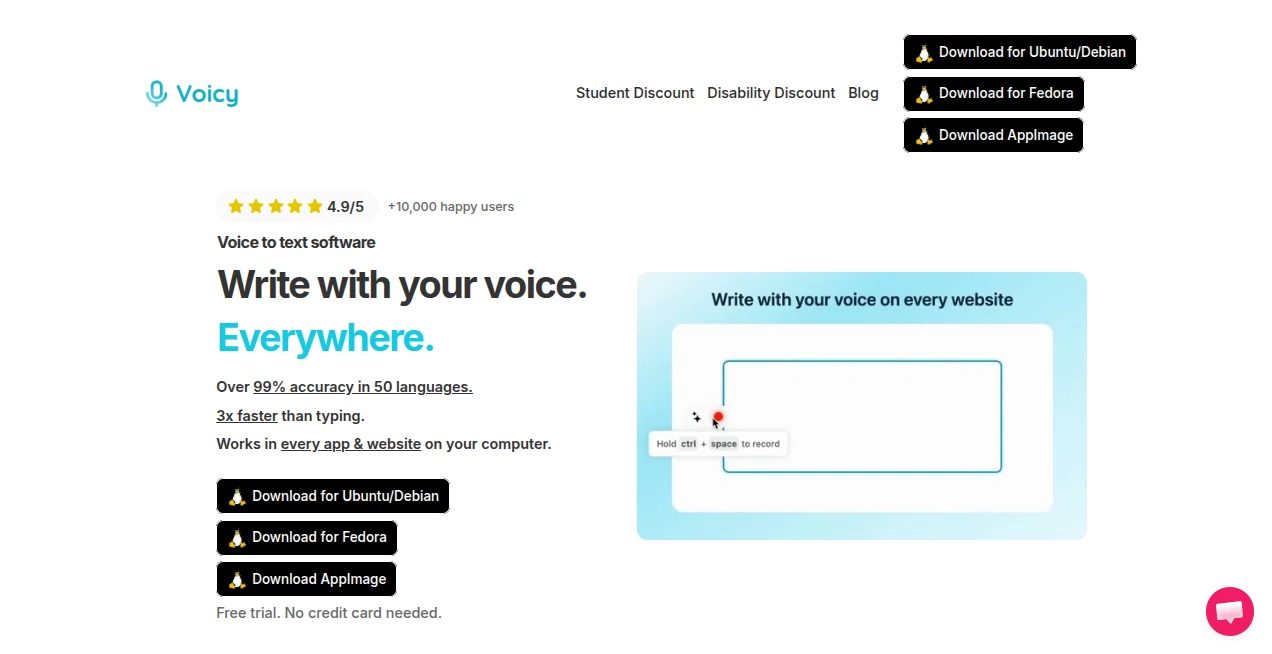
Voicy is an AI-powered speech-to-text application designed to make writing by voice feel as natural as speaking. Instead of typing everything manually, users can dictate text directly into the applications and websites they already use. The service is built around speed, accessibility, and convenience, with support for more than 50 languages and a claimed accuracy of over 99%.
What makes the experience particularly useful is that it is not limited to a single editor or browser window. Whether you are composing an email in Gmail, writing a document in Microsoft Word or Google Docs, chatting with an AI assistant, or posting a message on social media, the same voice-typing workflow can be used across the computer. The company says the technology can make writing around three times faster than conventional typing.
Key Features
- AI-powered speech-to-text with claimed accuracy above 99% across more than 50 languages.
- Automatic punctuation and formatting, reducing the need to manually clean up dictated text.
- Voice typing that works across applications and websites rather than being restricted to one editor.
- Support for Windows, Mac, Linux distributions, and mobile devices through the available plans and applications.
- Compatibility with everyday services including Gmail, Google Docs, Microsoft Word, Outlook, WhatsApp, ChatGPT, Claude, Notion, Telegram, Discord, Trello, Asana, and many others.
- Custom keyboard shortcuts for quickly starting and stopping dictation.
- A free trial with 30 minutes of recording time and no credit card requirement.
User Interface
The setup is intentionally straightforward. After installing the application, users complete a short configuration process and choose a keyboard shortcut for controlling dictation. Once that is done, voice input can be started without repeatedly opening a separate transcription window.
This approach makes the interface almost disappear into the normal writing process. For someone drafting a long email or document, that matters. You can focus on the idea you want to express rather than constantly switching between a microphone tool and the application where the text needs to appear.
Accuracy & Performance
The service advertises more than 99% speech-recognition accuracy in over 50 languages. It also automatically handles punctuation and formatting, which is an important distinction between basic voice typing and a more polished dictation workflow.
For practical use, this can be especially helpful when writing longer passages. A user can speak naturally instead of stopping after every sentence to insert commas or periods. The advertised three-times-faster-than-typing experience is also appealing for writers, developers, students, professionals, and anyone who spends a significant part of the day entering text.
Actual recognition quality can still vary depending on factors such as pronunciation, background noise, microphone quality, language, and technical vocabulary. Even so, the combination of speech recognition and automatic formatting makes the workflow considerably more convenient than traditional manual typing.
Capabilities
The biggest strength is its broad compatibility. Rather than forcing users to change where they work, the software brings voice input to the places they already use. This includes productivity applications, email services, messaging platforms, social networks, writing tools, project-management software, and AI chat applications.
It can also be useful for interacting with AI assistants. Speaking a detailed prompt can be much faster than typing it, particularly when the prompt contains several instructions or a long explanation. For writers, the same approach can be used to create first drafts, notes, emails, articles, and other text-heavy material.
Support for more than 50 languages further expands its usefulness. The service lists languages including English, Spanish, French, German, Portuguese, Mandarin, Japanese, Korean, Arabic, Persian, Russian, and several others.
Security & Privacy
Privacy is presented as an important part of the product. The company describes the application as privacy-focused and states that nobody sees users' transcripts except the users themselves. This is particularly relevant for people dictating work-related messages, private notes, business documents, or personal correspondence.
Anyone considering a voice-typing service for sensitive professional information should still review the provider's current privacy policy and data-handling terms before using it for confidential material. That is a sensible precaution for any cloud-connected speech-recognition service.
Use Cases
There are many situations where voice input can save meaningful amounts of time. A writer can dictate an article outline while thinking through the structure instead of waiting to type each sentence. A business professional can compose emails while keeping their hands free. Students can dictate essays and notes, while people who find extended keyboard use uncomfortable can use speech as an alternative input method.
Developers can also benefit from voice input when writing documentation, explaining code, creating issue descriptions, or drafting prompts. The ability to dictate directly into development-related applications makes the workflow useful beyond conventional office writing.
Another interesting use is accessibility. Voice dictation can provide an easier way to interact with computers for people who have difficulty with prolonged keyboard or mouse use. In that context, reducing the physical effort required to produce text can be just as valuable as improving speed.
Pros and Cons
- Pros: High advertised accuracy, support for 50+ languages, automatic punctuation, broad application compatibility, customizable keyboard shortcuts, multiple desktop platforms, and a free trial without requiring a credit card.
- Pros: Particularly useful for long-form writing, email, AI prompts, notes, accessibility, and everyday productivity.
- Cons: Recognition performance can naturally depend on microphone quality, speech patterns, accents, language, and surrounding noise.
- Cons: Users with very specialized terminology may still want to review dictated text before sending or publishing it.
- Cons: Unlimited usage requires a paid plan after the free trial period.
Pricing Plans
A 30-minute free trial is available with full access to the features, and no credit card is required to start.
The Pro plan is listed at $8.49 per month when billed annually and includes unlimited recording time, unlimited personal devices, and desktop and mobile access. The site also offers a lifetime option for a one-time payment of $260, with unlimited recording time and access across personal devices.
For organizations, the Teams plan requires a minimum of three users and is listed at $6.79 per user per month. It includes unlimited recording time, desktop and mobile access, and priority support. The company also advertises 20% discounts for students and people with disabilities.
How to Use It
- Download and install the application for your operating system.
- Complete the short setup process.
- Choose a keyboard shortcut for starting and stopping voice recording.
- Open the application or website where you want to write.
- Activate dictation using the selected shortcut.
- Speak naturally and let the speech-recognition system convert your voice into text.
- Review the resulting text when necessary and continue editing normally.
The workflow is especially simple because the dictation function is designed to operate inside the applications and websites you already use. There is no need to repeatedly copy text from a separate transcription editor.
Comparison with Similar Tools
Traditional operating-system dictation features are convenient because they are already built into many computers, but they may not provide the same combination of automatic punctuation, broad application coverage, language support, and cross-platform availability. Dedicated transcription services can be excellent for converting recorded interviews or meetings into text, but they are often designed around uploaded recordings rather than live voice typing.
This product takes a different approach. Its focus is everyday dictation: press a shortcut, speak, and continue working wherever you are. That makes it more comparable to a dedicated voice-input layer for the entire computer than to a conventional audio transcription website.
Conclusion
For anyone who spends hours typing emails, documents, messages, notes, articles, or prompts, voice dictation can be a surprisingly effective way to change the daily workflow. The combination of claimed 99%+ accuracy, automatic punctuation, more than 50 supported languages, and compatibility with thousands of websites and applications makes this a compelling option for people who want to write faster without constantly reaching for the keyboard.
The free 30-minute trial is a sensible way to evaluate the experience before committing to a subscription. If the recognition quality works well with your voice, language, and typical working environment, the unlimited plans can make voice-based writing a practical part of everyday productivity.
Frequently Asked Questions (FAQ)
What is this AI speech-to-text software?
It is a voice-typing application that converts spoken words into written text and allows users to dictate across websites and desktop applications.
How accurate is the speech recognition?
The service advertises more than 99% accuracy across over 50 languages. Actual results can vary depending on pronunciation, background noise, microphone quality, and the language being spoken.
Does it automatically add punctuation?
Yes. Automatic punctuation and formatting are among the core features, helping dictated text look more natural without requiring users to verbally specify every punctuation mark.
What platforms are supported?
Desktop downloads are available for Windows, Mac, Ubuntu/Debian, Fedora, and AppImage-based Linux systems. The paid plans also include mobile access.
Can it be used with ChatGPT and other AI assistants?
Yes. The service is designed to work across websites and specifically highlights compatibility with AI applications such as ChatGPT and Claude. This makes it useful for creating longer prompts by voice.
Is there a free version?
There is a free trial providing 30 minutes of recording time with full feature access. No credit card is required to start the trial.
Is voice data private?
The company describes the service as privacy-focused and states that nobody sees users' transcripts except the users themselves. For confidential information, users should always review the current privacy policy and terms before use.
Is it useful for students?
Yes. Dictation can help students draft essays, notes, assignments, and other written material more quickly. The service also offers a student discount.
Can developers use speech-to-text for coding workflows?
Yes. It can be used in development environments and websites for tasks such as drafting documentation, writing issue descriptions, explaining code, and creating technical prompts.
AI Productivity Tools , AI Transcription , AI Speech to Text , AI Writing Assistants .
These classifications represent its core capabilities and areas of application. For related tools, explore the linked categories above.

Voicy Alternatives Product

Embedful

Claude and C…
Alai
TierCove
Voza Transcr…

Neurohelper

Airtable AI …

GPT Image 2 …

Sourcetable
