Video Editor AI
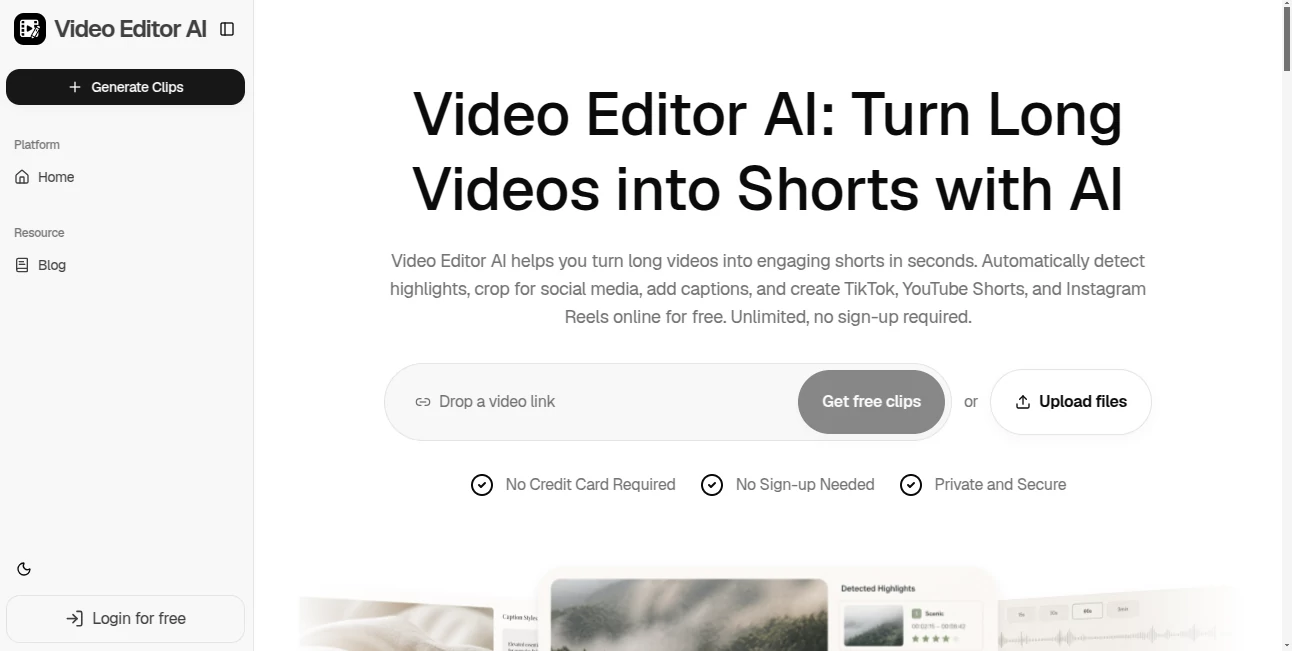
What is Video Editor AI?
Turning a long video into a handful of useful short clips can take far longer than recording the original content. Video Editor AI is built around a much simpler idea: give it a podcast, webinar, interview, YouTube video, or other long-form recording, and let AI identify the moments worth sharing and prepare them for short-form platforms.
The service focuses on content repurposing rather than traditional timeline editing. It can identify highlights, remove unnecessary pauses and filler words, generate captions, reframe footage for different screen formats, and prepare clips for platforms such as TikTok, YouTube Shorts, and Instagram Reels. It is also available online without requiring an account or credit card, making it easy to test the workflow before committing to it.
Key Features
- AI highlight detection for finding potentially engaging moments in long videos.
- Viral Score that ranks clips according to factors such as hook strength, shareability, and predicted watch time.
- Automatic captions and animated subtitles generated from the video's spoken content.
- Auto Reframe for 9:16, 1:1, and 16:9 formats while keeping important subjects and faces in view.
- Silence and filler-word removal to make clips tighter and easier to watch.
- AI B-roll that can add relevant visual elements and cutaways to short-form content.
- Support for repurposing podcasts, webinars, interviews, YouTube videos, and other long recordings.
- A browser-based workflow that requires no traditional video-editing software.
User Interface
The interface is designed around a straightforward content-repurposing workflow rather than a complicated professional editing suite. The main process starts with providing a video, followed by AI analysis and editing, before moving on to the finished clips.
This approach is particularly useful for creators who do not want to spend time learning a large collection of editing controls. Someone working with a weekly podcast, for example, can focus on the original conversation while the editor handles much of the repetitive work involved in finding moments, formatting clips, and preparing captions.
Accuracy & Performance
The quality of an automated clipping tool depends heavily on how well it identifies context and meaningful moments. Here, the system analyzes long-form footage for highlights, hooks, emotions, and other potentially valuable sections before creating clips.
Its automated workflow can save considerable time when working with lengthy recordings. The highlight-ranking feature is also useful when there are many possible clips and the creator needs a quick way to decide which ones deserve attention first. As with any automated editing system, final review is still worthwhile before publishing, especially for content where wording, context, or brand presentation matters.
Capabilities
The strongest part of the platform is its ability to turn one piece of long-form content into multiple pieces of short-form material. A single podcast episode can become several quotable clips, while a webinar can be transformed into a series of educational snippets or promotional videos.
Automatic reframing makes the same footage more suitable for vertical and square formats, while captions make spoken content easier to follow when viewers are watching without sound. Silence and filler removal can further tighten the presentation, and AI B-roll provides another way to make clips visually more engaging.
Security & Privacy
The website presents the service as private and secure and does not require users to create an account before trying the basic workflow. It also states that no credit card or sign-up is required to get started.
Because video uploads can contain private conversations, customer information, or unreleased material, users should still review the provider's privacy and terms pages before processing sensitive footage. This is especially important for businesses, agencies, and creators working with confidential recordings.
Use Cases
Podcasters: Long podcast episodes often contain dozens of moments that could work as short videos. The platform can identify highlights, remove unnecessary pauses, add captions, and format those moments for social media.
YouTubers: Instead of manually searching through an hour-long video for Shorts material, creators can use automated highlight detection to find promising sections and turn them into shorter pieces of content.
Educators and Coaches: A webinar, class, or coaching session can be divided into smaller lessons, tips, and promotional clips. This makes existing educational material useful beyond the original long-form recording.
Marketers: Product demonstrations, customer testimonials, events, and brand videos can be repurposed into a collection of social posts without producing every short clip from scratch.
Agencies: Teams handling content for several clients can benefit from automating repetitive clipping and formatting work. Instead of spending hours manually preparing every variation, editors can concentrate on reviewing and refining the strongest results.
Pros and Cons
- Pros: Free to try, no sign-up required, no credit card required, automatic highlight detection, caption generation, silence and filler removal, multiple aspect ratios, AI B-roll, and support for major short-form video platforms.
- Pros: Particularly useful for turning long recordings into a larger volume of social content.
- Pros: The workflow is accessible to users who do not have extensive video-editing experience.
- Cons: Automated highlight selection may still need human review when context is important.
- Cons: Creators who need detailed frame-by-frame professional editing may prefer a traditional full-featured video editor.
Pricing Plans
The website currently promotes the service as free to use, with unlimited clip generation and no sign-up required. It also states that users can start without providing a credit card.
This makes the product particularly interesting for creators who want to experiment with automated video repurposing without immediately entering a subscription. Since pricing and available features can change as the service develops, users should check the current website before making decisions based on commercial requirements.
How to Use the Tool
Getting started is intentionally simple. Begin by providing a long-form video, such as a podcast, webinar, interview, or YouTube recording. The AI then analyzes the material and looks for hooks, highlights, emotions, and potentially valuable moments.
After analysis, the editing stage can generate short clips, captions, subtitles, layouts, and suitable framing. Review the suggested clips and choose the ones that best fit your audience and message. Once the results look right, they can be prepared for channels such as TikTok, YouTube Shorts, and Instagram Reels.
Comparison with Similar Tools
Traditional video editors give creators detailed control over every cut, transition, layer, and effect, but that flexibility can make the process slower when the goal is simply to extract short clips from long footage. This platform takes the opposite approach by concentrating on automation and content repurposing.
It is also different from AI video generators that create completely new footage from text prompts. Its main strength is working with content that already exists and finding new ways to package that material. For a creator who has plenty of long-form recordings but not enough time to turn them into Shorts and Reels, that distinction is important.
Conclusion
For creators sitting on hours of podcasts, interviews, webinars, streams, and educational recordings, the biggest challenge is often not creating content but getting more value from what has already been produced. This tool addresses that problem directly by combining highlight detection, automated captions, smart reframing, filler removal, and B-roll assistance in one workflow.
Its no-sign-up and free-to-use approach also lowers the barrier to experimentation. A creator can take an existing long video, see what the AI finds, and decide whether the resulting clips are useful without first committing to a complicated editing setup.
It will not replace a professional editor for every project, but for fast social-media repurposing, it offers a practical shortcut from one long recording to a collection of ready-to-review short videos.
Frequently Asked Questions (FAQ)
What is Video Editor AI?
It is an online AI video editing and repurposing service designed to turn long-form videos into short clips for platforms such as TikTok, YouTube Shorts, and Instagram Reels.
What types of videos can be turned into Shorts?
The service is designed for podcasts, webinars, interviews, YouTube videos, and other long-form recordings. It can identify useful sections and prepare them as shorter pieces of content.
How does the AI find the best moments?
The system analyzes the video for highlights, hooks, emotions, and other potentially valuable moments. It can then rank clips using its Viral Score, which considers factors including hook strength, predicted watch time, and shareability.
Can it automatically add captions?
Yes. Automatic captions and animated subtitles are among the core editing features, allowing spoken content to be converted into captioned short videos with minimal manual work.
Can videos be resized for different social platforms?
Yes. The Auto Reframe feature supports 9:16, 1:1, and 16:9 formats and is designed to keep important subjects and faces properly positioned.
Does it remove silence and filler words?
Yes. Its Silence & Filler Removal feature is designed to remove dead air, pauses, and common filler words to make short clips more concise.
Do I need to create an account?
No. The website currently states that users can start without signing up and without entering credit card information.
Who can benefit most from this tool?
It is especially useful for podcasters, YouTubers, educators, coaches, marketers, streamers, and agencies that regularly need to transform long-form recordings into short-form social content.
AI Video Editor , AI Short Clips Generator , AI Repurpose Assistant , AI Captions or Subtitle .
These classifications represent its core capabilities and areas of application. For related tools, explore the linked categories above.
Video Editor AI details
Website unavailable — View Alternatives
Pricing
- Free
Apps
- Web App
Categories

Video Editor AI Alternatives Product
MikeSullyToo…

Happyhorse

ViraFlow
Subclip

Jasper

Gemini Omni

Kapwing

happyhorse

Fast Wan