Video Transcription AI
What is Video Transcription AI?
Turning spoken content into searchable, editable text has become an essential part of modern workflows. Whether you're reviewing online lectures, documenting business meetings, creating subtitles, or organizing research interviews, an accurate transcription tool can save countless hours of manual work.
This platform delivers a fast and reliable way to convert both video and audio into well-structured text directly from a web browser. It supports common media formats, online video links, meeting recordings, and multilingual content without requiring complicated software installation. The clean workflow makes transcription accessible to students, professionals, journalists, educators, marketers, and content creators alike.
One of its strongest advantages is the balance between simplicity and capability. Instead of overwhelming users with unnecessary settings, it focuses on delivering quick results while maintaining excellent transcription quality. For anyone who regularly works with spoken content, it can quickly become an indispensable productivity companion.
Key Features
User Interface
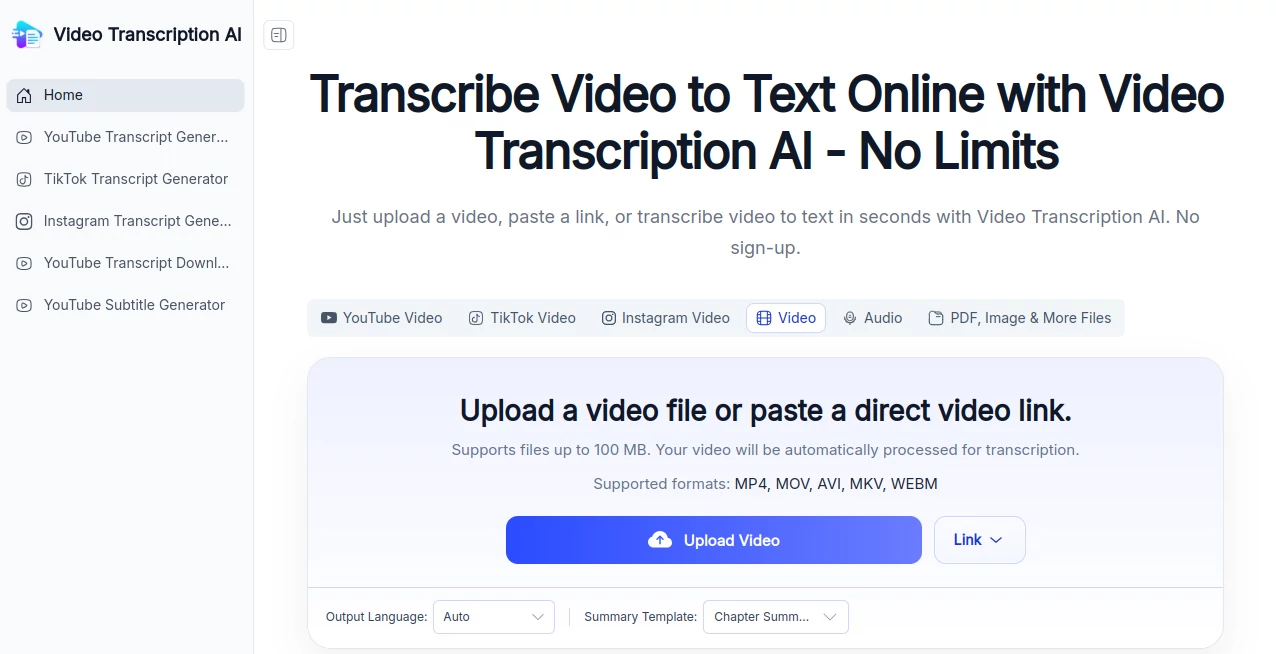
The interface is refreshingly straightforward. Users simply upload a video, drag and drop a file, or provide a supported video link before starting the transcription process. Everything happens inside the browser, eliminating the need for software installation or technical configuration.
Navigation feels intuitive even for first-time visitors. Uploading files, monitoring progress, and exporting transcripts require only a few clicks, making the entire experience smooth from beginning to end.
Accuracy & Performance
The transcription engine delivers highly accurate results across a wide range of accents and speaking styles when audio quality is clear. Multiple transcription modes allow users to prioritize either speed or maximum accuracy depending on the project.
Support for more than 200 languages makes the platform useful for international teams, multilingual interviews, educational institutions, and global businesses. Speaker recognition further improves readability by identifying different participants during conversations or meetings.
Capabilities
- Convert video and audio into editable text.
- Support for YouTube links and uploaded media files.
- Compatible with common formats including MP4, MOV, AVI, and meeting recordings.
- Speaker recognition for multi-person conversations.
- Transcription in over 200 languages.
- Browser-based workflow without software installation.
- Fast processing for both short and long recordings.
- Copy, download, or share completed transcripts.
- Handles files up to 5GB.
- Queue multiple transcription tasks simultaneously.
Security & Privacy
Privacy is an important consideration when dealing with meetings, interviews, and confidential recordings. Uploaded files are processed securely, allowing users to transcribe sensitive content with greater confidence. Since everything runs online, there is no need to install additional applications that might complicate internal IT policies.
Use Cases
- Converting university lectures into searchable study notes.
- Creating transcripts for podcasts and webinars.
- Preparing subtitles for social media videos.
- Documenting Zoom meetings and online conferences.
- Transcribing journalist interviews.
- Generating written records for research projects.
- Repurposing video content into blog articles.
- Improving accessibility for educational materials.
- Creating searchable archives of recorded presentations.
Pros and Cons
Pros
- Very simple browser-based workflow.
- No registration required to get started.
- Supports over 200 languages.
- Speaker recognition improves transcript readability.
- Works with both uploaded files and online video links.
- Handles large media files.
- Fast transcription performance.
Cons
- Audio quality still affects transcription accuracy.
- Complex background noise may require manual corrections.
- Advanced editing features are limited compared to dedicated video editors.
Pricing Plans
The service offers free online transcription without requiring account creation, making it an excellent choice for occasional users. Pricing and premium capabilities may expand over time as additional features become available.
How to Use Video Transcriber AI
Start by uploading a supported video or audio file, or paste a compatible video link. Once the media has been added, choose the preferred language and allow the system to process the recording automatically. After the transcription is complete, review the generated text, make any necessary edits, and export or copy the transcript for future use.
Comparison with Similar Tools
Compared with many traditional transcription platforms, this solution emphasizes accessibility and speed. Many alternatives require software installation, paid subscriptions, or account registration before processing media. Here, users can begin almost immediately through a browser-based workflow.
Its combination of multilingual support, speaker recognition, generous upload limits, and straightforward interface makes it particularly attractive for educators, students, researchers, business teams, and creators who need dependable transcripts without unnecessary complexity.
Conclusion
For anyone working with spoken content, a dependable transcription tool can dramatically reduce repetitive manual work. This platform combines excellent language coverage, strong transcription accuracy, an intuitive interface, and convenient browser access into a solution that fits both personal and professional workflows.
Whether the goal is documenting meetings, creating subtitles, studying online courses, publishing articles, or organizing interviews, it provides a practical and efficient way to transform recordings into readable text. Its ease of use makes it suitable for beginners, while its multilingual capabilities satisfy the needs of more demanding users.
Frequently Asked Questions (FAQ)
Does it support multiple languages?
Yes. The platform can transcribe content in more than 200 languages.
Can it identify different speakers?
Yes. Speaker recognition helps separate conversations involving multiple participants.
Do I need to install software?
No. Everything works directly inside a web browser.
Can I transcribe meeting recordings?
Yes. Meeting recordings from popular conferencing platforms and common video formats are supported.
Is there a file size limit?
Yes. Individual uploads can be as large as 5GB, making it suitable for lengthy recordings.
AI Productivity Tools , AI Transcription , AI Speech to Text , AI Video Recording .
These classifications represent its core capabilities and areas of application. For related tools, explore the linked categories above.
Video Transcription AI details
Website unavailable — View Alternatives
Pricing
- Free
Apps
- Web App
Categories

Video Transcription AI Alternatives Product

Futurwise

Khuram Youraj

BetterAntisp…

Remove My Me…

GPT Image 2 …

ChatGPT
WhisperWebUI

VercelAPP

Agent Grid