ViralClip
What is ViralClip?
ViralClip is an AI-powered creative workspace designed for creators, marketers, and businesses that want to turn successful short-form video ideas into fresh content. Instead of moving between separate tools for researching a trending clip, understanding its structure, generating new visuals, and preparing content for social platforms, the platform brings these steps into one workflow.
The concept is particularly useful for TikTok, Instagram Reels, and YouTube Shorts creators. Users can study a reference video, extract useful creative information, build a new version with AI, and export vertical-ready content. It can also be used to create product-focused videos, images, and other assets without starting every project from scratch.
Key Features
- AI video generation from text prompts, images, and references.
- Viral video cloning based on the structure of trending short-form content.
- TikTok transcript extraction with timestamps and scene context.
- Video-to-prompt analysis for turning reference footage into structured creative direction.
- Subtitle and watermark removal tools for cleaning reference footage.
- Image-to-video generation and AI image creation.
- Product-focused video and image workflows.
- Lip sync, motion control, and AI voice generation.
- Unified credit usage across video, image, and voice generation.
- HD, watermark-free downloads on paid plans.
User Interface
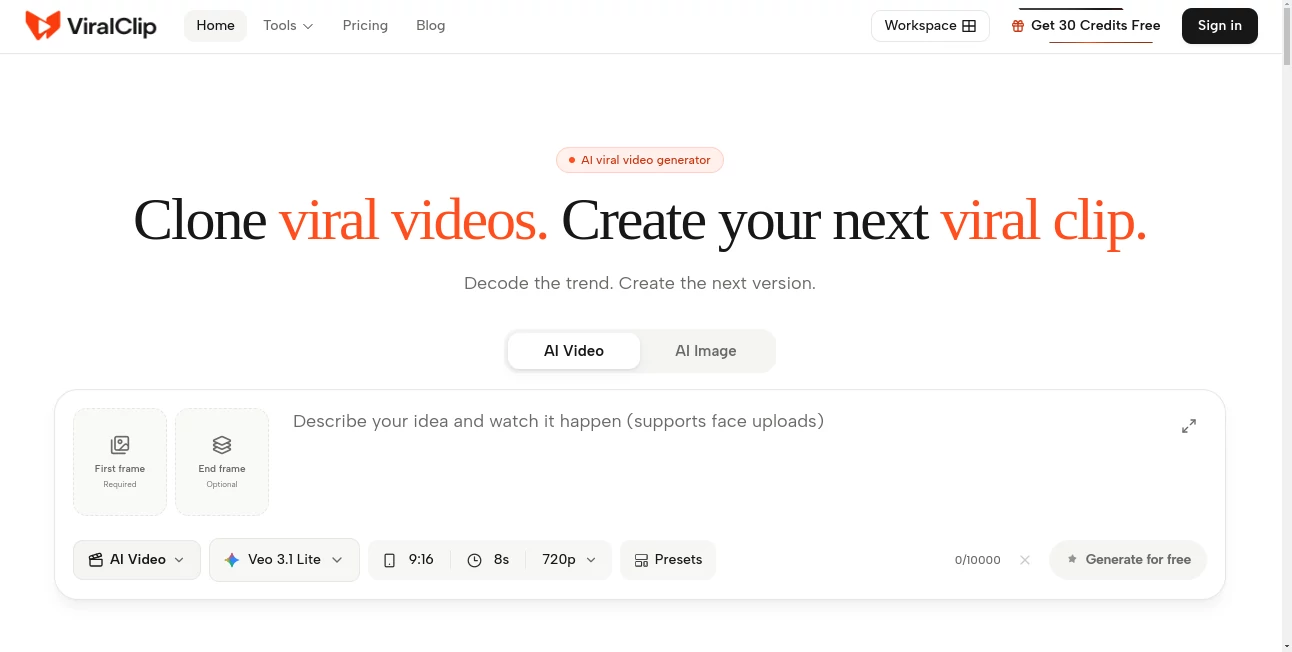
The interface is organized around focused creative workflows rather than forcing users to learn a complicated editing environment. Creators can choose whether they want to research a reference, generate a video, create product imagery, or prepare supporting assets.
This workflow makes sense for short-form production because the creative process is often iterative. A creator may begin with a TikTok reference, extract its script and structure, turn the idea into a prompt, generate several variations, and then select the strongest result. Keeping these activities together reduces unnecessary switching between browser tabs and disconnected applications.
Accuracy & Performance
The platform is designed around speed, which matters when working with short-lived social media trends. Its research tools can extract timestamped transcripts and provide scene-level information from reference videos, helping creators understand what happens throughout a clip instead of relying only on a general description.
Generation performance depends on the selected AI model, resolution, duration, and references used. The service supports multiple video and image models, including options from providers such as Veo, Seedance, Sora, Kling, Nano Banana, GPT Image, and Seedream. Credit requirements are shown before rendering, which gives users a clearer idea of the cost of a generation.
Capabilities
One of the strongest aspects of the platform is the range of creative tasks covered by a single workspace. Users can generate text-to-video and image-to-video content, create AI images, work with reference material, synchronize speech with lip movement, and transfer motion into new visual concepts.
For product creators, the workflow goes beyond ordinary video generation. Product imagery and listing assets can be produced alongside promotional videos, making the platform useful for ecommerce campaigns as well as social media content.
The history system also keeps generated videos and related creative work available for re-editing and variations. This is useful when a creator wants to test several hooks, visual directions, or versions of the same concept.
Security & Privacy
The service provides dedicated privacy, terms of service, acceptable use, and refund policy pages for users. Its acceptable use policy also states that adult, NSFW, and sexually explicit content generation is prohibited.
As with any online AI creation platform, users should review the current privacy and terms documentation before uploading commercially sensitive material, confidential product information, or third-party footage. This is especially important for businesses working with unreleased campaigns or customer assets.
Use Cases
Short-form content creation: TikTok, Reels, and Shorts creators can research successful videos and develop new versions adapted to their own creative direction.
Product marketing: Ecommerce brands can turn product ideas and reference material into promotional clips and coordinated product images.
UGC-style campaigns: Marketers can experiment with short-form concepts designed around the style and pacing commonly found in user-generated content.
Trend research: Creators can extract transcripts, timestamps, and scene information from reference videos before deciding how to approach a trend.
Creative testing: Agencies and social media teams can generate multiple variations of an idea and compare different hooks, visuals, and structures.
Social media production: The vertical-first workflow is particularly suitable for teams publishing frequently across TikTok, Instagram Reels, and YouTube Shorts.
Pros and Cons
Pros
- Combines video research, generation, and creative preparation in one workspace.
- Useful free research tools for TikTok transcripts and subtitle removal.
- Supports multiple AI video and image models.
- Strong focus on short-form social media content.
- Includes product-oriented creative workflows.
- Uses one credit balance across its generation tools.
- Paid plans provide HD and watermark-free downloads.
Cons
- Generation costs vary depending on the selected model and output settings.
- Users producing large volumes of content may need a higher-tier plan.
- The platform is more specialized toward AI-assisted content production than traditional frame-by-frame video editing.
- Results can vary between different underlying AI generation models.
Pricing Plans
The platform currently offers several subscription levels, with monthly pricing designed for different production volumes. All listed plans include access to its AI video and image generation models, while credit allowances increase with each tier.
Basic – $10/month: Includes 150 credits per month and is aimed at individuals and creators with lighter production needs.
Standard – $39/month: Includes 600 credits per month and is positioned for active creators who need a more consistent production workflow.
Pro – $69/month: Provides 1,100 credits per month and is intended for professional creators producing content at a higher volume.
Ultra – $169/month: Includes 2,800 credits per month and targets teams and users with substantial generation requirements.
The service also offers yearly and one-time purchasing options, with the exact credit distribution and terms depending on the selected option. Actual usage varies by model, resolution, duration, and reference materials, so the number of videos generated from a credit balance can differ between projects.
How to Use It
Getting started is straightforward. Begin by deciding whether you want to analyze an existing trend or create something from scratch.
- Paste a TikTok reference link or start with your own creative prompt.
- Use the available research tools to extract a transcript, timestamps, or scene information when working from an existing video.
- Turn the reference into a structured creative direction or choose a generation workflow.
- Select the appropriate video or image model and configure the output settings.
- Review the displayed credit cost before rendering.
- Generate the content and create additional variations if needed.
- Download the finished vertical content for publishing on TikTok, Reels, or Shorts.
Comparison with Similar Tools
Many AI video platforms concentrate primarily on generating clips from prompts. This platform takes a somewhat different approach by connecting research and generation. The ability to inspect a reference video, extract its useful creative elements, and then move into a cloning or creation workflow makes it particularly relevant to social media creators.
Another distinction is the combination of video, image, voice, product imagery, and research utilities. Someone who only needs occasional text-to-video generation may prefer a more narrowly focused generator. For creators who repeatedly research trends and produce short-form variations, however, having these functions connected can make the overall workflow considerably more practical.
The inclusion of multiple underlying AI models is also useful for experimentation. Rather than being tied to a single generation model, users can work with different options depending on the type of result they want and the available credit budget.
Conclusion
For creators who live in the fast-moving world of short-form video, the biggest challenge is often not coming up with one idea but turning an idea into several strong pieces of content quickly. This platform addresses that problem by connecting trend research, creative analysis, AI generation, and publishing preparation.
Its strongest use case is likely to be creators, marketers, ecommerce teams, and agencies that regularly work with TikTok, Reels, and Shorts. The combination of free research utilities, multiple generation models, product-focused workflows, and a shared credit system gives users a practical environment for testing ideas and producing new variations.
It is not simply a tool for generating another AI video from a sentence. Its real advantage is the workflow around the generation itself: understand what is working, shape the creative direction, produce a new version, and move it toward publication while the trend is still relevant.
Frequently Asked Questions (FAQ)
What is this platform used for?
It is an AI creative workspace for researching viral short-form videos and generating new video, image, voice, and product-related assets.
Can I create videos from a text prompt?
Yes. The platform supports text-to-video generation as well as image-to-video and reference-based generation.
Can I analyze a TikTok video?
Yes. Its TikTok transcript tool can extract spoken content, timestamps, and scene context from a reference video to help creators understand its structure.
Can I create a new video based on a viral video?
Yes. The viral video cloning workflow is designed to help users study a proven short-form structure and create a new version rather than simply reproducing the original footage.
Does it support image generation?
Yes. The platform includes AI image generation, multi-reference image editing, and product-oriented image workflows alongside its video tools.
Can I use it for TikTok, Instagram Reels, and YouTube Shorts?
Yes. Its workflow is designed around vertical 9:16 content and supports exports intended for TikTok, Reels, and Shorts.
Is there a free way to try the service?
Yes. Free credits are available to get started, and several research tools, including TikTok transcript extraction and subtitle removal, are offered as free tools.
Which AI models are available?
The available model selection includes video and image models such as Veo, Seedance, Sora, Kling, Nano Banana, GPT Image, and Seedream. The available models and their usage costs may change over time.
Do the plans include watermark-free downloads?
Paid plans include HD, watermark-free downloads according to the current pricing information.
Does the platform support AI voice features?
Yes. The service includes text-to-speech and AI voice generation, along with features such as lip sync and motion control.
AI Image to Video , AI Video Generator , AI Tiktok Assistant , AI UGC Video Generator .
These classifications represent its core capabilities and areas of application. For related tools, explore the linked categories above.

ViralClip Alternatives Product

WonderShare …

Mediagen

RenderFlow AI

Veo 4 AI

Banana AI

Seedance 2.0
Seedance

Viewra

FluxMov