VoiceCloner
What is VoiceCloner?
VoiceCloner is a straightforward AI voice cloning platform designed for people who want to turn their own voice into reusable speech without dealing with a complicated setup. The process starts with a clear recording, creates a private voice profile, and then lets you type text and generate speech in that voice.
One of the most appealing parts of the service is how quickly someone can test it. Voice cloning can be tried without creating an account or entering a credit card, while signing in adds features such as saved voice profiles and additional trial credits. For creators working on narration, podcasts, courses, presentations, or video content, the simple workflow can save a surprising amount of time.
Key Features
- AI voice cloning from a personal voice recording
- Free trial without requiring an account
- Private voice profiles for managing cloned voices
- Multilingual speech generation in English, Spanish, French, Japanese, and Chinese
- HD voice cloning on paid plans
- MP3 downloads without watermarks
- MP3 and WAV support for generated audio projects
- Adjustable speech speed and pitch
- Emotion and speech controls for generated audio
- Voice Design for creating additional AI voices
User Interface
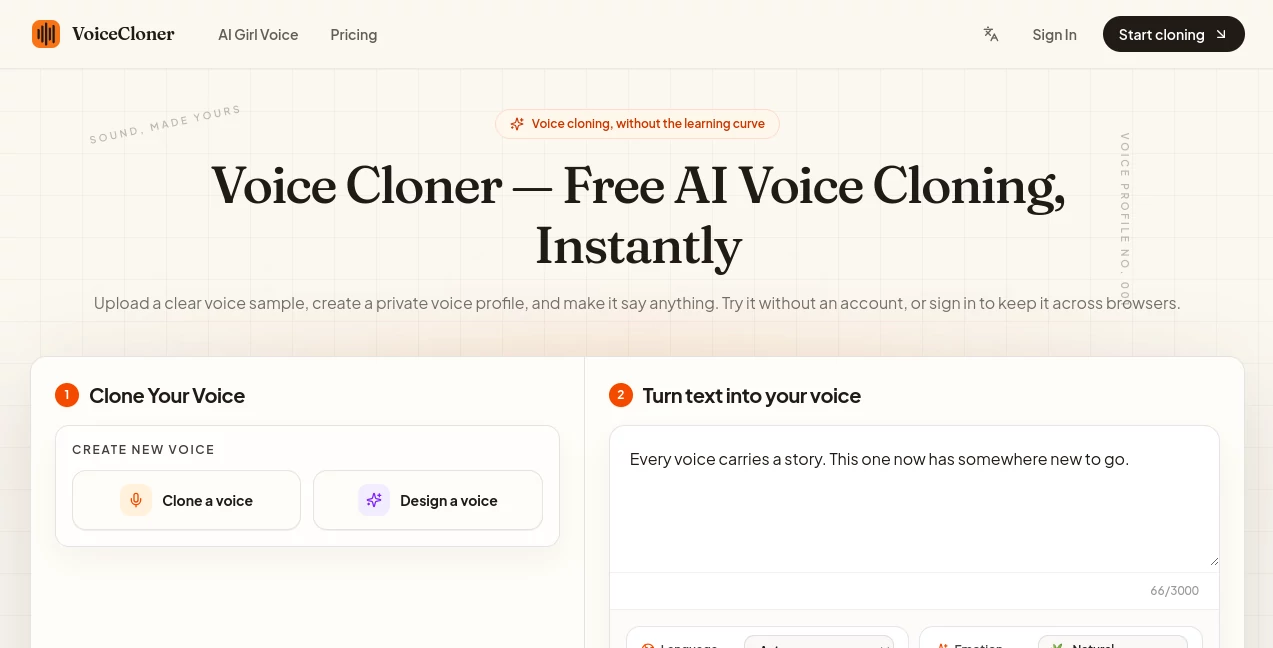
The interface is built around a three-step workflow, which makes the platform easy to understand even for someone who has never used a voice cloning service before. You upload a recording, create the voice profile, and then enter the text you want spoken.
The generation area includes useful controls for language, emotion, speed, pitch, pauses, and interjections. This gives users more control than simply pressing a generate button and accepting whatever comes out. Generated results are also kept in a history area, making it easier to return to previous work.
For a first-time user, the uncluttered layout is one of the strongest aspects. There is no large collection of unrelated AI features competing for attention.
Accuracy & Performance
The quality of a cloned voice depends heavily on the source recording. The platform recommends using around 30 to 120 seconds of speech from a single speaker, recorded without music, echo, or distracting background noise. A clean sample gives the system a much better representation of the speaker's tone, rhythm, pronunciation, and vocal character.
Voice profiles are generally prepared in under a minute, avoiding the long training processes associated with some traditional voice cloning workflows. The final result can also vary depending on the language, text, and quality of the original recording, so a clean and consistent sample remains important.
Capabilities
The platform focuses specifically on custom voice generation rather than trying to become an all-purpose AI suite. Once a voice profile has been created, users can type new text and turn it into speech using that voice.
Multilingual generation is particularly useful for creators who publish content for different audiences. A single voice profile can be used for English, Spanish, French, Japanese, and Chinese speech, helping maintain a recognizable vocal identity across languages.
Users can also control elements such as speed and pitch, insert pauses, and work with emotional or conversational cues. Generated audio can be downloaded for use in videos, podcasts, online courses, presentations, and other projects.
Security & Privacy
Voice data deserves careful attention because a voice recording can represent a person's identity. The service states that voice recordings are processed through its system and external voice providers required to generate the clone. Pending samples that have not yet been cloned are removed after 30 minutes, while completed voice samples are retained.
The platform also states that it does not sell or share voice data and allows users to request deletion of their voice clones. Users should still make sure they have the necessary rights before uploading anyone else's voice.
This is especially important for public recordings. The fact that a voice can be found in a podcast or video does not automatically mean it can legally be cloned. The service requires users to confirm that they have the right or permission to use the voice.
Use Cases
There are plenty of practical situations where personal voice cloning can be useful. A YouTube creator could prepare narration without repeatedly recording every sentence. A course instructor could produce corrections or additional lessons without setting up a microphone session each time.
- Video narration: Create voiceovers for educational, promotional, or social media videos.
- Podcasts: Produce additional narration or corrections using a consistent voice.
- Online courses: Turn written lessons into spoken educational material.
- Presentations: Add personalized narration to slides and visual content.
- Multilingual content: Create speech in several supported languages while maintaining a consistent vocal character.
- Content production: Generate repeated announcements, scripts, and short-form audio without recording every version manually.
Pros and Cons
- Pros: Free trial, no account required for initial use, simple workflow, multilingual voice generation, downloadable audio, private voice profiles, adjustable speech controls, and commercial licensing on selected paid plans.
- Cons: Results depend strongly on the quality of the uploaded recording, the number of voice profiles and credits varies by plan, and users must have permission to clone a voice.
Pricing Plans
The pricing system is based on credits, with free access available alongside yearly subscriptions and paid usage options. The free plan costs $0 and does not require a credit card. It includes trial credits, one voice profile, or two when signed in, plus limited AI Voice Design access and daily free credits for signed-in users.
The Starter plan is listed at $7.90 per month when billed annually, providing 600,000 credits per year, approximately 15 to 18 hours of audio, five voice profiles, five AI Voice Design generations per day, and HD voice cloning.
The Pro plan costs $19.90 per month on annual billing and includes 1,800,000 credits per year, approximately 45 to 55 hours of audio, 20 voice profiles, 20 AI Voice Design generations per day, HD voice cloning, priority generation, and a commercial license.
The Studio plan is priced at $55 per month when billed annually. It provides 5,400,000 credits per year, approximately 135 to 160 hours of audio, 50 voice profiles, 50 daily AI Voice Design generations, HD voice cloning, the highest-priority generation queue, a commercial license, and dedicated customer support.
How to Use VoiceCloner
Start with a clean recording containing 30 to 120 seconds of speech from one person. Avoid background music, echo, and other voices because they can affect the resulting voice profile.
Upload the recording and create a voice profile. The system processes the sample and builds a representation of the speaker's vocal characteristics without requiring a lengthy training job.
Once the profile is ready, enter the text you want to hear. Select the language and adjust available controls such as emotion, speed, pitch, pauses, or interjections when needed. Generate the speech, listen to the result, and download the finished audio.
Comparison with Similar Tools
Many AI voice platforms combine voice cloning with large marketplaces, extensive text-to-speech libraries, video editors, or other AI features. That can be useful for users who want an entire production suite, but it can also make a simple task feel unnecessarily complicated.
This service takes a narrower approach. Its workflow is centered on creating a custom voice from an authorized recording and turning written text into downloadable speech. There is no requirement to browse through a marketplace of unrelated voices before getting started, and the initial trial does not require an account.
For someone who already knows whose voice they want to use and simply needs a practical way to generate speech from it, this focused approach can be more convenient than navigating a much larger platform.
Conclusion
AI voice cloning becomes much more useful when the technology stays out of the way and lets the creator focus on the actual content. This platform takes that approach with a short workflow, personal voice profiles, multilingual generation, adjustable speech controls, and downloadable audio.
The free option makes it particularly easy to experiment before committing to a paid plan. For individual creators, educators, podcasters, video producers, and teams producing regular voice content, the combination of custom voices and credit-based plans offers a practical way to scale voice production.
As with any voice cloning technology, responsible use matters. The best experience starts with your own voice or a recording you have explicit permission to use. Used that way, AI voice cloning can become a useful extension of a creator's existing production workflow rather than a replacement for their creative identity.
Frequently Asked Questions (FAQ)
Can I clone a voice for free?
Yes. The free plan allows users to try voice cloning without a credit card, and the initial experience can be used without creating an account. Signing in provides additional trial credits and voice profile management.
How long should a voice sample be?
A recording of approximately 30 to 120 seconds is recommended. Clear speech from one speaker in a quiet environment generally produces a better voice profile than a recording containing music, echo, or background conversations.
Do I need an account?
No. Voice cloning can be tested without signing up. An account becomes useful when you want to save and manage voice profiles across browsers.
Can I generate speech in different languages?
Yes. The platform supports English, Spanish, French, Japanese, and Chinese for multilingual voice generation.
Can I download the generated audio?
Yes. Generated speech can be downloaded as MP3, and the platform also supports WAV for voice projects.
Is voice cloning legal?
Voice cloning can be used legally when you own the voice or have clear permission from the speaker. Users should not upload another person's recording without authorization or use a cloned voice to impersonate or mislead others.
Can I clone a voice from YouTube or a podcast?
Only when you own the recording or have explicit permission from the speaker and the necessary rights to use it. A publicly available recording is not automatically free to clone.
Does the cloned voice sound natural?
The quality can be natural when the original recording is clear and consistent. Results depend on factors such as the recording quality, text, language, and characteristics of the source voice.
Are commercial rights included?
Commercial licensing is included with the Pro and Studio plans according to the current pricing information. Users should review the applicable terms before using generated audio commercially.
What makes this different from a regular text-to-speech tool?
Instead of selecting a generic voice from a preset library, the service creates a custom voice profile from an authorized recording. This makes it possible to generate new speech while retaining characteristics of the original voice.
AI Voice Cloning , AI Text to Speech , AI Speech Synthesis , AI Voice & Audio Editing .
These classifications represent its core capabilities and areas of application. For related tools, explore the linked categories above.
VoiceCloner details
Website unavailable — View Alternatives
Pricing
- Freemium
Apps
- Web App
Categories

VoiceCloner Alternatives Product
vo4 ai

Gandr
livetalktran…
Chatterbox T…

mp3tourl
Seed Audio
sam tts

Omni Voice

HappyHorse