VoiceWarp
What is VoiceWarp?
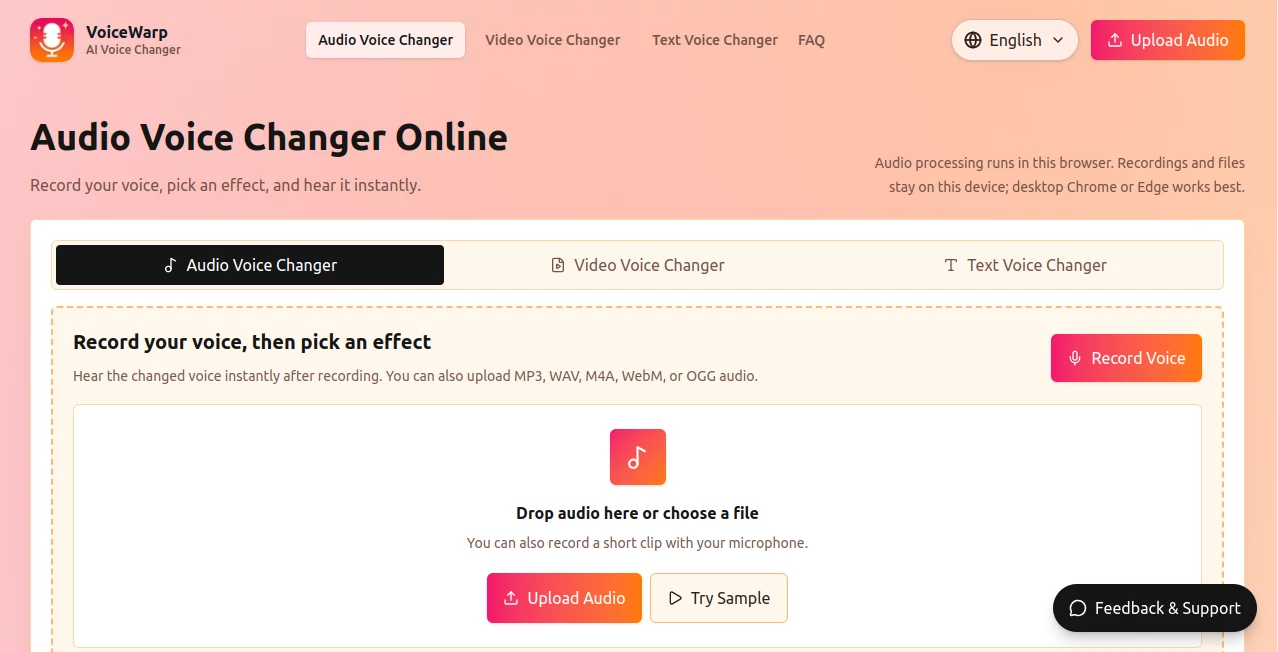
VoiceWarp is a browser-based voice changing tool designed for people who want to modify recordings, microphone audio, videos, or even generate speech from written text without installing a full desktop audio editor. Its main appeal is simplicity: record or upload your media, select an effect, preview the result, and export it.
The tool is currently available as a free beta and does not require an account. It supports several common audio and video formats, while its browser-based processing model makes it particularly interesting for users who prefer not to upload their personal recordings to a remote server.
For casual creators, gamers, students, social media users, and anyone experimenting with different vocal styles, it offers a surprisingly practical set of controls in one place.
Key Features
- Voice changing directly in the browser
- Microphone recording for quick voice experiments
- Support for MP3, WAV, M4A, WebM, and OGG audio
- Video support for MP4, WebM, MOV, and M4V
- 22 built-in voice and sound effect presets
- Adjustable pitch, speed, echo, and reverb
- Saved voice chains for reusing favorite settings
- Text-to-speech generation with downloadable MP3 output
- Audio and video processing performed locally in the browser
- Export options for changed audio, generated speech, and processed video
User Interface
The interface keeps the workflow straightforward. Users can record directly from a microphone or drag an existing audio file into the browser. After selecting an input, the available effects are presented as easy-to-understand presets rather than complicated audio engineering controls.
There are 22 presets, including Male, Female, Kid, Deep, Robot, Echo, Reverb, Monster, Anonymous, Alien, Chipmunk, Radio, Horror, Podcast, Megaphone, Telephone, Demon, Bitcrusher, Fast, Slow, and Reverse. This makes experimenting quick, even for someone with little experience in audio editing.
For users who want more control, advanced settings allow pitch, speed, echo, and reverb to be adjusted manually. Favorite combinations can also be saved as voice chains, which is useful when the same effect needs to be reused across several clips.
Accuracy & Performance
Performance depends largely on the device because audio and video effects are processed inside the browser. Short recordings can be handled conveniently, while larger video files may take longer to render.
Desktop Chrome and Edge are recommended for the smoothest experience. This approach also means the processing workflow does not depend entirely on a cloud server, although users should keep the browser tab open while effects are being rendered.
The goal here is not professional studio-grade vocal engineering. Instead, the platform focuses on quick transformations, creative effects, social clips, demonstrations, and everyday voice experiments.
Capabilities
The platform goes beyond a basic microphone voice changer. Users can work with uploaded audio, record a new clip, modify the voice in a video, or type a script and generate speech.
The text voice feature is especially useful when a creator needs a quick voiceover without recording their own voice. A script can be entered, a voice selected, and an MP3 generated for download. Character-style effects can then be applied to the generated speech.
It is worth noting that this is not an identity-preserving voice cloning service. The current system relies on voice effects rather than attempting to reproduce a specific person's identity.
Security & Privacy
Privacy is one of the more interesting aspects of the service. Audio recordings, uploaded audio files, and videos are processed locally in the browser, so those media files do not need to be uploaded to a remote processing server for the voice effects workflow.
The text-to-speech workflow is different: typed scripts are sent to the speech generator before the resulting speech is processed with effects in the browser. Users working with sensitive text should keep this distinction in mind.
For ordinary recordings and quick creative projects, local browser processing provides a convenient privacy advantage and removes the need to maintain a separate cloud media library.
Use Cases
There are plenty of situations where a lightweight voice changer is more useful than a large editing application. Content creators can use it for social clips, funny videos, short voiceovers, and character-based content. Gamers can experiment with different character voices for recordings or entertainment.
Students can use voice effects for classroom demonstrations and creative projects, while podcasters and video creators can test different vocal treatments before moving a project into professional editing software.
It can also be useful for memes, short-form videos, demos, audio experiments, and situations where a creator simply wants to see what a recording sounds like with a completely different character.
Pros and Cons
- Pros: Free beta access, no signup required, simple browser-based workflow, multiple voice presets, manual audio controls, microphone recording, audio and video support, text-to-speech functionality, and local processing for audio and video effects.
- Cons: Large files can take longer to process, desktop Chrome or Edge is recommended, processing depends on the user's device, and the current version does not provide true voice identity cloning.
Pricing Plans
The service is currently free to use in beta and does not require signup. There is no paid subscription required for the current version.
Because processing is performed in the browser for audio and video effects, the experience can vary depending on the hardware and browser being used. Larger files may require more processing time, particularly when rendering video.
How to Use It
Getting started takes only a few steps. First, open the voice changer and either record a short clip with a microphone or upload a supported audio file. For video projects, select a compatible video file instead.
Next, choose one of the available voice effects. If the preset needs adjustment, use the pitch, speed, echo, and reverb controls to fine-tune the sound. You can save a preferred combination as a voice chain if you expect to use the same settings again.
Preview the result and, once the effect sounds right, export the changed audio or rendered video. For a text-based voiceover, enter a script, select a voice, generate the speech, and download the resulting MP3.
Comparison with Similar Tools
Traditional desktop voice editors usually offer much deeper control, but they can require installation, technical knowledge, and a more involved workflow. This browser-based approach takes the opposite direction: it focuses on getting from an original recording to a changed voice with as few steps as possible.
Compared with dedicated AI voice cloning platforms, it also has a different purpose. It is not designed to reproduce a person's identity or create a digital copy of a particular speaker. Instead, its strength lies in accessible voice effects such as robotic, deep, anonymous, radio, monster, telephone, and other character-oriented sounds.
That makes it a good fit for quick creative work rather than users looking for a complete professional audio production suite or advanced voice-cloning studio.
Conclusion
For anyone who wants a fast way to experiment with voices without installing specialized software, this browser-based solution offers a useful combination of accessibility and creative controls. The selection of presets covers everything from subtle changes to deliberately unusual character effects, while the manual controls give experienced users more room to shape the result.
The local processing approach is another strong point, particularly for users who prefer keeping audio and video files on their own device. Add microphone recording, video support, text-to-speech, saved voice chains, and free beta access, and the result is a flexible tool for quick voice-focused projects.
It may not replace a professional audio workstation, but for social content, short videos, experiments, demonstrations, gaming clips, and everyday voice effects, it provides a convenient starting point with very little friction.
Frequently Asked Questions (FAQ)
Is it free to use?
Yes. The current beta is free and does not require signup.
Does it support uploaded audio?
Yes. Supported audio formats include MP3, WAV, M4A, WebM, and OGG.
Can it change voices in videos?
Yes. The beta supports MP4, WebM, MOV, and M4V video files and can apply voice effects to video content.
Does it offer text-to-speech?
Yes. Users can enter a script, choose a voice, generate speech, and download the result as an MP3.
Does it clone real people's voices?
No. The current version uses voice effects rather than true voice identity cloning.
Are uploaded audio and video files sent to a server?
Audio recordings, audio files, and videos are processed locally in the browser. The text-to-speech workflow sends typed text to the speech generator before applying effects in the browser.
Which browser should I use?
Desktop Chrome or Edge is recommended for the smoothest experience.
Why can large videos take longer to process?
Video rendering happens on the user's device, so processing time depends on the file size and available hardware resources.
AI Voice Changer , AI Text to Speech , AI Voice & Audio Editing .
These classifications represent its core capabilities and areas of application. For related tools, explore the linked categories above.

VoiceWarp Alternatives Product

Voice To Ins…
PureMIDI

Seed Audio
SpeechGen AI

Krisp
Sonicker

Gandr

Fine Voice

Happy Horse …