


















Vosko
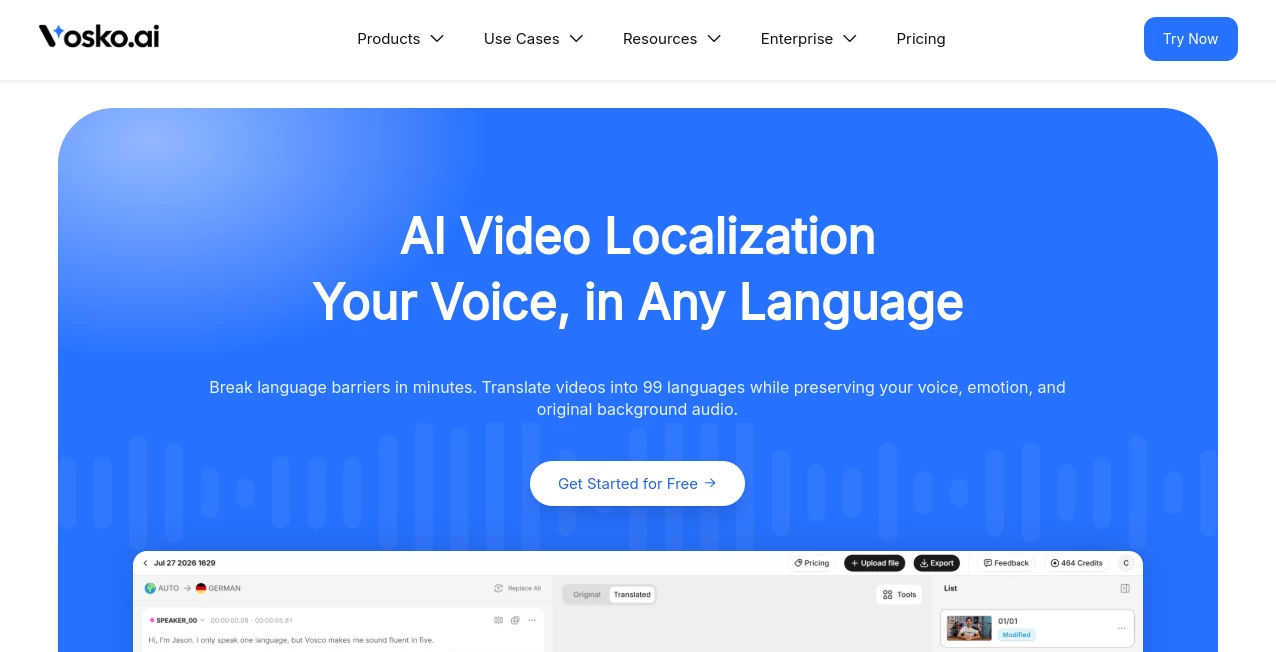
What is Vosko?
Vosko is an AI-powered video localization platform designed to help creators, educators, marketers, agencies, and businesses turn existing video content into multilingual experiences. Instead of recording a separate version for every market, users can translate and dub their videos while keeping the original speaker's vocal identity, emotional delivery, and background audio.
The platform supports more than 30 target languages and focuses heavily on natural voice preservation and synchronization. This makes it particularly interesting for YouTube channels, online courses, product videos, podcasts, short-form content, corporate training, and marketing campaigns that need to reach audiences in different countries without rebuilding the entire production from scratch.
One of its strongest ideas is simple: localization should not make a creator sound like someone else. The system analyzes characteristics such as pitch, resonance, accents, and breathing patterns to reproduce the speaker's vocal timbre in another language. For a creator who has spent years building recognition around their voice, that can make a meaningful difference.
Key Features
- Video translation and dubbing across 30+ languages.
- Voice timbre preservation designed to retain the identity of the original speaker.
- Multi-speaker detection and independent speaker audio tracks.
- Background music, sound effects, and ambient audio preservation.
- Translation support for specialized terminology and business language.
- Emotion and pacing controls for localized dialogue.
- Automatic speech synchronization and timing adjustment.
- Interactive script and timeline editing.
- Detection and removal of hardcoded subtitles with background reconstruction.
- Export options for localized video, audio, and subtitle files.
User Interface
The workspace is built around the localization process rather than treating translation as a one-click operation. Users can review translated scripts alongside their video, inspect speaker tracks, and make changes before exporting the finished version.
The timeline editor is especially useful when a translated sentence becomes longer than the original. Instead of forcing creators to accept awkward timing, the workflow can adjust speech pacing dynamically. This gives users more control over the final result and makes the platform feel closer to a professional post-production environment than a basic translation utility.
Accuracy & Performance
Performance is centered on synchronization and voice consistency. The platform states that its voice timbre fidelity reaches 99.4% and that its multi-speaker processing can achieve 99.8% precision. It also promotes processing speeds up to 50 times faster than traditional localization workflows.
These figures are best viewed as the provider's published benchmarks rather than a guarantee for every video. Real-world results will naturally depend on recording quality, accents, background noise, speaker overlap, terminology, and the complexity of the source material.
Where the platform stands out is the combination of translation, voice preservation, speaker separation, and timing controls. A short marketing video, for example, can be localized without simply replacing the original voice with a generic narrator.
Capabilities
The system goes beyond basic speech translation. It can separate dialogue from music and environmental sounds, identify multiple speakers, adapt specialized terminology, and adjust translated speech to better fit the original video timing.
For creators working with interviews or podcasts, independent speaker timelines can make editing considerably easier. For marketers, the ability to preserve a spokesperson's recognizable voice can help maintain brand consistency across regions. Educators can also localize courses without having to record every lesson again.
Subtitle handling is another useful addition. Hardcoded subtitles can be detected and removed while the underlying visual area is reconstructed, allowing localized text to appear more naturally within the final video.
Security & Privacy
Privacy is presented as an important part of the platform's infrastructure. Uploaded media is described as being processed using volatile memory, with files and generated voice models permanently purged after rendering.
The service also states that customer videos, custom glossaries, and brand voices are not used to train public AI foundation models. It describes AES-256 encryption for data at rest and TLS 1.3 for data in transit, alongside isolated workspace environments for collaborative teams.
Anyone working with interviews, customer footage, proprietary training material, or cloned voices should still review the current terms and privacy documentation before uploading sensitive material and ensure they have the necessary rights and consent for voice cloning.
Use Cases
- YouTube creators: Localize existing videos for international audiences while retaining the recognizable voice of the channel host.
- TikTok and short-form creators: Adapt short videos and trending content for different language markets without creating completely new recordings.
- E-learning: Translate courses and lectures while keeping the instructor's delivery style and timing.
- E-commerce: Localize product demonstrations, UGC advertisements, and promotional videos for international stores.
- Marketing agencies: Produce multilingual campaign variations without repeating the entire production process for every market.
- Corporate training: Convert onboarding, safety, and internal training videos into multiple languages.
- Podcasts: Create multilingual versions of interviews and episodes while maintaining the host's vocal character.
- Entertainment: Dub short dramas and other dialogue-heavy productions while keeping different speakers distinguishable.
Pros and Cons
Pros
- Supports more than 30 target languages.
- Focuses on preserving the original speaker's voice.
- Handles multiple speakers separately.
- Preserves background music and sound effects.
- Includes script editing and timing controls.
- Useful for both creators and professional localization workflows.
- Supports downloadable localized audio and subtitle outputs.
Cons
- Voice cloning should only be used when the necessary permissions have been obtained.
- Highly complex recordings may still require manual review.
- Published performance figures may vary depending on the source material.
- Professional localization workflows can become costly as video volume increases.
- Users who only need simple subtitles may find the broader feature set unnecessary.
Pricing Plans
The website currently promotes a free way to get started, allowing users to explore the localization workflow before committing to a larger production process. The service is positioned toward creators as well as professional and enterprise teams, although exact paid-plan limits and pricing can change over time.
For occasional localization, the free entry point can be a convenient way to test voice preservation and translation quality on a real video. Teams producing large volumes of multilingual content should evaluate the current paid plans according to minutes processed, languages required, export needs, and collaboration requirements.
How to Use Vosko
Getting started follows a straightforward localization workflow:
- Upload a video containing the dialogue you want to localize.
- Select the target language or languages.
- Allow the platform to process the dialogue, speakers, translation, and voice characteristics.
- Review the translated script inside the editing workspace.
- Correct terminology, speaker assignments, or phrasing where necessary.
- Adjust pacing, emotion, and timing to fit the original footage.
- Preview the localized result and check synchronization.
- Export the completed video, audio tracks, or subtitle files for publication.
Comparison with Similar Tools
Traditional dubbing remains valuable when a production requires human actors, extensive direction, or theatrical-level localization. The downside is the time and coordination involved in recording, editing, mixing, and approving multiple language versions.
Basic automatic dubbing services are faster and can be useful for straightforward videos, but they may replace the creator's recognizable voice with a generic synthetic voice and provide limited editing control.
The approach here sits between those two options. It combines automated translation with voice preservation, speaker separation, background-audio handling, and an editing environment. That combination is particularly attractive for creators who want to scale multilingual content while keeping a recognizable identity across markets.
For example, a technology YouTuber could record one product review in English, localize it into Spanish, German, Japanese, or Portuguese, review the terminology, and export the resulting versions without organizing a separate voice-recording session for each language.
Conclusion
Video localization is no longer limited to large studios with dedicated dubbing teams. Modern AI workflows make it possible for individual creators and smaller businesses to experiment with international audiences using the content they already have.
The biggest strength here is the focus on preserving more than words. Voice identity, emotional delivery, background sound, speaker separation, and timing all contribute to whether a translated video actually feels natural.
For YouTubers, educators, marketers, agencies, podcasters, and businesses with a growing international audience, this makes the platform worth considering. It is especially compelling when simply adding subtitles is not enough and the goal is to make viewers feel as though the original content was created for their language from the beginning.
Frequently Asked Questions (FAQ)
How many languages are supported?
The platform currently advertises support for more than 30 target languages, with its website highlighting 32 languages for voice localization.
Can it preserve the original speaker's voice?
Yes. Voice preservation is one of its central features. The system analyzes characteristics of the source voice and applies them to translated speech to maintain a recognizable vocal identity.
Can multiple speakers be translated?
Yes. The platform includes speaker detection and independent audio timelines, making it suitable for interviews, podcasts, panels, and other videos featuring several people.
Does it preserve background music?
Its audio processing is designed to separate dialogue from background music, sound effects, and ambient audio so the original soundscape can remain intact after translation.
Can I edit the translated script?
Yes. The editing workspace allows users to review and modify translated text before finalizing the localized video. Timing and speech pacing can also be adjusted to better match the original footage.
Is there a free option?
The service currently advertises a free way to get started. Because pricing, usage limits, and plan details can change, users should check the current offering before starting a larger localization project.
Is voice cloning safe to use commercially?
Voice cloning should only be performed when you have the appropriate rights and consent from the person whose voice is being replicated. This is particularly important for commercial projects, public figures, employees, and guest speakers.
Who can benefit most from this type of tool?
It is particularly useful for YouTube creators, online educators, marketers, e-commerce brands, agencies, corporate teams, podcasters, and entertainment producers that need to publish video content in multiple languages without recreating every recording.
AI Video to Video , AI Voice Cloning , AI Video Generator , AI Voice & Audio Editing .
These classifications represent its core capabilities and areas of application. For related tools, explore the linked categories above.

Vosko Alternatives Product

Motion Contr…

WonderShare …

AI Animate I…

Kling O1

Seedance 2.0…

Seedance 2.0

Audio Convert

AI Pixel Ani…

Seedance 2 V…
