

















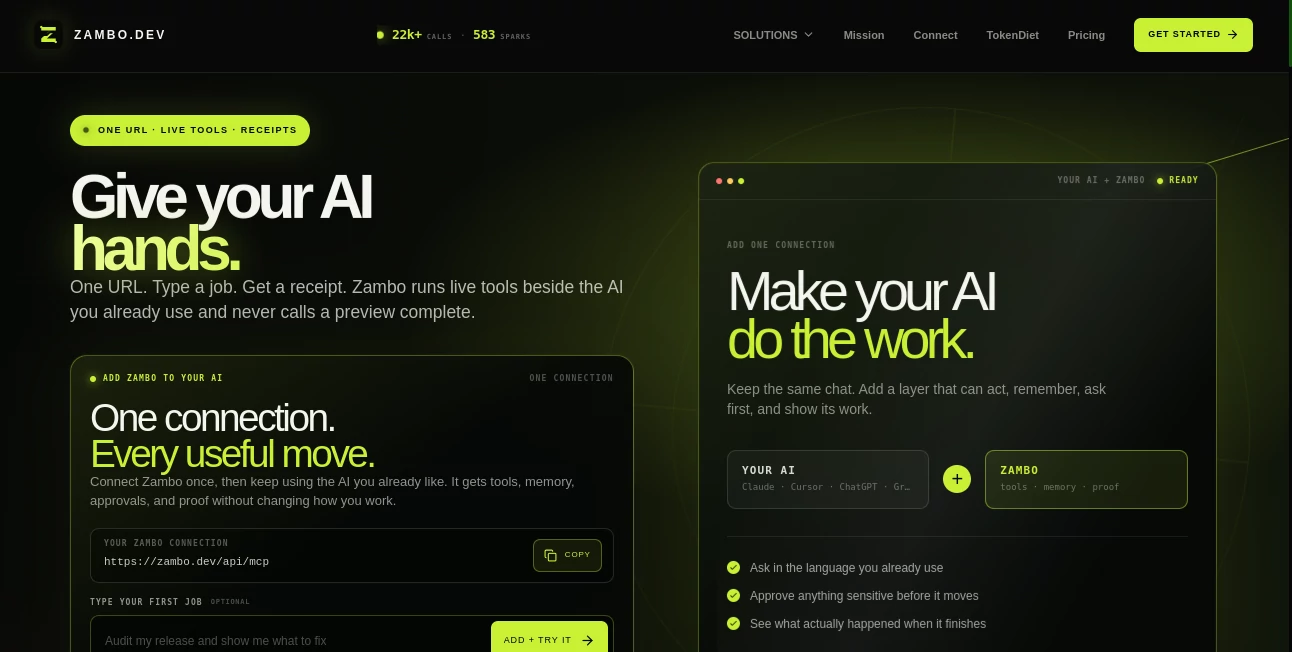
What is Zambo?
zambo.dev is a hosted AI capability layer that gives AI assistants access to a broad collection of practical tools through a single MCP connection. Instead of installing several separate services or managing a collection of API credentials, developers can connect one remote MCP server and expose a large set of capabilities to compatible AI clients.
The service is particularly interesting for developers working with Claude Desktop, Cursor, Windsurf, VS Code, Cline, and other MCP-compatible environments. Its toolset goes well beyond simple text generation, covering code analysis, strategy, opportunity research, lead generation, wallet intelligence, AI model selection, prompt security, structured data validation, and agent-oriented workflows.
For someone building AI-powered applications or experimenting with autonomous agents, the practical advantage is straightforward: fewer integrations to maintain and more capabilities available from one connection.
Key Features
User Interface
The main experience is designed around simplicity rather than a complicated dashboard. The hosted MCP approach lets developers connect the service directly from the MCP or connector settings of their preferred AI client.
Once connected, users can interact with the available capabilities through their existing AI workflow. There is no need to run a local server process for the hosted connection, and the service does not require an API key for its basic MCP access.
This makes the initial setup surprisingly quick. A developer can add the remote MCP endpoint, reload the client, and start asking the connected AI assistant to perform useful tasks.
Accuracy & Performance
Performance depends on the individual capability being called, the underlying data source, and the AI client making the request. The platform uses a shared infrastructure built around a Node.js and Express backend, PostgreSQL, and a multi-model AI cascade.
Several tools are deterministic rather than relying entirely on free-form AI responses. For example, opportunity analysis can return structured diagnostics and action plans, while code auditing can produce a score together with security findings and development recommendations.
This combination of structured processing and AI reasoning makes the system more useful for practical workflows than a basic conversational chatbot alone.
Capabilities
The available capabilities cover a surprisingly wide range of developer and business tasks. AI agents can access strategy-generation tools, code auditing, contractor lead discovery, startup credit programs, wallet scoring, DeFi opportunity scanning, research data, model selection, prompt-injection detection, and JSON schema validation.
One particularly useful feature is the universal routing capability. Instead of knowing exactly which tool should handle a request, a developer can submit a natural-language requirement and let the platform route it toward the appropriate capability.
The MCP layer also makes the tools accessible from several popular AI development environments. This is useful when an agent needs to move beyond answering questions and actually work with external data, diagnostics, structured operations, or specialized services.
Security & Privacy
Security is an important consideration when AI agents are given access to external tools. The platform includes capabilities designed specifically for this problem, including prompt-injection detection and schema enforcement for structured data flowing through agent pipelines.
The prompt-defense functionality can identify suspicious instruction patterns and potential jailbreak or prompt-injection attempts before they reach an AI system. Another tool can validate JSON structures and identify field-level problems when AI-generated data does not follow an expected contract.
Developers should still review the permissions and data requirements of each workflow before connecting external AI systems to production applications. Tool access should be treated with the same care as any other external API integration.
Use Cases
One strong use case is AI-assisted software development. Developers can connect the MCP server to an AI coding environment and use capabilities for code auditing, troubleshooting, model selection, schema validation, and security analysis without building every integration themselves.
It can also be useful for startup research. Opportunity analysis can examine a website, business idea, repository, or wallet and produce a structured diagnostic with recommended next steps. This gives founders a quick way to investigate an idea before spending hours on manual research.
Another practical application is local contractor lead generation. The lead-generation capability can search for potential customers based on a trade and location, making it relevant to agencies and service businesses looking for new opportunities.
AI agent builders may find the MCP architecture particularly valuable. Instead of creating a separate connector for every capability, an agent can work through one hosted connection and access multiple specialized tools from the same environment.
There are also specialized use cases for Web3 and on-chain applications, including wallet intelligence, blockchain network information, DeFi opportunity discovery, and autonomous payment-related workflows.
Pros and Cons
- Pros: One hosted MCP connection provides access to a large collection of AI and developer capabilities.
- Pros: Basic MCP access does not require an API key or a traditional signup process.
- Pros: Works with several popular AI development clients and coding environments.
- Pros: Includes practical developer tools such as code auditing, schema validation, model selection, and prompt-injection detection.
- Pros: Natural-language routing reduces the need to understand every individual endpoint.
- Pros: A free usage tier allows developers to test many capabilities before paying.
- Cons: The breadth of available tools can initially feel overwhelming.
- Cons: Free usage limits vary by capability.
- Cons: Some advanced functionality requires a paid subscription or separate payment.
- Cons: Results from AI-powered capabilities can still depend on the quality of the supplied input and underlying data.
Pricing Plans
The platform offers a free starting point for developers who want to test its capabilities without committing to a subscription. Individual tools have their own usage limits, and several are available without payment.
The main paid option is a $49 monthly pass. It provides access to the broader product collection, more generous or unlimited usage across supported capabilities, native MCP access, additional code audits, strategy credits, lead-generation functionality, blockchain-related features, and future tools included with the subscription.
There is also a short-term day-pass option priced at $1.49 in USDC on Base for users who need temporary access rather than a recurring subscription. Because individual tools can have different limits and pricing rules, users should check the current plan information before relying on a particular capability for a production workflow.
How to Use It
- Open an AI client that supports remote MCP connections, such as Claude Desktop, Cursor, Windsurf, VS Code, or Cline.
- Open the client's MCP, connector, or server configuration area.
- Add the hosted MCP endpoint provided by the service.
- Save the configuration and reload the AI client if required.
- Ask the AI assistant to perform a specific task instead of simply asking about the available tools.
- For example, a developer could request a security review of a public GitHub repository or ask the system to analyze a business opportunity.
- Review the returned information and verify important findings before using them in a production environment.
The setup is intentionally lightweight. There is no requirement to maintain a local MCP process for the hosted connection, which can make testing and experimentation much easier for developers who are new to MCP.
Comparison with Similar Tools
Traditional AI integrations usually require developers to connect each service separately. That can mean multiple API keys, different authentication methods, separate SDKs, and additional maintenance whenever an external service changes.
An MCP-based capability layer takes a different approach. Rather than integrating every function directly into an application, developers can expose a collection of tools through a standardized connection that compatible AI clients understand.
Compared with a basic AI chatbot, this approach is also more action-oriented. The system can connect an AI assistant with specialized functions for code analysis, research, business diagnostics, security checks, data validation, and other tasks instead of limiting the experience to conversational responses.
For developers who only need one specific API, a direct integration may still be simpler. However, for people experimenting with AI agents or building workflows that require several capabilities, a unified MCP connection can substantially reduce integration overhead.
Conclusion
This MCP platform takes an ambitious approach to AI tooling by putting a large collection of practical capabilities behind a single developer-friendly connection. Its strongest point is not one isolated feature, but the range of tasks that can become available to an AI assistant without requiring a separate integration for each one.
The combination of code analysis, strategic reasoning, business research, security utilities, lead generation, structured-data tools, and agent-oriented capabilities makes it worth exploring for developers building more capable AI workflows.
It is especially well suited to people who want their AI coding assistant or agent to do more than generate text. The free access makes experimentation straightforward, while the paid pass is aimed at users who need broader and more frequent access to the full toolset.
Frequently Asked Questions (FAQ)
Does it require an API key?
No API key is required for the hosted MCP connection. Users can connect the remote server through a supported MCP-compatible client and begin using the available capabilities subject to the applicable usage limits.
Which AI clients can connect to it?
The hosted MCP connection supports popular environments including Claude Desktop, Cursor, Windsurf, native VS Code, and Cline. Compatibility can change as clients update their MCP implementations, so developers should check the current connection instructions for their environment.
Can developers use it for code analysis?
Yes. One of the available capabilities can audit a public GitHub repository and provide a production-readiness score, security findings, and other code-quality information.
Is there a free version?
Yes. Several capabilities can be used without payment, although the number of calls available varies by tool. The paid subscription is intended for users who need broader access and higher usage limits.
What is MCP?
Model Context Protocol, commonly known as MCP, is a standard for connecting AI applications with external tools and data sources. It allows compatible AI clients to discover and call capabilities without requiring every integration to be implemented as a custom connection.
Is the platform useful for AI agents?
Yes. Its architecture is particularly relevant to AI agents because multiple specialized capabilities can be exposed through a single MCP connection. This can help an agent move from generating responses to performing structured research, analysis, validation, and other tool-based operations.