


















Zoice
What is Zoice?
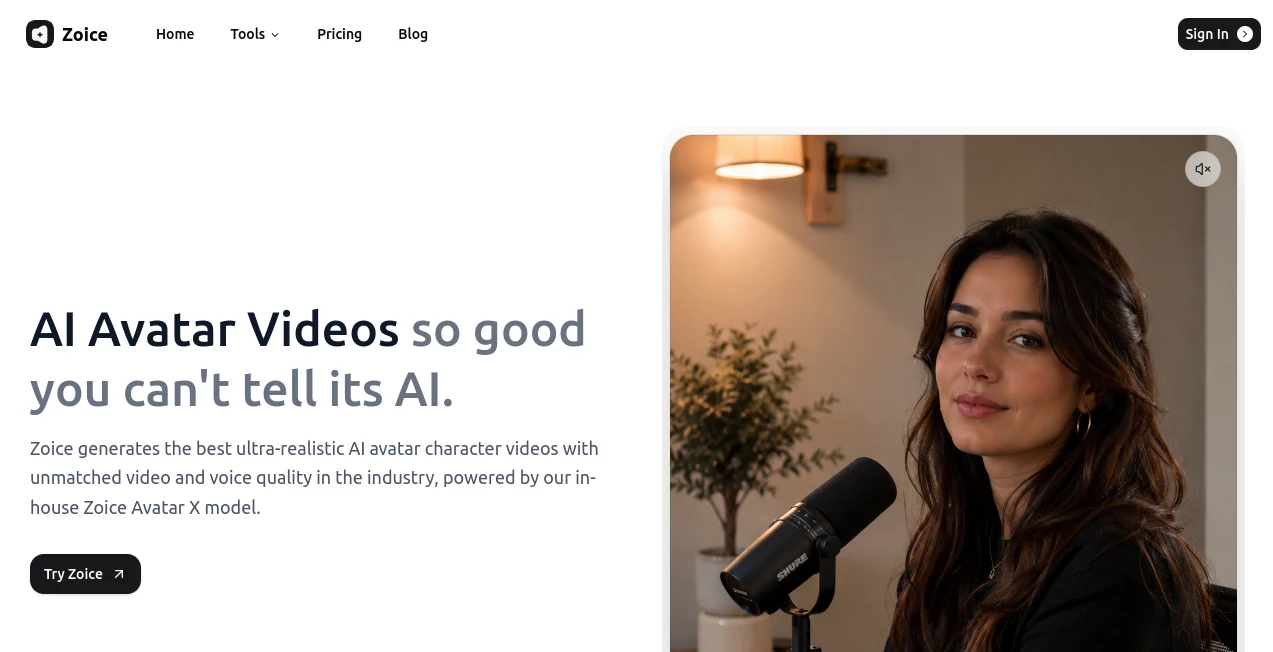
Let's face it—creating professional videos is a pain. You need a camera, a studio, a script, and frankly, a lot of patience to get everything right. But what if you could skip all that? What if you could turn a simple photo into a talking, gesturing, and engaging presenter that looks just like a real person? That's exactly what this platform does, and it's nothing short of revolutionary. The first time I saw a friend use it to create a promotional video from a single headshot, I was genuinely stunned. The avatar wasn't just moving its lips; it had realistic eye movements and natural facial expressions. It felt like I was watching a real person talk.
Key Features
This tool is built to make professional video creation accessible to everyone, from solo creators to large marketing teams. It combines a suite of powerful AI features that work together seamlessly to produce high-quality output without the technical headaches.
User Interface
The platform is refreshingly straightforward. You don't need to be a tech wizard to figure it out. You simply upload a photo, type in your script, and let the AI work its magic . The dashboard is clean and intuitive, guiding you through each step. Unlike other complex video editors, everything is centralized and easy to navigate, making the process feel less like work and more like creative play.
Accuracy & Performance
What really sets this apart is the accuracy of its lip-sync and the natural feel of its gestures. When the avatar speaks, the mouth movements are perfectly aligned with the words, which is something even many expensive tools struggle with . You can even prompt the AI to add specific hand gestures to emphasize key points in your script, making the performance feel incredibly human and engaging. The generation speed is also impressive, allowing you to create polished videos in a fraction of the time it would take using traditional methods.
Capabilities
This platform is packed with features that go beyond simple avatar creation. You can clone your own voice to maintain brand consistency or choose from over 100 languages to reach a global audience . The "Image to Avatar" feature is a game-changer, turning any photo into a personalized digital presenter . Beyond avatars, you also have access to AI-powered tools for image generation, text-to-speech, and transcription, making it a truly all-in-one content creation suite .
Security & Privacy
In an age where data privacy is a major concern, this platform takes it seriously. They offer enterprise-grade encryption to ensure your uploaded photos, voice recordings, and generated content remain secure and private. You retain full control over your data, providing peace of mind for businesses and individuals alike .
Use Cases
The applications for this technology are virtually endless. Marketers are using it to produce high-quality UGC (User-Generated Content) style videos and AI influencer campaigns without hiring actors . Small businesses are creating explainer videos and product demos that look incredibly professional. Educators are turning dense lesson plans into engaging visual lectures, and even HR departments are using it for corporate training and internal communications. It truly empowers anyone to create a "face" for their content .
Pros and Cons
Pros:
- Produces highly realistic avatars with natural expressions and gestures .
- Voice cloning and support for 100+ languages for global reach .
- Very high accuracy in lip-sync, making videos look authentic.
- User-friendly interface that requires no technical skills .
Cons:
- Requires a stable internet connection as it is a web-based platform.
- Some of the more advanced AI features may require a higher-tier subscription plan.
Pricing Plans
There is a plan for everyone, starting with a free tier that lets you test the waters. The free plan gives you 50 credits per day to use across its tools . For more professional use, the Starter plan begins at $7.99 per month, offering more credits and features like custom voice profiles . The Basic, Creator, and Agency plans scale up in credits and voice profiles, with the Agency plan offering up to 50,000 credits per month for large-volume creators .
How to Use Zoice
Getting started is as easy as one, two, three. First, sign up for a free account. Next, click on the "AI Avatar" tool. You'll be prompted to upload an image or photo of the person you want to animate. Then, you simply type or paste your script into the text field. Here, you can select a voice, choose your language, and even add prompts for specific gestures. Hit the "Generate" button, and within moments, you'll have a professional, talking video ready to download and share.
Comparison with Similar Tools
While there are other AI avatar generators out there, this one consistently outshines the competition in a few key areas. Its ability to create realistic avatars from a single image, combined with its advanced lip-sync accuracy and prompt-based gestures, puts it in a league of its own . Some alternatives might offer better custom avatars, but they often fall short on realism or voice quality. This platform strikes the perfect balance of quality, features, and affordability, making it a top choice for creators and businesses .
Conclusion
This platform is more than just a tool; it's a glimpse into the future of content creation. It removes the traditional barriers of video production, allowing anyone with an idea to bring it to life with a professional digital presenter. Whether you are a marketer looking to scale your content or an educator trying to engage your students, this tool is an incredibly powerful and accessible solution. It saves time, cuts costs, and most importantly, helps your message connect on a deeper, more human level .
Frequently Asked Questions (FAQ)
What is the "Image to Avatar" feature?
It's a key feature that lets you take a single photo of a person and turn it into a fully animated, talking AI avatar .
Can I use my own voice for the avatar?
Yes, the platform offers a voice cloning feature that allows you to create custom voice profiles for your avatars .
How many languages does it support?
It supports over 100 languages, making it ideal for creating localized content for a global audience.
Is there a free version available?
Yes, there is a free plan that includes 50 credits per day to try out the various tools .
Who is this tool best for?
It is ideal for content creators, marketers, educators, business owners, and anyone looking to create professional videos quickly and easily without a production studio .
These classifications represent its core capabilities and areas of application. For related tools, explore the linked categories above.

Zoice Alternatives Product

Beardless Fi…

AI Anime Pro

aiiStudio

Yodayo AI

Try OC Maker

Toon Tone

Klyra AI
DaVinci AI

AvatarCraft …
