Audio AI
What is Audio AI?
Audio AI is a browser-based audio enhancement platform built for people who want cleaner, clearer recordings without having to become audio-editing experts. It focuses on a practical problem: you already have the recording, but something about the sound is getting in the way. Maybe the speaker sounds distant, background noise is distracting, the volume jumps between sentences, or a voice is buried beneath music.
The platform lets users upload a recording, select an output format, generate an enhanced version, and compare it with the original before downloading the result. New users can also receive free credits after signing in, making it possible to test the workflow before committing to a paid plan.
What makes the approach particularly useful is that enhancement is not treated simply as making everything louder. The goal is to improve intelligibility while keeping the speaker recognizable and preserving a believable sense of the original recording. That makes it useful for everything from a quick voice memo to a podcast interview or lesson recorded in less-than-perfect conditions.
Key Features
- AI-powered audio enhancement directly in the browser
- Background noise reduction for distracting environmental sounds
- Voice enhancement for weak, distant, or buried speech
- Echo and reverb reduction for recordings made in untreated spaces
- Audio volume leveling for recordings with inconsistent loudness
- Voice and music separation for mixed recordings
- Support for MP3, OGG, WAV, M4A, and AAC input files
- Multiple output formats including MP3, AAC, M4A, OGG, Opus, FLAC, and WAV
- Original-versus-enhanced audio comparison
- Browser-based workflow without requiring heavyweight desktop software
- Support for recordings used in podcasts, tutorials, interviews, lessons, and music
- Free credits for new users to test the enhancement workflow
User Interface
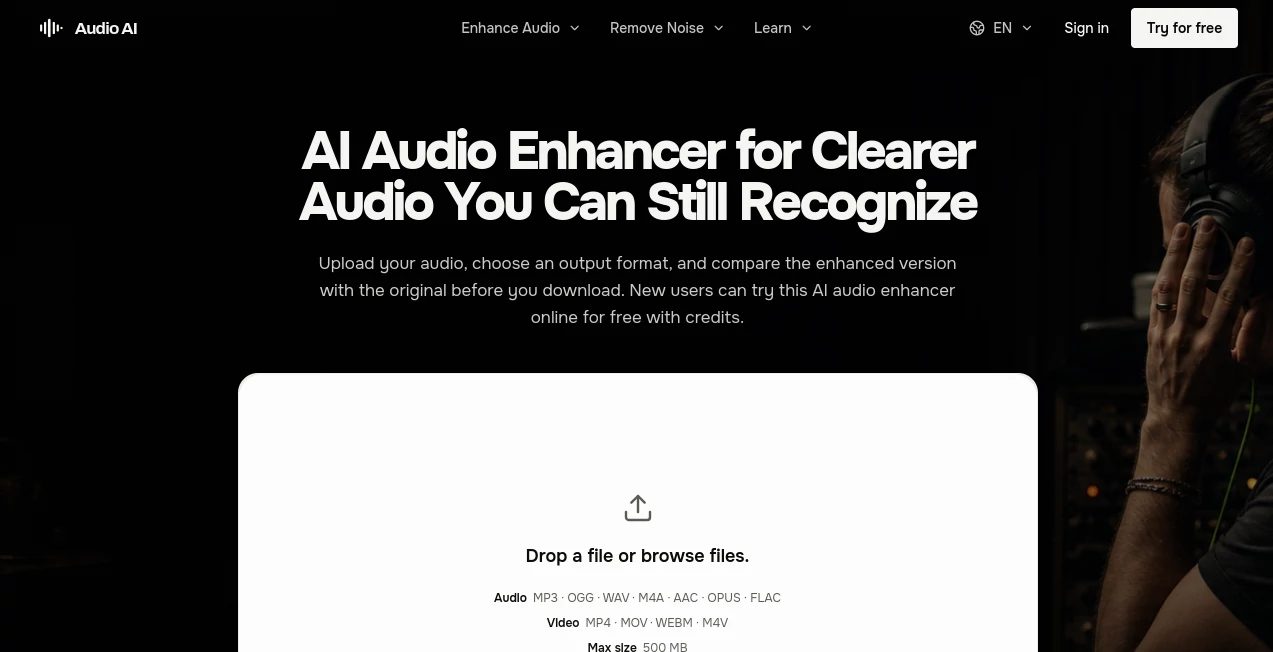
The interface is refreshingly straightforward. Instead of presenting users with a wall of technical controls, the workflow starts with the recording itself. Upload a supported file, choose the desired output format, generate the result, and listen to the difference.
The before-and-after comparison is especially helpful. Audio processing can sometimes look impressive on paper while sounding worse in practice. Being able to return to the original and compare the difficult parts of a recording makes it easier to decide whether the enhancement is actually useful.
The maximum upload size is currently 500 MB, while supported audio formats include MP3, OGG, WAV, M4A, and AAC. This covers many of the formats people are likely to encounter when working with voice recordings and everyday audio.
Accuracy & Performance
Audio enhancement works best when the original recording still contains usable speech or musical information. The system is designed to address common problems such as background noise, uneven volume, echo, and voices that are difficult to hear clearly.
A sensible way to judge the result is to listen to more than one sentence. Quiet words, consonants, pauses, and sections where the background becomes noticeable are often more revealing than a single polished phrase. A good enhancement should make the recording easier to understand without making the speaker sound metallic, thin, or disconnected from the original environment.
For example, imagine an interview recorded beside a busy street. The useful answer is already present, but passing traffic keeps pulling attention away from the speaker. Reducing that distraction can make the interview substantially easier to follow without requiring the entire recording to be rebuilt from scratch.
Capabilities
The platform covers several common audio cleanup situations. Users can work on spoken recordings, podcasts, interviews, tutorials, educational material, voice clips, and music or instrumental recordings.
For speech, the emphasis is on intelligibility and natural voice presence. Background noise can be reduced, room reflections can be softened, and inconsistent volume can be addressed. When music competes with a voice, separation tools can help create a more speech-focused result.
There are also practical limitations. This is not intended to replace a full multitrack mixing or mastering environment. Tasks such as rearranging sentences, removing filler words, cutting clips, or performing detailed instrument-by-instrument mixing are better handled by dedicated editing and music-production software.
Security & Privacy
Audio recordings can contain private conversations, interviews, lessons, business discussions, and other sensitive material. For that reason, users should treat the source file carefully and review the current privacy policy before uploading recordings that contain confidential information.
It is also a good practice to keep an untouched copy of the original recording. That gives you a reliable reference if you later need to compare results or use the source in another editing workflow.
Use Cases
Podcasters: Clean up interviews and spoken episodes where different microphones, rooms, or recording conditions create inconsistent sound.
Video creators: Improve narration, voiceovers, tutorials, commentary, and spoken clips when the audio quality does not match the visual content.
Educators: Make lessons, webinars, lectures, and course recordings easier for students to follow, particularly when the original recording was made with a laptop or phone microphone.
Journalists and researchers: Improve field interviews and voice recordings where wind, traffic, room noise, or imperfect recording environments interfere with speech.
Remote teams: Clean up conversations captured through laptops, phones, meetings, or untreated office spaces before sharing recordings with colleagues.
Musicians and creators: Review individual music or instrumental recordings when unwanted noise or an uneven presentation distracts from the material.
Pros and Cons
Pros
- Simple browser-based workflow
- Useful for both speech and everyday recordings
- Original and enhanced versions can be compared before downloading
- Supports several common audio formats
- Offers multiple export formats
- New users can test the service with free credits
- Useful for podcasts, interviews, tutorials, and voice recordings
Cons
- Results depend heavily on the quality of the original recording
- Severely damaged or clipped audio cannot always be fully recovered
- It is not designed to replace a complete multitrack mixing environment
- Users working with sensitive recordings should review the privacy terms before uploading them
Pricing Plans
The service uses a credit-based model with several purchasing options. Users can choose between monthly subscriptions, yearly subscriptions, and one-time credit purchases, depending on how regularly they need audio enhancement.
New users receive free credits after signing in, which provides a practical way to test the workflow before purchasing additional processing capacity. The workspace also displays the credit requirement before generation, allowing users to review how available credits will be used.
For someone cleaning audio occasionally, one-time credits can be more convenient than maintaining a subscription. Regular podcasters, creators, educators, or professionals processing recordings repeatedly may find a subscription more suitable.
How to Use the Tool
- Upload a supported audio file such as MP3, OGG, WAV, M4A, or AAC.
- Choose the output format you want for the finished recording.
- Generate the enhanced version using the available credits.
- Compare the original recording with the enhanced result, paying attention to quiet words, background noise, pauses, and overall voice quality.
- Download the version that provides the best balance between clarity and natural sound.
A useful tip is to keep the original file available while listening. Do not judge an enhancement simply because it sounds louder. The better version is usually the one that makes the message easier to understand while keeping the voice, music, and surrounding environment believable.
Comparison with Similar Tools
There are many audio editors and enhancement services available, but they do not all solve the same problem. Traditional desktop editors provide extensive manual control and are excellent for detailed production work, but they can require more technical knowledge and setup.
This platform takes a more focused approach. Instead of asking users to build a processing chain from individual effects, it provides a straightforward workflow for improving an existing recording and checking the result before keeping it.
It is particularly appealing when the job is simple: you have one recording, you know what sounds wrong, and you want a cleaner version without spending a long time adjusting technical settings. For advanced multitrack mixing, detailed mastering, or extensive content editing, a dedicated production application remains the better choice.
Conclusion
Good audio does not necessarily mean studio-perfect audio. In many situations, the biggest improvement comes from making speech easier to understand and removing the distractions that compete with it.
This platform does that through a practical browser workflow that combines enhancement, cleanup, comparison, and export in one place. The ability to hear the original alongside the processed version is a particularly useful touch because it puts the final decision in the hands of the listener rather than relying on visual settings or technical numbers.
For podcasters, educators, video creators, interviewers, professionals, and anyone who regularly ends up with recordings that are almost good enough, it offers a convenient way to give those files a second chance. The strongest results will still come from good source recordings, but when the material is already there and the problem is mainly clarity, noise, echo, or inconsistent levels, this kind of focused enhancement can save considerable editing time.
Frequently Asked Questions (FAQ)
What audio files can be uploaded?
The current workspace accepts MP3, OGG, WAV, M4A, and AAC audio files. The maximum supported upload size is 500 MB.
Which output formats are available?
Users can export enhanced recordings in MP3, AAC, M4A, OGG, Opus, FLAC, or WAV, depending on the intended use of the finished file.
Can background noise be reduced?
Yes. The enhancement workflow is designed to reduce distracting sounds such as traffic, wind, fans, hiss, and room noise while keeping useful speech understandable and natural.
Can voice be separated from background music?
Yes. Voice and music separation can create a more speech-focused result when music competes with spoken or sung vocals. Dense overlapping sounds may still leave some audible bleed.
Can audio from a video be enhanced?
The current workspace accepts audio files rather than video files. To improve audio from a video, export its audio track into a supported format and upload that file.
Will the result always sound like studio-quality audio?
No. Enhancement cannot completely replace a good microphone, a quiet recording environment, or an undamaged source. However, it can make many everyday recordings considerably easier to hear and follow.
Is there a free option?
New users receive free credits after signing in, allowing them to test the online enhancement workflow before purchasing additional credits or selecting a paid option.
Is this suitable for professional music production?
It can be useful for improving individual music or instrumental recordings, but detailed multitrack mixing, mastering, and instrument-level control are better handled with dedicated music-production software.
AI Noise Cancellation , AI Podcast Assistant , AI Audio Enhancer , AI Voice & Audio Editing .
These classifications represent its core capabilities and areas of application. For related tools, explore the linked categories above.

Audio AI Alternatives Product

SongFromShort

Audio Convert

Soniq Chat

ModelsLab

AI Podcast I…

Adobe Podcast

Speech Notes

VoiceMOAT

Lyria 3