

















Creen
What is Creen?
Creating professional visuals usually means switching between multiple applications, learning different interfaces, and paying for several subscriptions. This platform simplifies that entire process by bringing advanced AI image and video generation into one browser-based workspace. Whether you are a digital creator, marketer, designer, educator, or entrepreneur, it offers a fast way to transform ideas into eye-catching visual content.
From text-to-image creation to image animation and text-to-video generation, the platform combines several leading AI models into a single experience. Instead of spending hours editing or rendering content, users can focus on creativity while the AI handles the technical work behind the scenes.
One of its biggest strengths is accessibility. Beginners can start creating within minutes, while experienced creators benefit from advanced generation options, high-resolution outputs, and an efficient workflow that removes unnecessary complexity.
Key Features
User Interface
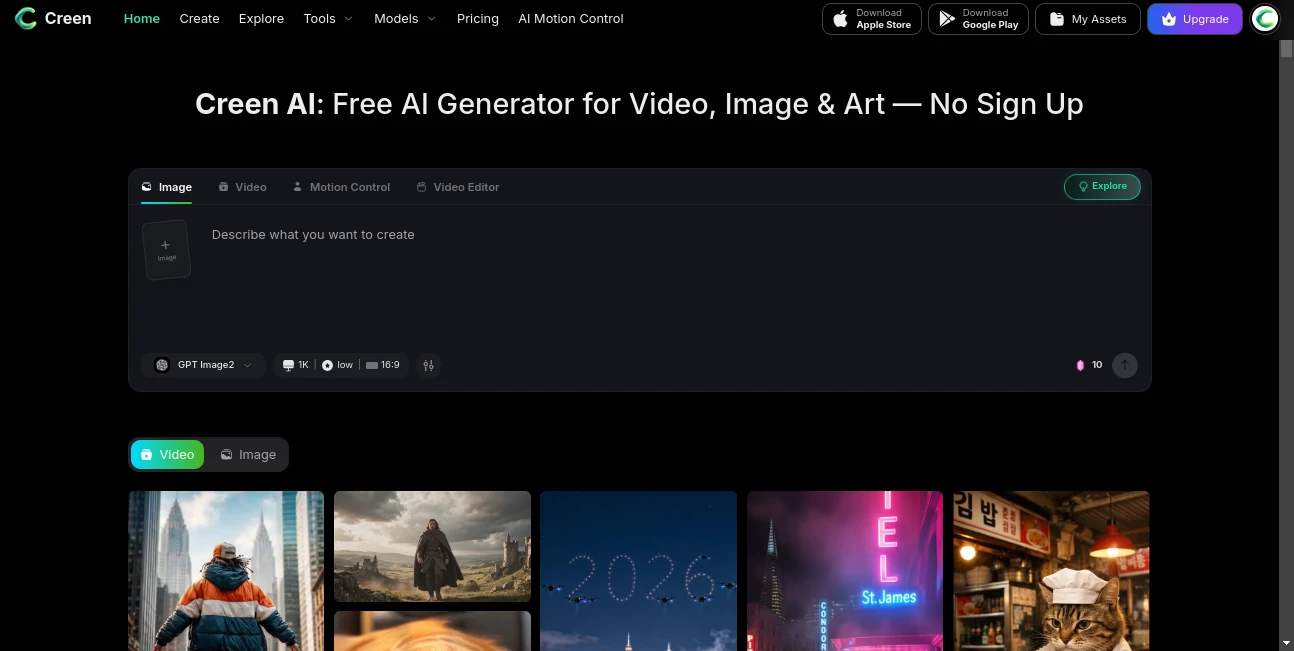
The dashboard is clean, modern, and easy to understand. Navigation is straightforward, allowing users to move between image generation, video creation, and creative inspiration without feeling overwhelmed. Prompt input, generation settings, and downloads are organized logically, making the creative process smooth even for first-time visitors.
Accuracy & Performance
The platform delivers impressive visual quality by utilizing multiple state-of-the-art AI generation models. Images contain detailed textures, vibrant colors, and realistic lighting, while generated videos provide smooth motion suitable for presentations, advertisements, social media, and creative storytelling. Fast processing times allow users to experiment with different prompts without long waiting periods.
Capabilities
- AI text-to-image generation
- AI image-to-video creation
- AI text-to-video generation
- Support for multiple AI generation models
- High-resolution image output
- Creative template inspiration
- Image enhancement and editing workflows
- Quick prompt experimentation
- Browser-based workspace
- Suitable for personal and commercial creative projects
Security & Privacy
The service operates through a secure web platform with encrypted connections. Users can create content directly online without installing desktop software, reducing setup complexity. Privacy policies and account management options are available through the official website, allowing users to review how their information is handled.
Use Cases
- Creating engaging social media content
- Producing marketing visuals and advertisements
- Designing YouTube thumbnails and promotional graphics
- Generating concept art for creative projects
- Creating animated visuals from existing images
- Building presentation graphics
- Developing product showcase videos
- Generating artwork for blogs and websites
- Rapid content creation for agencies and freelancers
- Creative brainstorming and visual prototyping
Pros and Cons
Pros
- Combines image and video generation in one platform.
- Simple interface suitable for beginners.
- Supports multiple AI generation technologies.
- Produces high-quality visual outputs.
- Fast content generation workflow.
- Accessible directly from a web browser.
Cons
- Advanced features may require premium credits.
- Complex prompts can require several refinements.
- Generation speed may vary during peak usage.
Pricing Plans
The platform offers free access for users who want to explore its core capabilities. Premium plans and additional credits unlock more advanced AI models, expanded generation capacity, and enhanced creative features for users with professional production needs.
How to Use Creen AI
- Open the platform in your web browser.
- Select whether you want to generate an image or a video.
- Enter a detailed prompt or upload a reference image.
- Choose the preferred generation model and settings.
- Start the generation process.
- Review the results and regenerate if needed.
- Download the finished content for your projects.
Comparison with Similar Tools
Compared with many AI creative platforms that specialize in either image generation or video production, this solution combines both workflows inside a single environment. That eliminates the need to switch between separate applications and helps creators maintain a faster production pipeline.
Another advantage is its support for multiple AI models, allowing users to experiment with different visual styles and creative approaches without relying on a single generation engine. This flexibility makes it suitable for marketing teams, designers, content creators, and businesses looking for a more versatile creative workspace.
Conclusion
This platform provides an impressive balance between simplicity and creative power. By combining AI image generation, video creation, and modern visual production tools into one accessible workspace, it helps users produce professional-quality content with significantly less effort.
Whether the goal is creating social media assets, marketing campaigns, concept art, promotional videos, or creative experiments, it delivers a streamlined experience that saves time while encouraging creativity. For individuals and teams searching for an efficient AI-powered visual creation solution, it represents a compelling option worth exploring.
Frequently Asked Questions (FAQ)
Can beginners use this platform?
Yes. The interface is designed to be intuitive, making it suitable for users with little or no design experience.
Does it support both images and videos?
Yes. Users can generate images from text, create videos from prompts, and animate existing images.
Can generated content be used for commercial projects?
Commercial usage depends on the selected subscription plan and the platform's current licensing terms.
Is installation required?
No. Everything runs directly inside a web browser without requiring desktop software.
Who benefits most from this platform?
Content creators, marketers, designers, agencies, educators, entrepreneurs, and social media managers can all benefit from its AI-powered creative workflow.
AI Photo & Image Generator , AI Image to Video , AI Video Generator , AI Text to Image .
These classifications represent its core capabilities and areas of application. For related tools, explore the linked categories above.
Creen details
Website unavailable — View Alternatives
Pricing
- Free
Apps
- Web App
- iOS App
- Android App
Categories

Creen Alternatives Product

ArchOne AI

AI Anime Pro

Photo Retouch

Image Unblur

String Art G…

VO4 AI

Seedance 2.5

Gemini Omni

loraai.me
