
Image To Music AI
What is Image To Music AI?
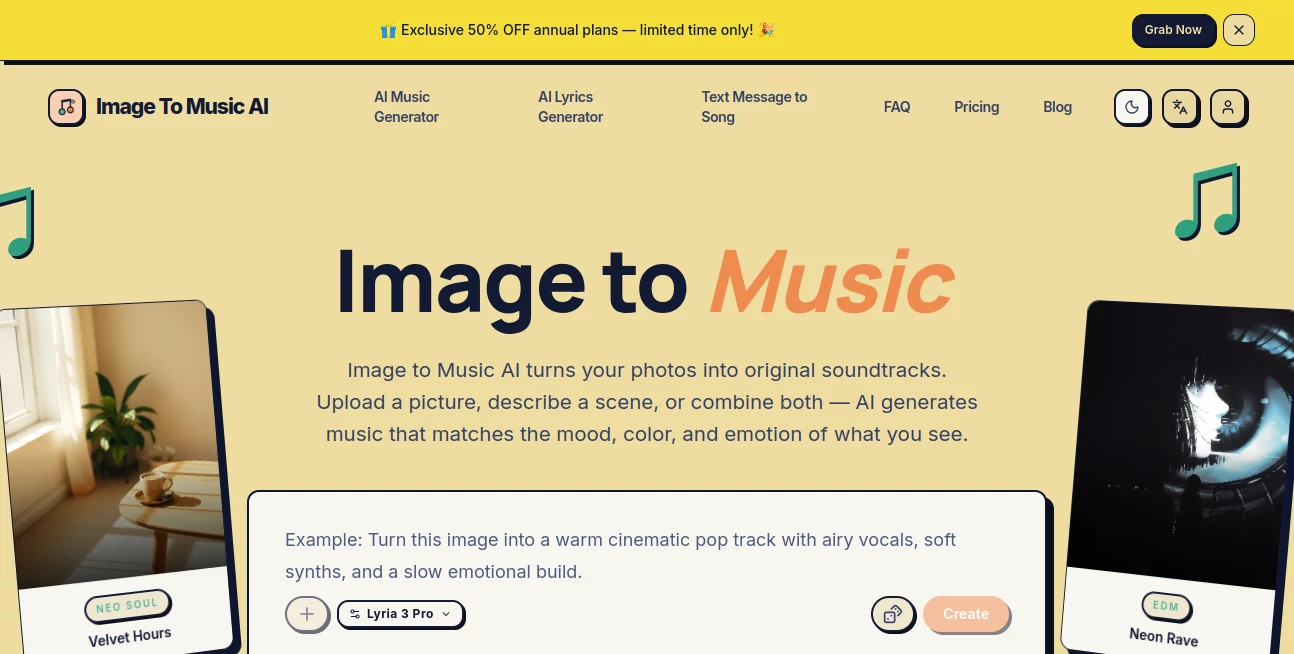
Creativity often begins with a single image. Whether it is a travel photo, a digital painting, a product shot, or a cherished memory, every visual tells a story that deserves its own soundtrack. This platform transforms that idea into reality by converting images into original AI-generated music in just a few moments. Instead of relying entirely on text prompts, it analyzes the mood, lighting, colors, and composition of an uploaded image to create music that naturally reflects its atmosphere.
The workflow is remarkably approachable. Users simply upload a photo, optionally add a short prompt to refine the musical direction, preview the generated track, and regenerate until they achieve the desired result. Even someone with no music production experience can create cinematic background music, emotional melodies, energetic beats, or ambient soundscapes within seconds.
This visual-first approach feels refreshingly intuitive. Rather than trying to describe emotions with complicated musical terminology, creators can let their images communicate the feeling while AI handles the composition. The result is a smooth creative experience suitable for content creators, photographers, marketers, designers, and anyone who wants unique music without traditional production skills.
Key Features
User Interface
The interface is clean, modern, and beginner-friendly. Everything happens directly in the browser, eliminating complicated installations or technical setup. Uploading an image, generating music, comparing multiple versions, and downloading the final track are all organized into a simple workflow that is easy to understand even during a first visit.
Accuracy & Performance
The platform analyzes visual elements such as lighting, composition, color palette, and overall atmosphere before producing a soundtrack that closely matches the image's emotional tone. Most generations are completed in around 30 seconds, allowing creators to experiment with multiple ideas without interrupting their creative flow.
Capabilities
- Generate original music directly from uploaded images.
- Support image-guided creation with optional text prompts.
- Create full soundtracks for videos and creative projects.
- Generate multiple versions from the same image.
- Download finished music after generation.
- Support JPG, PNG, and WebP image formats.
- Provide different generation modes for various creative needs.
- Create music suitable for personal and commercial projects depending on the selected plan.
- Work entirely online without software installation.
- Offer AI image generation and AI lyrics generation alongside music creation.
Security & Privacy
User projects are processed through cloud-based generation with account-based storage. Different subscription plans provide varying storage durations, while commercial licensing is available on higher-tier plans. Users remain responsible for ensuring they own the rights to uploaded images and other input materials.
Use Cases
- Generate background music for YouTube videos.
- Create original soundtracks for travel photography.
- Produce music for short-form social media content.
- Add unique audio to marketing campaigns.
- Create mood-based music for presentations.
- Support game concept demonstrations.
- Enhance digital artwork with matching audio.
- Create custom music for portfolio projects.
- Generate atmospheric tracks for creative storytelling.
- Build personalized soundtracks from memorable photos.
Pros and Cons
Pros
- Very easy for beginners.
- Image-first workflow feels natural.
- Fast music generation.
- No music production knowledge required.
- Supports optional prompt refinement.
- Commercial licensing available on premium plans.
- Multiple creative AI tools included.
Cons
- Advanced features require a paid subscription.
- Generation limits depend on available credits.
- Commercial use is not included in the free plan.
- Final results still benefit from experimenting with prompts.
Pricing Plans
A generous free plan allows new users to experience image-to-music generation before upgrading. Paid subscriptions increase monthly generation limits, unlock higher-quality outputs, provide longer cloud storage, priority processing, and commercial usage rights. Multiple subscription tiers make the platform suitable for casual creators as well as professionals producing content regularly.
How to Use Image To Music AI
Start by uploading an image that represents the mood or atmosphere you want to capture. Add an optional text description if you would like to guide the genre, instruments, or emotional direction. Launch the generation process and wait a short time while the AI analyzes the visual content and composes a matching soundtrack. Listen to the preview, make adjustments if necessary, regenerate alternative versions, and download the final music once it matches your creative vision.
Comparison with Similar Tools
Many AI music generators rely almost entirely on detailed text prompts, requiring users to describe genres, tempos, instruments, and emotions manually. This platform introduces a more intuitive workflow by allowing the image itself to become the creative foundation. Visual information provides context that is often difficult to express with words alone, making the first generated result feel closer to the intended mood. For photographers, designers, social media creators, and visual storytellers, this image-driven approach offers a noticeably smoother creative experience.
Conclusion
For anyone who believes every image deserves its own soundtrack, this platform offers an impressive creative solution. Its combination of visual understanding, fast AI generation, simple workflow, and accessible interface removes many of the barriers traditionally associated with music production. Whether creating cinematic travel videos, promotional content, artistic presentations, or personal memories, it delivers an enjoyable way to connect visuals and sound while keeping the creative process both efficient and inspiring.
Frequently Asked Questions (FAQ)
Do I need music production experience?
No. The platform is designed for beginners as well as experienced creators.
Which image formats are supported?
JPG, PNG, and WebP images can be uploaded for music generation.
Can I modify the generated music?
Yes. Users can adjust prompts, generate multiple versions, and choose the result that best matches their project.
Is there a free version?
Yes. New users can begin with free credits and explore the core generation features before subscribing.
Can the generated music be used commercially?
Commercial usage is available with eligible paid subscription plans, while the free plan is intended for personal use.
AI Text to Music , AI Audio Enhancer , AI Music Generator .
These classifications represent its core capabilities and areas of application. For related tools, explore the linked categories above.
Image To Music AI details
Website unavailable — View Alternatives
Pricing
- Free
Apps
- Web App
Categories

Image To Music AI Alternatives Product

Klyra AI

MeloLab AI M…

Seedance

SAM Audio

Lyria 3
Musikalis AI…

ModelsLab

AudioVideoGe…

Flow Song