
ImageWise
What is ImageWise?
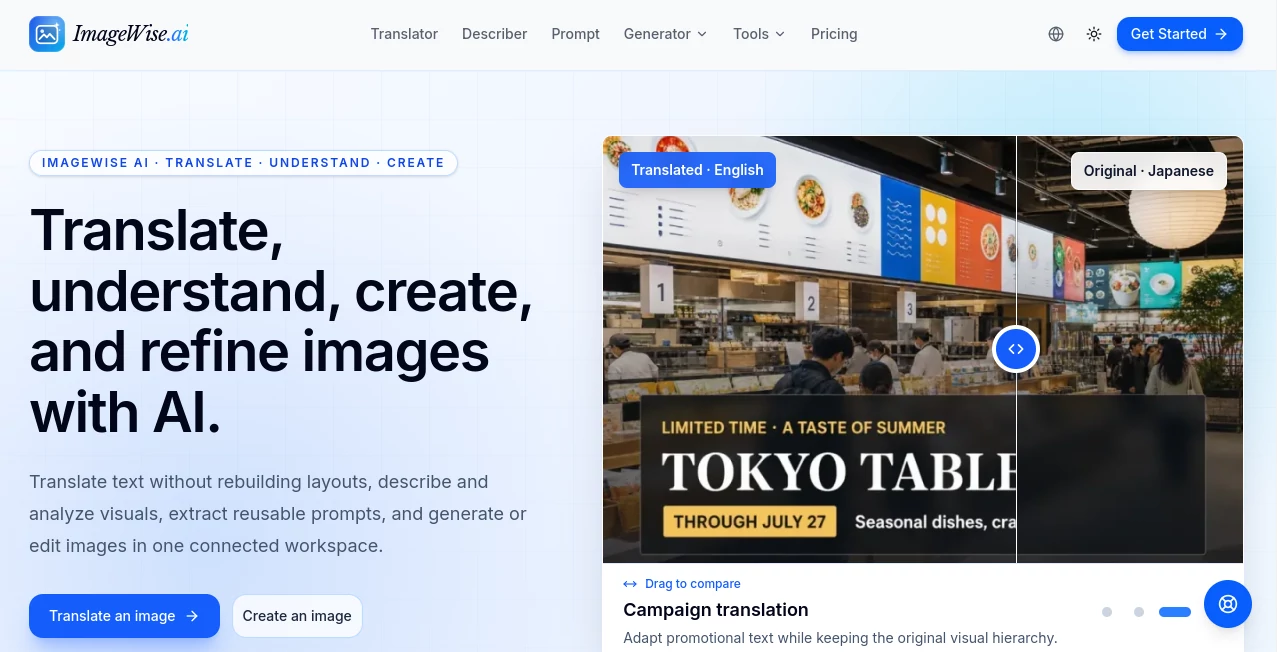
Working with images often means jumping between several different tools. One handles translation, another generates images, a third writes descriptions, and yet another takes care of upscaling or background removal. ImageWise.ai brings many of these everyday tasks into one connected image workspace, making the process considerably easier for creators, marketers, online stores, designers, and anyone who works with visual content.
The platform is designed around a simple idea: upload an image, choose what you want to accomplish, and let AI handle the heavy lifting. You can translate text inside an image while keeping its visual layout, analyze or describe a picture, turn an image into a reusable prompt, generate new visuals, or refine an existing image without constantly switching between services.
It is particularly useful when the goal is not simply to create an image, but to take an existing visual and move it through several stages of a real workflow. For example, an online store could translate a product graphic for another market, improve its resolution, remove the background, and prepare the result for a new campaign.
Key Features
- AI Image Translation: Translate text contained in images while aiming to preserve the original visual layout, making localization much easier for product graphics, screenshots, and marketing materials.
- Image Description: Generate descriptions, captions, and alt text from uploaded images.
- Image Analysis: Examine visual content and extract useful information from an image.
- Image to Prompt: Turn a reference image into a structured prompt that can be reused for AI image creation.
- Chat With Images: Ask questions about an uploaded image and receive contextual answers.
- Text-to-Image Generation: Create new visuals from written instructions or references.
- Image-to-Image Generation: Use an existing visual as the starting point for creating or transforming another image.
- Image Outpainting: Extend an image into new aspect ratios while maintaining important visual details.
- Background Removal: Isolate subjects and produce transparent PNG images.
- AI Image Upscaling: Enlarge smaller images with 2x, 3x, or 4x enhancement options.
- Image Enhancement: Improve details, sharpness, faces, noise, and compression artifacts.
- Batch Processing: Upload up to 20 JPG, PNG, WebP, or GIF images at once for supported workflows.
- Browser Image Utilities: Additional tools include image compression, resizing, cropping, conversion, merging, flipping, watermarking, metadata removal, and image splitting.
User Interface
The interface follows a straightforward workspace approach rather than forcing users through a complicated editing process. Images can be uploaded by dragging them into the workspace, and users can choose between different AI actions depending on what they want to accomplish.
The batch upload option is especially practical for people working with collections of product images or marketing assets. Supported uploads can include JPG, PNG, WebP, and GIF files, with individual images up to 20 MB.
Accuracy & Performance
Performance depends on the specific AI operation being used, but the platform covers a broad range of image understanding and generation tasks. Translation, description, visual analysis, prompt extraction, generation, editing, and visual question answering are handled as separate AI workflows, allowing users to select the operation that fits the job.
The ability to process several images together can also reduce repetitive work. For a marketer preparing dozens of product visuals, for instance, batch processing can be much more convenient than uploading each file individually.
Capabilities
The strongest aspect of the platform is the range of tasks available around a single image. A creator can start with a reference image, understand its contents, extract a prompt from it, generate a variation, extend the canvas, improve its quality, and prepare the final asset for another use.
There is also a useful distinction between AI-powered operations and simple browser-based image utilities. Tasks such as resizing, converting, cropping, merging, or removing metadata can be handled without necessarily requiring an AI workflow, while more advanced operations use AI credits.
Security & Privacy
Privacy is an important consideration whenever images are uploaded to an online service. The platform provides account, billing, task history, privacy policy, and AI-use information for users to review before working with their content. Its documentation also distinguishes browser-based image utilities from account-based AI processing.
For sensitive business material, users should still review the current privacy and AI-use policies before uploading confidential images, especially when the files contain customer information, private documents, or proprietary artwork.
Use Cases
- E-commerce: Translate product graphics, improve product image quality, remove backgrounds, and prepare visuals for different markets.
- Marketing: Adapt existing campaign artwork, create new promotional visuals, and generate descriptions or reusable prompts.
- Social Media: Resize, enhance, extend, or transform images for different platforms and content formats.
- Design: Use reference images as creative starting points, extract prompts, and experiment with image-to-image workflows.
- Localization: Translate text embedded inside product graphics, screenshots, labels, and other visual materials.
- Content Creation: Generate image descriptions, captions, alt text, and new visuals from existing references.
- Online Stores: Process groups of product images and prepare cleaner, higher-quality assets without relying on multiple separate services.
- Visual Research: Ask questions about images and use AI-powered analysis to better understand visual information.
Pros and Cons
Pros
- Combines image generation, understanding, translation, and editing workflows in one workspace.
- Supports image translation with an emphasis on preserving the original layout.
- Includes image-to-prompt and image question-answering capabilities.
- Offers useful AI enhancement and upscaling options.
- Supports batch uploads for supported workflows.
- Includes several free browser-based image utilities.
- Offers multiple subscription levels for different workloads.
Cons
- AI-powered operations use credits, so frequent users need to monitor their usage.
- Some advanced workflows require an account.
- Users working with highly sensitive images should review the privacy and AI-use policies before uploading files.
- The large number of available image functions may take a little time for new users to explore fully.
Pricing Plans
The platform offers a free entry point through its browser-based image utilities, while AI features operate through a credit system. Users can try each AI feature once per day for free, with an account required to continue and keep results in their account.
The Starter plan costs $9 per month and includes 60 AI credits, generation, editing, translation, and image understanding features, along with task history and email support.
The Pro plan costs $29 per month and provides 300 AI credits. It is aimed more toward creators, marketers, and online stores, with batch and e-commerce workflows, high-resolution exports, full history, and multiple output languages.
The Enterprise plan costs $99 per month and includes 1,200 AI credits, dedicated support, and additional workflows for e-commerce, manga, and multi-image production.
Monthly credits expire after 35 days, while annual plans and credit packs have a 12-month expiration period. Failed AI tasks are automatically refunded according to the platform's pricing information.
How to Use It
- Open the image workspace and choose the type of task you want to perform.
- Upload an image from your device or provide an image URL where supported.
- For batch workflows, select multiple compatible images at once.
- Choose the source and target language when working with image translation.
- Select the desired AI operation, such as describing, analyzing, translating, generating, enhancing, or creating a prompt from the image.
- Add a custom instruction when you need the result to follow a particular requirement.
- Process the image and review the generated result.
- Save the result or continue refining it with another available image workflow.
A practical workflow might begin with a product image, followed by translation for a new market, background removal, upscaling, and final resizing. Keeping these steps within one workspace can make the process much less fragmented.
Comparison with Similar Tools
Many AI image platforms concentrate on one particular task, such as text-to-image generation, photo enhancement, background removal, or image translation. This platform takes a broader approach by combining image creation with image understanding and practical editing utilities.
That difference matters for users who regularly move between creative and production tasks. Someone who only wants to generate artistic images may prefer a specialized image generator, while a marketer, designer, or e-commerce operator may benefit more from having translation, description, prompt extraction, generation, enhancement, and everyday editing tools available together.
The credit-based model also provides a more structured way to manage AI usage. Instead of treating every operation as part of a single unlimited workflow, users can choose a plan according to the amount of AI processing they actually need.
Conclusion
For anyone who works with images beyond simple generation, this platform offers a compelling combination of creative and practical capabilities. Its value comes from connecting image understanding, translation, generation, editing, enhancement, and everyday image preparation rather than treating them as isolated tasks.
The combination is particularly appealing for marketers, creators, designers, and online businesses that frequently reuse visual assets. Whether the task is translating a product graphic, extracting a prompt from a reference, improving an old image, or preparing a batch of visuals for publication, having these functions within one workspace can save considerable time.
It is not necessarily the answer for every specialized image workflow, but for users looking for a flexible image toolkit that covers both AI-powered and everyday image tasks, it is a strong option worth exploring.
Frequently Asked Questions (FAQ)
What can I do with this image platform?
You can translate, describe, analyze, generate, edit, enhance, upscale, and extend images. It also supports image-to-prompt workflows and lets users ask questions about visual content.
Can I use it for free?
Yes. Several browser-based image utilities are available for free, and AI features can be tried once per day before continued use requires an account and AI credits.
Can I translate text inside an image?
Yes. The image translation workflow is designed to translate text while preserving the original visual layout, which can be useful for product graphics, screenshots, labels, and marketing assets.
How many images can I upload at once?
Supported workflows allow users to select or drag up to 20 JPG, PNG, WebP, or GIF images at a time. Each image can be up to 20 MB.
Does it support image upscaling?
Yes. The AI upscaler can enlarge images by 2x, 3x, or 4x while attempting to recover useful visual detail.
Can I remove an image background?
Yes. The background removal tool can isolate subjects and export clean images with transparent backgrounds.
Does it have image-to-prompt functionality?
Yes. You can use a reference image to create a structured AI image prompt, which can then be reused as part of a new generation workflow.
Which plans are available?
The available paid plans are Starter at $9 per month, Pro at $29 per month, and Enterprise at $99 per month. Each tier provides a different amount of AI credits and additional capabilities.
AI Photo & Image Generator , AI Image Recognition , AI Image to Image , AI Text to Image .
These classifications represent its core capabilities and areas of application. For related tools, explore the linked categories above.

ImageWise Alternatives Product

Nano Banana 2

GPT Image 1.5

loraai.me

Create a Car…

GPT Image 2
![FLUX.2 [max] Image Generator - AI image generator with prompt gallery and production-ready editing workflows.](/media_submitaitools/telegram/flux2max.app-favicon.webp)
FLUX.2 [max]…

GPT Image Pr…
Resize Image…

Block Poster…