
LiveToka
What is LiveToka?
I still remember sitting in a Zoom call with colleagues from three different countries, everyone speaking at their natural pace while the rest of us tried to keep up with delayed, clunky subtitles. The conversation felt broken. Then I started using this platform and suddenly the whole experience changed. Speech turns into clear text instantly, and translations appear in real time with almost no noticeable lag. It feels like everyone is finally speaking the same language, even when they’re not. For global teams, educators, and anyone who works across borders, that shift is huge.
Introduction
Live conversations should flow naturally, even when people speak different languages. This tool makes that possible by delivering real-time transcription and translation across more than 100 languages directly in your browser. No complicated setup, no extra apps to install — just turn it on and it works with Zoom, Teams, Google Meet, and more. It’s built for situations where every second counts: international meetings, customer support calls, lectures, livestreams, and interviews. The combination of speed, accuracy, and simplicity has made it a favorite for teams that need to communicate clearly without slowing down.
Key Features
User Interface
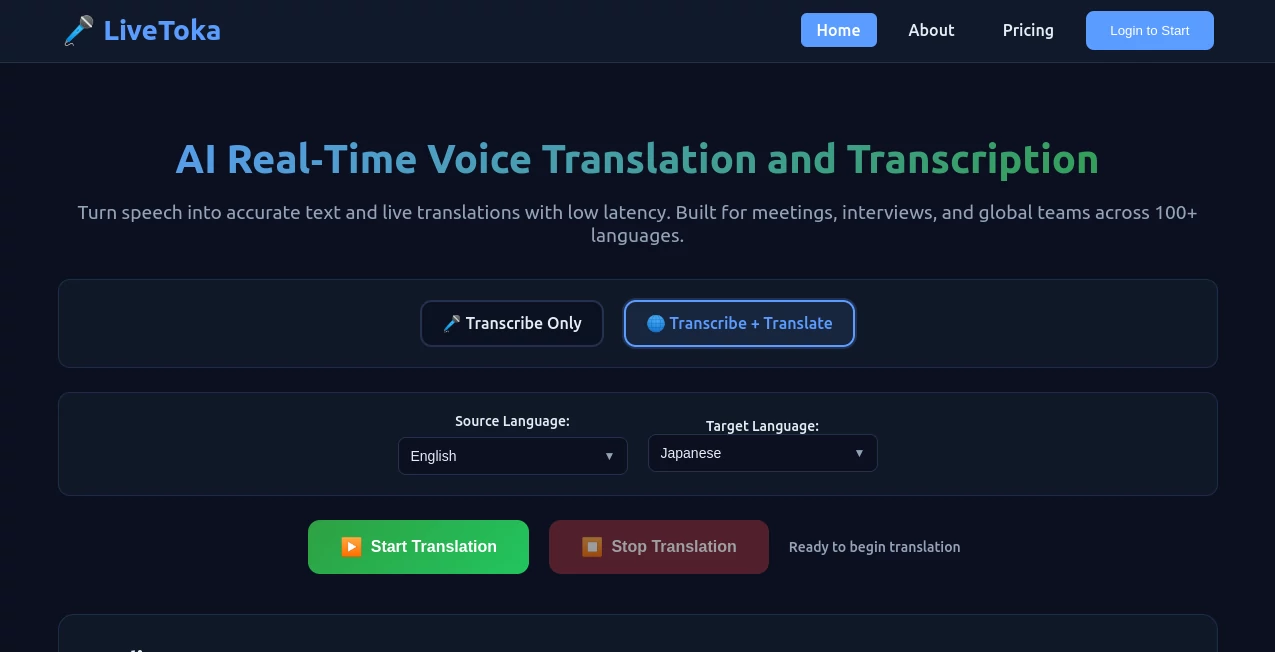
The interface is wonderfully straightforward. Click “Start Service,” grant microphone access, and you’re live. You can switch between transcription-only and full translation modes instantly, and change target languages without interrupting the flow. The text appears cleanly on screen with good punctuation and timing. Everything stays out of the way until you need it, making it easy to focus on the actual conversation rather than the technology.
Accuracy & Performance
The speech recognition handles different accents and speaking styles remarkably well, while the translations feel context-aware rather than robotic word-for-word swaps. Latency stays impressively low, so conversations keep their natural rhythm. Users in education and support roles particularly praise how reliable it is during longer sessions, with minimal drift even as topics shift between technical and casual discussion.
Capabilities
It supports over 100 languages with strong bilingual pairs, real-time captions, full session transcripts, and export options (including CSV and JSON). You can run it alongside your favorite meeting platforms without changing your workflow. The AI also generates meeting summaries and action items automatically, turning raw conversations into usable notes. It works equally well for one-on-one interviews, team standups, webinars, or classroom lectures.
Security & Privacy
Your audio is processed in real time and not stored unless you explicitly save transcripts. The platform follows strong privacy practices, giving both individuals and organizations confidence when discussing sensitive topics. For companies handling client calls or schools working with student data, that careful approach matters a lot.
Use Cases
An international support team uses it to talk naturally with customers while getting accurate, exportable transcripts for follow-up. A university lecturer delivers classes to students from multiple countries with real-time bilingual captions. A product manager runs global demos and gets clean, summarized notes afterward. Families separated by distance use it for video calls where grandparents and grandchildren can finally understand each other without constant repetition. It shines anywhere language barriers slow people down.
Pros and Cons
Pros:
- Truly low-latency translation that keeps conversations feeling natural.
- Works seamlessly with major meeting platforms without extra setup.
- Helpful AI summaries and action items save significant follow-up time.
- Strong support for over 100 languages with good bilingual handling.
- Simple enough for non-technical users while powerful for professionals.
Cons:
- Very noisy environments or strong accents may need clearer speech for best results.
- Advanced usage and higher volume benefit from paid plans.
Pricing Plans
You can start completely free to test how it works in your real meetings. Paid plans unlock higher usage limits, premium features, longer recordings, and priority processing. The pricing is straightforward and scales with your needs, making it accessible for individuals while practical for teams and organizations that rely on it daily.
How to Use LiveToka
Open the site in your browser, click “Start Service,” and allow microphone access. Choose your source and target languages if translating. Speak normally while the system transcribes and translates in real time. Switch modes or languages anytime during the call. When finished, export the full transcript with summaries if needed. It integrates so smoothly with your existing tools that you barely notice it’s there — until you realize how much clearer communication has become.
Comparison with Similar Tools
Many translation tools feel clunky, with noticeable delays or robotic output that breaks conversation flow. This one stands out through its low latency, natural-sounding results, and seamless integration with the platforms people already use. It focuses on practical, everyday communication rather than just raw translation power, which makes it more useful for real meetings and learning environments.
Conclusion
Language should connect people, not create distance. This platform removes that distance with technology that feels invisible yet incredibly effective. Whether you’re bridging global teams, teaching diverse students, or simply staying close with family across borders, it delivers clarity and convenience that make every conversation smoother. In a world that’s more connected than ever, having reliable real-time voice translation like this feels less like a luxury and more like a necessity done right.
Frequently Asked Questions (FAQ)
How many languages does it support?
Over 100 languages with strong bilingual support for the most common pairs.
Does it require any software installation?
No — everything runs directly in your browser.
Can I export transcripts after the call?
Yes, with clean, punctuated text and optional summaries.
Is it suitable for professional or educational use?
Absolutely — many teams and institutions use it daily for meetings and classes.
AI Translate , AI Speech Recognition , AI Speech to Text , AI Voice Assistants .
These classifications represent its core capabilities and areas of application. For related tools, explore the linked categories above.

LiveToka Alternatives Product

TranslateAI …

globalize.now

Elispeak

Speech Notes

LPM 1.0

Gemini Omni …

Models by Ha…
Transpic

Seedance 2.5