MusiCraft
What is MusiCraft?
Creating original music has traditionally required technical knowledge, expensive software, and countless hours of production. This platform changes that experience by bringing multiple AI-powered music creation tools into a single workspace where anyone can transform an idea into a polished track within minutes. Whether the inspiration starts with a text prompt, a photograph, or a simple melody, the creative process becomes remarkably accessible.
Designed for musicians, content creators, marketers, podcasters, game developers, and hobbyists, the platform combines music generation, remixing, stem separation, lyric writing, mastering, and artwork creation without requiring a traditional digital audio workstation. Instead of switching between multiple applications, users can complete an entire production workflow from concept to release in one environment.
What makes this solution especially appealing is its balance between simplicity and creative flexibility. Beginners can generate impressive songs with a single prompt, while experienced creators have enough control to refine styles, arrangements, vocals, and production details for more personalized results.
Key Features
User Interface
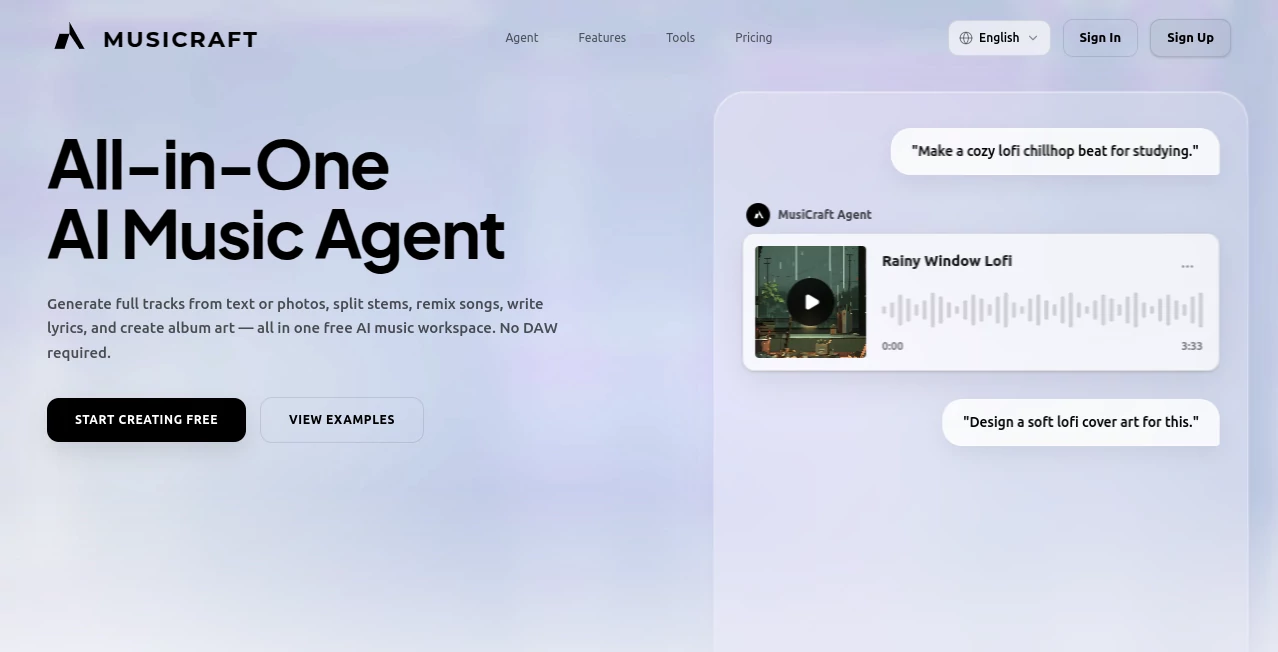
The interface is clean, modern, and designed around conversation-based music creation. Users simply describe the mood, genre, or creative vision, and the AI begins building a complete composition. Navigation remains intuitive, allowing even first-time visitors to access advanced production tools without feeling overwhelmed.
Accuracy & Performance
The AI produces surprisingly coherent musical arrangements across numerous genres including pop, cinematic, electronic, lo-fi, rock, orchestral, jazz, and more. Generated tracks maintain consistent rhythm, harmony, and structure while allowing users to regenerate sections until the desired result is achieved. Processing is fast enough to encourage experimentation without interrupting creative momentum.
Capabilities
- Generate complete songs from simple text prompts.
- Create music inspired by uploaded photos.
- Remix existing tracks into entirely different musical styles.
- Separate vocals, drums, bass, and instruments into individual stems.
- Generate original song lyrics.
- Create professional album artwork.
- Design artist logos.
- Analyze uploaded songs for BPM, key, chord progression, and structure.
- Clone singing voices from short voice samples.
- Master songs for streaming platforms.
- Support more than one hundred music genres.
- Export production-ready audio files.
Security & Privacy
User-generated projects remain under the creator's control, and uploaded files are processed within personal workspaces. Generated tracks can be kept private until they are ready to be shared or published. Commercial usage information and royalty guidance are clearly explained, helping creators understand how they can use their finished music.
Use Cases
- Create background music for YouTube videos.
- Produce TikTok and Instagram soundtracks.
- Generate podcast intros and outros.
- Compose original music for indie games.
- Create advertising jingles.
- Develop demo songs before entering a professional studio.
- Produce cinematic trailer music.
- Generate study, meditation, and ambient playlists.
- Experiment with different genres while learning music production.
- Create album artwork and promotional assets alongside the music.
Pros and Cons
Pros
- Complete AI music production suite in one platform.
- Very beginner friendly.
- Supports text, image, remixing, and analysis workflows.
- High-quality stem separation.
- Integrated mastering and artwork generation.
- Large variety of musical genres.
- No traditional music production experience required.
Cons
- Advanced users may still prefer dedicated professional DAWs for detailed editing.
- Some premium features require paid access.
- Creative output may occasionally need several generations to perfectly match a specific vision.
Pricing Plans
The platform offers a free entry point that allows new users to explore its core capabilities before upgrading. Premium plans unlock additional generations, advanced production features, and larger creative limits, making them suitable for frequent creators and professionals.
How to Use MusiCraft AI
- Sign in and open the creative workspace.
- Choose whether to start with text, an image, or an existing audio file.
- Describe the desired mood, genre, instruments, or atmosphere.
- Generate the initial composition.
- Refine sections by regenerating or remixing specific parts.
- Optionally separate stems, master the audio, or create album artwork.
- Download and publish the finished project.
Comparison with Similar Tools
Compared with many AI music generators that focus solely on text-to-music creation, this platform provides a much broader production ecosystem. Beyond composing songs, users can remix tracks, isolate stems, analyze music, clone vocals, generate artwork, and master recordings without relying on additional software. This integrated workflow significantly reduces production time while giving creators greater creative freedom from a single dashboard.
Conclusion
For anyone interested in AI-assisted music production, this platform delivers an impressively complete creative environment rather than just another song generator. Its combination of intelligent composition, remixing, mastering, artwork generation, and voice technologies creates an efficient workflow that serves beginners and experienced creators alike. The ability to move from a simple idea to a release-ready track without complicated software makes it an excellent choice for modern digital creators who value both speed and quality.
Frequently Asked Questions (FAQ)
Can beginners create music without production experience?
Yes. The platform is designed for users with little or no musical background, allowing them to generate professional-sounding tracks through simple prompts.
Can music be generated from images?
Yes. Uploaded photos can be analyzed to create music inspired by their colors, mood, and visual composition.
Does it support remixing existing songs?
Yes. Users can transform uploaded tracks into new musical styles while preserving important characteristics like rhythm and melody.
Can vocals and instruments be separated?
Yes. Built-in stem separation extracts vocals, drums, bass, and other musical elements for remixing or editing.
Is commercial use supported?
The platform provides information about commercial usage and royalty policies. Users should review the current licensing terms associated with their chosen plan before publishing commercial projects.
AI Text to Music , AI Voice Cloning , AI Music Generator , AI Voice & Audio Editing .
These classifications represent its core capabilities and areas of application. For related tools, explore the linked categories above.

MusiCraft Alternatives Product

VoiceMOAT

ElevenLabs

mp3tourl
AI Song Maker
Seed Audio
SeedMusic 1.0

Omnesuite AL…
WhisperWebUI
lyria 3