


















Orai
What is Orai?
Orai is an AI-powered speaking coach designed to help people become clearer, more confident, and more effective when they speak. Instead of simply recording a presentation and leaving you to judge yourself, it analyzes your delivery and provides practical feedback on areas such as filler words, pace, clarity, and energy.
The idea is refreshingly simple: practice for a few minutes, see what needs improvement, and try again. That makes it useful for people preparing for presentations, interviews, investor pitches, meetings, speeches, or even everyday professional conversations.
One of its strongest qualities is that practice does not have to feel like a formal training session. Short scenarios and quick exercises make it easy to rehearse whenever you have a spare minute. For someone who tends to say "um," speak too quickly, or lose confidence halfway through a presentation, that repeated feedback can be particularly valuable.
Key Features
- Real-time speech feedback: Analyze important aspects of your delivery, including filler words, pace, clarity, and energy.
- Filler-word tracking: Identify habits such as saying "um," "like," or "you know" too frequently.
- Pace and pause coaching: Understand when you are speaking too quickly and where a deliberate pause could make your message stronger.
- Speaking scenarios: Practice situations such as presentations, interviews, pitches, toasts, and difficult questions.
- Progress tracking: Streaks and progress trends help users see whether their communication habits are improving over time.
- AI coaching suggestions: After a practice session, the platform provides actionable feedback rather than simply presenting a score.
- Mobile and web access: Practice from iOS, Android, or a web browser.
- Free speaking tools: The platform also provides browser-based tools such as a teleprompter, speech timer, audio recorder, video recorder, speech topic generator, pause planner, and readability checker.
User Interface
The interface is built around quick practice rather than complicated menus or lengthy courses. A typical session can revolve around a single speaking scenario, allowing users to concentrate on their delivery instead of learning how to operate the software.
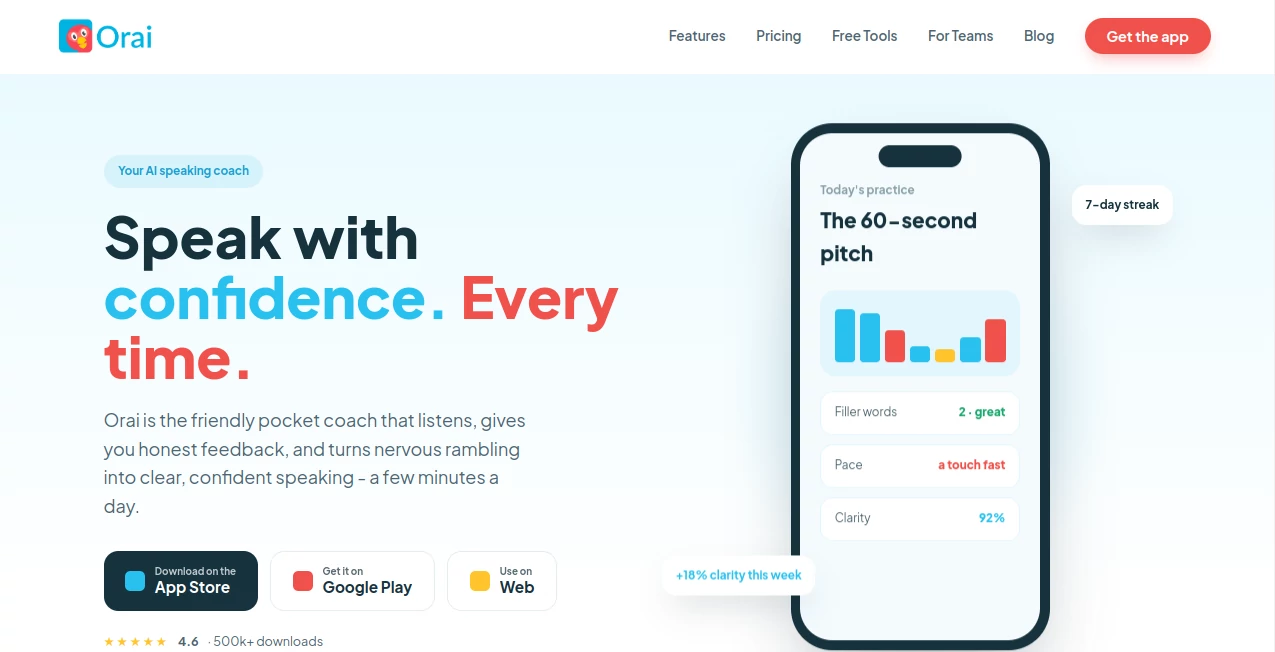
The feedback is presented in a straightforward scorecard format. Seeing measurements such as filler-word count, speaking pace, clarity, and energy gives users something concrete to work on during the next attempt.
This approach works especially well for people who dislike traditional public-speaking courses. You can record a short answer, review the feedback, make one adjustment, and immediately repeat the exercise.
Accuracy & Performance
The platform focuses on measurable characteristics of speech rather than trying to judge whether someone is inherently a "good" speaker. Filler words, speaking pace, clarity, and energy provide useful signals that can be compared from one practice session to another.
For example, someone rehearsing an investor pitch might discover that their clarity score is strong but their pace is too fast. Instead of receiving a vague recommendation to "speak better," they can work specifically on slowing down and adding pauses around important points.
It is important to remember that automated speech analysis is a coaching aid rather than a replacement for an experienced human speaking coach. Context, audience reaction, body language, and the quality of the underlying message can require human judgment.
Capabilities
The platform is particularly strong for deliberate speaking practice. Users can rehearse a presentation several times, experiment with different delivery styles, and track whether specific habits are improving.
The scenario library makes this more practical. Someone preparing for a job interview can practice answering questions, while a founder can rehearse an elevator pitch. A professional who frequently gives presentations can use short daily sessions to improve delivery without setting aside hours for formal training.
There are also free browser tools for preparing and polishing speeches. These include a teleprompter, speech timer, words-per-minute calculator, speech-length calculator, pause planner, readability checker, wedding toast builder, elevator pitch builder, and speech outline templates.
Security & Privacy
Privacy is an important consideration for any application that processes spoken recordings. The service states that practice recordings remain private, allowing users to rehearse without an audience.
Some of the separate free browser tools take an even more privacy-conscious approach. For example, the video recorder processes the recording locally in the browser, meaning the video is not uploaded and can remain on the user's device.
Organizations considering the service should still review the current privacy documentation, retention practices, and enterprise terms before using confidential business material, sensitive presentations, or private customer information.
Use Cases
Public speaking: Rehearse presentations and speeches while monitoring pace, clarity, filler words, and energy.
Job interviews: Practice answers before an interview and become more comfortable speaking clearly under pressure.
Investor pitches: Founders can rehearse short pitches repeatedly and identify delivery habits that could weaken an important presentation.
Sales presentations: Sales professionals can practice product demonstrations and customer-facing presentations before important meetings.
Workplace communication: Employees can improve how they communicate during presentations, standups, meetings, and other professional situations.
Students: Students preparing classroom presentations, speeches, or academic talks can use repeated practice to build confidence.
Daily communication: Short sessions can help people gradually reduce filler words and develop a more deliberate speaking style.
Pros and Cons
Pros:
- Practical feedback on several important speaking habits.
- Useful tracking for filler words, pace, clarity, and energy.
- Short practice sessions make regular training easier.
- Scenario-based practice is suitable for real-world situations.
- Available on web, iOS, and Android.
- Includes a collection of useful free speaking tools.
- Progress trends and streaks encourage consistent practice.
- Enterprise features are available for organizations and training teams.
Cons:
- It is primarily designed for intentional practice rather than coaching during live meetings.
- Automated feedback cannot replace the nuance of an experienced human speech coach.
- Some advanced features require a paid plan.
- Users who specifically want immersive VR roleplay or complex conversational simulations may prefer a different type of training platform.
Pricing Plans
The service offers several ways to access its coaching features. A seven-day Pro trial provides full access before a paid subscription begins, with a credit card required for the trial.
- Pro Monthly: $12 per month, including unlimited practice, the full scenario library, real-time feedback, AI coaching tips, and progress tracking.
- Pro Annual: $49.99 per year.
- Lifetime: $149 as a one-time payment for lifetime access to the available Pro features.
- Enterprise: Custom pricing for teams, with features such as administration and analytics, custom scenarios, SSO, bulk provisioning, and dedicated customer support.
- Journey: A separate four-week presentation skills program priced at $200 as a one-time payment.
The pricing structure is attractive for users who prefer a long-term commitment without necessarily paying every month, especially because a lifetime option is available. However, pricing and included features can change, so checking the current offer before purchasing is recommended.
How to Use It
Start by choosing a speaking situation that matches your goal. This could be an interview answer, presentation, elevator pitch, speech, or another scenario that you expect to encounter in real life.
Speak naturally rather than trying to produce a perfect recording on the first attempt. The purpose of the exercise is to discover your habits. Once the session finishes, review the feedback and identify one or two areas that deserve attention.
If your filler-word count is high, focus on replacing unnecessary words with short pauses. If your pace is too fast, slow down around important statements. If your clarity needs work, concentrate on pronunciation and sentence delivery.
Then repeat the same exercise. This repetition is where the platform becomes most useful. Instead of practicing once and forgetting about it, you can compare sessions and gradually build more consistent speaking habits.
Comparison with Similar Tools
AI speaking coaches are not all designed around the same workflow. Some concentrate on private speech rehearsal, while others focus on simulated conversations, everyday communication, live meetings, or immersive training.
This platform is particularly well suited to people who want repeatable speech practice on mobile or web. Its workflow is straightforward: speak, receive feedback, make an adjustment, and try again.
Other solutions may be a better choice for specific requirements. Interactive roleplay platforms can be more suitable when the learner needs to respond to an AI character in a changing conversation. Meeting-focused assistants are designed for people who want communication feedback while participating in real desktop meetings. Immersive training services can be preferable when VR scenarios and structured professional courses are important.
The main advantage here is focus. Rather than trying to become an all-purpose communication platform, the service puts a strong emphasis on repeated speaking practice and measurable delivery feedback.
Conclusion
Improving public speaking rarely happens because someone reads one article about communication. It usually comes from repetition, honest feedback, and the willingness to correct small habits over time. That is exactly where this AI speaking coach makes sense.
Its combination of real-time feedback, practical scenarios, progress tracking, and short practice sessions creates a useful environment for people who want to become better speakers without committing to lengthy training programs.
Whether you are preparing for an interview, refining an investor pitch, practicing a presentation, or simply trying to stop saying "um" every few sentences, the platform offers a practical way to turn speaking practice into a regular habit.
For professionals, students, entrepreneurs, sales teams, and anyone who communicates regularly, it is a compelling addition to a personal communication toolkit.
Frequently Asked Questions (FAQ)
What does the AI speaking coach analyze?
It analyzes aspects of speech delivery including filler words, pace, clarity, and energy, then provides feedback and suggestions for improvement.
Can I practice speeches and presentations?
Yes. The platform is designed for speech, presentation, interview, pitch, and other speaking scenarios, making it useful for both professional and personal preparation.
Is there a free trial?
Yes. The Pro plan currently includes a seven-day free trial with full access to the available Pro features. A credit card is required to start the trial.
Does it work on mobile devices?
Yes. The service is available through iOS and Android applications as well as the web.
Can it help reduce filler words?
Yes. Filler words are one of its core feedback metrics. It can identify common verbal habits and show users how their usage changes across practice sessions.
Is it useful for job interviews?
Yes. Interview scenarios provide a convenient way to rehearse answers, improve delivery, and become more comfortable speaking under pressure.
Does it provide progress tracking?
Yes. Paid access includes progress trends and streaks designed to help users maintain a consistent speaking practice routine.
Is there a plan for businesses?
Yes. Enterprise access includes features such as team administration, analytics, custom scenarios, SSO, bulk provisioning, and dedicated customer support.
Can it replace a professional speaking coach?
It can be a useful supplement to professional coaching, but it should not be viewed as a complete replacement. Human coaches can evaluate context, audience response, body language, message structure, and other factors that automated analysis may not fully capture.
AI Speech Recognition , AI Speech to Text , AI Voice Assistants .
These classifications represent its core capabilities and areas of application. For related tools, explore the linked categories above.

Orai Alternatives Product

YTVidHub-you…

Video Transl…

Gemini Omni …

Fish Voice

Maestra

Speech Notes

SuperAI

MP3toMIDI

Speech Text
