PixGrid
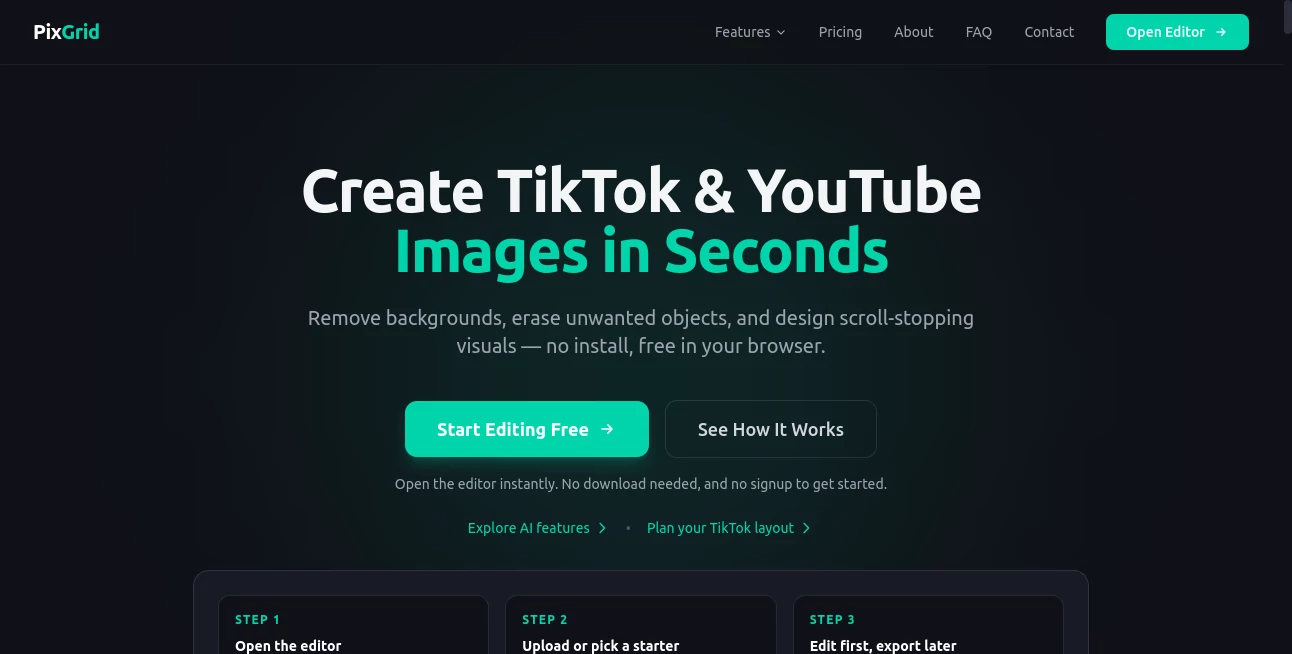
What is PixGrid?
PixGrid is an AI-powered photo editing platform designed to help creators, marketers, sellers, and everyday users create professional visuals directly from a browser. It combines modern AI image tools with a complete editing workspace, allowing users to remove backgrounds, erase unwanted objects, generate images, apply creative effects, and build social media-ready designs without installing complicated software.
The platform focuses on making advanced image editing accessible. Instead of switching between multiple applications for cutting objects, improving photos, creating thumbnails, or designing promotional graphics, users can complete the entire workflow in one place. Its browser-based approach makes it convenient for quick edits on both desktop and mobile devices.
From YouTube thumbnails and Instagram posts to ecommerce product images and branded content, the tool provides practical features for creators who need high-quality results without spending hours learning professional editing programs.
Key Features
User Interface
The interface is built around a flexible canvas editor that feels familiar for both beginners and experienced designers. Users can work with layers, text, shapes, stickers, templates, and drawing tools while combining AI-powered features inside the same workspace.
The browser-based editor removes the need for downloads or heavy installations. A creator can open the editor, upload an image, make adjustments, and export the final design within minutes. The clean workflow is especially useful for social media managers and content creators who frequently need fast visual production.
Accuracy & Performance
The platform uses AI-powered processing for tasks such as background removal, object removal, smart editing, and image enhancement. These features are designed to save time while maintaining natural-looking results, especially when working with product photos, portraits, and marketing graphics.
AI-assisted editing helps users handle tasks that traditionally require manual selections and detailed Photoshop skills. Whether removing unwanted elements from a photo or extending an image background, the technology helps speed up creative workflows.
Capabilities
The platform offers a broad collection of creative tools for different image-related needs. Users can generate visuals from text prompts, transform photos into artistic styles, create collages, and prepare images for different social platforms.
- AI image generation from text descriptions
- One-click background removal with edge detection
- AI object removal and smart inpainting
- Photo enhancement and creative filters
- Layer-based image editing
- Text editing with multiple fonts and design options
- Templates for social media posts and marketing materials
- Export options including PNG, SVG, and PDF formats
Security & Privacy
Privacy is an important part of the editing experience. Regular canvas editing happens directly in the browser, while AI-powered processing is handled through protected systems. Images used for AI operations are processed for the requested action and are not designed to become part of a permanent image library.
This approach gives creators more confidence when working with personal photos, client designs, ecommerce images, or private projects.
Use Cases
This AI image editing solution is suitable for a wide range of creative and business workflows. Content creators can quickly design thumbnails, channel graphics, and social media posts. Small businesses can improve product photos and create promotional materials without hiring a designer for every task.
- YouTube Creators: Create attractive thumbnails and channel graphics.
- Social Media Managers: Design Instagram, TikTok, Facebook, and LinkedIn visuals.
- Ecommerce Sellers: Improve product images, remove backgrounds, and create marketplace-ready photos.
- Photographers: Perform quick edits, enhancements, and creative transformations.
- Design Beginners: Create professional-looking graphics without advanced software skills.
Pros and Cons
Pros
- Works directly in a web browser without installation.
- Combines traditional editing tools with AI features.
- Useful templates for social media and marketing designs.
- Supports multiple export formats.
- Simple workflow for beginners.
- Flexible pricing without forced subscriptions.
Cons
- Advanced AI features require credits or paid access.
- Professional designers may still need specialized desktop software for complex projects.
- AI processing depends on internet availability.
Pricing Plans
The platform offers a free starting option with access to editing features and selected AI tools. Users who need advanced AI capabilities can choose one-time payment plans instead of traditional recurring subscriptions.
- Free Plan: Includes the canvas editor, layers, templates, fonts, filters, and selected AI features with export limitations.
- Day Pass: Provides premium AI access and credits for short-term projects.
- Pro Month: Designed for regular creators who need more AI credits and unlimited exports.
- Ultra Pass: Suitable for heavy users managing frequent AI image workflows.
How to Use PixGrid
Getting started is simple and requires no complicated setup. Users can open the editor, upload an image or select a template, then choose the editing tools they need.
- Upload an image or start with a ready-made canvas.
- Use AI tools to remove, enhance, generate, or transform visuals.
- Add text, layers, effects, or design elements.
- Export the final image for publishing, marketing, or personal use.
Comparison with Similar Tools
Compared with traditional design platforms, this solution focuses more heavily on AI-assisted photo editing and quick image improvements. While many design applications provide templates and graphics, this platform combines those features with AI-powered editing actions such as object removal, background replacement, and image generation.
Compared with simple background removal services, it provides a more complete workspace where users can continue editing after removing an object or changing an image background. This makes it useful for people who want a complete creative workflow instead of a single-purpose tool.
Conclusion
PixGrid provides a practical way to create and edit images with the help of artificial intelligence while keeping the experience simple and accessible. Its combination of AI editing, creative templates, and browser-based convenience makes it a strong option for creators, marketers, and businesses that need professional visuals quickly.
For users who want faster content creation without managing complex software, this platform offers a balanced mix of automation and creative control. It is especially valuable for social media production, ecommerce design, and everyday image enhancement tasks.
Frequently Asked Questions (FAQ)
Is this AI photo editor free to use?
Yes. Users can start with free editing features and access additional premium AI capabilities through optional paid plans.
Does it require software installation?
No. The editor works directly inside a modern web browser, allowing users to create and edit images without downloading applications.
What types of images can be created?
Users can create social media graphics, thumbnails, product images, posters, banners, profile visuals, and creative artwork.
Can AI remove objects from photos?
Yes. AI-powered object removal and smart editing features help erase unwanted elements and fill missing areas naturally.
Who can benefit from this tool?
Creators, ecommerce sellers, marketers, photographers, designers, and anyone who needs faster image creation can benefit from its features.
AI Photo & Image Generator , Photo & Image Editor , AI Background Remover , AI Text to Image .
These classifications represent its core capabilities and areas of application. For related tools, explore the linked categories above.

PixGrid Alternatives Product

Image 2 AI

Banana Promp…
Action Figur…

GPT Image 1.5

ChatGPT Imag…

UnblurImage …
chibi art

PropFade

SuperAI