
Pruna AI
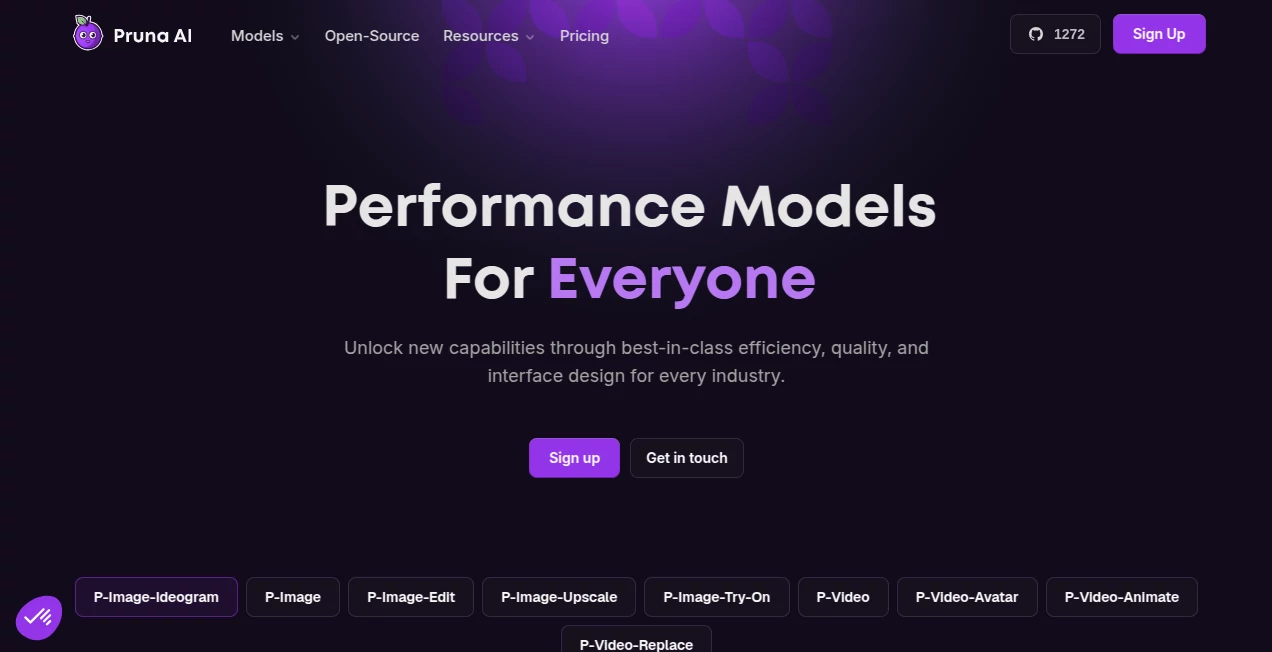
What is Pruna AI?
Pruna AI is built around a practical idea: powerful generative AI should not have to be slow, expensive, or difficult to integrate. The platform provides a collection of optimized performance models for creating and editing images and videos, with a strong focus on speed, cost efficiency, and production-ready use.
Instead of asking users to manage complicated model infrastructure themselves, the platform offers ready-to-use models through an API, while also providing options for self-hosted and open-source workflows. This makes it interesting not only for individual creators, but also for developers and teams building AI-powered products.
The current model lineup covers tasks such as text-to-image generation, image editing, image upscaling, virtual try-on, video generation, video animation, and avatar-oriented video workflows. The overall approach is refreshingly straightforward: optimize the models so people can spend less time waiting and more time iterating.
Key Features
- Fast image generation designed to produce results in around a second.
- AI video generation from text, images, and audio.
- Image editing with dedicated performance models.
- Image upscaling for improving detail and resolution.
- Image-to-image workflows including virtual try-on.
- Video animation and avatar-oriented generation.
- Production-ready API access through a unified interface.
- Self-hosting options for organizations that need greater infrastructure control.
- Open-source resources for developers who want to run models within their own environment.
- Usage-based pricing rather than requiring a traditional monthly subscription.
User Interface
The experience is aimed at getting users from an idea to a working generation without unnecessary complexity. The platform provides model playgrounds where users can experiment with individual capabilities, while developers can move directly into API-based workflows when they are ready to integrate generation into an application.
For someone testing several models, this structure is particularly useful. You can experiment with image generation, editing, upscaling, or video without having to build a separate workflow for every capability.
Accuracy & Performance
Performance is one of the strongest parts of the platform. The image generation model is designed to produce an image in roughly one second, with the service listing a cost of $0.005 per image output. Its image editing model is also designed for sub-second inference in typical configurations.
The video side takes a similar approach. The video generation model supports text, image, and audio inputs, while draft mode allows creators to preview ideas more quickly before spending resources on a final-quality generation. This is particularly useful when experimenting with camera movement, composition, dialogue, or advertising concepts.
In real creative work, that iteration speed matters. A creator working on ten variations of an advertisement, for example, benefits more from being able to test ideas quickly than from generating one impressive clip and waiting several minutes for every subsequent change.
Capabilities
The platform's capabilities extend beyond a single generative model. Its performance model catalog includes image generation, image editing, image upscaling, virtual try-on, video generation, video replacement, video animation, and avatar video workflows.
The image generation system focuses on prompt adherence and controlled text rendering, which can be useful for marketing graphics, concept images, product visuals, and social media assets. Image editing provides a more targeted workflow when the starting point already exists.
On the video side, creators can work from text prompts or image references, while audio can also be incorporated into supported workflows. The available models are therefore suitable for everything from short promotional clips and social advertisements to animated product imagery and avatar content.
Security & Privacy
For developers using the API, access is managed through API keys, and the documentation places responsibility on customers to protect those credentials and restrict access to authorized systems and users.
The service terms define inputs and outputs as customer data and describe operational telemetry separately. For businesses integrating generative AI into their products, this distinction is useful when evaluating how the service fits into an existing security and compliance process.
Organizations with stricter infrastructure requirements can also consider the self-hosted option, which provides additional control over where and how the models are deployed.
Use Cases
Marketing and advertising: Teams can create product visuals, social advertisements, campaign concepts, and multiple creative variations without manually producing every asset.
Product visualization: Image generation, editing, upscaling, and virtual try-on capabilities can help e-commerce teams explore product presentations and promotional imagery.
Social media content: Short AI-generated videos, animated images, avatars, and image variations can speed up the production of content for social platforms.
Creative prototyping: Designers can quickly test visual directions before committing time to a polished production workflow.
AI applications: Developers can connect the models to their own products through the API rather than building and maintaining an entire inference infrastructure from scratch.
Video production: The combination of text prompts, image references, and audio makes the video models useful for concept videos, promotional clips, music-related content, and other short-form productions.
Pros and Cons
Pros
- Very strong focus on inference speed.
- Low per-generation costs for several models.
- Supports both image and video generation workflows.
- API access makes integration relatively straightforward.
- Self-hosted and open-source options provide additional flexibility.
- Draft mode makes video experimentation more practical.
- Usage-based billing avoids the need for a recurring subscription.
Cons
- The platform is more developer-oriented than a traditional consumer image-generation application.
- Users looking for a large all-in-one creative editor may need additional tools for advanced post-production.
- Pricing varies considerably between models and output types, so high-volume users should calculate expected usage before deployment.
- Some advanced capabilities are accessed through specific models rather than one universal generation workflow.
Pricing Plans
The service currently uses a credit-based, pay-per-use pricing model for its API rather than requiring a monthly subscription. Users can add credits when needed, with the documented minimum top-up being $5.
Pricing depends on the model and the type of output. For example, the image generation model is listed at $0.005 per image output, while image editing is $0.010 per output. Image upscaling is listed at $0.005 per output for the standard configuration.
Video pricing is calculated by output duration. The video generation model is listed at $0.02 per second for 720p output with draft mode disabled, while draft mode can reduce the price to $0.005 per second. 1080p generation is priced higher. Other specialized video models have their own per-second rates.
This approach is particularly attractive for developers who prefer to pay according to actual usage instead of committing to a fixed monthly plan.
How to Use It
- Create an account and access the user dashboard.
- Create an API key from the API Keys section if you plan to integrate the models programmatically.
- Add credits to the account through the billing section.
- Select the model that matches the task, such as image generation, image editing, upscaling, or video generation.
- Send the appropriate text, image, audio, or other supported input.
- Review the generated result and adjust the prompt or parameters when necessary.
- For production applications, integrate the selected model through the API and monitor usage.
Comparison with Similar Tools
Many AI generation platforms focus primarily on giving consumers a simple interface for creating images or videos. This platform takes a somewhat different direction by putting model efficiency and API access at the center of the product.
That difference matters for developers. Rather than paying primarily for access to a creative application, a developer can use individual performance models as building blocks inside another service. The availability of self-hosting and open-source resources also gives technical teams more deployment choices than a typical closed creative application.
For image creators who simply want an easy editor with dozens of artistic effects, a dedicated consumer-focused application may feel more convenient. For a startup, agency, or developer that needs fast inference and predictable per-generation costs, the performance-model approach can be considerably more appealing.
Conclusion
This platform stands out by concentrating on an area that is often overlooked in generative AI: the economics and speed of actually running models. Fast generation is useful, but fast generation at a low enough cost to support real applications is much more valuable.
Its combination of image and video capabilities, API access, usage-based billing, and deployment flexibility makes it particularly interesting for developers, AI startups, creative teams, and businesses that want to incorporate generative media into their own products.
If your workflow involves repeatedly generating, editing, upscaling, or animating media, the ability to iterate quickly can make a noticeable difference. Rather than treating AI generation as a one-off experiment, this platform is designed with production workflows in mind.
Frequently Asked Questions (FAQ)
What can the platform generate?
It provides models for AI image generation, image editing, image upscaling, virtual try-on, video generation, video animation, video replacement, and avatar-oriented video workflows.
Does it support an API?
Yes. The API provides access to the performance models through a unified interface, allowing developers to integrate generation capabilities into their own applications.
Is a monthly subscription required?
No. The API uses credit-based, pay-per-use pricing. Users can add credits and pay according to their actual model usage.
How much does image generation cost?
The standard image generation model is currently listed at $0.005 per image output. Other image models, including image editing and specialized workflows, have different prices.
Can it generate videos from text?
Yes. The video generation model supports text-to-video as well as image-to-video workflows, with supported configurations also accepting audio input.
Can I use the models in my own infrastructure?
Self-hosted and open-source options are available, giving technical teams additional control over deployment and infrastructure.
Is it useful for businesses?
Yes. Its API, usage-based billing, fast inference, and range of image and video models make it suitable for businesses building AI-powered creative, marketing, e-commerce, and media applications.
Does it offer image editing as well as image generation?
Yes. Dedicated image editing models are available alongside text-to-image generation, allowing users to modify existing visual content rather than always starting from a blank prompt.
What makes the video workflow different?
The video system emphasizes rapid iteration, including a draft mode that lets users preview motion and composition before generating a higher-quality final result. This can reduce wasted generations when experimenting with creative ideas.
AI Image to Video , AI Video Generator , AI Image to Image , AI Text to Image .
These classifications represent its core capabilities and areas of application. For related tools, explore the linked categories above.

Pruna AI Alternatives Product

Leonardo.ai

PropFade

Spark Robin

Wan 2.7

FastMoro AI

Neurohelper

Picsart

UnblurImage …

LipPulse