
Unifically
What is Unifically?
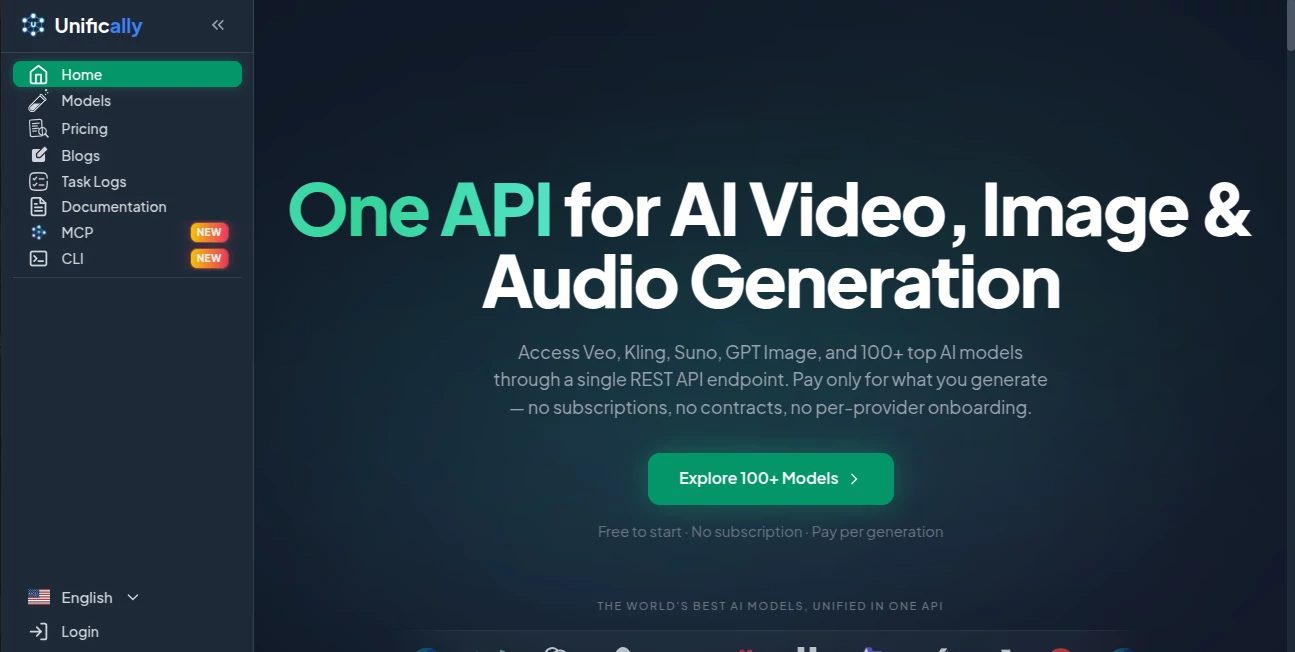
Unifically brings a large collection of modern AI models together behind a single API, making it easier for developers and creative teams to generate video, images, audio, music, speech, and text without managing separate integrations for every provider. The platform currently provides access to more than 100 AI models through one REST API endpoint, with models from providers such as Google, OpenAI, Anthropic, Kling, Alibaba, ElevenLabs, Suno, xAI, and others.
What makes the service particularly appealing is its pay-per-generation approach. There are no monthly subscriptions, contracts, minimum spending requirements, or expiring credit packs. Instead, users add balance and pay for the generations they actually run. For teams experimenting with different models, this can make testing and production workflows considerably easier to manage.
Key Features
- Access to 100+ AI models through one REST API.
- Video generation, image generation, audio, music, speech, and language models in one platform.
- Pay-per-generation pricing instead of mandatory subscriptions.
- No minimum spend and no expiring credits.
- Browser-based playgrounds for testing models before integrating them into an application.
- Model-specific pricing and parameter information for comparing different generation options.
- Support for popular providers and models including Veo, Kling, Suno, GPT Image, ElevenLabs, and many others.
- API access designed to simplify multi-provider AI development.
User Interface
The platform keeps the experience focused on the actual generation task. Its model directory lets users browse available model families, filter them by type and provider, and open individual models for testing. Many models include a browser playground, so developers can experiment with prompts and settings before writing an integration.
This is useful when a project needs to compare several models for the same job. Instead of opening multiple provider dashboards and learning several interfaces, a developer can evaluate different options from one environment.
Accuracy & Performance
Performance naturally depends on the underlying model, provider, input and generation settings. Rather than presenting every model as identical, the platform exposes different variants and their relevant pricing units, allowing users to compare models according to resolution, duration, quality mode, token usage, or other parameters.
The service also reports 99.9% uptime and more than 100,000 API calls per day on its platform. For production applications, this centralized infrastructure can remove some of the operational work involved in maintaining several individual AI provider integrations.
Capabilities
The range of available capabilities is one of the strongest parts of the platform. Depending on the selected model, developers can work with text-to-video, image-to-video, reference-to-video, video-to-video, video editing, text-to-image, image-to-image, text-to-speech, speech-to-text, music generation, sound effects, and text processing.
The model directory groups dozens of model families across video, image, audio, and language categories. This gives developers the freedom to choose a specialized model for a particular task rather than forcing every workflow through one general-purpose AI system.
The platform also provides an MCP server that allows compatible AI assistants and development environments to access image, video, music, and speech generation capabilities. Long-running jobs can return a task ID and be checked until completion, which is particularly useful for generation tasks that take longer to process.
Security & Privacy
API access requires an account, and users are responsible for protecting their account credentials and API keys. The service operates through its own API infrastructure and handles provider integrations behind the unified interface.
Developers should still review the platform's current terms and privacy documentation before sending confidential, regulated, or sensitive material through any third-party AI API. This is especially important for applications involving customer information, private media, or proprietary business data.
Use Cases
This platform fits a wide variety of development and creative workflows. A startup could use it to add AI image generation to a product without building separate integrations for every image provider. A marketing team could experiment with several video models before selecting the right one for advertisements or social content.
It can also be useful for automated media pipelines. For example, an application could generate an image, create a video from that image, produce narration, and add music using different specialized models while keeping the API integration centralized.
Another practical use is model comparison. When a new generation model becomes available, developers can test it alongside existing alternatives and compare cost, output quality, speed, resolution, and capabilities before changing their production workflow.
Pros and Cons
- Pros: Access to a broad selection of AI models through one API.
- Pros: Pay-per-use billing without mandatory monthly subscriptions.
- Pros: No minimum spending requirement or expiring credit packs.
- Pros: Browser playgrounds make model testing easier before development.
- Pros: Useful combination of image, video, audio, music, speech, and language capabilities.
- Cons: Output quality and processing speed can vary considerably between underlying models.
- Cons: Developers still need to understand the parameters and pricing structure of individual models.
- Cons: Users building highly specialized integrations may still prefer direct access to a particular provider.
Pricing Plans
The pricing structure is based on usage rather than a conventional subscription plan. Users pay for completed generations according to the selected model and its billing unit. Depending on the service, billing can be based on items such as generated images, video seconds, audio usage, or input and output tokens.
The platform highlights several suggested spending levels, including $20 for trying the service, $50 for hobby use, $250 for creator workloads, and $1,000 for studio-level usage, while custom pricing is also available for larger volumes. These figures represent usage budgets rather than traditional monthly subscription tiers.
Because different models have different rates, users should check the individual model pricing before running large workloads. The pricing directory is designed to show the relevant variant and billing unit so that a generation can be estimated before spending.
How to Use Unifically
- Create an account and access the platform.
- Browse the available AI model families.
- Select a model based on the required output and capabilities.
- Use the browser playground to test prompts and generation settings where available.
- Review the model's current pricing and billing unit.
- Add balance and generate the required output.
- For application development, create an API key and integrate the selected model through the REST API.
Comparison with Similar Tools
Traditional AI platforms often focus on their own collection of models, while individual model providers generally require developers to maintain a separate integration for each service. A multi-model API takes a different approach by putting those integrations behind a common interface.
This approach is especially attractive for developers who do not want their application tightly coupled to a single AI provider. It also makes experimentation easier because changing from one supported model to another can require less infrastructure work. Direct provider APIs can still be preferable when a company needs provider-specific features, direct support, or the most specialized access available.
Conclusion
For developers and teams working with generative AI, having access to many strong models is valuable, but managing multiple APIs can quickly become complicated. Unifically addresses that problem by providing a unified API for a broad selection of video, image, audio, music, speech, and language models.
The pay-per-generation model is another notable advantage. Instead of committing to several subscriptions, users can test models, compare their results, and spend according to actual usage. Combined with browser playgrounds, model-level pricing information, and support for a wide range of capabilities, the platform offers a practical foundation for applications that need more than one AI provider.
For developers building AI-powered products, creative automation systems, media applications, or experimental workflows, this unified approach can significantly reduce the friction of working with an increasingly diverse AI model ecosystem.
Frequently Asked Questions (FAQ)
What does the platform provide?
It provides a unified API for accessing more than 100 AI models covering video, image, audio, music, speech, and language generation.
Does it require a monthly subscription?
No. The service uses pay-per-generation billing, so users pay for the generations they run rather than being required to purchase a recurring subscription.
Can I test models without building an API integration first?
Yes. Many models include a browser-based playground where users can experiment with prompts and settings before integrating the model into an application.
Which types of AI generation are supported?
Depending on the selected model, supported capabilities include text-to-video, image-to-video, text-to-image, image editing, video editing, text-to-speech, speech-to-text, music generation, sound effects, and text processing.
Can developers use the service in their own applications?
Yes. The platform provides a REST API designed for integrating supported AI models into applications and automated workflows.
Are all AI models priced the same?
No. Each model and variant can have its own pricing and billing unit. Video may be charged by output second, images by generation, and language models according to token usage, for example.
Is there an MCP server?
Yes. An MCP server is available for compatible AI assistants and development environments, providing access to media generation capabilities through the same usage-based infrastructure.
AI Photo & Image Generator , AI Music Generator , AI Video Generator , AI API Design .
These classifications represent its core capabilities and areas of application. For related tools, explore the linked categories above.

Unifically Alternatives Product

Banana Promp…
GPT Image 2 …

GPT Image 2 …

Video Breakd…

Nano Banana …

lovimg

Fiddl.art

Chibi Art

HappyHorse A…